github.com/TonyLianLong/LLM-groundedDiffusion @main
Chat with this repoBrowse by type
What it actually does AI analysis from the code graph — generated when you open this
README
LLM-grounded Diffusion: Enhancing Prompt Understanding of Text-to-Image Diffusion Models with Large Language Models
Long Lian, Boyi Li, Adam Yala, Trevor Darrell at UC Berkeley/UCSF.
Transactions on Machine Learning Research (TMLR), with Featured Certification
Paper | Project Page | 5-minute Blog Post | HuggingFace Demo (updated!) | Citation | LLM-grounded Video Diffusion Models
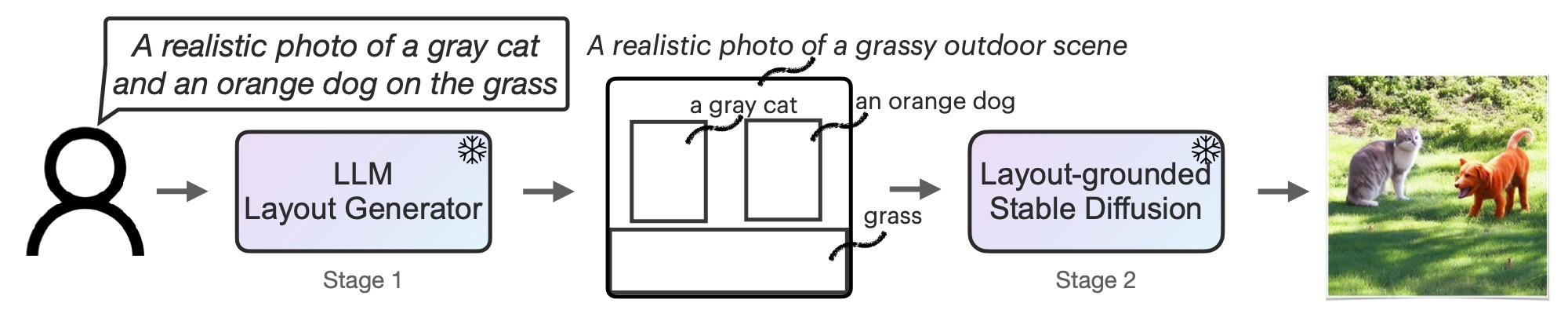
TL;DR: Text Prompt -> LLM as a Request Parser -> Intermediate Representation (such as an image layout) -> Stable Diffusion -> Image.
Updates
[2024.1] Added a result with self-hosted Mixtral-8x7B-Instruct-v0.1 (see our reference benchmark results section). Surprisingly, the Mixtral model's performance is comparable with GPT-3.5. This shows that it's possible to self-host LMD/LMD+ without external API calls to LLMs to achieve good results.
[2023.11] Our LLM-grounded Diffusion (LMD+) has been officially integrated to upstream diffusers v0.24.0! This is an example colab that shows using our pipeline with official diffusers. The implementation in upstream diffusers is a simplified LMD+, and we recommend using the current full repo to reproduce our results.
Using our pipeline with only a few lines of code with official diffusers
# Requires diffusers >= 0.24.0

import torch
from diffusers import DiffusionPipeline

pipe = DiffusionPipeline.from_pretrained(
    "longlian/lmd_plus",
    custom_pipeline="llm_grounded_diffusion",
    custom_revision="main",
    variant="fp16", torch_dtype=torch.float16
)
pipe.enable_model_cpu_offload()

# An example prompt with LLM response
prompt = "a waterfall and a modern high speed train in a beautiful forest with fall foliage"
llm_response = """
[('a waterfall', [71, 105, 148, 258]), ('a modern high speed train', [255, 223, 181, 149])]
Background prompt: A beautiful forest with fall foliage
Negative prompt:
"""

phrases, boxes, bg_prompt, neg_prompt = pipe.parse_llm_response(llm_response)

# Use `LLMGroundedDiffusionPipeline` to generate an image
images = pipe(
    prompt=prompt,
    negative_prompt=neg_prompt,
    phrases=phrases,
    boxes=boxes,
    gligen_scheduled_sampling_beta=0.4,
    output_type="pil",
    num_inference_steps=50,
    lmd_guidance_kwargs={}
).images

# PIL Image:
images[0]
[2023.10] Our repo now supports using SDXL for high-quality generation with SDXL Refiner! Simply add --sdxl to generation command to use it. You can also use --sdxl-step-ratio to control the strength of the refinement (use 0.5 for stronger refinement and 0.1 for weaker refinement). See examples above.
[2023.10] Please also check out our new work LLM-grounded Video Diffusion Models (LVD), which shows that LLMs have knowledge in their weights that can ground video diffusion models 🔥🔥🔥!
[2023.8] Our repo has been largely improved: now we have a repo with many methods implemented, including our training-free LMD and LMD+ (LMD with GLIGEN adapters).
[2023.6] Our huggingface WebUI demo for stage 1 and 2 is updated: now we support enabling each of the guidance components to get a taste of contributions! Check it out here.
Our WebUI is also available to run locally. The instructions to run our WebUI locally to get faster generation without queues are here.
Our repo implements the following layout-to-image methods (stage 2)
These methods can be freely combined with our proposed LLM-based box-to-layout method (stage 1) also implemented in this repo.
- [x] Training-Free LMD (Using original SD v1/v2 weights)
- [x] LMD+ (Training-Free LMD that uses both cross-attention control and GLIGEN adapters)
- [x] Layout Guidance (Backward Guidance)
- [x] BoxDiff (ICCV '23)
- [x] MultiDiffusion (Region Control, ICML '23)
- [x] GLIGEN (CVPR '23)
Feel free to contact me / submit a pull request to add your methods!
Our repo's features
- (New) Supports SDXL refiner for high-resolution high-quality generation
- Both web-based ChatGPT and OpenAI API on GPT-3.5/4 supported: Allows generating bounding boxes by either asking ChatGPT yourself (free) or in batch with OpenAI API (fully automated).
- LLM queries are cached to save $$$ on LLM APIs: we cache each LLM query for layout generation so it does not re-generate the layouts from the same prompt.
- Open-source LLMs supported!: Host LLMs yourself for more freedom and lower costs! We support Vicuna, LLaMA 2, StableBeluga2, etc. More in FAQ.
- Supports both LMD (which uses SD weights without training and performs attention guidance) and LMD+ (which adds GLIGEN adapters to SD in addition to attention guidance)
- Supports SD v1 and SD v2 in the same codebase: if you implement a new feature or a new loss, it's likely that it will work on both SD v1 and v2.
- Several baseline stage 2 methods implemented in the same codebase: handy if you want to benchmark and compare
- Hackable: we provide a minimal copy of diffusion UNet architecture in our repo that exports the attention maps according to your need. This allows you to change things without maintaining your own diffusers package.
- Parallel and resumable image generation supported! You can generate in parallel to make use of multiple GPUs/servers. If a generation fails on some images (e.g., CUDA OOM), you can simply rerun generation to regenerate those. More in FAQ.
- Modular: we implement different methods in different files. Copy from a file in
generationand start creating your method without impacting existing methods. - Web UI supported: don't want to code or run anything? Try our public WebUI demo or instructions to run WebUI locally.
And more exciting features! Expand to see.
- FlashAttention and PyTorch v2 supported.
- Unified benchmark: same evaluation protocol on layouts (stage 1) and generated images (stage 1+2) for all methods implemented.
- Provides different presets to balance better control and fast generation in Web UI.
LLM-grounded Diffusion (LMD)
We provide instructions to run our code in this section.
Installation
pip install -r requirements.txt
Stage 1: Text-to-Layout Generation
Note that we have uploaded the layout caches into this repo so that you can skip this step if you don't need layouts for new prompts.
Since we have cached the layout generation (which will be downloaded when you clone the repo), you need to remove the cache in cache directory if you want to re-generate the layout with the same prompts.
Our layout generation format: The LLM takes in a text prompt describing the image and outputs three elements: 1. captioned boxes, 2. a background prompt, 3. a negative prompt (useful if the LLM wants to express negation). The template and examples are in prompt.py. You can edit the template and the parsing function to ask the LLM to generate additional things or even perform chain-of-thought for better generation.
Option 1 (automated): Use an OpenAI API key
If you have an OpenAI API key, you can put the API key in utils/api_key.py or set OPENAI_API_KEY environment variable. Then you can use OpenAI's API for batch text-to-layout generation by querying an LLM, with GPT-4 as an example:
python prompt_batch.py --prompt-type demo --model gpt-4 --auto-query --always-save --template_version v0.1
--prompt-type demo includes a few prompts for demonstrations. The layout generation will be cached so it does not query the LLM again with the same prompt (lowers the cost).
You can visualize the bounding boxes in img_generations/imgs_demo_templatev0.1.
Option 2 (free): Manually copy and paste to ChatGPT
python prompt_batch.py --prompt-type demo --model gpt-4 --always-save --template_version v0.1
Then copy and paste the template to ChatGPT. Note that you want to use GPT-4 or change the --model to gpt-3.5 in order to match the cache file name. Then copy the response back. The generation will be cached.
If you want to visualize before deciding to save or not, you don't need to pass in --always-save.
Run our benchmark on text-to-layout generation evaluation
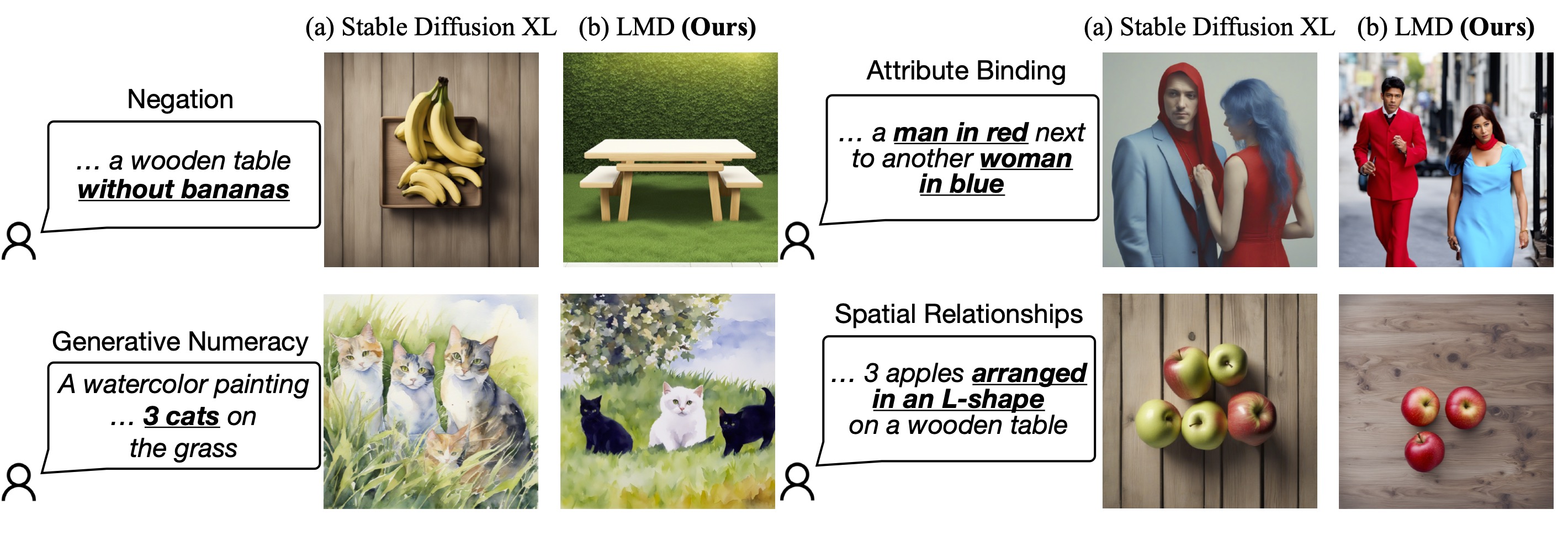
We provide a benchmark that applies both to stage 1 and stage 2. This benchmarks includes a set of prompts with four tasks (negation, numeracy, attribute binding, and spatial relationships) as well as unified benchmarking code for all implemented methods and both stages.
This will generate layouts from the prompts in the benchmark (with --prompt-type lmd) and evaluate the results:
python prompt_batch.py --prompt-type lmd --model gpt-3.5 --auto-query --always-save --template_version v0.1
python scripts/eval_stage_one.py --prompt-type lmd --model gpt-3.5 --template_version v0.1
Our reference benchmark results (stage 1, evaluating the generated layouts only)
| Method | Negation | Numeracy | Attribution | Spatial | Overall |
|---|---|---|---|---|---|
| GPT-3.5 | 100 | 97 | 100 | 99 | 99.0% |
| GPT-4 | 100 | 100 | 100 | 100 | 100.0% |
Stage 2: Layout-to-Image Generation
Note that since we provide caches for stage 1, you don't need to run stage 1 on your own for cached prompts that we provide (i.e., you don't need an OpenAI API key or to query an LLM).
Run layout-to-image generation using the gpt-4 cache and LMD+:
python generate.py --prompt-type demo --model gpt-4 --save-suffix "gpt-4" --repeats 5 --frozen_step_ratio 0.5 --regenerate 1 --force_run_ind 0 --run-model lmd_plus --no-scale-boxes-default --template_version v0.1
--save-suffix is the suffix added to the name of the run. You can change that if you change the args to mark the setting in the runs. --run-model specifies the method to run. You can set to LMD/LMD+ or the implemented baselines (with examples below). Use --use-sdv2 to enable SDv2.
Run our benchmark on layout-to-image generation evaluation
We use a unified evaluation metric as stage 1 in stage 2 (--prompt-type lmd). Since we have layout boxes for stage 1 but only images for stage 2, we use OWL-ViT in order to detect the objects and ensure they are generated (or not generated in negation) in the right number, with the right attributes, and in the right place.
This runs generation with LMD+ and evaluate the generation:
# Use GPT-3.5 layouts
python generate.py --prompt-type lmd --model gpt-3.5 --save-suffix "gpt-3.5" --repeats 1 --frozen_step_ratio 0.5 --regenerate 1 --force_run_ind 0 --run-model lmd_plus --no-scale-boxes-default --template_version v0.1
python scripts/owl_vit_eval.py --model gpt-3.5 --run_base_path img_generations/img_generations_templatev0.1_lmd_plus_lmd_gpt-3.5/run0 --skip_first_prompts 0 --prompt_start_ind 0 --verbose --detection_score_threshold 0.15 --nms_threshold 0.15 --class-aware-nms
# Use GPT-4 layouts
python generate.py --prompt-type lmd --model gpt-4 --save-suffix "gpt-4" --repeats 1 --frozen_step_ratio 0.5 --regenerate 1 --force_run_ind 0 --run-model lmd_plus --no-scale-boxes-default --template_version v0.1
python scripts/owl_vit_eval.py --model gpt-4 --run_base_path img_generations/img_generations_templatev0.1_lmd_plus_lmd_gpt-4/run0 --skip_first_prompts 0 --prompt_start_ind 0 --verbose --detection_score_threshold 0.15 --nms_threshold 0.15 --class-aware-nms
Our reference benchmark results
| Method | Negation | Numeracy | Attribution | Spatial | Overall |
|---|---|---|---|---|---|
| SD v1.5 | 28 | 39 | 52 | 28 | 36.8% |
| LMD+ (GPT-3.5) | 100 | 86 | 69 | 67 | 80.5% |
| LMD+ (GPT-4) | 100 | 84 | 79 | 82 | 86.3% |
| LMD+ (StableBeluga2*) | 88 | 60 | 56 | 64 | 67.0% |
| LMD+ (Mixtral-8x7B-Instruct-v0.1*) | 98 | 72 | 62 | 78 | 77.5% |
* StableBeluga2 is an open-sourced model based on Llam
Core symbols most depended-on inside this repo
Shape
Languages
Modules by API surface
For agents
$ claude mcp add LLM-groundedDiffusion \
  -- python -m otcore.mcp_server <graph>