github.com/TinyActive/fluxion @main
Chat with this repoBrowse by type
What it actually does AI analysis from the code graph — generated when you open this
README
🔐 Fluxion
Unified Vulnerability Intelligence Platform
  <a href="#features">Features</a> •
  <a href="#tech-stack">Tech Stack</a> •
  <a href="#getting-started">Getting Started</a> •
  <a href="#installation">Installation</a> •
  <a href="#api-documentation">API Docs</a> •
  <a href="#contributing">Contributing</a> •
  <a href="#license">License</a>


  <img src="https://img.shields.io/badge/version-1.0.0-blue.svg" alt="Version">
  <img src="https://img.shields.io/badge/license-MIT-green.svg" alt="License">
  <img src="https://img.shields.io/badge/PRs-welcome-brightgreen.svg" alt="PRs Welcome">
📖 About
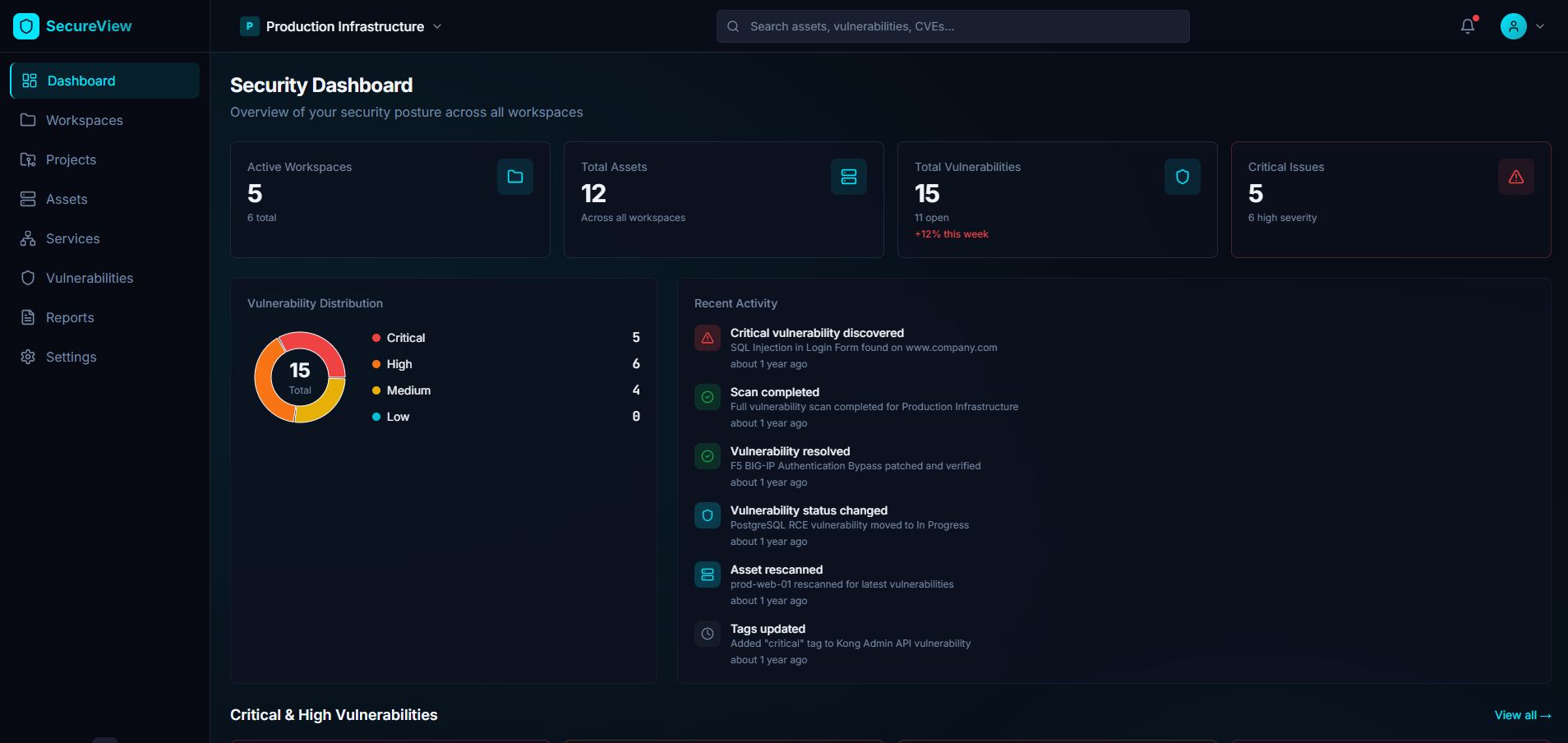
Fluxion is a comprehensive, open-source vulnerability intelligence and management platform designed to help security teams centralize, track, and manage their security operations. It provides a unified interface for managing assets, vulnerabilities, security reports, and knowledge base articles, making it easier for organizations to maintain a strong security posture.
Key Highlights
- 🎯 Centralized Vulnerability Management - Track and manage vulnerabilities across your entire infrastructure
- 🏢 Multi-Workspace Support - Organize assets and vulnerabilities by workspaces and projects
- 📊 Comprehensive Reporting - Generate detailed security reports and analytics
- 🔍 Asset Discovery & Management - Track all your digital assets in one place
- 📚 Knowledge Base - Build and maintain your security knowledge repository
- 🔔 Activity Tracking - Monitor all security-related activities and changes
- 🔐 Enterprise Security - Built-in authentication and authorization
- 🚀 Modern Tech Stack - React + TypeScript frontend with FastAPI backend
✨ Features
Core Functionality
- Workspace & Project Management
- Create and manage multiple workspaces
- Organize projects within workspaces
-
Role-based access control
-
Asset Management
- Track web applications, APIs, networks, and cloud resources
- Associate assets with projects and workspaces
-
Monitor asset status and criticality
-
Vulnerability Management
- Comprehensive vulnerability tracking and classification
- CVSS scoring and severity assessment
- Vulnerability lifecycle management (Open, In Progress, Resolved, etc.)
-
Link vulnerabilities to affected assets
-
Security Services
- Manage various security service types
- Track service status and completion
-
Associate services with projects
-
Reporting & Analytics
- Generate detailed security reports
- Track report status and types
-
Export capabilities for compliance
-
Knowledge Base
- Create and manage security articles
- Categorize knowledge by type and status
-
Build institutional security knowledge
-
User Management
- User authentication and authorization
- Role-based permissions
- Telegram integration for notifications
🛠️ Tech Stack
Frontend
- Framework: React 18 with TypeScript
- Build Tool: Vite 5
- UI Components: Radix UI primitives
- Styling: Tailwind CSS with custom theme
- Forms: React Hook Form with Zod validation
- Data Fetching: TanStack Query (React Query)
- Routing: React Router v6
- Charts: Recharts
- State Management: React Context API
- HTTP Client: Axios
Backend
- Framework: FastAPI
- Database: MySQL 8.0
- ORM: SQLModel
- Authentication: JWT with python-jose
- Password Hashing: Passlib with bcrypt
- Migrations: Alembic
- Validation: Pydantic
- ASGI Server: Uvicorn
DevOps & Infrastructure
- Containerization: Docker & Docker Compose
- Web Server: Nginx (for frontend)
- Database: MySQL 8.0
- Python Version: 3.11+
- Node Version: 18+
🚀 Getting Started
Prerequisites
Before you begin, ensure you have the following installed:
- Docker (v20.10+) and Docker Compose (v2.0+)
- Node.js (v18+) and npm or bun
- Python (v3.11+)
- Git
Quick Start with Docker
The fastest way to get Fluxion up and running is using Docker Compose:
# Clone the repository
git clone https://github.com/TinyActive/fluxion.git
cd fluxion

# Edit docker-compose.yml to update configuration
# IMPORTANT: Change the following before running:
# 1. Database passwords (MYSQL_ROOT_PASSWORD, MYSQL_PASSWORD, DB_PASSWORD)
# 2. SECRET_KEY for JWT tokens
# 3. CORS_ORIGINS to match your domain/IP
# 4. VITE_API_BASE_URL in frontend build args
# 5. TELEGRAM_BOT_TOKEN (optional)

# Start all services
docker-compose up -d

# Wait for services to be healthy (may take 1-2 minutes)
docker-compose ps

# Run database migrations
docker-compose exec backend alembic upgrade head

# Create initial admin user (optional)
docker-compose exec backend python -m app.initial_data
The application will be available at: - Frontend: http://localhost:8080 - Backend API: http://localhost:8000 - API Docs (Swagger): http://localhost:8000/api/v1/docs - API Docs (ReDoc): http://localhost:8000/api/v1/redoc
📦 Installation
Option 1: Docker Compose (Recommended)
-
Clone the repository
bash git clone https://github.com/TinyActive/fluxion cd fluxion -
Configure environment variables
Edit docker-compose.yml file and update the following environment variables:
Database service:
yaml
   environment:
     MYSQL_ROOT_PASSWORD: your_secure_root_password  # Change this
     MYSQL_DATABASE: vuls_db
     MYSQL_USER: vuls_user
     MYSQL_PASSWORD: your_secure_password  # Change this
Backend service:
yaml
   environment:
     DB_HOST: db
     DB_CONNECTION: mysql
     DB_PORT: 3306
     DB_DATABASE: vuls_db
     DB_USERNAME: vuls_user
     DB_PASSWORD: your_secure_password  # Must match MYSQL_PASSWORD
     SECRET_KEY: "your_random_secret_key_here"  # Change this
     CORS_ORIGINS: '["http://localhost:8080", "http://127.0.0.1:8080"]' # Change this
     TELEGRAM_BOT_TOKEN: "your_telegram_bot_token"  # Optional
     AUTH_ENABLED: "True"
Frontend service:
yaml
   build:
     context: .
     dockerfile: Dockerfile
     args:
       - VITE_API_BASE_URL=http://localhost:8000/api/v1  # Update to your API URL
- Start the services
bash
   docker-compose up -d
Option 2: Local Development
Backend Setup
-
Navigate to backend directory
bash cd backend -
Create a virtual environment
bash python -m venv venv source venv/bin/activate # On Windows: venv\Scripts\activate -
Install dependencies
bash pip install -r requirements.txt -
Create
.envfileenv DB_CONNECTION=mysql DB_HOST=localhost DB_PORT=3306 DB_DATABASE=vuls_db DB_USERNAME=root DB_PASSWORD=your_password SECRET_KEY=your_secret_key TELEGRAM_BOT_TOKEN=optional_bot_token AUTH_ENABLED=True -
Run migrations
bash alembic upgrade head -
Start the backend server
bash
   uvicorn app.main:app --reload --host 0.0.0.0 --port 8000
Frontend Setup
-
Navigate to project root
bash cd .. # from backend directory -
Install dependencies
bash npm install # or using bun bun install -
Configure API endpoint
Create .env file in the root directory:
env
   VITE_API_BASE_URL=http://localhost:8000/api/v1
-
Start the development server
bash npm run dev # or using bun bun run dev -
Access the application
Open your browser and navigate to http://localhost:5173
Database Setup (MySQL)
If running locally without Docker, you'll need to set up MySQL:
# Install MySQL 8.0
# Create database
mysql -u root -p
CREATE DATABASE vuls_db CHARACTER SET utf8mb4 COLLATE utf8mb4_unicode_ci;
CREATE USER 'vuls_user'@'localhost' IDENTIFIED BY 'your_password';
GRANT ALL PRIVILEGES ON vuls_db.* TO 'vuls_user'@'localhost';
FLUSH PRIVILEGES;
EXIT;
🎮 Usage
Default Login
After initial setup, you can login with the default credentials:
- Username:
admin@vuls.local - Password:
admin
Key Workflows
- Create a Workspace
- Navigate to Workspaces page
- Click "New Workspace"
-
Fill in workspace details
-
Add a Project
- Select a workspace
- Create a new project within the workspace
-
Define project scope and objectives
-
Register Assets
- Navigate to Assets page
- Add web applications, APIs, or other digital assets
-
Associate assets with projects
-
Track Vulnerabilities
- Create vulnerability entries
- Set severity and CVSS scores
- Link to affected assets
-
Update status as remediation progresses
-
Generate Reports
- Navigate to Reports page
- Create comprehensive security reports
-
Track report status and distribution
-
Build Knowledge Base
- Document security findings
- Create reusable security articles
- Categorize by type and status
📚 API Documentation
Interactive API Documentation
Once the backend is running, you can explore the API using:
- Swagger UI: http://localhost:8000/api/v1/docs
- ReDoc: http://localhost:8000/api/v1/redoc
API Endpoints
Authentication
POST /api/v1/auth/login- User loginPOST /api/v1/auth/register- User registrationGET /api/v1/auth/me- Get current user
Workspaces
GET /api/v1/workspaces- List all workspacesPOST /api/v1/workspaces- Create workspaceGET /api/v1/workspaces/{id}- Get workspace detailsPUT /api/v1/workspaces/{id}- Update workspaceDELETE /api/v1/workspaces/{id}- Delete workspace
Projects
GET /api/v1/projects- List all projectsPOST /api/v1/projects- Create projectGET /api/v1/projects/{id}- Get project detailsPUT /api/v1/projects/{id}- Update projectDELETE /api/v1/projects/{id}- Delete project
Assets
GET /api/v1/assets- List all assetsPOST /api/v1/assets- Create assetGET /api/v1/assets/{id}- Get asset detailsPUT /api/v1/assets/{id}- Update assetDELETE /api/v1/assets/{id}- Delete asset
Vulnerabilities
GET /api/v1/vulnerabilities- List all vulnerabilitiesPOST /api/v1/vulnerabilities- Create vulnerabilityGET /api/v1/vulnerabilities/{id}- Get vulnerability detailsPUT /api/v1/vulnerabilities/{id}- Update vulnerabilityDELETE /api/v1/vulnerabilities/{id}- Delete vulnerability
Reports
GET /api/v1/reports- List all reportsPOST /api/v1/reports- Create reportGET /api/v1/reports/{id}- Get report detailsPUT /api/v1/reports/{id}- Update reportDELETE /api/v1/reports/{id}- Delete report
Knowledge Base
GET /api/v1/knowledge-base- List all articlesPOST /api/v1/knowledge-base- Create articleGET /api/v1/knowledge-base/{id}- Get article detailsPUT /api/v1/knowledge-base/{id}- Update articleDELETE /api/v1/knowledge-base/{id}- Delete article
Services
GET /api/v1/services- List all servicesPOST /api/v1/services- Create serviceGET /api/v1/services/{id}- Get service detailsPUT /api/v1/services/{id}- Update serviceDELETE /api/v1/services/{id}- Delete service
Activities
GET /api/v1/activities- List all activitiesGET /api/v1/activities/{id}- Get activity details
Users
GET /api/v1/users- List all usersPOST /api/v1/users- Create userGET /api/v1/users/{id}- Get user detailsPUT /api/v1/users/{id}- Update userDELETE /api/v1/users/{id}- Delete user
🏗️ Project Structure
``` fluxion/ ├── backend/ # FastAPI backend application │ ├── alembic/ # Database migrations │ │ └── versions/ # Migration files │ ├── app/ │ │ ├── api/ # API routes │ │ │ └── v1/ │ │ │ ├── endpoints/ # API endpoint modules │ │ │ └── api.py # API router │ │ ├── core/ # Core configurations │ │ │ ├── config.py # Settings and config │ │ │ └── security.py # Security utilities │ │ ├── db/ # Database configuration │ │ ├── models/ # SQLModel database models │ │ ├── schemas/ # Pydantic schemas │ │ ├── services/ # Business logic │ │ ├── main.py # FastAPI application │ │ └── initial_data.py # Initial data seeding │ ├── requirements.txt # Python dependencies │ └── Dockerfile # Backend Docker config ├── src/ # React frontend application │ ├── components/ # React components │ │ ├── ui/ # Reusable UI components │ │ ├── assets/ # Asset-related components │ │ ├── vulnerabilities/ # Vulnerability components │ │ └── ... # Other feature components │ ├── pages/ # Page components │ ├── hooks/ # Custom React hooks │ ├── context/ # React Context providers │ ├── data/ # Data fetching functions │ ├── lib/ # Utility libraries │ ├── services/ # Service layer │ ├── utils/ # Utility functions │ └── config/ # Frontend configuration ├── public/ # Static assets ├── docker-compose.yml # Docker Compose configuration ├── Dockerfile # Frontend Docker config ├── package.json # Node.js dependencies ├── vite.config.ts # Vite configuration ├── tailwind.config.ts
Extension points exported contracts — how you extend this code
browse all types & interfaces →
Core symbols most depended-on inside this repo
Shape
Languages
Modules by API surface
Datastores touched
For agents
$ claude mcp add fluxion \
  -- python -m otcore.mcp_server <graph>