github.com/ThirteenAG/GTAIV.EFLC.FusionFix @v5.0.1
Chat with this repoBrowse by type
What it actually does AI analysis from the code graph — generated when you open this
README







This projects aims to fix some issues in Grand Theft Auto IV: The Complete Edition, as well as add various new features for modern systems.
Also available for Max Payne 3 and other games.
Installation:
[!NOTE] Install Grand Theft Auto IV: The Complete Edition from your library, then:
- Download GTAIV.EFLC.FusionFix.zip and unpack its contents to the game's root directory, where the exe is located.
- Or alternatively download GTAIV.EFLC.FusionFixWebInstaller.exe or GTAIV.EFLC.FusionFixOfflineInstaller.exe, open it, select the game's directory and wait for it to finish. Note: If you get an error while installing, this is likely due to the installer not having write access. Go into the properties of the games directory and change your system's users to have write permission and hit apply, now installation should work.
[!WARNING] Non-Windows users (Proton/Wine) need to perform a DLL override.
Click here for details
You need to tell Wine explicitly that the
dinput8.dllfile is to be used. There's more than one way to achieve it. Note that Proton Experimental already loads it by default, so you may skip this step.Method 1:
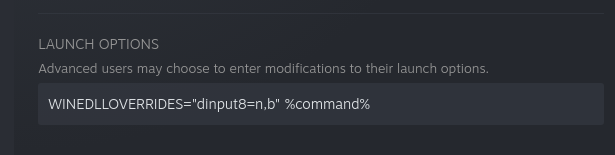
WINEDLLOVERRIDESvariable lets you temporarily specify DLL overrides. It can be used from a command line as well as in the Steam launcher. In case of command line, simply prepend the usual start command withWINEDLLOVERRIDES="dinput8=n,b". For Steam, head to game’s properties and setLAUNCH OPTIONStoWINEDLLOVERRIDES="dinput8=n,b" %command%.
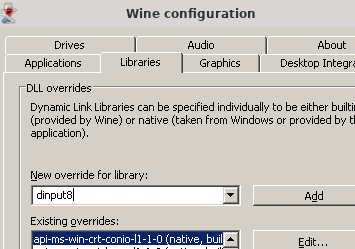
Method 2: Use
winecfgtool to make a permanent override for a specific Wine prefix. In case of Proton, Steam creates the Wine prefix for Grand Theft Auto IV: The Complete Edition in$HOME/.steam/steam/steamapps/compatdata/12210/pfx. Then you need to runwinecfgwith that path:WINEPREFIX="$HOME/.steam/steam/steamapps/compatdata/12210/pfx" winecfgSelectLibrariestab and fill the combo box with the name of the library you wish to override and hitAdd. You can verify that it’s been added to the list below with(native, builtin)suffix. Then close the window withOKbutton.
Related Wine documentation: * More on DLL overrides * More on WINEDLLOVERRIDES method
Additionally: * Install and run Protontricks. * Select "Grand Theft Auto IV" -> "Select the default Wineprefix" -> "Install a Windows DLL or component". * Search for "d3dx9_43", select it and click OK.
[!IMPORTANT] Only The Complete Edition is fully supported. Legacy versions of the game (e.g., v1.0.7.0 or v1.0.8.0) additionally require the installation of the Legacy Addon, which is done by unpacking its contents to the game's root directory.
Multiplayer is not supported. Take-Two has agreed that it generally will not take legal action against third-party projects involving Rockstar’s PC games that are single-player, non-commercial, and respect the intellectual property (IP) rights of third parties. This does not apply to (i) multiplayer or online services; (ii) tools, files, libraries, or functions that could be used to impact multiplayer or online services, or (iii) use or importation of other IP (including other Rockstar IP) in the project; or (iv) making new games, stories, missions, or maps. Forking this project or creating any derivative software intended for use with multiplayer of any kind is forbidden. Any persons or entities who do so are not associated with this project.
No support will be provided for illegal copies of the game. Purchase an official copy from either Steam or Rockstar Games Launcher.
Donation links





New menu options
FusionFix adds new options to the in-game menu that can be easily toggled and customized in real time. The config file allows for further customization by advanced users.
Display
- FOV, adjusts in-game field of view
- Language, switch languages in-game like in previous versions
- Definition, toggle the old fuzzy look from consoles
- Console Gamma, restores contrasted look from consoles
- Console Auto Exposure, restores the stronger auto exposure / eye adaptation effect from consoles
- Motion Blur, a separate toggle for motion blur with several intensity levels
- Depth of Field, controls how intense the distant blur is during gameplay and whether it's enabled in cutscenes
- Tree Lighting, offers "PC", "PC" with some improvements ("PC+") and "Console" style tree lighting
- Tree Alpha, offers "PC", "PC" with some improvements ("PC+") and "Console" alpha test reference for trees
- Bloom, a global toggle for bloom
- Screen Filter, an option to change color filters in the main game and episodes
- Distant Lights, toggle for integrated Project2DFX
Graphics
- FPS Limiter, set a custom FPS limit, selects from a list of predefined values, or turn it off
- Anti-aliasing, a toggle for FXAA or SMAA
- Volumetric Fog, a more advanced fog shader that hides the edges of the world
- Sun Shafts, a godrays implementation faithful to the original art style
- Extended Sunlight Reach, allows sunlight to reach surfaces that it couldn't before, and increases cloud shading
- Tone Mapping, prevents highlights from being blown out, more operators can be found here
- Ambient Occlusion, a toggle for scalable ambient obscurance
- Shadow Filter, toggles between sharp, soft, or contact hardening shadows
- Graphics API, selects between DirectX 9 and Vulkan (through DXVK), requires a restart
Game
- Skip Intro, added an option to skip intro
- Skip Menu, added an option to skip main menu after startup
- Letterbox, draws cutscene borders on top and bottom of the screen
- Pillarbox, draws cutscene borders on screen sides in ultrawide
- Transparent Map Menu, makes the map screen background transparent
- FPS Counter, shows an episode colored FPS counter on the top left of the screen
- Windowed, toggle windowed mode
- Windowed Borderless, toggle borderless mode
- Pause Game On Focus Loss, pauses the game when it's minimized
- Extra Night Shadows, forces every lamppost and player headlights to cast shadows (original PC-only "feature"; extremely broken, not recommended)
- LightSyncRGB, custom ambient lighting for IV, TLAD and TBOGT, health indication on G-Keys, police lights, ammo counter, only Logitech hardware is supported, requires Logitech G HUB app, watch full clip on YouTube
- Seasonal Events, enables added seasonal events at specific date
- Check For Fusion Fix Updates, checks if there's an update available on startup
Audio
- Cutscene Audio Sync, see issue 691, only enables this if you experience audio desynchronization in cutscenes
- Alternative Dialogues, when enabled, forces the game to use alternative dialogues in some missions
Controls
- Always Run, allows running by default and sprinting in interiors, tap Sprint button to toggle between walk and run
- Allow Movement When Zoomed, allows movement when aiming with a sniper rifle
- Extended Sniper Controls, allows aiming with sniper rifles without using the scope, press Jump button to toggle between third-person aim and the scope
- Camera Shake, shake effect has been fixed to work consistently at any frame rate and can be disabled with this option
- Centered Vehicle Camera, makes vehicle camera centered, for more options install the original mod separately
- Centered On Foot Camera, makes on foot camera centered, also for more options install the original mod
- Turn Indicators, allows the player to use vehicle turn indicators and ha
Core symbols most depended-on inside this repo
Shape
Languages
Modules by API surface
For agents
$ claude mcp add GTAIV.EFLC.FusionFix \
  -- python -m otcore.mcp_server <graph>