github.com/TheBlewish/Automated-AI-Web-Researcher-Ollama @main
Chat with this repoBrowse by type
What it actually does AI analysis from the code graph — generated when you open this
README
Automated-AI-Web-Researcher-Ollama
Description
Automated-AI-Web-Researcher is an innovative research assistant that leverages locally run large language models through Ollama to conduct thorough, automated online research on any given topic or question. Unlike traditional LLM interactions, this tool actually performs structured research by breaking down queries into focused research areas, systematically investigating each area via web searching and scraping relevant websites, and compiling its findings. The findings are automatically saved into a text document with all the content found and links to the sources. Whenever you want it to stop its research, you can input a command, which will terminate the research. The LLM will then review all of the content it found and provide a comprehensive final summary of your original topic or question. Afterward, you can ask the LLM questions about its research findings.
Project Demonstration
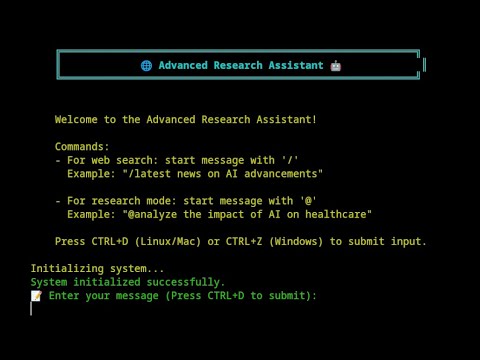
Click the image above to watch the demonstration of my project.
Here's How It Works:
- You provide a research query (e.g., "What year will the global population begin to decrease rather than increase according to research?").
- The LLM analyzes your query and generates 5 specific research focus areas, each with assigned priorities based on relevance to the topic or question.
- Starting with the highest priority area, the LLM:
- Formulates targeted search queries
- Performs web searches
- Analyzes search results, selecting the most relevant web pages
- Scrapes and extracts relevant information from the selected web pages
- Documents all content found during the research session into a research text file, including links to the websites that the content was retrieved from
- After investigating all focus areas, the LLM generates new focus areas based on the information found and repeats its research cycle, often discovering new relevant focus areas based on previous findings, leading to interesting and novel research focuses in some cases.
- You can let it research as long as you like, with the ability to input a quit command at any time. This will stop the research and cause the LLM to review all the content collected so far in full, generating a comprehensive summary in response to your original query or topic.
- The LLM will then enter a conversation mode where you can ask specific questions about the research findings if desired.
The key distinction is that this isn't just a chatbot—it's an automated research assistant that methodically investigates topics and maintains a documented research trail, all from a single question or topic of your choosing. Depending on your system and model, it can perform over a hundred searches and content retrievals in a relatively short amount of time. You can leave it running and return to a full text document with over a hundred pieces of content from relevant websites and then have it summarize the findings, after which you can ask it questions about what it found.
Features
- Automated research planning with prioritized focus areas
- Systematic web searching and content analysis
- All research content and source URLs saved into a detailed text document
- Research summary generation
- Post-research Q&A capability about findings
- Self-improving search mechanism
- Rich console output with status indicators
- Comprehensive answer synthesis using web-sourced information
- Research conversation mode for exploring findings
Installation
Note: To use on Windows, follow the instructions on the /feature/windows-support branch. For Linux and MacOS, use this main branch and the follow steps below:
-
Clone the repository:
sh git clone https://github.com/TheBlewish/Automated-AI-Web-Researcher-Ollama cd Automated-AI-Web-Researcher-Ollama -
Create and activate a virtual environment:
sh python -m venv venv source venv/bin/activate -
Install dependencies:
sh pip install -r requirements.txt -
Install and configure Ollama:
Install Ollama following the instructions at https://ollama.ai.
Using your selected model, reccommended to pick one with the required context length for lots of searches (
phi3:3.8b-mini-128k-instructorphi3:14b-medium-128k-instructare recommended). -
Go to the llm_config.py file which should have an ollama section that looks like this:
LLM_CONFIG_OLLAMA = {
    "llm_type": "ollama",
    "base_url": "http://localhost:11434",  # default Ollama server URL
    "model_name": "custom-phi3-32k-Q4_K_M",  # Replace with your Ollama model name
    "temperature": 0.7,
    "top_p": 0.9,
    "n_ctx": 55000,
    "stop": ["User:", "\n\n"]
Then change to the left of where it says replace with your Ollama model name, the "model_name" function, to the name of the model you have setup in Ollama to use with the program, you can now also change 'n_ctx' to set the desired context size.
Usage
-
Start Ollama:
sh ollama serve -
Run the researcher:
sh python Web-LLM.py -
Start a research session:
- Type
@followed by your research query. - Press
CTRL+Dto submit. - Example:
@What year is the global population projected to start declining?
- Type
-
During research, you can use the following commands by typing the associated letter and submitting with
CTRL+D:- Use
sto show status. - Use
fto show the current focus. - Use
pto pause and assess research progress, which will give you an assessment from the LLM after reviewing the entire research content to determine whether it can answer your query with the content collected so far. It will then wait for you to input one of two commands:cto continue with the research orqto terminate it, resulting in a summary as if you had terminated it without using the pause feature. - Use
qto quit research.
- Use
-
After the research completes:
- Wait for the summary to be generated and review the LLM's findings.
- Enter conversation mode to ask specific questions about its findings.
- Access the detailed research content found, available in a research session text file which will be located in the program's directory. This includes:
- All retrieved content
- Source URLs for all of the information
- Focus areas investigated
- Generated summary
Configuration
The LLM settings can be modified in llm_config.py. You must specify your model name in the configuration for the researcher to function. The default configuration is optimized for research tasks with the specified Phi-3 model.
Current Status
This is a prototype that demonstrates functional automated research capabilities. While still in development, it successfully performs structured research tasks. It has been tested and works well with the phi3:3.8b-mini-128k-instruct model when the context is set as advised previously.
Dependencies
- Ollama
- Python packages listed in
requirements.txt - Recommended models:
phi3:3.8b-mini-128k-instructorphi3:14b-medium-128k-instruct(with custom context length as specified)
Contributing
Contributions are welcome! This is a prototype with room for improvements and new features.
License
This project is licensed under the MIT License—see the LICENSE file for details.
Acknowledgments
- Ollama team for their local LLM runtime
- DuckDuckGo for their search API
Personal Note
This tool represents an attempt to bridge the gap between simple LLM interactions and genuine research capabilities. By structuring the research process and maintaining documentation, it aims to provide more thorough and verifiable results than traditional LLM conversations. It also represents an attempt to improve on my previous project, 'Web-LLM-Assistant-Llamacpp-Ollama,' which simply gave LLMs the ability to search and scrape websites to answer questions. Unlike its predecessor, I feel this program takes that capability and uses it in a novel and very useful way. As a very new programmer, with this being my second ever program, I feel very good about the result. I hope that it hits the mark!
Given how much I have been using it myself, unlike the previous program, which felt more like a novelty than an actual tool, this is actually quite useful and unique—but I am quite biased!
Please enjoy! And feel free to submit any suggestions for improvements so that we can make this automated AI researcher even more capable.
Disclaimer
This project is for educational purposes only. Ensure you comply with the terms of service of all APIs and services used.
Core symbols most depended-on inside this repo
Shape
Languages
Modules by API surface
For agents
$ claude mcp add Automated-AI-Web-Researcher-Ollama \
  -- python -m otcore.mcp_server <graph>