github.com/TencentARC/GFPGAN @v1.3.8 sqlite
README








- :boom: Updated online demo:
. Here is the backup.
- :boom: Updated online demo:
- Colab Demo for GFPGAN
 ; (Another Colab Demo for the original paper model)

:rocket: Thanks for your interest in our work. You may also want to check our new updates on the tiny models for anime images and videos in Real-ESRGAN :blush:
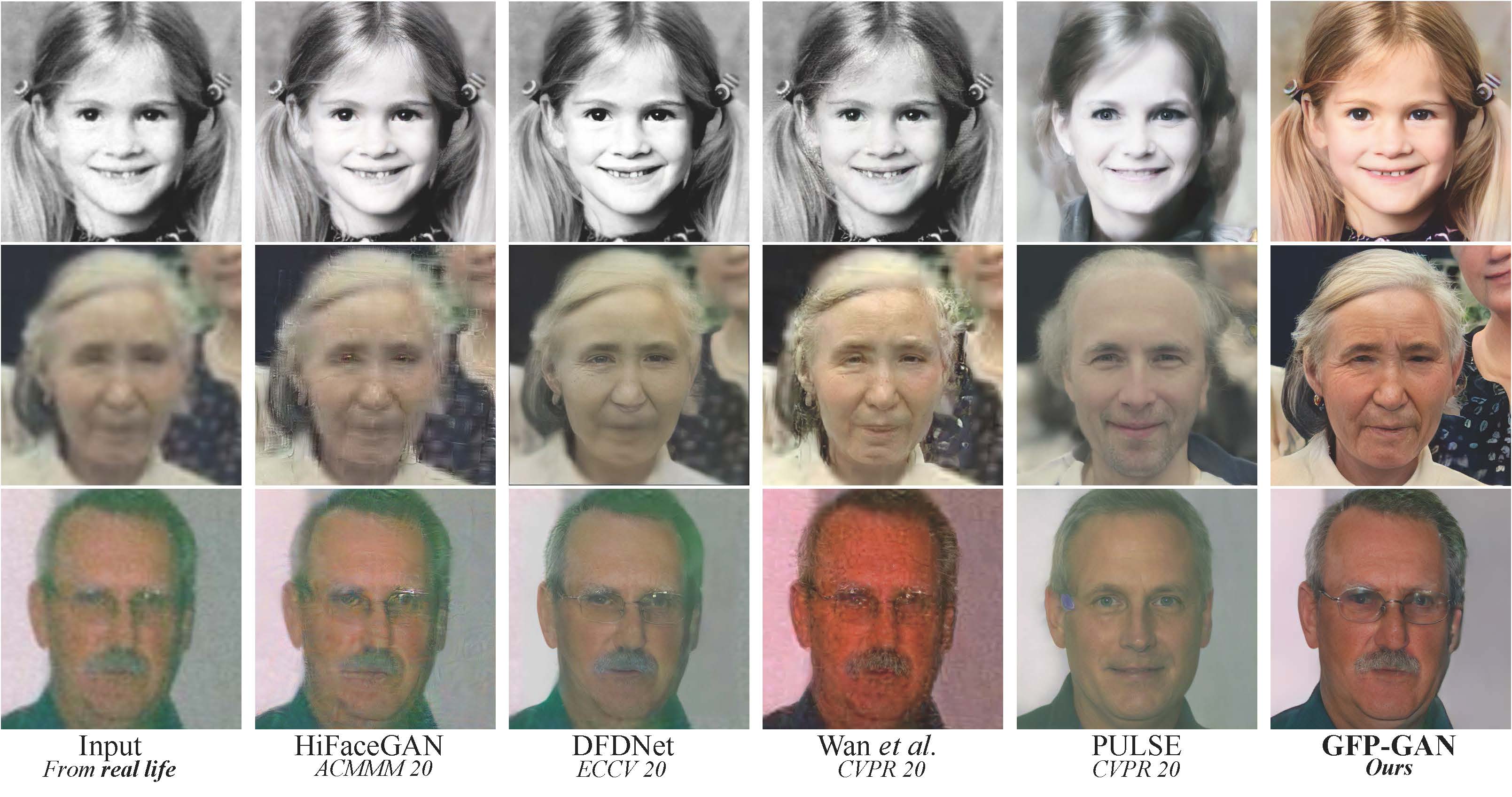
GFPGAN aims at developing a Practical Algorithm for Real-world Face Restoration.
It leverages rich and diverse priors encapsulated in a pretrained face GAN (e.g., StyleGAN2) for blind face restoration.
:question: Frequently Asked Questions can be found in FAQ.md.
:triangular_flag_on_post: Updates
- :white_check_mark: Add RestoreFormer inference codes.
- :white_check_mark: Add V1.4 model, which produces slightly more details and better identity than V1.3.
- :white_check_mark: Add V1.3 model, which produces more natural restoration results, and better results on very low-quality / high-quality inputs. See more in Model zoo, Comparisons.md
- :white_check_mark: Integrated to Huggingface Spaces with Gradio. See Gradio Web Demo.
- :white_check_mark: Support enhancing non-face regions (background) with Real-ESRGAN.
- :white_check_mark: We provide a clean version of GFPGAN, which does not require CUDA extensions.
- :white_check_mark: We provide an updated model without colorizing faces.
If GFPGAN is helpful in your photos/projects, please help to :star: this repo or recommend it to your friends. Thanks:blush: Other recommended projects:
:arrow_forward: Real-ESRGAN: A practical algorithm for general image restoration
:arrow_forward: BasicSR: An open-source image and video restoration toolbox
:arrow_forward: facexlib: A collection that provides useful face-relation functions
:arrow_forward: HandyView: A PyQt5-based image viewer that is handy for view and comparison
:book: GFP-GAN: Towards Real-World Blind Face Restoration with Generative Facial Prior
[Paper] [Project Page] [Demo]
Xintao Wang, Yu Li, Honglun Zhang, Ying Shan
Applied Research Center (ARC), Tencent PCG
:wrench: Dependencies and Installation
- Python >= 3.7 (Recommend to use Anaconda or Miniconda)
- PyTorch >= 1.7
- Option: NVIDIA GPU + CUDA
- Option: Linux
Installation
We now provide a clean version of GFPGAN, which does not require customized CUDA extensions.
If you want to use the original model in our paper, please see PaperModel.md for installation.
-
Clone repo
bash git clone https://github.com/TencentARC/GFPGAN.git cd GFPGAN -
Install dependent packages
```bash
Install basicsr - https://github.com/xinntao/BasicSR
We use BasicSR for both training and inference
pip install basicsr
Install facexlib - https://github.com/xinntao/facexlib
We use face detection and face restoration helper in the facexlib package
pip install facexlib
pip install -r requirements.txt python setup.py develop
If you want to enhance the background (non-face) regions with Real-ESRGAN,
you also need to install the realesrgan package
pip install realesrgan ```
:zap: Quick Inference
We take the v1.3 version for an example. More models can be found here.
Download pre-trained models: GFPGANv1.3.pth
wget https://github.com/TencentARC/GFPGAN/releases/download/v1.3.0/GFPGANv1.3.pth -P experiments/pretrained_models
Inference!
python inference_gfpgan.py -i inputs/whole_imgs -o results -v 1.3 -s 2
Usage: python inference_gfpgan.py -i inputs/whole_imgs -o results -v 1.3 -s 2 [options]...

  -h                   show this help
  -i input             Input image or folder. Default: inputs/whole_imgs
  -o output            Output folder. Default: results
  -v version           GFPGAN model version. Option: 1 | 1.2 | 1.3. Default: 1.3
  -s upscale           The final upsampling scale of the image. Default: 2
  -bg_upsampler        background upsampler. Default: realesrgan
  -bg_tile             Tile size for background sampler, 0 for no tile during testing. Default: 400
  -suffix              Suffix of the restored faces
  -only_center_face    Only restore the center face
  -aligned             Input are aligned faces
  -ext                 Image extension. Options: auto | jpg | png, auto means using the same extension as inputs. Default: auto
If you want to use the original model in our paper, please see PaperModel.md for installation and inference.
:european_castle: Model Zoo
| Version | Model Name | Description |
|---|---|---|
| V1.3 | GFPGANv1.3.pth | Based on V1.2; more natural restoration results; better results on very low-quality / high-quality inputs. |
| V1.2 | GFPGANCleanv1-NoCE-C2.pth | No colorization; no CUDA extensions are required. Trained with more data with pre-processing. |
| V1 | GFPGANv1.pth | The paper model, with colorization. |
The comparisons are in Comparisons.md.
Note that V1.3 is not always better than V1.2. You may need to select different models based on your purpose and inputs.
| Version | Strengths | Weaknesses |
|---|---|---|
| V1.3 | ✓ natural outputs |
✓better results on very low-quality inputs
✓ work on relatively high-quality inputs
✓ can have repeated (twice) restorations | ✗ not very sharp
✗ have a slight change on identity | |V1.2 | ✓ sharper output
✓ with beauty makeup | ✗ some outputs are unnatural |
You can find more models (such as the discriminators) here: [Google Drive], OR [Tencent Cloud 腾讯微云]
:computer: Training
We provide the training codes for GFPGAN (used in our paper).
You could improve it according to your own needs.
Tips
- More high quality faces can improve the restoration quality.
- You may need to perform some pre-processing, such as beauty makeup.
Procedures
(You can try a simple version ( options/train_gfpgan_v1_simple.yml) that does not require face component landmarks.)
-
Dataset preparation: FFHQ
-
Download pre-trained models and other data. Put them in the
experiments/pretrained_modelsfolder. -
Modify the configuration file
options/train_gfpgan_v1.ymlaccordingly. -
Training
python -m torch.distributed.launch --nproc_per_node=4 --master_port=22021 gfpgan/train.py -opt options/train_gfpgan_v1.yml --launcher pytorch
:scroll: License and Acknowledgement
GFPGAN is released under Apache License Version 2.0.
BibTeX
@InProceedings{wang2021gfpgan,
    author = {Xintao Wang and Yu Li and Honglun Zhang and Ying Shan},
    title = {Towards Real-World Blind Face Restoration with Generative Facial Prior},
    booktitle={The IEEE Conference on Computer Vision and Pattern Recognition (CVPR)},
    year = {2021}
}
:e-mail: Contact
If you have any question, please email xintao.wang@outlook.com or xintaowang@tencent.com.
Core symbols most depended-on inside this repo
NormalizeShape
Languages
Modules by API surface
Used by 2 indexed graphs manifest dependencies, hub-wide
Dependencies from manifests, versioned
For agents
$ claude mcp add GFPGAN \
  -- python -m otcore.mcp_server <graph>