github.com/Tencent/mars @v1.3.0
Chat with this repoBrowse by type
What it actually does AI analysis from the code graph — generated when you open this
README
Mars



-%20iOS%20%7C%20OS%20X%20%7C%20Android(ndk16b)%20%7C%20Windows(vs2015)%20-brightgreen.svg)
(中文版本请参看这里)
Mars is a cross-platform infrastructure component developed by WeChat Mobile Team. It is proved to be effective by billions of WeChat users.
- Cross platform, easy to deploy if you are developing multi-platform or multi-business application.
- Suitable for small amount data transmission
- Mobile platform friendly, low power and traffic consumption
- A network solution fit for mobile application
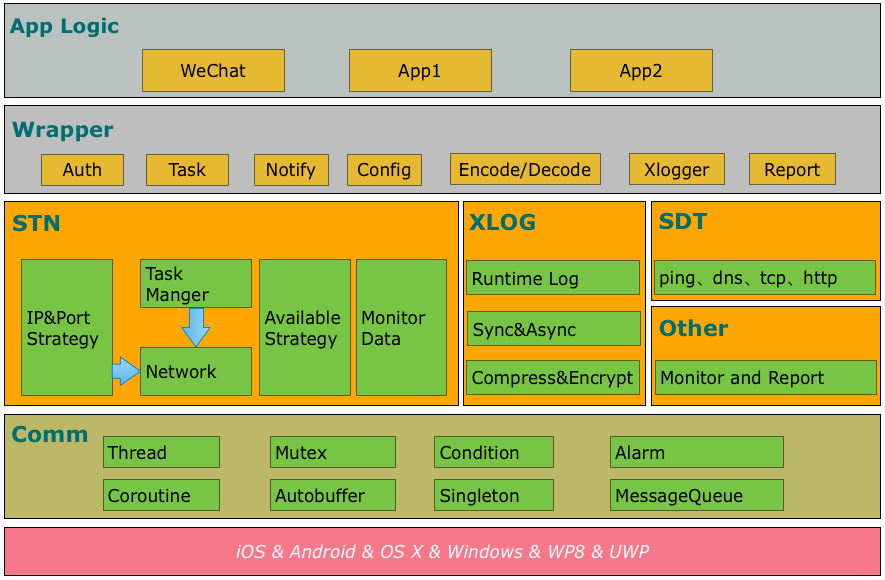
- comm: common library, including socket, thread, message queue, coroutine, etc.
- Xlog: a reliable log component with high-performance.
- SDT: a network detection component.
- STN: a signaling network component, the major part of Mars.
Samples
Start with sample usage here.
Getting started
Choose Android or iOS/OS X or Windows.
Android
You can use either mars-wrapper or mars-core. We recommend you to use mars-wrapper when you just wanna build a sample or demo, while mars-core is preferred to be used in your APP.
mars-wrapper
Add dependencies by adding the following lines to your app/build.gradle.
dependencies {
    compile 'com.tencent.mars:mars-wrapper:1.2.0'
}
OR
mars-core
Add dependencies by adding the following lines to your app/build.gradle.
dependencies {
    compile 'com.tencent.mars:mars-core:1.2.2'
}
OR
mars-xlog
If you just want to user xlog, add dependencies by adding the following lines to your app/build.gradle. note: xlog is included in mars-core and mars-wrapper.
dependencies {
    compile 'com.tencent.mars:mars-xlog:1.0.7'
}
If you read here, make sure you have added dependencies of mars-wrapper, mars-core or mars-xlog.
Xlog Init
Initialize Xlog when your APP starts. Remember to use an exclusive folder to save the log files, no other files are acceptable in the folder since they would be removed by the cleansing function in Xlog automatically.
When multiple processes is used in your app, make sure that each process owns its exclusive log file.
System.loadLibrary("c++_shared");
System.loadLibrary("marsxlog");

final String SDCARD = Environment.getExternalStorageDirectory().getAbsolutePath();
final String logPath = SDCARD + "/marssample/log";

// this is necessary, or may crash for SIGBUS
final String cachePath = this.getFilesDir() + "/xlog"

//init xlog
if (BuildConfig.DEBUG) {
    Xlog.appenderOpen(Xlog.LEVEL_DEBUG, Xlog.AppenderModeAsync, cachePath, logPath, "MarsSample", 0, "");
    Xlog.setConsoleLogOpen(true);

} else {
    Xlog.appenderOpen(Xlog.LEVEL_INFO, Xlog.AppenderModeAsync, cachePath, logPath, "MarsSample", 0, "");
    Xlog.setConsoleLogOpen(false);
}

Log.setLogImp(new Xlog());
Uninitialized Xlog when your app exits
Log.appenderClose();
STN Init
If you add dependencies of mars-core to your project, you need to initialize and release STN. Initialize STN before you use it
// set callback
AppLogic.setCallBack(stub);
StnLogic.setCallBack(stub);
SdtLogic.setCallBack(stub);

// Initialize the Mars PlatformComm
Mars.init(getApplicationContext(), new Handler(Looper.getMainLooper()));

// Initialize the Mars
StnLogic.setLonglinkSvrAddr(profile.longLinkHost(), profile.longLinkPorts());
StnLogic.setShortlinkSvrAddr(profile.shortLinkPort());
StnLogic.setClientVersion(profile.productID());
Mars.onCreate(true);

BaseEvent.onForeground(true);
StnLogic.makesureLongLinkConnected();
Firstly, you should call the setCallBack interface, and secondly, the Mars.init. Then, to initialize the Mars, there is to need to strictly follow the orders of the four commands. Finally, after Mars are initialized, onForeground and makesureLongLinkConnect can be called.
Destroy STN or exit your app:
Mars.onDestroy();
Event Change
Network change:
BaseEvent.onNetworkChange()
If you add dependencies of mars-wrapper to your project, you just need initialize STN and no need uninitialized.
MarsServiceProxy.init(this, getMainLooper(),null);
No matter which way of dependencies you used, you must pay attention to these.
The state (background or foreground) of the APP is changed:
BaseEvent.onForeground(boolean);
The account of the APP is changed:
StnLogic.reset();
If you want to modify the encryption algorithm of Xlog, the packer/unpacker of longlink/shortlink, or you want to define the other components by yourself, refer here
iOS/OS X
Compile
python build_ios.py
or
python build_osx.py
- Add mars.framework as a dependency of your project.
- Rename files in mars/libraries/mars_android_sdk/jni with .rewriteme extension to .cc extension.
- Add header files in mars/libraries/mars_android_sdk/jni and source files from step 2 into your project.
Xlog Init
Initialize Xlog when your app starts. Remember to use an exclusive folder to save the log files, no other files are acceptable in the folder since they would be removed by the cleansing function in Xlog automatically.
NSString* logPath = [[NSSearchPathForDirectoriesInDomains(NSDocumentDirectory, NSUserDomainMask, YES) objectAtIndex:0] stringByAppendingString:@"/log"];

// set do not backup for logpath
const char* attrName = "com.apple.MobileBackup";
u_int8_t attrValue = 1;
setxattr([logPath UTF8String], attrName, &attrValue, sizeof(attrValue), 0, 0);

// init xlogger
#if DEBUG
xlogger_SetLevel(kLevelDebug);
appender_set_console_log(true);
#else
xlogger_SetLevel(kLevelInfo);
appender_set_console_log(false);
#endif
appender_open(kAppednerAsync, [logPath UTF8String], "Test",  0, "");
Close xlog in function "applicationWillTerminate"
appender_close();
STN Init
Initialize STN before you use it:
- (void)setCallBack {
    mars::stn::SetCallback(mars::stn::StnCallBack::Instance());
    mars::app::SetCallback(mars::app::AppCallBack::Instance());
}

- (void) createMars {
    mars::baseevent::OnCreate();
}

- (void)setClientVersion:(UInt32)clientVersion {
    mars::stn::SetClientVersion(clientVersion);
}

- (void)setShortLinkDebugIP:(NSString *)IP port:(const unsigned short)port {
    std::string ipAddress([IP UTF8String]);
    mars::stn::SetShortlinkSvrAddr(port, ipAddress);
}

- (void)setShortLinkPort:(const unsigned short)port {
    mars::stn::SetShortlinkSvrAddr(port);
}

- (void)setLongLinkAddress:(NSString *)string port:(const unsigned short)port debugIP:(NSString *)IP {
    std::string ipAddress([string UTF8String]);
    std::string debugIP([IP UTF8String]);
    std::vector<uint16_t> ports;
    ports.push_back(port);
    mars::stn::SetLonglinkSvrAddr(ipAddress,ports,debugIP);
}

- (void)setLongLinkAddress:(NSString *)string port:(const unsigned short)port {
    std::string ipAddress([string UTF8String]);
    std::vector<uint16_t> ports;
    ports.push_back(port);
    mars::stn::SetLonglinkSvrAddr(ipAddress,ports);
}

- (void)reportEvent_OnForeground:(BOOL)isForeground {
    mars::baseevent::OnForeground(isForeground);
}

- (void)makesureLongLinkConnect {
    mars::stn::MakesureLonglinkConnected();
}
Firstly, you should call the setCallBack interface, and secondly, the Mars.init. Then, to initialize the Mars, there is to need to strictly follow the orders of the four commands. Finally, after Mars are initialized, onForeground and makesureLongLinkConnect can be called.
If you want to destroy STN or exit App:
- (void)destroyMars {
    mars::baseevent::OnDestroy();
}
Event Change
When the App's state of background or foreground is changed:
- (void)reportEvent_OnForeground:(BOOL)isForeground {
    mars::baseevent::OnForeground(isForeground);
}
Network change:
- (void)reportEvent_OnNetworkChange {
    mars::baseevent::OnNetworkChange();
}
Windows
Install Visual Studio 2015.
Compile
python build_windows.py
- Add mars.lib as a dependency of your project.
- Rename files in mars/libraries/mars_android_sdk/jni with .rewriteme extension to .cc extension.
- Add header files in mars/libraries/mars_android_sdk/jni and source files from step 2 into your project.
Xlog Init
Initialize Xlog when your app starts. Remember to use an exclusive folder to save the log files, no other files are acceptable in the folder since they would be removed by the cleansing function in Xlog automatically.
std::string logPath = ""; //use your log path
std::string pubKey = ""; //use you pubkey for log encrypt

// init xlog
#if DEBUG
xlogger_SetLevel(kLevelDebug);
appender_set_console_log(true);
#else
xlogger_SetLevel(kLevelInfo);
appender_set_console_log(false);
#endif
appender_open(kAppednerAsync, logPath.c_str(), "Test", 0, pubKey.c_str());
Uninitialized xlog before your app exits
appender_close();
STN Init
Initialize STN before you use it:
void setShortLinkDebugIP(const std::string& _ip, unsigned short _port)
{
    mars::stn::SetShortlinkSvrAddr(_port, _ip);
}
void setShortLinkPort(unsigned short _port)
{
    mars::stn::SetShortlinkSvrAddr(_port, "");
}
void setLongLinkAddress(const std::string& _ip, unsigned short _port, const std::string& _debug_ip)
{
    vector<uint16_t> ports;
    ports.push_back(_port);
    mars::stn::SetLonglinkSvrAddr(_ip, ports, _debug_ip);
}

void Init()
{
    mars::stn::SetCallback(mars::stn::StnCallBack::Instance());
    mars::app::SetCallback(mars::app::AppCallBack::Instance());
    mars::baseevent::OnCreate();

    //todo
    //mars::stn::SetClientVersion(version);
    //setShortLinkDebugIP(...)
    //setLongLinkAddress(...)

    mars::baseevent::OnForeground(true);
    mars::stn::MakesureLonglinkConnected();
}
Firstly, you should call the setCalBack interface, and secondly, the Mars.init. Then, to initialize the Mars, there is to need to strictly follow the orders of the four commands. Finally, after Mars are initialized, onForeground and makesureLongLinkConnect can be called.
If you want to destroy STN or exit App:
mars::baseevent::OnDestroy();
Support
Any problem?
- Learn more from mars/sample.
- Read the source code.
- Read the wiki or FAQ for help.
- Contact us for help.
Contributing
For more information about contributing issues or pull requests, see our Mars Contributing Guide.
License
Mars is under the MIT license. See the LICENSE file for details.
Mars



Mars 是微信官方的跨平台跨业务的终端基础组件。
- comm:可以独立使用的公共库,包括 socket、线程、消息队列、协程等;
- xlog:高可靠性高性能的运行期日志组件;
- SDT: 网络诊断组件;
- STN: 信令分发网络模块,也是 Mars 最主要的部分。
Samples
sample 的使用请参考这里。
Getting started
接入 Android 或者 iOS/OS X 或者 Windows 。
Android
gradle 接入我们提供了两种接入方式:mars-wrapper 或者 mars-core。如果你只是想做个 sample 推荐使用 mars-wrapper,可以快速开发;但是如果你想把 mars 用到你的 app 中的话,推荐使用 mars-core,可定制性更高。
mars-wrapper
在 app/build.gradle 中添加 mars-wrapper 的依赖:
dependencies {
    compile 'com.tencent.mars:mars-wrapper:1.2.0'
}
或者
mars-core
在 app/build.gradle 中添加 mars-core 的依赖:
dependencies {
    compile 'com.tencent.mars:mars-core:1.2.2'
}
或者