github.com/TechyNilesh/DeepImageSearch @v3.0.2
Chat with this repoWhat it actually does AI analysis from the code graph — generated when you open this
README

DeepImageSearch is a Python library for building AI-powered image search systems. It supports text-to-image search, image-to-image search, hybrid search, and LLM-powered captioning using CLIP/SigLIP/EVA-CLIP multimodal embeddings with FAISS/ChromaDB/Qdrant vector indexing. Built for the agentic RAG era with MCP server, LangChain tool, and PostgreSQL metadata storage out of the box.







Features
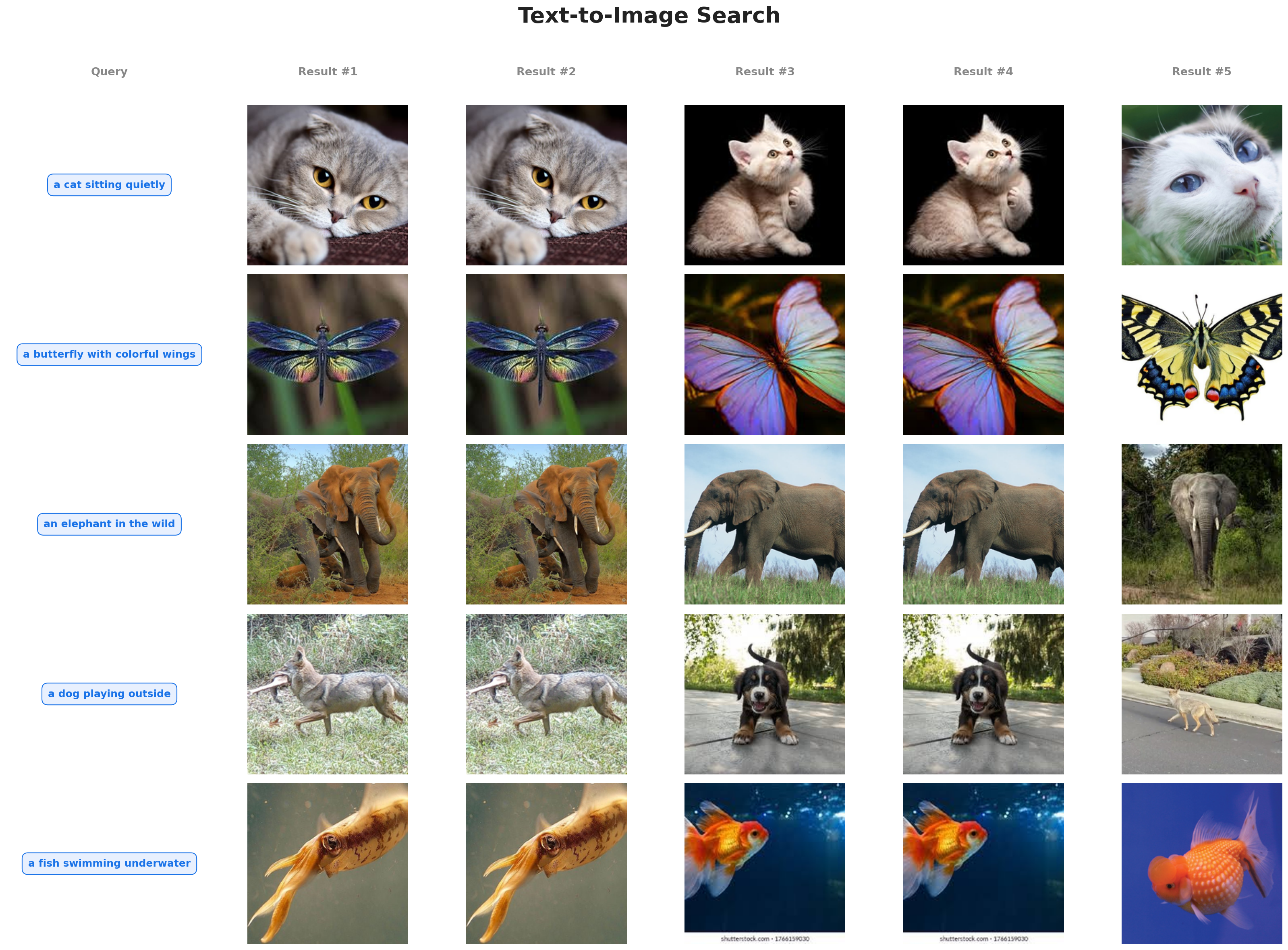
- Text-to-Image Search -- find images using natural language queries like "a red car parked near a lake"
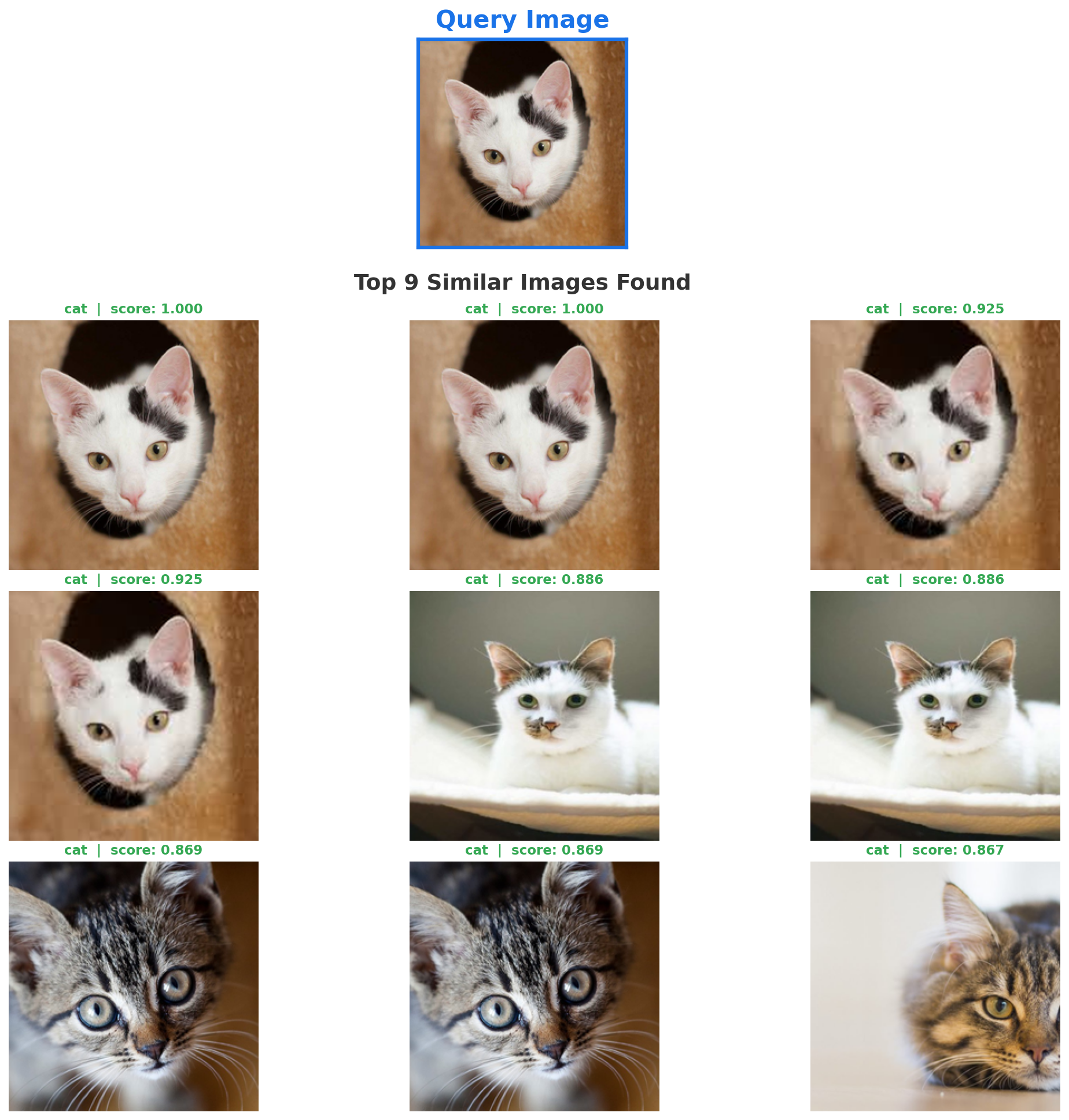
- Image-to-Image Search -- find visually similar images from a query image
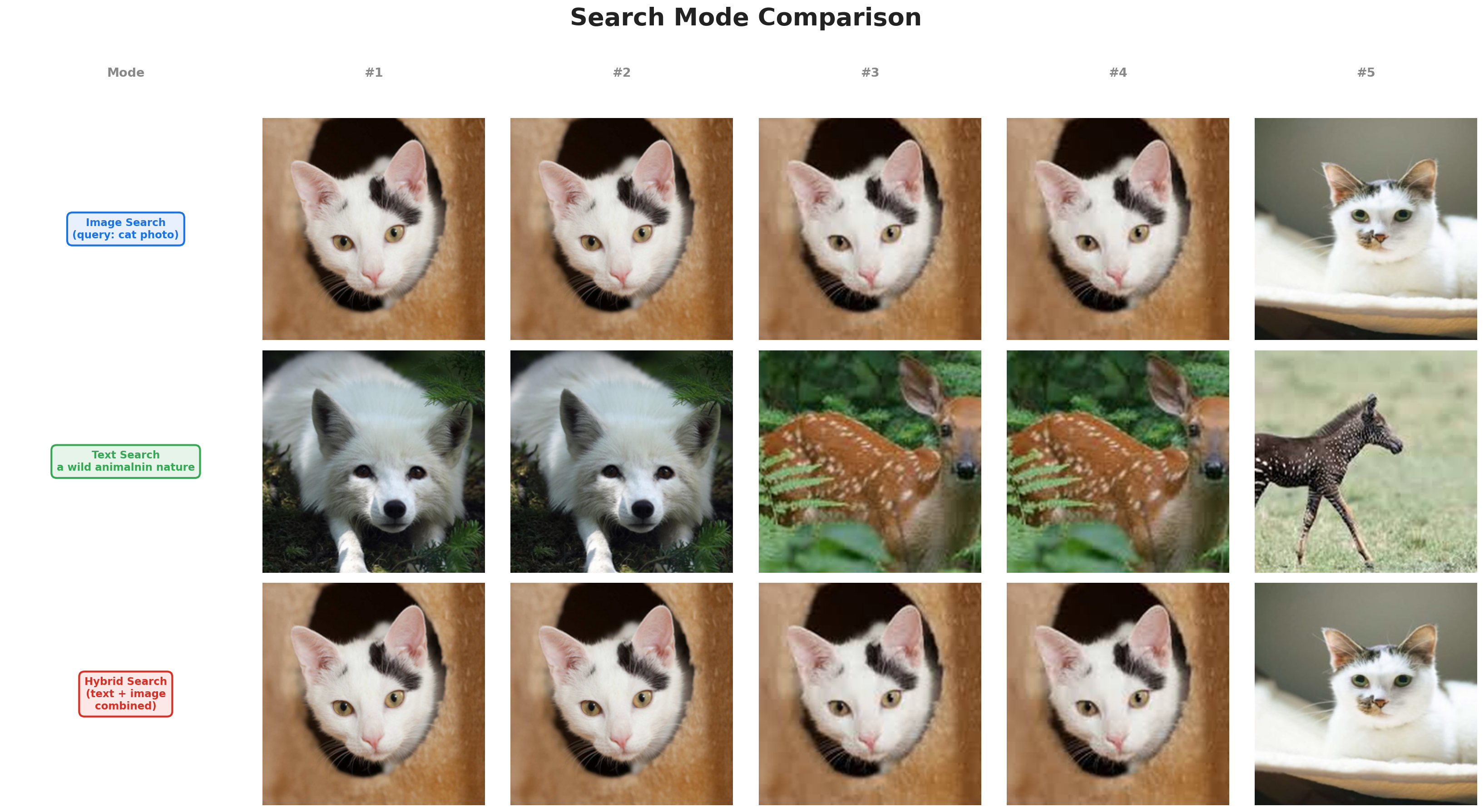
- Hybrid Search -- combine text and image queries with weighted fusion
- Multimodal Embeddings -- CLIP, SigLIP, EVA-CLIP via open_clip, plus 500+ legacy timm models
- LLM Captioning -- auto-generate image captions using any OpenAI SDK-compatible provider
- Image Records -- every image tracked with ID, index, name, path, caption, timestamp (like a database)
- Multiple Vector Stores -- FAISS (default), ChromaDB, Qdrant with metadata filtering
- Metadata Storage -- local JSON (default) or PostgreSQL for production
- Agentic Integration -- MCP server for Claude, LangChain tool for agent pipelines
- GPU & CPU Support -- auto-detects CUDA, MPS (Apple Silicon), or CPU
- Modern Packaging --
uv/pipcompatible viapyproject.toml, Python 3.10+
Installation
From PyPI (stable release)
pip install DeepImageSearch --upgrade
From GitHub (latest v3)
pip install git+https://github.com/TechyNilesh/DeepImageSearch.git
Or with uv (recommended):
uv pip install git+https://github.com/TechyNilesh/DeepImageSearch.git
With optional extras from GitHub:
pip install "DeepImageSearch[all] @ git+https://github.com/TechyNilesh/DeepImageSearch.git"
Optional Extras
pip install "DeepImageSearch[llm]"          # LLM captioning (OpenAI SDK)
pip install "DeepImageSearch[chroma]"       # ChromaDB vector store
pip install "DeepImageSearch[qdrant]"       # Qdrant vector store
pip install "DeepImageSearch[postgres]"     # PostgreSQL metadata store
pip install "DeepImageSearch[mcp]"          # MCP server for Claude
pip install "DeepImageSearch[langchain]"    # LangChain agent tool
pip install "DeepImageSearch[all]"          # Everything
If using a GPU, uninstall
faiss-cpuand installfaiss-gpuinstead.
Quick Start
from DeepImageSearch import SearchEngine

engine = SearchEngine(model_name="clip-vit-b-32")

# Index from a folder or list of paths
engine.index("./photos")
engine.index(["img1.jpg", "img2.jpg", "img3.jpg"])

# Text search
results = engine.search("a sunset over mountains")

# Image search
results = engine.search("query.jpg")

# Hybrid search
results = engine.search("outdoor scene", image_query="photo.jpg", mode="hybrid")

# Filtered search
results = engine.search("red car", filters={"source": "instagram"})

# Plot results
engine.plot_similar_images("query.jpg", number_of_images=9)
Image-to-Image Search
Text-to-Image Search
Search Mode Comparison (Image vs Text vs Hybrid)
Search Results
Each result contains full image identity -- you always know which image matched:
{
    "id": "a1b2c3...",
    "score": 0.87,
    "metadata": {
        "image_id": "a1b2c3...",
        "image_index": 42,
        "image_name": "sunset_042.jpg",
        "image_path": "/data/photos/sunset_042.jpg",
        "caption": "A sunset over mountains with orange sky",
        "indexed_at": "2026-03-28T10:30:00+00:00"
    }
}
Image Records
Every indexed image is tracked as a structured record (maps directly to SQL):
records = engine.get_records()              # all records
record = engine.get_record("a1b2c3...")     # by ID
print(engine.count)                         # total indexed
print(engine.info())                        # engine summary
LLM Captioning
Auto-generate image captions using any OpenAI SDK-compatible provider. Just pass model, api_key, and base_url:
from DeepImageSearch import SearchEngine

engine = SearchEngine(
    model_name="clip-vit-l-14",
    captioner_model="your-model-name",
    captioner_api_key="your-api-key",
    captioner_base_url="https://your-provider.com/v1",
)

engine.index("./photos", generate_captions=True)
results = engine.search("person holding umbrella")
Works with OpenAI, Google Gemini, Anthropic Claude, Ollama, Together AI, Groq, vLLM, or any OpenAI SDK-compatible endpoint.
Vector Stores
# FAISS (default)
engine = SearchEngine(model_name="clip-vit-b-32")

# ChromaDB
engine = SearchEngine(model_name="clip-vit-b-32", vector_store="chroma")

# Qdrant
engine = SearchEngine(model_name="clip-vit-b-32", vector_store="qdrant")
Metadata Storage
Image records are stored locally in image_records.json by default. For production, use PostgreSQL:
from DeepImageSearch import SearchEngine
from DeepImageSearch.metadatastore.postgres_store import PostgresMetadataStore

store = PostgresMetadataStore(
    connection_string="postgresql://user:pass@localhost:5432/mydb"
)
engine = SearchEngine(model_name="clip-vit-b-32", metadata_store=store)
engine.index("./photos")   # records go to PostgreSQL, vectors go to FAISS
You can implement your own backend by subclassing BaseMetadataStore.
Embedding Presets
| Preset | Model | Text Search | Best For |
|---|---|---|---|
clip-vit-b-32 |
CLIP ViT-B/32 | Yes | Fast, general purpose |
clip-vit-b-16 |
CLIP ViT-B/16 | Yes | Better accuracy |
clip-vit-l-14 |
CLIP ViT-L/14 | Yes | High accuracy |
clip-vit-l-14-336 |
CLIP ViT-L/14@336 | Yes | Highest accuracy |
siglip-vit-b-16 |
SigLIP ViT-B/16 | Yes | Improved zero-shot |
clip-vit-bigg-14 |
CLIP ViT-bigG/14 | Yes | Maximum quality |
vgg19 |
VGG-19 (timm) | No | Legacy, image-only |
resnet50 |
ResNet-50 (timm) | No | Legacy, image-only |
Any timm model name also works for image-only search.
Agentic Integration
MCP Server
Expose your image index as a tool for Claude:
deep-image-search-mcp --index-path ./my_index --model clip-vit-l-14
Claude Desktop config:
{
  "mcpServers": {
    "image-search": {
      "command": "deep-image-search-mcp",
      "args": ["--index-path", "./my_index"]
    }
  }
}
LangChain Tool
from DeepImageSearch.agents.langchain_tool import create_langchain_tool

tool = create_langchain_tool(index_path="./my_index")
Generic Tool
from DeepImageSearch import ImageSearchTool

tool = ImageSearchTool(index_path="./my_index")
results = tool("a photo of a dog", k=5)
Advanced Usage
For full control, use core modules directly:
from DeepImageSearch.core.embeddings import EmbeddingManager
from DeepImageSearch.core.indexer import Indexer
from DeepImageSearch.core.searcher import Searcher
from DeepImageSearch.core.captioner import Captioner
from DeepImageSearch.vectorstores.faiss_store import FAISSStore
from DeepImageSearch.metadatastore.json_store import JsonMetadataStore

embedding = EmbeddingManager.create("clip-vit-l-14", device="cuda")
store = FAISSStore(dimension=embedding.dimension, index_type="hnsw")
metadata = JsonMetadataStore()

captioner = Captioner(
    model="your-model",
    api_key="your-key",
    base_url="https://your-provider.com/v1",
)

indexer = Indexer(embedding=embedding, vector_store=store, metadata_store=metadata, captioner=captioner)
searcher = Searcher(embedding=embedding, vector_store=store)

indexer.index(image_paths, generate_captions=True)
results = searcher.search_by_text("sunset photo")
Backward Compatibility (v2 API)
Existing v2 code continues to work:
from DeepImageSearch import Load_Data, Search_Setup

image_list = Load_Data().from_folder(["folder_path"])
st = Search_Setup(image_list=image_list, model_name="vgg19", pretrained=True)
st.run_index()
st.get_similar_images(image_path="query.jpg", number_of_images=10)
st.plot_similar_images(image_path="query.jpg", number_of_images=9)
Architecture
DeepImageSearch/
├── core/
│   ├── embeddings.py      # CLIP/SigLIP/EVA-CLIP + timm backends
│   ├── indexer.py          # Batch indexing pipeline
│   ├── searcher.py         # Text/image/hybrid search + plotting
│   └── captioner.py        # OpenAI SDK-compatible LLM captioning
├── vectorstores/
│   ├── base.py             # Abstract vector store interface
│   ├── faiss_store.py      # FAISS with metadata sidecar
│   ├── chroma_store.py     # ChromaDB integration
│   └── qdrant_store.py     # Qdrant integration
├── metadatastore/
│   ├── base.py             # ImageRecord dataclass + abstract interface
│   ├── json_store.py       # Local JSON file backend (default)
│   └── postgres_store.py   # PostgreSQL backend
├── agents/
│   ├── tool_interface.py   # Generic agent tool
│   ├── mcp_server.py       # MCP server for Claude
│   └── langchain_tool.py   # LangChain tool wrapper
├── data/
│   └── loader.py           # Image loading from folders/CSV/lists
├── search_engine.py        # High-level unified API
└── DeepImageSearch.py       # v2 backward-compatible shim
Examples
Ready-to-run demo scripts in the Demo/ folder:
| # | Demo | Description |
|---|---|---|
| 1 | Basic Image Search | Index a folder, find similar images, plot results |
| 2 | Text-to-Image Search | Search images with natural language queries |
| 3 | Hybrid Search | Combine text + image queries with weight tuning |
| 4 | Filtered Search | Attach metadata and filter results |
| 5 | LLM Captioning | Auto-generate captions with any vision LLM |
| 6 | Vector Stores | FAISS vs ChromaDB vs Qdrant |
| 7 | Metadata Storage | JSON records, PostgreSQL, custom stores |
| 8 | Agentic Tools | MCP server, LangChain tool, generic tool |
| 9 | Embedding Models | Compare CLIP presets and timm models |
| 10 | Incremental Indexing | Add images over time, save/reload |
Documentation
For detailed documentation: Read Full Documents
Core Contributors

Citation
If you use DeepImageSearch in your Research/Product, please cite:
@misc{TechyNilesh/DeepImageSearch,
  author = {VERMA, NILESH},
  title = {Deep Image Search - AI-Based Image Search Engine},
  year = {2021},
  publisher = {GitHub},
  journal = {GitHub repository},
  howpublished = {\url{https://github.com/TechyNilesh/DeepImageSearch}},
}
Please do STAR the repository, if it helped you in any way.
Feel free to give suggestions, report bugs and contribute.
Star History
Core symbols most depended-on inside this repo
infoShape
Languages
Modules by API surface
Datastores touched
For agents
$ claude mcp add DeepImageSearch \
  -- python -m otcore.mcp_server <graph>