hub / github.com/TangKe/Ruler
github.com/TangKe/Ruler @1.0.5
Chat with this repo
122 symbols
201 edges
11 files
28 documented · 23%
What it actually does AI analysis from the code graph — generated when you open this
loading…
README
标尺
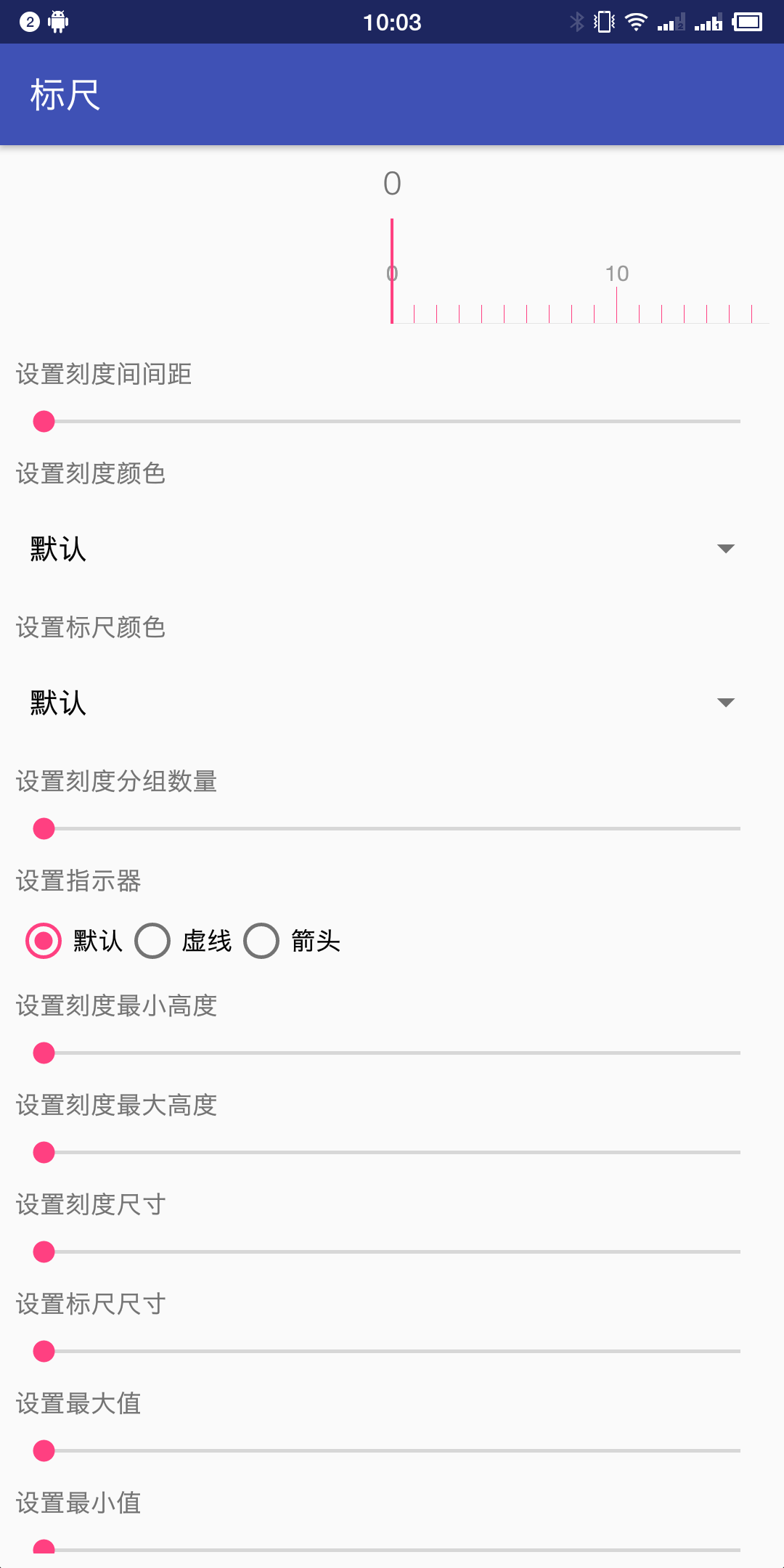
提供可以左右滑动的标尺控件,获取到用户选择的值,整个控件为纯绘制。
支持主题配置,提供一套默认主题。
支持所有绘制元素的自定义,可自定义元素
- 刻度间距
- 刻度颜色
- 标尺颜色
- 刻度分组数量
- 指示器
- 刻度高度
- 刻度尺寸
- 标尺尺寸
- 字体颜色
- 字体大小
- 自定义标尺文本格式
- 自定义可以点击的标记
- 两指缩放
使用方式
在你的build.gradle的dependencies中加入
dependencies {
  implementation 'ke.tang:ruler:1.0.5'
}
基本用法
- 在布局中
```xml
   <ke.tang.ruler.RulerView
       android:layout_width="match_parent"
       android:layout_height="wrap_content" />
```
- 或者在
Java中直接使用RulerView类,详细用法以及接口功能,请查看Javadoc
提供的Xml属性
| 属性名 | 属性类型 | 说明 |
|---|---|---|
| stepWidth | dimension | 刻度之间的间距 |
| rulerValueFormatter | string | 用于格式化值的完整类名 |
| scaleColor | color|reference | 设置刻度颜色 |
| rulerColor | color|reference | 设置标尺颜色 |
| sectionScaleCount | integer | 刻度分组数量 |
| scaleMinHeight | dimension | 小刻度高度 |
| scaleMaxHeight | dimension | 大刻度高度 |
| scaleSize | dimension | 刻度宽度 |
| rulerSize | dimension | 标尺高度 |
| indicator | reference | 中间指示器 |
| maxValue | integer | 标尺最大值(范围0-10000) |
| minValue | integer | 标尺最小值(范围0-10000) |
| value | integer | 当前值(范围0-10000) |
| android:textSize | dimension | 文本尺寸 |
| android:textColor | color|reference | 文本颜色 |
License
    Copyright 2018 TangKe

    Licensed under the Apache License, Version 2.0 (the "License");
    you may not use this file except in compliance with the License.
    You may obtain a copy of the License at

       http://www.apache.org/licenses/LICENSE-2.0

    Unless required by applicable law or agreed to in writing, software
    distributed under the License is distributed on an "AS IS" BASIS,
    WITHOUT WARRANTIES OR CONDITIONS OF ANY KIND, either express or implied.
    See the License for the specific language governing permissions and
    limitations under the License.
Extension points exported contracts — how you extend this code
OnRulerValueChangeListener (Interface)* 当标尺的值变化时的回调接口 */
library/src/main/java/ke/tang/ruler/OnRulerValueChangeListener.kt
Marker (Interface)
(no doc)
library/src/main/java/ke/tang/ruler/Marker.kt
OnMarkerClickListener (Interface)
(no doc)
library/src/main/java/ke/tang/ruler/OnMarkerClickListener.kt
RulerValueFormatter (Interface)
(no doc)
library/src/main/java/ke/tang/ruler/RulerValueFormatter.kt
Core symbols most depended-on inside this repo
toDipcalled by 5
library/src/main/java/ke/tang/ruler/RulerView.kt
finish
called by 4
library/src/main/java/ke/tang/ruler/OverScroller.java
startSpringback
called by 4
library/src/main/java/ke/tang/ruler/OverScroller.java
isFinished
called by 3
library/src/main/java/ke/tang/ruler/OverScroller.java
abortAnimation
called by 3
library/src/main/java/ke/tang/ruler/OverScroller.java
getDeceleration
called by 3
library/src/main/java/ke/tang/ruler/OverScroller.java
update
called by 3
library/src/main/java/ke/tang/ruler/OverScroller.java
getBounds
called by 3
library/src/main/java/ke/tang/ruler/Marker.kt
Shape
Languages
Kotlin54%
Java46%
Modules by API surface
library/src/main/java/ke/tang/ruler/OverScroller.java53 symbols
library/src/main/java/ke/tang/ruler/RulerView.kt29 symbols
sample/src/main/java/ke/tang/ruler/sample/MainActivity.kt11 symbols
library/src/main/java/ke/tang/ruler/DrawableMarker.kt9 symbols
library/src/main/java/ke/tang/ruler/Marker.kt6 symbols
library/src/main/java/ke/tang/ruler/ViscousFluidInterpolator.java3 symbols
library/src/main/java/ke/tang/ruler/ClickableMarker.kt3 symbols
library/src/main/java/ke/tang/ruler/RulerValueFormatter.kt2 symbols
library/src/main/java/ke/tang/ruler/OnRulerValueChangeListener.kt2 symbols
library/src/main/java/ke/tang/ruler/OnMarkerClickListener.kt2 symbols
library/src/main/java/ke/tang/ruler/MoneyRulerValueFormatter.kt2 symbols
For agents
$ claude mcp add Ruler \
  -- python -m otcore.mcp_server <graph>