github.com/SylphAI-Inc/AdalFlow @v1.1.3 sqlite
README
⚡ AdalFlow is a PyTorch-like library to build and auto-optimize any LM workflows, from Chatbots, RAG, to Agents. ⚡
<a href="https://colab.research.google.com/drive/1_YnD4HshzPRARvishoU4IA-qQuX9jHrT?usp=sharing">
    <img alt="Try Quickstart in Colab" src="https://colab.research.google.com/assets/colab-badge.svg">
</a>
View Documentation
<a href="https://pypi.org/project/adalflow/">
    <img alt="PyPI Version" src="https://img.shields.io/pypi/v/adalflow?style=flat-square">
</a>
<a href="https://pypi.org/project/adalflow/">
    <img alt="PyPI Downloads" src="https://static.pepy.tech/badge/adalflow">
</a>
<a href="https://pypi.org/project/adalflow/">
    <img alt="PyPI Downloads" src="https://static.pepy.tech/badge/adalflow/month">
</a>
<a href="https://star-history.com/#SylphAI-Inc/AdalFlow">
    <img alt="GitHub stars" src="https://img.shields.io/github/stars/SylphAI-Inc/AdalFlow?style=flat-square">
</a>
<a href="https://github.com/SylphAI-Inc/AdalFlow/issues">
    <img alt="Open Issues" src="https://img.shields.io/github/issues-raw/SylphAI-Inc/AdalFlow?style=flat-square">
</a>
<a href="https://opensource.org/license/MIT">
    <img alt="License" src="https://img.shields.io/github/license/SylphAI-Inc/AdalFlow">
</a>
  <a href="https://discord.gg/ezzszrRZvT">
    <img alt="discord-invite" src="https://dcbadge.limes.pink/api/server/ezzszrRZvT?style=flat">
</a>
Why AdalFlow
- 100% Open-source Agents SDK: Lightweight and requires no additional API to setup
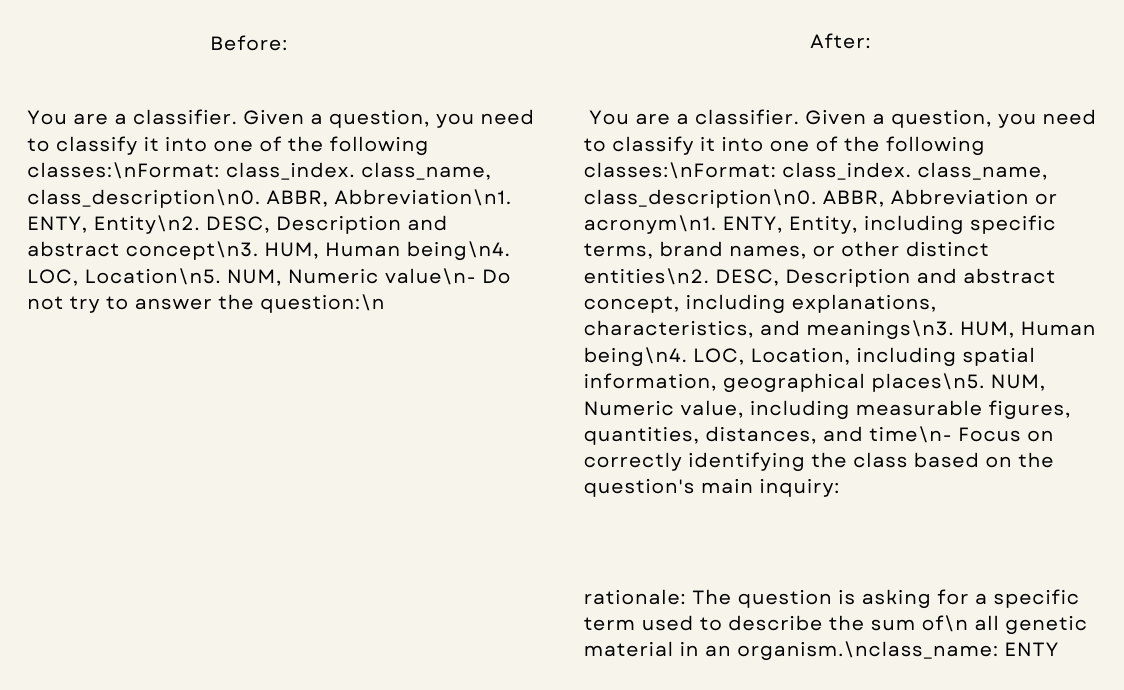
Human-in-the-LoopandTracingFunctionalities. - Say goodbye to manual prompting: AdalFlow provides a unified auto-differentiative framework for both zero-shot optimization and few-shot prompt optimization. Our research,
LLM-AutoDiffandLearn-to-Reason Few-shot In Context Learning, achieve the highest accuracy among all auto-prompt optimization libraries. - Switch your LLM app to any model via a config: AdalFlow provides
Model-agnosticbuilding blocks for LLM task pipelines, ranging from RAG, Agents to classical NLP tasks.
View Documentation
Quick Start
Install AdalFlow with pip:
pip install adalflow
Hello World Agent Example
from adalflow import Agent, Runner
from adalflow.components.model_client.openai_client import OpenAIClient
from adalflow.core.types import (
    ToolCallActivityRunItem,
    RunItemStreamEvent,
    ToolCallRunItem,
    ToolOutputRunItem,
    FinalOutputItem
)
import asyncio

# Define tools
def calculator(expression: str) -> str:
    """Evaluate a mathematical expression."""
    try:
        result = eval(expression)
        return f"The result of {expression} is {result}"
    except Exception as e:
        return f"Error: {e}"

async def web_search(query: str="what is the weather in SF today?") -> str:
    """Web search on query."""
    await asyncio.sleep(0.5)
    return "San Francisco will be mostly cloudy today with some afternoon sun, reaching about 67 °F (20 °C)."

def counter(limit: int):
    """A counter that counts up to a limit."""
    final_output = []
    for i in range(1, limit + 1):
        stream_item = f"Count: {i}/{limit}"
        final_output.append(stream_item)
        yield ToolCallActivityRunItem(data=stream_item)
    yield final_output

# Create agent with tools
agent = Agent(
    name="MyAgent",
    tools=[calculator, web_search, counter],
    model_client=OpenAIClient(),
    model_kwargs={"model": "gpt-4o", "temperature": 0.3},
    max_steps=5
)

runner = Runner(agent=agent)
1. Synchronous Call Mode
# Sync call - returns RunnerResult with complete execution history
result = runner.call(
    prompt_kwargs={"input_str": "Calculate 15 * 7 + 23 and count to 5"}
)

print(result.answer)
# Output: The result of 15 * 7 + 23 is 128. The counter counted up to 5: 1, 2, 3, 4, 5.

# Access step history
for step in result.step_history:
    print(f"Step {step.step}: {step.function.name} -> {step.observation}")
# Output:
# Step 0: calculator -> The result of 15 * 7 + 23 is 128
# Step 1: counter -> ['Count: 1/5', 'Count: 2/5', 'Count: 3/5', 'Count: 4/5', 'Count: 5/5']
2. Asynchronous Call Mode
# Async call - similar output structure to sync call
result = await runner.acall(
    prompt_kwargs={"input_str": "What's the weather in SF and calculate 42 * 3"}
)

print(result.answer)
# Output: San Francisco will be mostly cloudy today with some afternoon sun, reaching about 67 °F (20 °C).
#         The result of 42 * 3 is 126.
3. Async Streaming Mode
# Async streaming - real-time event processing
streaming_result = runner.astream(
    prompt_kwargs={"input_str": "Calculate 100 + 50 and count to 3"},
)

# Process streaming events in real-time
async for event in streaming_result.stream_events():
    if isinstance(event, RunItemStreamEvent):
        if isinstance(event.item, ToolCallRunItem):
            print(f"🔧 Calling: {event.item.data.name}")
        elif isinstance(event.item, ToolCallActivityRunItem):
            print(f"📝 Activity: {event.item.data}")
        elif isinstance(event.item, ToolOutputRunItem):
            print(f"✅ Output: {event.item.data.output}")
        elif isinstance(event.item, FinalOutputItem):
            print(f"🎯 Final: {event.item.data.answer}")

# Output:
# 🔧 Calling: calculator
# ✅ Output: The result of 100 + 50 is 150
# 🔧 Calling: counter
# 📝 Activity: Count: 1/3
# 📝 Activity: Count: 2/3
# 📝 Activity: Count: 3/3
# ✅ Output: ['Count: 1/3', 'Count: 2/3', 'Count: 3/3']
# 🎯 Final: The result of 100 + 50 is 150. Counted to 3 successfully.
Set your OPENAI_API_KEY environment variable to run these examples.
Try the full Agent tutorial in Colab: 
View Quickstart: Learn How AdalFlow optimizes LM workflows end-to-end in 15 mins.
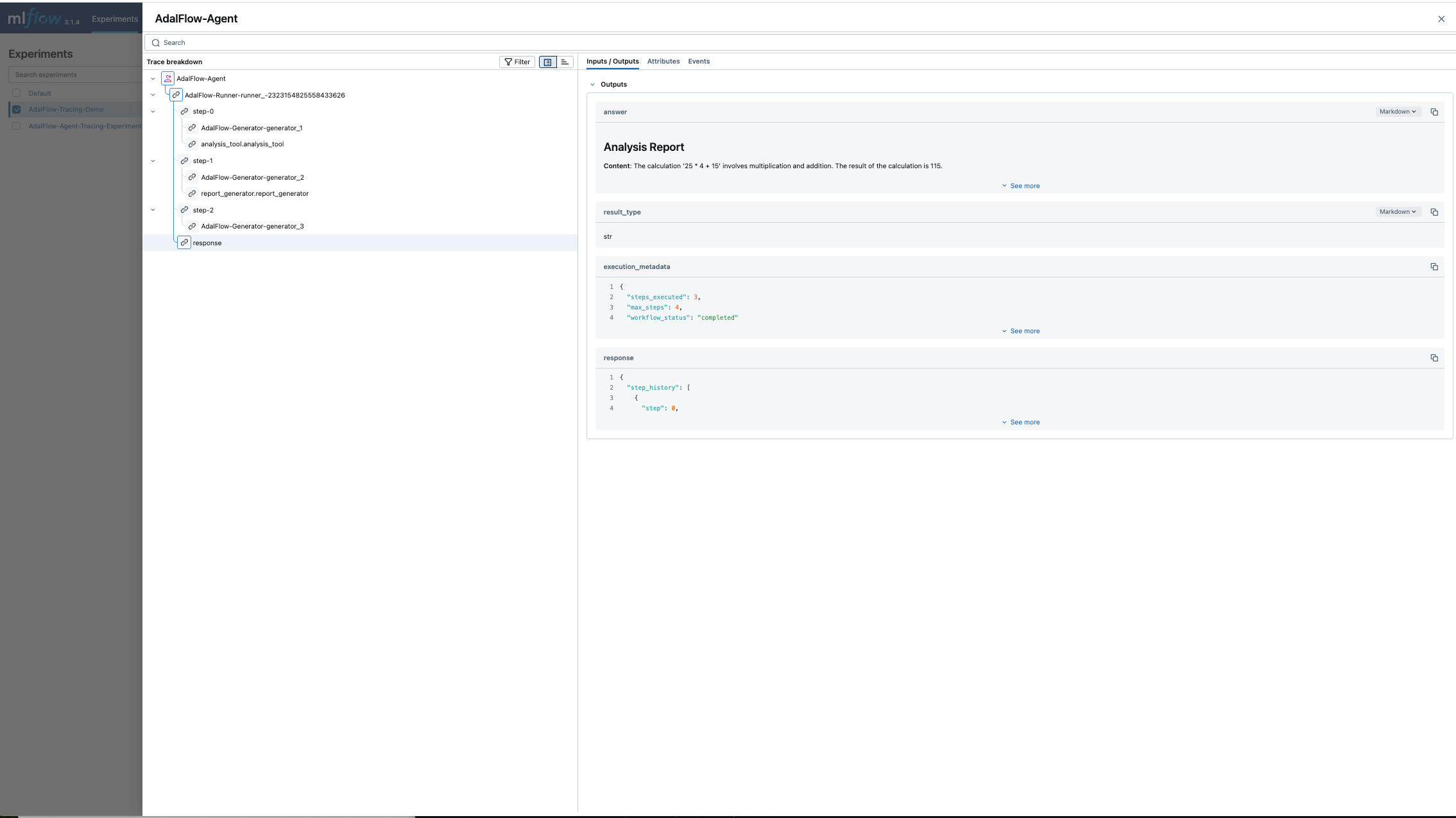
Go to Documentation for tracing, human-in-the-loop, and more.
Research
[Jan 2025] Auto-Differentiating Any LLM Workflow: A Farewell to Manual Prompting - LLM Applications as auto-differentiation graphs - Token-efficient and better performance than DsPy
Collaborations
We work closely with the VITA Group at University of Texas at Austin, under the leadership of Dr. Atlas Wang and in collaboration with Dr. Junyuan Hong, who provides valuable support in driving project initiatives.
For collaboration, contact Li Yin.
Hiring
We are looking for a Dev Rel to help us build the community and support our users. If you are interested, please contact Li Yin.
Documentation
AdalFlow full documentation available at adalflow.sylph.ai: <!-- - How We Started - Introduction - Full installation guide - Design philosophy - [Class hierarchy](https://adalflow.sylph.ai/tutorials/class_hier
Core symbols most depended-on inside this repo
appendShape
Languages
Modules by API surface
Dependencies from manifests, versioned
Datastores touched
For agents
$ claude mcp add AdalFlow \
  -- python -m otcore.mcp_server <graph>