github.com/SuperteamDAO/earn @main
Chat with this repoBrowse by type
What it actually does AI analysis from the code graph — generated when you open this
README

Superteam Earn
<strong>An open source platform connecting crypto founders with elite talent to create bounties, and accelerate project completion</strong>




🔗Official Links
Superteam Earn website - https://earn.superteam.fun
 Superteam website - https://superteam.fun
Superteam Earn X/Twitter - https://x.com/superteamearn
🛠️Development Setup
Prerequisites


Getting Started
- Clone the repository into a public Github repository (or fork it):
bash
   git clone https://github.com/SuperteamDAO/earn.git
- Navigate to the project directory:
bash
   cd earn
- Install the dependencies:
bash
   pnpm i
- Install the MariaDB adapter (required for local MySQL development):
bash
   pnpm add @prisma/adapter-mariadb
Then, uncomment the MariaDB adapter code in src/prisma.ts:
- Line 1: Uncomment the PrismaMariaDb import
- Lines 35-44: Uncomment the URL parsing and adapter creation code
- Line 47: Uncomment the adapter parameter in PrismaClient
-
Set up your
.envfile. -
Start by copying the
.env.examplefile to a new file named.env. This file will store your local environment settings. - Database setup:
Option 1: Local MySQL (Recommended for Development)
The app automatically detects your database type based on DATABASE_URL. Choose your platform:
🍎 macOS
- Install MySQL using Homebrew:
bash
  brew install mysql
-
Start MySQL service:
bash brew services start mysql -
Create database:
bash mysql -u root -e "CREATE DATABASE earn_db" -
Set
DATABASE_URLin.env:DATABASE_URL='mysql://root@localhost:3306/earn_db'
🪟 Windows
- Option A: Using MySQL Installer (Recommended for beginners)
- Download MySQL Community Server Installer
- Run the installer and choose "Developer Default"
- Set root password when prompted (remember this!)
- Complete installation
- Option B: Using Package Manager
```powershell # Using Chocolatey choco install mysql
# OR using winget winget install Oracle.MySQL ```
-
Start MySQL (if not already running):
- Open "Services" app (Win + R, type
services.msc) - Find "MySQL" service and start it
OR via command line:
powershell net start MySQL - Open "Services" app (Win + R, type
-
Create database:
powershell
 mysql -u root -p -e "CREATE DATABASE earn_db"
Enter your root password when prompted.
-
Set
DATABASE_URLin.env:DATABASE_URL='mysql://root:YOUR_PASSWORD@localhost:3306/earn_db'ReplaceYOUR_PASSWORDwith your MySQL root password.
🐧 Linux
Ubuntu/Debian:
```bash # Install MySQL sudo apt update sudo apt install mysql-server
# Start MySQL service sudo systemctl start mysql sudo systemctl enable mysql
# Secure installation (optional but recommended) sudo mysql_secure_installation
# Create database sudo mysql -e "CREATE DATABASE earn_db"
# Create user (optional, for better security) sudo mysql -e "CREATE USER 'earnuser'@'localhost' IDENTIFIED BY 'your_password';" sudo mysql -e "GRANT ALL PRIVILEGES ON earn_db.* TO 'earnuser'@'localhost';" sudo mysql -e "FLUSH PRIVILEGES;" ```
Fedora/RHEL/CentOS:
```bash # Install MySQL sudo dnf install mysql-server # or 'yum' for older versions
# Start MySQL service sudo systemctl start mysqld sudo systemctl enable mysqld
# Create database sudo mysql -e "CREATE DATABASE earn_db" ```
Set DATABASE_URL in .env:
``` # If using root: DATABASE_URL='mysql://root@localhost:3306/earn_db'
# If you created a user: DATABASE_URL='mysql://earnuser:your_password@localhost:3306/earn_db' ```
After setting up MySQL, generate Prisma client:
bash
  npx prisma generate && npx prisma db push
Option 2: Cloud MySQL Database
If you prefer not to run MySQL locally, you can use cloud services (all have free tiers):
- 

Then set DATABASE_URL in .env with the connection string from your cloud provider.
Privy setup:
- Create a new privy app, Client Side Web App
- Add env variables
NEXT_PUBLIC_PRIVY_APP_IDandPRIVY_APP_SECRET - Update the setting to include server side environment
- Add env variable
PRIVY_VERIFICATION_KEY(hidden under 'Verify with key instead' in Privy App settings) - Enable Solana External Wallets and Google social sign in -
Resend setup:
- To obtain your
RESEND_API_KEY, visit the Resend dashboard. Cloudinary setup:
- To obtain your
CLOUDINARY_*API keys, visit the Cloudinary dashboard. - Visit portal.jup.ag to generate a free API key
- Add
JUPITER_API_KEYto your.envfile - Required for token price fetching functionality
- Set up Solana RPC WebSocket URL:
- Set
NEXT_PUBLIC_RPC_WS_URLin your.envfile. This is required for wallet-related features. - You can use a public RPC endpoint or get one from providers like Helius, Triton.one.
NEXT_PUBLIC_RPC_WS_URL='wss://api.mainnet-beta.solana.com?api-key=abc-xyz'> Note: Public endpoints have rate limits. For development, consider using devnet:wss://api.devnet.solana.com
Facing an issue? Please feel free to reach out to Jill or Abhishek on Twitter.
- Run the development server
bash
   pnpm dev
⭐Contributing
We welcome contributions from everyone! Whether it's submitting an issue, a pull request, or suggesting new ideas, your input is highly valued. Check out our contributing guide for guidelines on how to proceed.
Facing an issue? Please feel free to reach out to Jill or Abhishek on Twitter.
Why should you contribute to Earn?
- Consistent, good-quality contributions will earn you contributor status in the Superteam of your preference! Contributors get special access to channels on Discord, preferential entry to events, and is a great stepping stone to becoming a Superteam member.
- Get XP if you're already a Superteam Member or Contributor
- Unwavering love and support from the Superteam Earn team!
Contributors
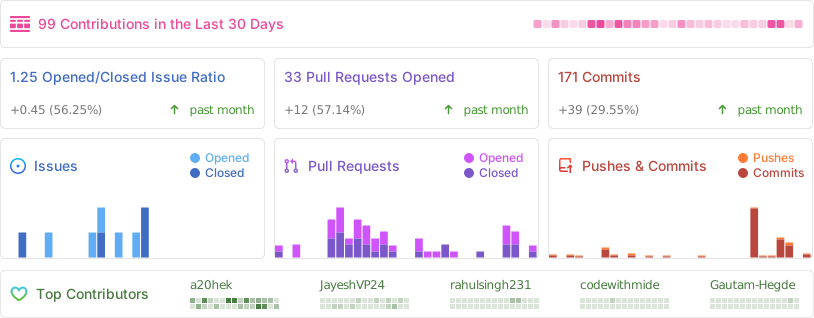
📊Repo Activity
Extension points exported contracts — how you extend this code
browse all types & interfaces →