github.com/SteveD3/kit_hunter @v2.0.0
Chat with this repoWhat it actually does AI analysis from the code graph — generated when you open this
README
Kit Hunter: A basic phishing kit detection tool
- Version 2.5.8
- 06 September 2021
Testing and development took place on Python 3.7.3 (Linux)
What is Kit Hunter?
Kit Hunter is a basic scanning tool that will search directories and locate phishing kits based on established markers. As detection happens, a report is generated for administrators.
By default the script will generate a report that shows the files that were detected as potentially problematic, list the markers that indicated them as problematic (a.k.a. tags), and then show the exact line of code where the detection happened.
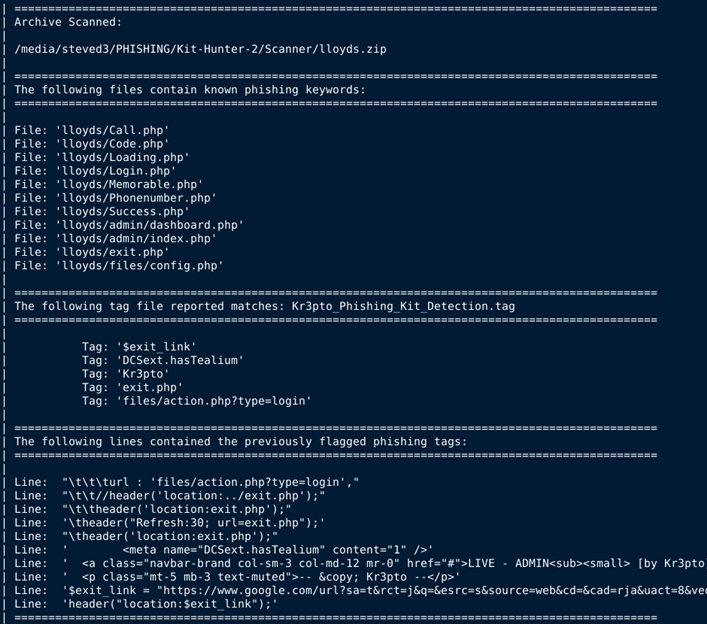
Usage:
Detailed installation and usage instructions are available at SteveD3.io
To launch a full scan using the default settings:
python3 kit_hunter_2.py
To launch a quick scan, using minimal detection rules:
python3 kit_hunter_2.py -q
To launch a custom scan:
python3 kit_hunter_2.py -c
Note: When using the
-cswitch, you must place a tag file in the same location as Kit Hunter. You can name this file whatever you want, but the extension must be.tag. Please remember that the formatting is important. There should only be one item per line, and no whitespaces. You can look at the other tag files if you need examples.
You can run kit_hunter_2.py from any location using the -d switch to select a directory to scan.
However, it is easier if you place kit_hunter_2.py in the directory above your web root (e.g. /www/ or /public_html/) and call the script from there.
The final report will be generated in the directory being scanned.
In my usage, I call Kit Hunter from my
/kit/download/directory where new phishing kits are saved. My reports are then generated and saved to that folder. However, if I call Kit Hunter and scan my/PHISHING/Archive/folder using the-dswitch, then the report will save to/PHISHING/Archive/.
Once scanning is complete, output from the script will point you to the location of the saved scan report.
When it comes to the tag files, there are 41 tag files shipping with Kit Hunter. These tag files detect targeted phishing campaigns, as well as various types of phishing tricks, such as obfuscation, templating, theming, and even branded kits like Kr3pto and Ex-Robotos.
As was the case with v1.0, the longer the tag file is, the longer it will take for the script to read it. Currently, the tag files still only take a few seconds to read.
Core symbols most depended-on inside this repo
file_is_supportedShape
Languages
Modules by API surface
For agents
$ claude mcp add kit_hunter \
  -- python -m otcore.mcp_server <graph>