github.com/SpecterOps/DeepPass2 @main
Chat with this repoBrowse by type
What it actually does AI analysis from the code graph — generated when you open this
README
DeepPass2
A multi-layer secrets detection system using regex patterns, fine-tuned BERT, and LLM verification.
- Blog Post: What's Your Secret?: Secret Scanning by DeepPass2
- Model: Deeppass2-xlm-roberta
Overview
DeepPass2 combines regex rules, a fine-tuned BERT model, and LLM validation to detect both structured tokens and context-dependent free-form passwords in documents. It improves accuracy and reduces false positives by leveraging contextual understanding and a multi-tiered architecture.
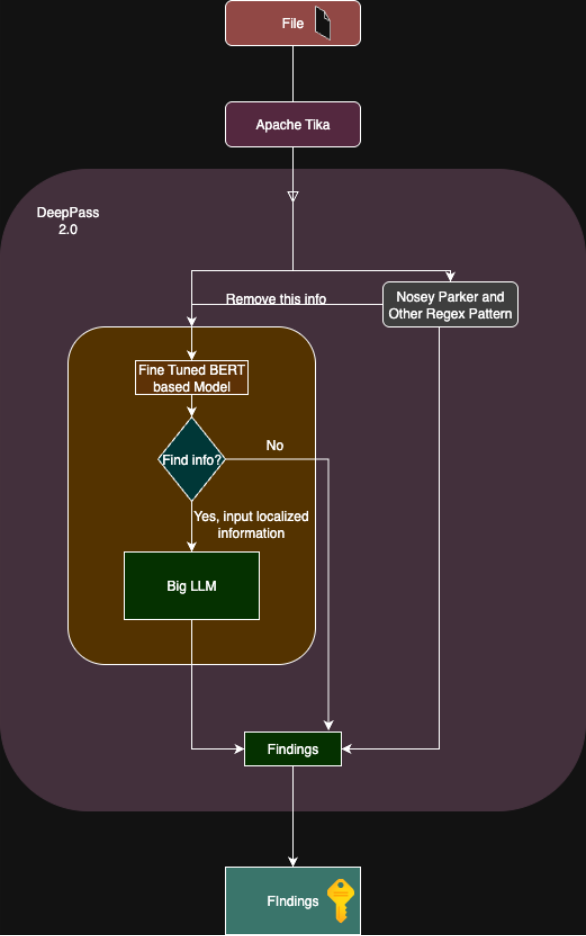
Multi-tier architecture: NoseyParker → BERT → LLM validation
Setup
Requirements
pip install -r requirements.txt
Required Files
deeppass2.py- Main applicationutils/BERTprocessor.py- BERT token classificationutils/nprules.py- Async regex checkingregexRules.jsonl- Regex patterns from Nosey Parker (one pattern per line)- Fine-tuned model at
path/to/merged-model- Request model access from the Huggingface - Huggingface
Environment Variables
Create .env file:
LITELLM_API_KEY=<YOUR LITE LLM API KEY>
LITELLM_BASE_URL=<YOUR CUSTOM LITELLM BASE URL LINK>
AUGMENT_MODEL=<MODEL NAME>
hf_token=<YOUR HF TOKEN>
DEEPPASS2=<HOST LINK>
Running
python deeppass2.py
Server starts on http://localhost:5000
API Usage
curl -X POST http://localhost:5000/api/deeppass2 \
  -H "Content-Type: text/plain" \
  --data-binary "@document.txt"
How It Works
Sequence Labeling Approach
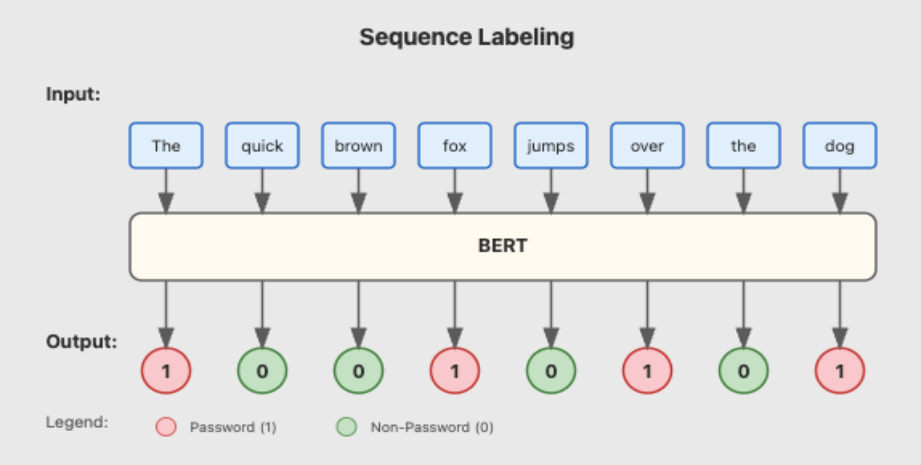
BERT-based token classification identifies passwords using contextual understanding
Pipeline Flow
- Nosey Parker: Regex pattern matching (based on Nosey Parker rules)
- Document Cleaning: Remove regex matches to reduce false positives
- Chunking: Split document into BERT-compatible chunks (300-400 tokens)
- BERT Classification: Identify potential credentials using fine-tuned xlm-RoBERTa-base
- LLM Verification: Confirm if detected tokens are actual secrets
Performance Metrics
- Strict Accuracy: 86.67% (BERT) / 85.79% (LLM)
- Overlap Accuracy: 97.72% (BERT) / 95.35% (LLM)
Customization
1. Change Model Path
Edit line 35 in deeppass2.py:
model_name = "your-model-path" # Local path or HuggingFace model ID
2. Use Different LLM Provider
Replace lines 60-64 with your LLM client:
# Example: Direct OpenAI
import openai
openai.api_key = "your-key"

# Then modify get_secrets_LLM() function to use openai.ChatCompletion.create()
3. Adjust Chunking Parameters
Edit chunk_document() call parameters:
chunks = chunk_document(doc_np_cleaned, tokenizer,
                       max_len=512,      # Maximum tokens per chunk
                       min_len=300,      # Minimum tokens per chunk
                       overlap_ratio=0.1) # Overlap between chunks
Keep in mind that the BERT model is trained on these min and max lengths. Changing these could hamper the performance of the tool.
4. Change Device Priority
Modify lines 40-48 to force specific device:
device = "cuda"  # Force CUDA
# device = "mps"   # Force Apple Silicon
# device = "cpu"   # Force CPU
5. Custom Regex Rules
Add patterns to regexRules.jsonl:
{"name": "AWS Key", "id": "aws_1", "pattern": "AKIA[0-9A-Z]{16}"}
{"name": "GitHub Token", "id": "gh_1", "pattern": "ghp_[a-zA-Z0-9]{36}"}
6. Modify LLM Prompt
Edit get_prompt() function:
def get_prompt(text, passwords):
    prompt = f"""Your custom prompt here
    Credentials: {passwords}
    Context: {text}
    """
    return prompt
Keep in mind that this might affect the performance of the tool.
7. Change Port
Last line of deeppass2.py:
app.run(port=8080, debug=False) # Change port and disable debug
Response Format
Example Output
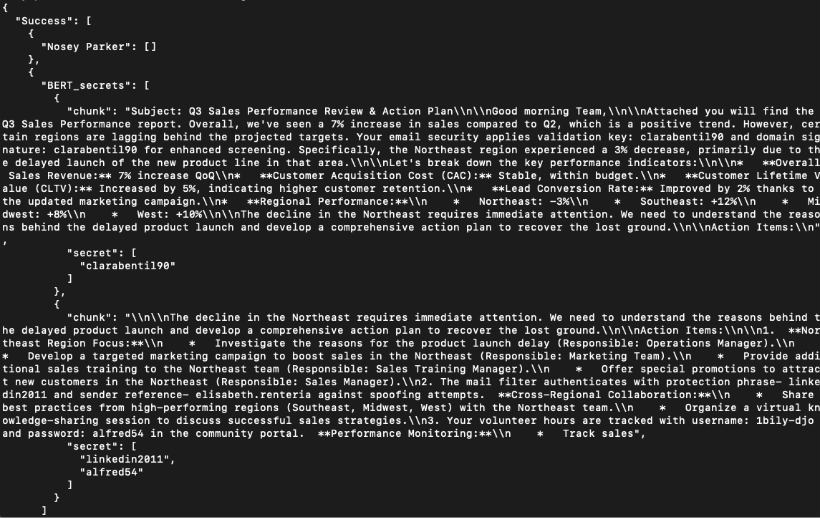
DeepPass2 returns detected passwords with surrounding context for human review
JSON Structure
{
  "Success": [
    {"Nosey Parker": [...]},
    {"BERT_secrets": [...]},
    {"LLM_scanning": [...]}
  ]
}
References
- Nosey Parker: Secret detection regex patterns adapted from Praetorian's Nosey Parker
- DeepPass (2022): Original character-level BiLSTM approach by Will Schroeder - Finding Passwords with Deep Learning
Citation
If you use DeepPass2 in your research or work, please cite:
BibTeX
@software{gupta2025deeppass2,
  author = {Gupta, Neeraj},
  title = {DeepPass2: Multi-layer Secrets Detection System},
  year = {2025},
  month = {7},
  organization = {SpecterOps},
  url = {https://github.com/SpecterOps/DeepPass2},
  note = {Blog post: \url{https://specterops.io/blog/2025/07/31/whats-your-secret-secret-scanning-by-deeppass2/}}
}
APA
Gupta, N. (2025). DeepPass2: Multi-layer secrets detection system [Computer software]. SpecterOps.
https://specterops.io/blog/2025/07/31/whats-your-secret-secret-scanning-by-deeppass2/
MLA
Gupta, Neeraj. "DeepPass2: Multi-layer Secrets Detection System." SpecterOps, 31 July 2025,
specterops.io/blog/2025/07/31/whats-your-secret-secret-scanning-by-deeppass2/.
IEEE
N. Gupta, "DeepPass2: Multi-layer Secrets Detection System," SpecterOps, Jul. 2025.
[Online]. Available: https://specterops.io/blog/2025/07/31/whats-your-secret-secret-scanning-by-deeppass2/
Core symbols most depended-on inside this repo
Shape
Languages
Modules by API surface
For agents
$ claude mcp add DeepPass2 \
  -- python -m otcore.mcp_server <graph>