github.com/SkeletonMan03/FZEasyMarauderFlash @main
Chat with this repoBrowse by type
What it actually does AI analysis from the code graph — generated when you open this
README
Easy Flipper Zero ESP32 Flash
This is for easily flashing Marauder on an ESP32 or WiFi Devboard for a Flipper Zero!
Windows Users:
You have two prerequisites.
You must install Git for Windows from here.
If you are flashing an ESP32 board, you need to install the driver from here in order for your device to be recognized
All other users:
You have one prerequisite.
You need to install git however you would on your system if you haven't already.
It is now simple to install or update Marauder or Evil Portal on Linux, Mac OS X, or Windows.
How to use:
- Ideally use a venv as it's best practice with any Python scripts, although it isn't required (Google it if you don't know what that is)
- Step 0 only has to be ran once. (That doesn't mean it's okay to skip it unless you're running it again after having just used it)
- Steps 1-4 are not necessary on AWOK boards
0) run
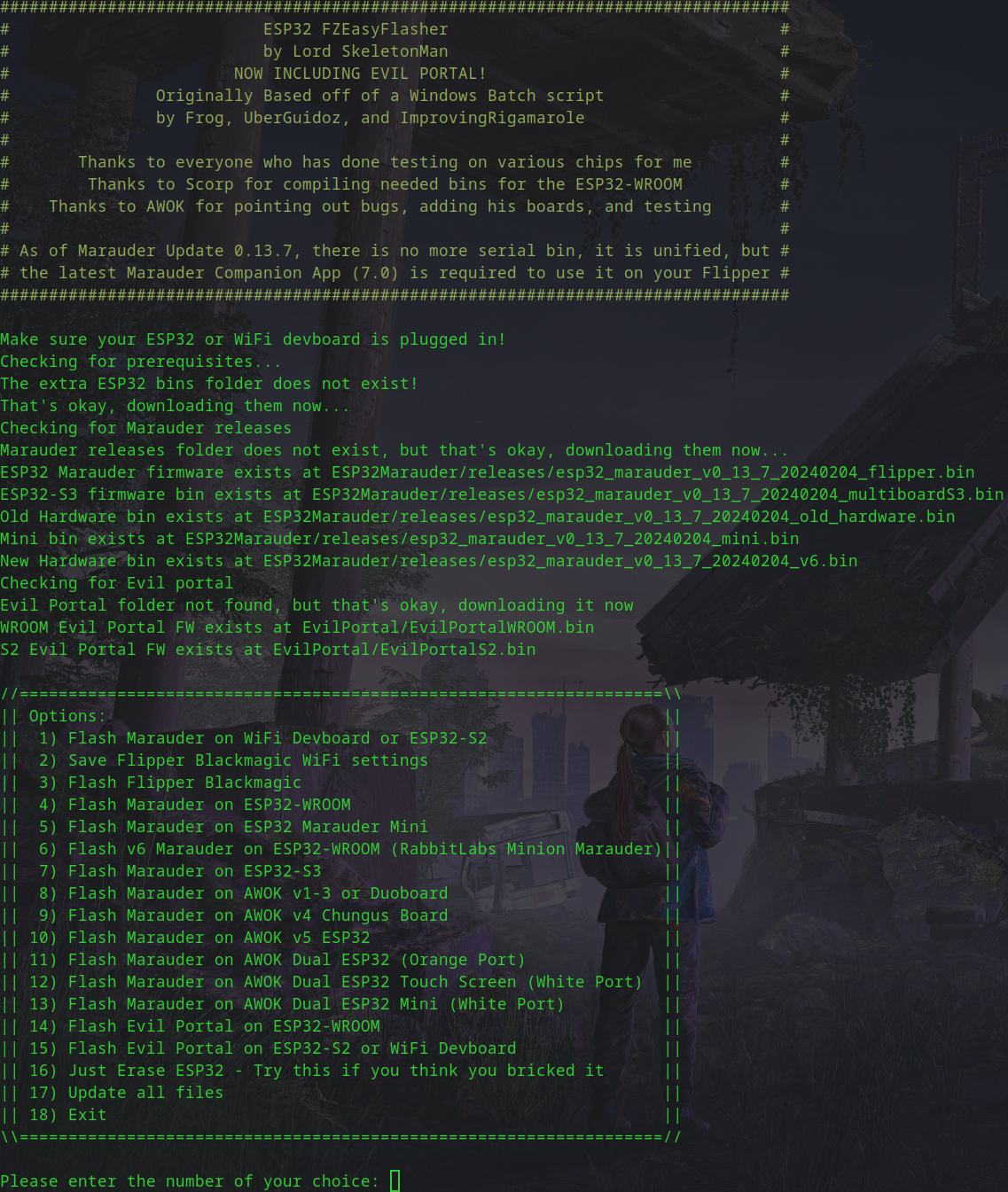
pip3 install -r requirements.txt. 1) Press and hold theBOOTbutton on the module 2) While still holdingBOOT, connect the devboard or ESP32 board via USB. 3) Press and release theRESETbutton. 4) Release theBOOTbutton. 5) runpython3 EasyInstall.py. 6) Select the option of what you want to do
This project was based on the Windows Marauder flasher batch script
You can find it here in UberGuidoZ's repo
About this script
- This script pulls all of its resources from the proper Github repositories in order to make sure you are up-to-date.
- The only dependencies it does not get by itself are the required Python modules and Windows tools.
- This script should work on most devices that can run Python 3 and can access serial ports via USB.
- Support for Evil Portal has been added!
- As of Marauder Update 0.13.7, there is no more serial bin, it is unified, but the latest Marauder Companion App (7.0) is required to use it on your Flipper
- AWOK v3 board support has been added!
Compatible boards
- Flipper Zero WiFi Devboard
- ESP32-S2 (The ESP32 chip that is on the WiFi Devboard)
- ESP32-S2-WROVER
- ESP32-WROOM
- ESP32 Marauder Mini
- ESP32-S3
- All AWOK ESP32 Boards
How to connect an ESP32-WROOM, WROVER, etc to the Flipper Zero
ESP32 -> Flipper Zero
TX0 -> RX
RX0 -> TX
GND -> GND
3v3 -> 3v3
Optional parameters
There are now optional parameters
* -h or --help - Show help
* -s or --serialport
For example, if you have a device you know is on /dev/ttyUSB0, you could specify it with python3 EasyInstall.py -s /dev/ttyUSB0 or python3 EasyInstall.py --serialport /dev/ttyUSB0
* Using this option will skip automatic detection of the serial port and will not try to identify the device
* -ps or --preselect - Preselect an option of what you want to flash
For example, if you want to flash a WiFi Devboard or ESP32-S2 without selecting from the menu, you could use python3 EasyInstall.py -ps 1 or python3 EasyInstall.py --preselect 1
Disclaimer:
I am absolutely not resposible if you somehow manage to brick your device with this tool (especially if you did it using optional parameters) and I cannot help you fix it.
Issues with flashing?
Here are some steps to try:
Since I keep having to tell Windows users on Discord to install Python to use this... YOU HAVE TO INSTALL PYTHON IN ORDER TO USE PYTHON SCRIPTS!! IT'S IN THE WINDOWS STORE!!!
Ensure you have followed the steps above and installed any necessary prerequisites
* Check that your computer can see the device. In Linux, run lsusb, on Mac run system_profiler SPUSBDataType, on Windows, open your Device Manager and look for it
* Try a different cable
* Try a different USB port
* Check your permissions. On Linux, you may have to add yourself to whatever group owns the port. For example, /dev/ttyUSB0 is typically owned by root and the dialout or uucp group (depending on your distro), find out which by running ls -la /dev/ttyUSB0, make note of the user and group that own it, then run sudo usermod -aG group user replacing group and user with the correct ones, then log out and back in.
Windows users: Can't find or communicate with your ESP32? Again, make sure the driver is installed, see above recommendations.
If you're using Windows, don't use Git Bash, it doesn't work well with this script. Instead, use Powershell, Windows Terminal, or CMD
* On Windows and Python is acting strange? Uninstall it then re-install it via the Microsoft Store.
* Make sure you're running the latest Python release! If you're on 3.8 when current is 3.11.3 for example, don't bother opening an issue until after you upgrade and try again. Don't try to use old stuff.
* Still can't get it and don't understand CLI at all and can't even figure out how to cd? What are you even doing? This definitely isn't for you. Try using the ESP Flasher app on your Flipper Zero.
TODO:
- Even more code cleanup.
- Add other popular ESP32 firmware
- Maybe an official name change
Contributors:
- I GREATLY appreciate contributions and PRs, thank you!
Acknowledgements:
Disclaimer: Also includes Acknowledgements from the above linked repo from UberGuidoz as this wouldn't exist without the original project * justcallmekoko for the AWESOME work in developing Marauder and porting it to the Flipper. * 0xchocolate for the Marauder companion plugin (now in Unleashed, RogueMaster, and Momentum.) * Frog For initial scripting under the Wifi Pentest Tool and inspiring the idea.
-
ImprovingRigmarole Initial (and continued) scripting of the batch Windows Marauder flasher and lots of testing.
-
UberGuidoZ Tweaking/Automating Frog's original, continued scripting, development, and testing.
- L0rd_K0nda from the Unleashed Flipper Zero Discord for testing this script for me
- SkeletonMan Creating this Python flasher in order to try to make a multi-os flasher since the Batch script obviously could not run on Linux or Mac OS X
- CorbanR Forking and fixing instructions and adding a requirement needed for Mac OS X
- dchalm Forking and fixing mistakes I should have noticed. Thank you!
- Scorp Compiling needed bins to be able to flash to ESP32-WROOM
- jacklythgoee For getting a knockoff ESP32-WROOM and giving me info to be able to try to detect it so it could be flashed.
- Der Skythe For fixing extra quotes I added without noticing and his awesome work on Flipper Zero Firmware
- seeker7r4c3r For adding the VID of the DrB0rk S3 Multiboard
- aafksab For fixing the Windows bug with the update option that was confusing me
- AWOK For adding his boards, testing, pointing out bugs, and kind of forcing me to do much needed cleanup by doing so
- bigbrodude6119 For creating Evil Portal
- TalkingSasquach For creating single file bins for Evil Portal
Core symbols most depended-on inside this repo
Shape
Languages
Modules by API surface
For agents
$ claude mcp add FZEasyMarauderFlash \
  -- python -m otcore.mcp_server <graph>