github.com/SirLynix/obs-kinect @v0.2
Chat with this repoBrowse by type
What it actually does AI analysis from the code graph — generated when you open this
README
obs-kinect
OBS Plugin to access Kinect data (and setup a virtual green screen based on depth).
Requirement
- Windows. For now this plugin is only compatible with Windows as it uses the official Kinect for Windows API (may change in the future).
- A Kinect (obviously), v2 (xbox one) preferred (this plugin should work with v1 but this hasn't been tested), they're relatively cheap on eBay (between 50€ and 100€).
- If your Kinect isn't pluggable to your computer: a Kinect to USB adapter (search for PeakLead Kinect to USB on Amazon).
- Not running on a potato computer, Kinect itself requires a little bit of CPU power, especially when using the faux green screen effect (I'm trying to improve that) because of the color-to-depth mapping (which is done on the CPU). The plugin itself runs on the GPU.
- Kinect for Windows runtime or Kinect for Windows SDK (if you plan to build this yourself or play with Kinect examples).
- OBS Studio >= 24.0.3 (hasn't been tested on older versions).
To do
- ~~Improve green-screen filtering using gaussian blur~~
- Optimize green-screen filtering effect (especially the color-to-depth mapping part, if possible)
- Add support for Kinect v1
- Add support for Linux and macOS (using libfreenect and libfreenect2)
- ~~Use shaders to do faux green-screen processing. 1080p pixel processing is a really heavy CPU task and would benefit a lot to run on the GPU~~
- Add more fun effects (use issues to post your ideas)
- ~~Add possibility to use body index masking (pixels identified by Kinect SDK to be you)~~
- Support audio?
How to use
Download the latest releases and copy the files in your OBS folder, restart OBS and you should have a "Kinect source" available
How to build
Clone and build OBS-studio first. Be sure to have the Kinect for Windows SDK
Copy the config.lua.default to config.lua and changes the values accordingly.
This project relies on Premake to generate its files, download the last version and use it the main folder (for example, to generate a Visual Studio 2019 solution use the premake5 vs2019 command).
Open the project workspace/solution (located in build/) and build it.
Commonly asked questions
Does it works on Linux/macOS?
Not yet, I still have to try to use libfreenect(2) for that. Unfortunately since some of the features I'm planning are based on Windows Kinect SDK features (like body indexing), theses will probably never be available to other systems.
Does this plugin works for the Kinect v1?
Not yet, I hope I will be able to add support for it in the future.
I have a Kinect for Xbox One, how can I use it on my computer?
Unfortunately, Microsoft used a proprietary port on the Xbox One. You have to buy a USB 3.0 and AC adapter to use it on your computer (search for PeakLead Kinect to USB on Amazon).
Don't forget to install the Kinect for Windows runtime before using this plugin.
What is the use of having access to the depth and infrared images?
I don't know, it looked fun.
Maybe you could use the infrared image for an horror game stream (where you play in the dark).
Be sure to tune the depth/infrared to color values to what suits you the most.
How does the green screen effect works?
Kinect gives us a color map (like any webcam does) and a depth map, allowing to get the distance between a pixel and the Kinect sensor. The green screen effect discard pixels being too far (or too close) and voilà. It also allows you to crop the source image, in case you have some depth artifacts. It also helps to decrease CPU power required for this effect (as cropped pixels are not processed).
There's also a cool effect of transition that you can enable, just play around and have fun.
Since 0.2 there's also a "Body" filter which uses the body informations from Kinect (basically Kinect tries to identifies pixels associated with a human being), which can filter you out even if you move away from the sensor.
Why do I have some "transparency shadow" around me/my hands?
That's because the color and the IR sensor of the kinect are one centimeter apart and don't see exactly the same thing. What you're seeing is really a "depth shadow".
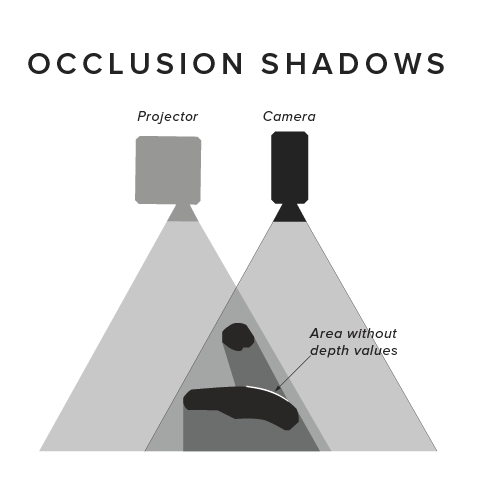
(image from https://daqri.com/blog/depth-cameras-for-mobile-ar/)
I hope to be able to improve this (using the body index masking).
It flickers so much
That's how Kinect depth map is, but I'm doing my best to improve it.
Since version 0.2 you can use blur passes on the filter image to improve the result. You can also try to use the new body filter.
Why do closes object disappears before reaching the min distance?
Kinect cannot read depth below 50cm in front of it, invalid depth are discarded.
Can I use this with VR (since SteamVR lighthouses use infrared too)?
I tested it with the HTC Vive base stations (SteamVR 1.0) and didn't have any issues, should be fine.
Why is it called a "green screen" even though there's no green involved
I'm lacking a better name, being a developper implies I sucks at naming things.
Why didn't you buy a real green screen instead of a Kinect?
I don't have the space to use a real green screen, and don't want to run into light setup.
Also I wanted a Kinect so badly since it got out.
Hey I have an idea
Great, how about posting it in the issues so we can talk about it?
How can I help?
Fork this project, improve it and make a pull request
Why isn't my language available?
Because I don't speak it, I could only do the english and french translations, but you can make it available by making a pull request with your language file!
What's the "GPU depth mapping/Use GPU to fetch color-to-depth values" option?
Color to depth mapping is done using a depth mapping texture, which allows the shader to get a color pixel depth coordinates but involves an indirect/dependent texture lookup. Every GPU on the market should support this (even the integrated ones) but it can be rather expensive on some GPUs.
In case this is an issue for you, you can uncheck that box to generate color to depth values on the CPU.
I do not recommend unchecking this box if you're not experiencing any issue.
Core symbols most depended-on inside this repo
Shape
Languages
Modules by API surface
For agents
$ claude mcp add obs-kinect \
  -- python -m otcore.mcp_server <graph>