github.com/RightNow-AI/picolm @main
Chat with this repoBrowse by type
What it actually does AI analysis from the code graph — generated when you open this
README





PicoLM
Run a 1-billion parameter LLM on a $10 board with 256MB RAM.
Pure C. Zero dependencies. One binary. No Python. No cloud.
echo "Explain gravity" | ./picolm model.gguf -n 100 -j 4
The Perfect Match: PicoLM + PicoClaw

PicoLM was built as the local brain for PicoClaw — an ultra-lightweight AI assistant in Go that runs on $10 hardware. Together, they form a fully offline AI agent — no cloud, no API keys, no internet, no monthly bills.
Every other LLM provider needs the internet. PicoLM doesn't.
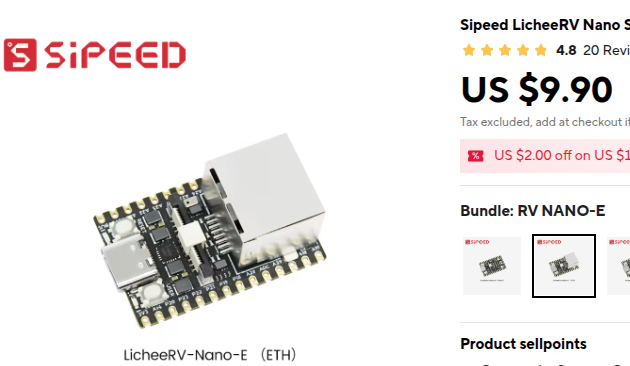
| The Hardware | The Architecture |
 |
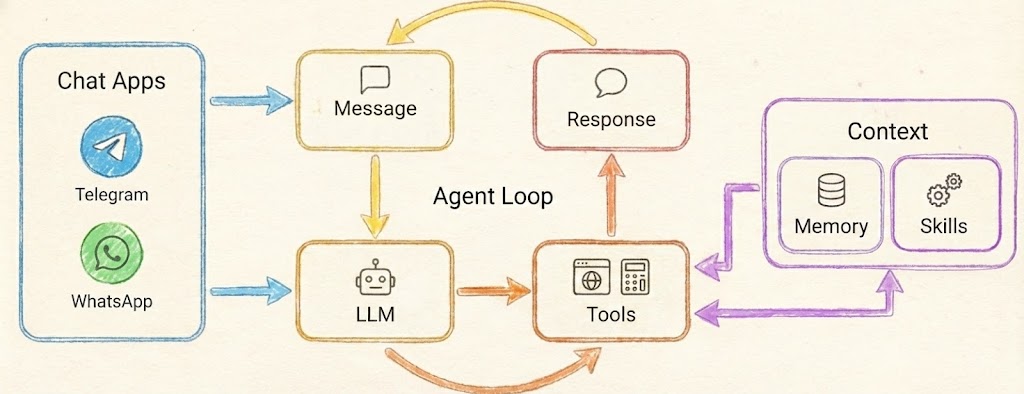 |
| $9.90 — that's the entire server | PicoLM powers the LLM box in PicoClaw's agent loop |
Why they're a perfect fit
| Cloud Provider (OpenAI, etc.) | PicoLM (Local) | |
|---|---|---|
| Cost | Pay per token, forever | Free forever |
| Privacy | Your data sent to servers | Everything stays on-device |
| Internet | Required for every request | Not needed at all |
| Latency | Network round-trip + inference | Inference only |
| Hardware | Needs a $599 Mac Mini | Runs on a $10 board |
| Binary | N/A | ~80KB single file |
| RAM | N/A | 45 MB total |
How it works
PicoClaw's agent loop spawns PicoLM as a subprocess. Messages come in from Telegram, Discord, or CLI — PicoClaw formats them into a chat template, pipes the prompt to picolm via stdin, and reads the response from stdout. When tools are needed, --json grammar mode guarantees valid JSON even from a 1B model.
Telegram / Discord / CLI
        │
        ▼
   ┌──────────┐    stdin: prompt     ┌───────────┐
   │ PicoClaw │ ──────────────────►  │  picolm   │
   │   (Go)   │ ◄──────────────────  │   (C)     │
   └──────────┘    stdout: response  │ + model   │
        │                            └───────────┘
        ▼                            45 MB RAM
   User gets reply                   No internet
Quick setup
# 1. Build PicoLM
cd picolm && make native    # or: make pi (Raspberry Pi)

# 2. Download model (one-time, 638 MB)
make model

# 3. Build PicoClaw
cd ../picoclaw && make deps && make build

# 4. Configure (~/.picoclaw/config.json)
{
  "agents": {
    "defaults": {
      "provider": "picolm",
      "model": "picolm-local"
    }
  },
  "providers": {
    "picolm": {
      "binary": "~/.picolm/bin/picolm",
      "model": "~/.picolm/models/tinyllama-1.1b-chat-v1.0.Q4_K_M.gguf",
      "max_tokens": 256,
      "threads": 4,
      "template": "chatml"
    }
  }
}
# 5. Chat — fully offline!
picoclaw agent -m "What is photosynthesis?"
Or install everything in one line
curl -sSL https://raw.githubusercontent.com/RightNow-AI/picolm/main/install.sh | bash
Performance on real hardware
| Device | Price | Generation Speed | RAM Used |
|---|---|---|---|
| Pi 5 (4-core) | $60 | ~10 tok/s | 45 MB |
| Pi 4 (4-core) | $35 | ~8 tok/s | 45 MB |
| Pi 3B+ | $25 | ~4 tok/s | 45 MB |
| Pi Zero 2W | $15 | ~2 tok/s | 45 MB |
| LicheeRV Nano | $10 | ~1 tok/s | 45 MB |
JSON tool calling
PicoClaw automatically activates --json grammar mode when it needs structured output. This guarantees syntactically valid JSON even from a 1B parameter model — essential for reliable tool calling on tiny hardware:
picoclaw agent -m "Search for weather in Tokyo"
# → PicoLM generates: {"tool_calls": [{"function": {"name": "web_search", "arguments": "{\"query\": \"weather Tokyo\"}"}}]}
For the full PicoClaw documentation, see the PicoClaw README.
What is PicoLM?
PicoLM is a minimal, from-scratch LLM inference engine written in ~2,500 lines of C11. It runs TinyLlama 1.1B (and other LLaMA-architecture models in GGUF format) on hardware that most inference frameworks won't even consider:
- Raspberry Pi Zero 2W ($15, 512MB RAM, ARM Cortex-A53)
- Sipeed LicheeRV ($12, 512MB RAM, RISC-V)
- Raspberry Pi 3/4/5 (1-8GB RAM, ARM NEON SIMD)
- Any Linux/Windows/macOS x86-64 machine
The model file (638MB) stays on disk. PicoLM memory-maps it and streams one layer at a time through RAM. Total runtime memory: ~45MB including the FP16 KV cache.
                    ┌──────────────────────────────────────────┐
   What goes        │         45 MB Runtime RAM                │
   in RAM           │  ┌─────────┐ ┌──────────┐ ┌───────────┐  │
                    │  │ Buffers │ │ FP16 KV  │ │ Tokenizer │  │
                    │  │  1.2 MB │ │ Cache    │ │   4.5 MB  │  │
                    │  │         │ │  ~40 MB  │ │           │  │
                    │  └─────────┘ └──────────┘ └───────────┘  │
                    └──────────────────────────────────────────┘

                    ┌──────────────────────────────────────────┐
   What stays       │        638 MB Model on Disk              │
   on disk          │       (mmap — OS pages in layers         │
   (via mmap)       │        as needed, ~1 at a time)          │
                    └──────────────────────────────────────────┘
Features
| Feature | Description |
|---|---|
| GGUF Native | Reads GGUF v2/v3 files directly — no conversion needed |
| K-Quant Support | Q2_K, Q3_K, Q4_K, Q5_K, Q6_K, Q8_0, Q4_0, F16, F32 |
| mmap Layer Streaming | Model weights stay on disk; OS pages in one layer at a time |
| FP16 KV Cache | Halves KV cache memory (44MB vs 88MB for 2048 context) |
| Flash Attention | Online softmax — no O(seq_len) attention buffer needed |
| Pre-computed RoPE | cos/sin lookup tables eliminate transcendentals from hot loop |
| SIMD Acceleration | ARM NEON (Pi 3/4/5) and x86 SSE2 (Intel/AMD) auto-detected |
| Fused Dot Products | Dequantize + dot-product in one pass — no intermediate buffer |
| Multi-threaded matmul | Parallel matrix-vector multiply across CPU cores |
| Grammar-Constrained JSON | --json flag forces valid JSON output (for tool calling) |
| KV Cache Persistence | --cache saves/loads prompt state — skip prefill on re-runs |
| BPE Tokenizer | Score-based byte-pair encoding, loaded from GGUF metadata |
| Top-p Sampling | Temperature + nucleus sampling with configurable seed |
| Pipe-friendly | Reads prompts from stdin: echo "Hello" \| ./picolm model.gguf |
| Zero Dependencies | Only libc, libm, libpthread. No external libraries. |
| Cross-platform | Linux, Windows (MSVC), macOS. ARM, x86-64, RISC-V. |
Quick Start
One-liner install (Raspberry Pi / Linux)
curl -sSL https://raw.githubusercontent.com/RightNow-AI/picolm/main/install.sh | bash
This will:
1. Detect your platform (ARM64, ARMv7, x86-64)
2. Install build dependencies (gcc, make, curl)
3. Build PicoLM with optimal SIMD flags for your CPU
4. Download TinyLlama 1.1B Q4_K_M (638 MB)
5. Run a quick test
6. Generate PicoClaw config
7. Add picolm to your PATH
Build from source
git clone https://github.com/rightnow-ai/picolm.git
cd picolm/picolm

# Auto-detect CPU (enables SSE2/AVX on x86, NEON on ARM)
make native

# Download a model
make model

# Run it
./picolm /opt/picolm/models/tinyllama-1.1b-chat-v1.0.Q4_K_M.gguf \
    -p "The meaning of life is" -n 100
Build on Windows (MSVC)
cd picolm
build.bat
picolm.exe model.gguf -p "Hello world" -n 50
Platform-specific builds
make native      # x86/ARM auto-detect (recommended for local machine)
make pi          # Raspberry Pi 3/4/5 (64-bit ARM + NEON SIMD)
make pi-arm32    # Pi Zero / Pi 1 (32-bit ARM)
make cross-pi    # Cross-compile for Pi from x86 (static binary)
make riscv       # RISC-V (Sipeed LicheeRV, etc.)
make static      # Static binary for single-file deployment
make debug       # Debug build with symbols, no optimization
Usage
PicoLM — ultra-lightweight LLM inference engine

Usage: picolm <model.gguf> [options]

Generation options:
  -p <prompt>    Input prompt (or pipe via stdin)
  -n <int>       Max tokens to generate (default: 256)
  -t <float>     Temperature (default: 0.8, 0=greedy)
  -k <float>     Top-p / nucleus sampling (default: 0.9)
  -s <int>       RNG seed (default: 42)
  -c <int>       Context length override
  -j <int>       Number of threads (default: 4)

Advanced options:
  --json         Grammar-constrained JSON output mode
  --cache <file> KV cache file (saves/loads prompt state)
Examples
Basic generation:
./picolm model.gguf -p "Once upon a time" -n 200
Greedy decoding (deterministic, temperature=0):
./picolm model.gguf -p "The capital of France is" -n 20 -t 0
# Output: Paris. It is the largest city in France and...
Chat with TinyLlama (ChatML format):
./picolm model.gguf -n 200 -t 0.7 -p "<|user|>
What is photosynthesis?</s>
<|assistant|>
"
Force JSON output (for tool calling / structured data):
./picolm model.gguf --json -t 0.3 -n 100 -p "<|user|>
Return the current time as JSON.</s>
<|assistant|>
"
# Output: {"time": "12:00 PM"}
Pipe from stdin:
echo "Explain quantum computing in one sentence" | ./picolm model.gguf -n 50
KV cache — skip repeated prefill:
# First run: processes prompt + saves cache
./picolm model.gguf --cache prompt.kvc -p "Long system prompt here..." -n 50

# Second run: loads cache, skips prompt prefill (74% faster)
./picolm model.gguf --cache prompt.kvc -p "Long system prompt here..." -n 50
# Output: "Skipping 25 cached prompt tokens"
Multi-threaded on a Pi 4 (4 cores):
./picolm model.gguf -p "Hello" -n 100 -j 4
Performance
Measured on TinyLlama 1.1B Q4_K_M (638 MB model):
| Metric | x86-64 (8 threads) | Pi 4 (4 cores, NEON) | Pi Zero 2W |
|---|---|---|---|
| Prefill | ~11 tok/s | ~6 tok/s | ~1.5 tok/s |
| Generation | ~13 tok/s | ~8 tok/s* | ~2 tok/s* |
| Runtime RAM | 45 MB | 45 MB | 45 MB |
| First token | ~2.3s | ~4s | ~16s |
| Binary size | ~80 KB | ~70 KB | ~65 KB |
*Estimated with NEON SIMD enabled. Actual numbers depend on SD card speed and thermal throttling.
What makes it fast
 Raw C inference          ████████████░░░░░░░░  13.5 tok/s  (baseline: 1.6)
 + Fused dot products     ████████████████░░░░  (eliminate dequant buffer)
 + Multi-threaded matmul  █████████████████░░░  (4-8 cores in parallel)
 + FP16 KV cache          █████████████████░░░  (halve memory bandwidth)
 + Pre-computed RoPE      ██████████████████░░  (no sin/cos in hot loop)
 + Flash attention        ██████████████████░░  (no O(n) attention alloc)
 + NEON/SSE2 SIMD         ███████████████████░  (4-wide vector ops)
 + KV cache persistence   ████████████████████  (skip prefill entirely)
Architecture
                          ┌─────────────────────────────────┐
                          │           picolm.c              │
                          │     CLI + Generation Loop       │
                          └──────┬──────────────┬───────────┘
                                 │              │
                    ┌────────────┘              └────────────┐
                    │                                        │
           ┌────────┴────────┐                    ┌──────────┴──────────┐
           │    model.h/c    │                    │    sampler.h/c      │
           │  GGUF Parser    │                    │  Temperature +      │
           │  mmap Layer     │                    │  Top-p Sampling     │
           │  Streaming      │                    └──────────┬──────────┘
           │  Forward Pass   │                               │
           │  KV Cache I/O   │                    ┌──────────┴──────────┐
           └───┬────────┬────┘                    │    grammar.h/c      │
               │        │                         │  JSON Constraint    │
      ┌────────┘        └───────┐                 │  Logit Masking      │
      │                         │                 └─────────────────────┘
┌─────┴──────┐          ┌───────┴────────┐
│ tensor.h/c │          │ tokenizer.h/c  │
│ matmul     │          │ BPE Encode     │
│ rmsnorm    │          │ Decode         │
│ softmax    │          │ Vocab Lookup   │
│ rope       │          └────────────────┘
│ silu       │
│ threading  │
└─────┬──────┘
      │
┌─────┴──────┐
│  quant.h/c │
│ Q4_K, Q6_K │
│ Q3_K, Q2_K │
│ FP16, F32  │
│ NEON + SSE │
│ Fused Dots │
└────────────┘
The LLaMA Forward Pass (what happens for each token)
``` Input Token │ ▼ ┌─
Core symbols most depended-on inside this repo
Shape
Languages
Modules by API surface
For agents
$ claude mcp add picolm \
  -- python -m otcore.mcp_server <graph>