github.com/ReikanYsora/Helios @2026.7.4
Chat with this repoWhat it actually does AI analysis from the code graph — generated when you open this
README
HELIOS




HELIOS is a custom Home Assistant Lovelace card that turns your solar setup into a living 3D view of your home, the sun and the weather, all in real time and right inside your dashboard.
It reads your solar, grid and battery wiring straight from the Home Assistant Energy dashboard, pulls a multi-model weather forecast from Open-Meteo (no key), and stitches both onto a tilted, rotatable map of your home. The sun's daily arc, the live sun disc, the incidence ray, the production / battery / grid chips and the cast shadows all follow a timeline you can scrub days into the past or the future, watching every layer move with it.
The scene is drawn by a self-contained 2.5D engine with no WebGL: a tilted raster basemap with every overlay (buildings, shadows, sun arc, chips and leaders) projected on top in SVG, so the card stays light and fluid on any device, phone included. Basemap tiles come from CARTO (free, no key), themed light or dark to match Home Assistant.
Website + live demo: explore the full card, the documentation and the public roadmap at helios-ha.org.
At a glance
Helios has three view modes, switched from the round buttons in the top-left corner.
Scene mode, the live 3D view
- Sun arc, the sun's full daily trajectory projected with depth onto your home. The below-horizon portion renders as discreet dots behind the home so it reads as a calm background, while the daylight portion, the sun disc and the irradiance readout always stack on top.
- Live sun disc + irradiance halo, pinned on the arc; the inner fill scales with the live W/m², a soft sun-coloured halo fades from the centre out.
- Incidence ray, a dashed line from the sun to the home, animated to flow faster the stronger the sun.
- Sunrise / sunset markers, placed where the arc crosses the horizon, with the local time (hidden in polar day / night where there is no crossing).
- PV production chip + leader + bead (when the solar source has a live power sensor), shows the measured instantaneous production; a bead rides the leader to the home at a speed proportional to current output.
- Battery chips (when a battery is configured), state of charge and signed instantaneous power, with a bead whose direction follows charge / discharge.
- Grid chip + leader + bead (when a grid source is configured), the active import / export flow, with a bead whose direction and speed track the power.
- Custom entity chip (optional), pick a power sensor AND an energy meter in the editor and Helios surfaces them as an extra chip top-left, with a leader to the home and a bead that flows with the value's sign.
- Home pill, the hub the chip cluster orbits, showing the live home consumption balance (the energy dashboard's own definition) once every configured family has its live sensor. Click any chip (or the home) to point the timeline at that metric; the home pill even grows a per-source stacked column when several solar sources are configured.
- Cast ground shadows, projected from the surrounding building footprints, fading as the sun nears the horizon. Toggle and opacity are configurable.
- Day / night ground, the ground darkens where the sun is below the horizon, so dawn and dusk read at a glance.
- Hover glow + auto-rotation, a soft halo signals the home is interactive; an opt-in idle orbit slowly turns the scene counter to the sun's motion and pauses the moment you touch the card.
- Timeline, the active period as a re-targetable chart below the scene: production (with dashed forecast and per-string breakdown), consumption, grid, battery, battery SoC, irradiance (with the cloud layers overlaid) or your custom entity. Click or drag to scrub; the whole scene snaps to the selected instant.
- Detail panels, double-tap (or double-click) any chip to open a compact readout top-right, tinted in that chip's colour: it aggregates the metric over the selected window as icon-only figures, all in your chosen unit. Production / consumption show total, peak and per-day average; grid shows import, export and net; battery shows energy charged and discharged; battery SoC and the custom entity show min / average / max; the sun shows peak and average irradiance plus the astronomy (sunrise, solar noon, sunset, max altitude, day length). Double-tap again to close.
- No UI mode (optional), fades the timeline and the on-card controls after a few seconds of inactivity and brings them back on any tap or move. Built for kiosks and wall displays.
Clock mode, the 24-hour dial
A radial instrument that bins each metric into 24 hours of the day and stands a ring of cylinders around the flat Helios mark at the centre, one bar per hour. The right-hand rail toggles metrics as filters: each active metric adds its own concentric ring (production, consumption, battery SoC, battery, grid, irradiance, custom). Hover or tap a slice to light up that hour across every ring and read each metric's value in the tooltip; hover or tap the centre mark for the period total. A soft day / night wedge on the ground shows when the sun is up over the period, and an N / S compass keeps the dial legible as it rotates with the scene.
Trend mode, the period-over-period comparison
A radial comparison of one metric, hour by hour: the current period stands as a ring of bars while a floating marker and stem pin the same hour in the previous comparable period, so you read instantly whether each hour is up or down. Bars are coloured good or bad depending on the metric (more production is good, more grid import is not). An arrow with a drop line marks the current hour, the flat Helios mark sits at the centre (hover or tap it for the period total), and the same day / night wedge grounds the dial.
Multilingual
Helios follows your Home Assistant language, with 63 languages translated today.
Screenshots
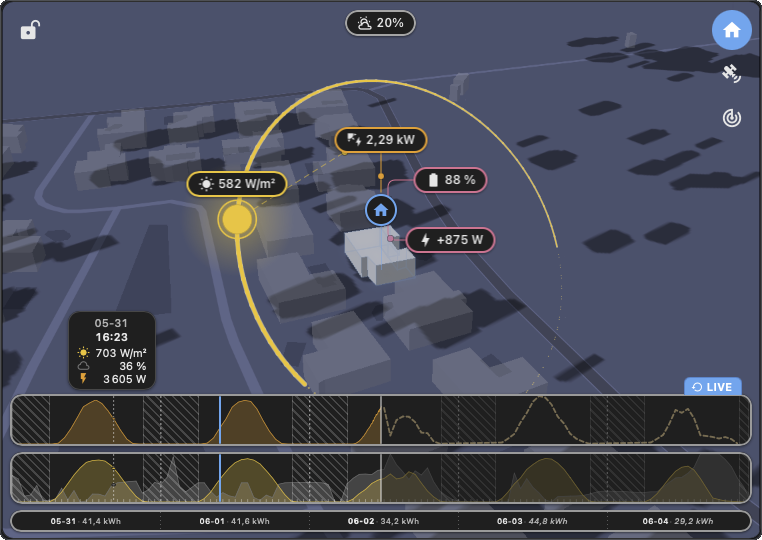
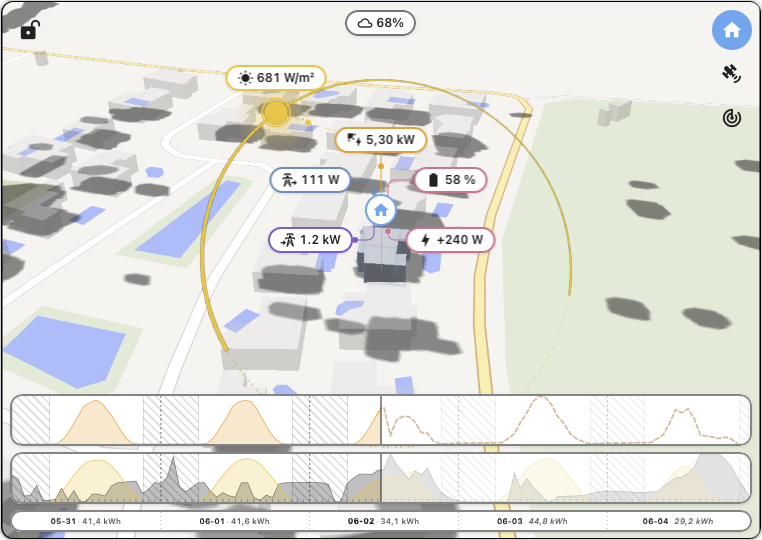
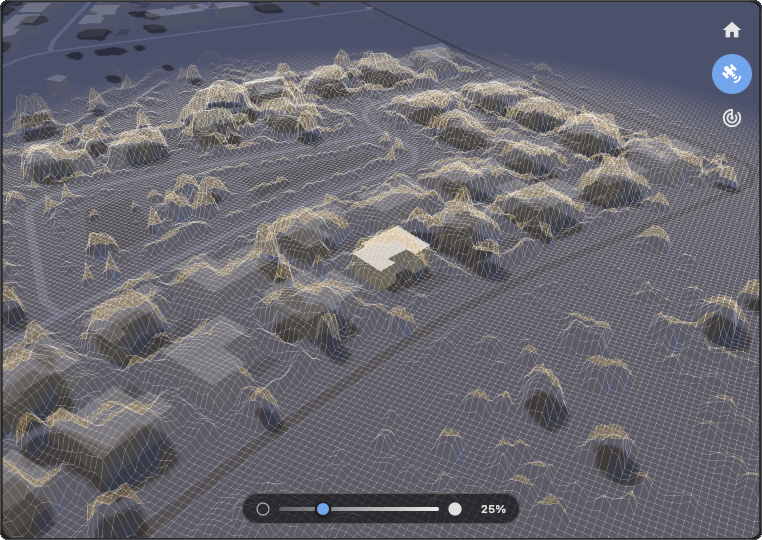
HELIOS displaying current solar exposure, cloud coverage and live PV production for the user's home. An interactive live demo is available at helios-ha.org.
Support my work
Helios is built and maintained by one person, in the open. If it helps your daily routine, a star on GitHub or a small coffee keeps the project alive and lets me keep pushing on the next cycle. Upcoming work is tracked live on the public roadmap at helios-ha.org.

Installation via HACS
Helios is available directly in the HACS store.
- Open HACS.
- Search for HELIOS.
- Install it.
- Reload your browser.
- Add the card to your dashboard (see Adding the card to a dashboard).
Manual installation
- Download
helios.jsfrom the latest release. - Copy it to
<config>/www/community/helios/. - Add the resource to your dashboard:
yaml
   url: /local/community/helios/helios.js
   type: module
Adding the card to a dashboard
- Open the dashboard where you want the card and click the pencil icon (Edit dashboard) in the top right.
- Click + Add card.
- Search for Helios in the card picker and select it. Or scroll to the bottom, pick Manual, and paste:
yaml type: custom:helios-card - Save. Helios picks up your Energy dashboard configuration automatically, no other setup is required.
If Helios does not appear in the picker, the resource is probably not loaded. With a HACS install it is registered automatically. For a manual install, go to Settings then Dashboards, open the three-dot menu, choose Resources, and add the resource as described above, then hard-refresh your browser.
Configuration
No API key required. The basemap is served by CARTO (free, no key) and weather comes from Open-Meteo (also free, no key).
Solar, grid and battery wiring is not configured per-card: Helios resolves every entity slot from the HA Energy dashboard (Settings then Dashboards then Energy), the same global config the official Energy card reads. Set the slots there once and Helios picks them up automatically. The options below cover only the visual and install-specific bits.
Where do the numbers come from
Helios follows the energy dashboard at 100% and never estimates a value:
- Live chips (real-time values in the scene) read the live power sensors of your energy dashboard sources: the optional "power" field of each source. If a source has no live power sensor, its chip is simply not shown, and the editor's live-data panel tells you what to add. Nothing is ever derived from cumulative meters to fake a "now" value.
- Curves, scrub, energy clock and totals read your kWh meters through the recorder statistics, the exact data the energy dashboard's bars are made of. Where the dashboard has a number, Helios shows the same number.
- Home consumption is the dashboard's own balance (solar + import - export
- battery), computed live from the live sensors, shown once every configured family has one.
- If the grid's live sensor is detected as mis-wired (for example an import-only sensor configured as a signed net sensor), Helios hides the grid chips and the editor explains what to fix, instead of showing values that cannot be trusted.
So: a visible chip is always a real-time measurement; a curve is always your official meter data. If a chip you expect is missing, open the editor: the live-data panel lists, family by family, what your dashboard provides and what is missing.
Minimal config:
type: custom:helios-card
The visual editor exposes every option below. Direct YAML editing also works.
Home location
| Key | Type | Default | Description |
|---|---|---|---|
home-latitude |
number | HA home | Optional override (decimal degrees). Applied only when both lat and lon are set and valid; otherwise the card uses hass.config. Useful for a holiday home, a shared install, or several cards each centred on a different place. |
home-longitude |
number | HA home | Companion to home-latitude. Partial or out-of-range values are ignored. |
Camera
| Key | Type | Default | Description |
|---|---|---|---|
auto-rotate-enabled |
boolean | false |
Idle camera orbit. Off by default; enable for kiosk / always-on dashboards. Any drag pauses it, then it resumes after a short idle. |
camera-pitch-deg |
15-85 | 55 |
Optional fixed pitch at boot. Drag still works unless locked. |
camera-bearing-deg |
0-359 | hemisphere | Optional fixed bearing at boot. |
camera-locked |
boolean | false |
Disable drag-rotate and the idle orbit; the camera stays at the configured pose. Also toggled live from the lock button on the card. |
The card also remembers the live camera pose, the active mode, the selected clock filters and the lock per home (or per
cache-id), so reopening the dashboard restores exactly what you left.
Interface
| Key | Type | Default | Description |
|---|---|---|---|
auto-hide-ui |
boolean | false |
No UI mode: fade the timeline and the on-card controls after a few seconds of inactivity, bringing them back on any tap or move. For kiosks and wall displays. |
Buildings + shadows
| Key | Type | Default | Description |
|---|---|---|---|
display-radius |
50-500 m | 200 |
Distance around the home within which buildings and shadows render. The main perf lever on older phones. |
building-count |
10-100 | 50 |
How many of the nearest buildings to keep around the home. |
building-real-size |
boolean | true |
Extrude buildings to their real OSM heights (capped). When false, every building uses the fixed building-height prism. |
building-height |
3-10 m | 6 |
Fixed prism height used when building-real-size is false. |
building-cluster-radius |
0-100 m | 0 |
Buildings within this distance of the home (or touching it) join the home group at full opacity. Use it to attach garages / verandas to the house. |
building-opacity |
0-1 | 0.5 |
Opacity of the surrounding buildings. The home (and its cluster) always stays at full opacity. |
building-color |
color | theme | Optional base tone for the surrounding buildings. |
shadows-enabled |
boolean | true |
Master toggle for the cast ground shadows (projected from the building footprints). |
shadow-opacity |
0-1 | 0.32 |
Opacity of the cast shadows. |
Data display
| Key | Type | Default | Description |
|---|---|---|---|
display-update-frequency-per-hour |
1-6 | 4 |
Storage + render cadence (buckets per hour) for the data store and every graph. 4 = 15-min |
Extension points exported contracts — how you extend this code
HeliosDiagnosticsCard (Interface)Core symbols most depended-on inside this repo
projectShape
Languages
Modules by API surface
For agents
$ claude mcp add Helios \
  -- python -m otcore.mcp_server <graph>