github.com/R2NorthstarTools/FlightCore @v3.2.2
Chat with this repoWhat it actually does AI analysis from the code graph — generated when you open this
README
<img src="https://github.com/R2NorthstarTools/FlightCore/raw/v3.2.2/docs/assets/Square310x310Logo.png" width="200px">


<a href="https://r2northstartools.github.io/FlightCore/index.html?win-setup"><img src="https://github.com/R2NorthstarTools/FlightCore/raw/v3.2.2/docs/assets/downloadbutton.png" width="300px"></a>
FlightCore
A Northstar installer, updater, and mod-manager

Install
Downloads are available on the releases page.
Windows: Download FlightCore_X.Y.Z_x64_en-US.msi and then run the installer by double-clicking the file.
Linux: Download flight-core_X.Y.Z_amd64.AppImage, put it in a preferred location and make it executable. A Flatpak version is planned for the future.
All versions of FlightCore feature an auto-updater that will ask to self-update on new releases.



Frequently Asked Questions (FAQ)
Answers to frequently asked questions can be found in docs/FAQ.md
Development
If you'd like to contribute to FlightCore, see docs/DEVELOPMENT.md
If you are a Northstar developer/contributor, you might want to look at docs/DEV-TOOLS.md
Translating
Translations can be submitted via weblate. \ If you want to add translations for a new language that does not exist in FlightCore yet, please reach out via GitHub issues so that we can add support for it.
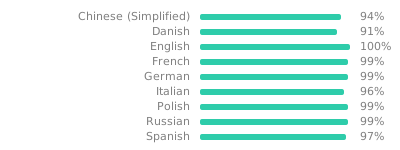
Roadmap
--> See https://github.com/R2NorthstarTools/FlightCore/issues/1
Extension points exported contracts — how you extend this code
ComponentCustomProperties (Interface)Core symbols most depended-on inside this repo
showNotificationShape
Languages
Modules by API surface
For agents
$ claude mcp add FlightCore \
  -- python -m otcore.mcp_server <graph>