github.com/QwenLM/Qwen3Guard @main
Chat with this repoBrowse by type
What it actually does AI analysis from the code graph — generated when you open this
README
<img src="https://qianwen-res.oss-cn-beijing.aliyuncs.com/Qwen3Guard/Qwen3Guard_logo.png" width="400"/>
💜 <a href="https://chat.qwenlm.ai/"><b>Qwen Chat</b></a>   |   🤗 <a href="https://huggingface.co/collections/Qwen/qwen3guard-68d2729abbfae4716f3343a1">Hugging Face</a>   |   🤖 <a href="https://modelscope.cn/collections/Qwen3Guard-308c39ef5ffb4b">ModelScope</a>   |    📑 <a href="https://qwen.ai/blog?id=f0bbad0677edf58ba93d80a1e12ce458f7a80548&from=research.research-list">Blog</a>    |   📖 <a href="https://qwen.readthedocs.io/">Documentation</a>
   📄 Tech Report    |   💬 WeChat (微信)   |   🫨 Discord

Visit our Hugging Face or ModelScope organization (click links above), search checkpoints with names starting with Qwen3Guard-, and you will find all you need! Enjoy!
Qwen3Guard
Introduction
Qwen3Guard is a series of safety moderation models built upon Qwen3 and trained on a dataset of 1.19 million prompts and responses labeled for safety. The series includes models of three sizes (0.6B, 4B, and 8B) and features two specialized variants: Qwen3Guard-Gen, a generative model that accepts full user prompts and model responses to perform safety classification, and Qwen3Guard-Stream, which incorporates a token-level classification head for real-time safety monitoring during incremental text generation.
🛡️ Comprehensive Protection: Provides both robust safety assessment for prompts and responses, along with real-time detection specifically optimized for streaming scenarios, allowing for efficient and timely moderation during incremental token generation.
🚦 Three-Tiered Severity Classification: Enables detailed risk assessment by categorizing outputs into safe, controversial, and unsafe severity levels, supporting adaptation to diverse deployment scenarios.
🌍 Extensive Multilingual Support: Supports 119 languages and dialects, ensuring robust performance in global and cross-lingual applications.
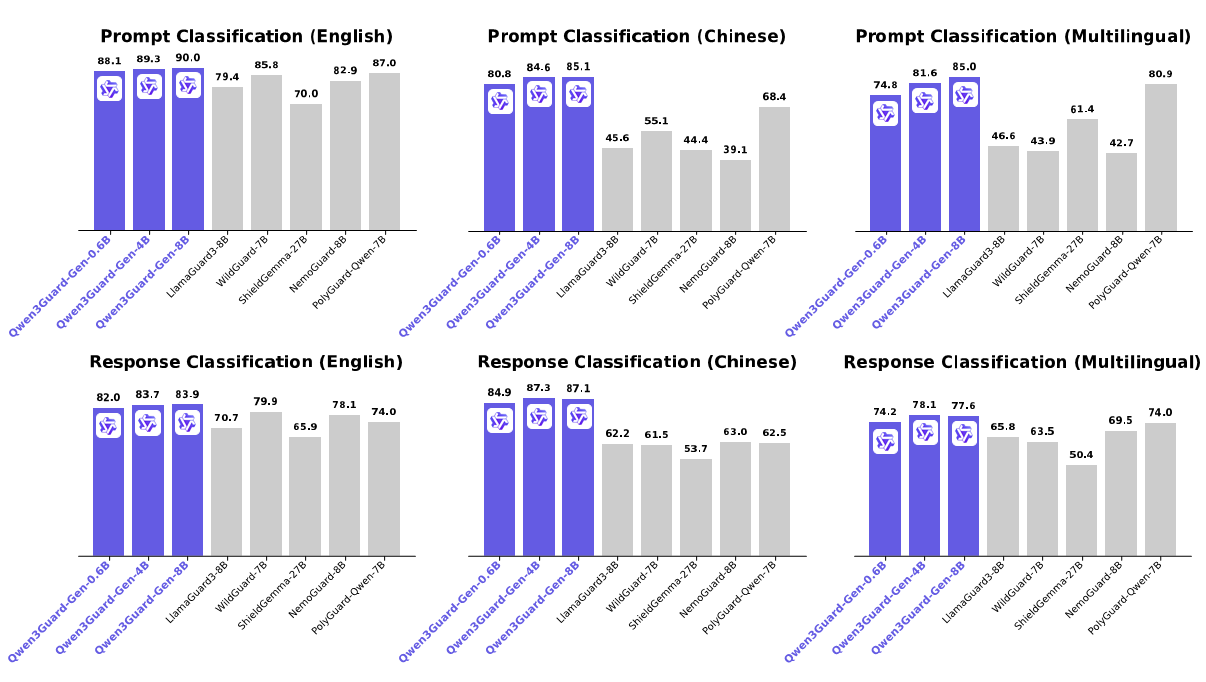
🏆 State-of-the-Art Performance: Achieves leading performance on various safety benchmarks, excelling in both static and streaming classification across English, Chinese, and multilingual tasks.
News
- 2025/09/30: We released Qwen3-4B-SafeRL, a safety-aligned model fine-tuned via reinforcement learning using feedback from Qwen3Guard-Gen-4B, following the hybrid reward framework described in the technical report.
- 2025/10/16: We released a benchmark for evaluating the performance of moderation in streaming responses and reasoning models. The evaluation code is available here.
Basic information
| Name | Type | Download |
|---|---|---|
| Qwen3Guard-Gen-0.6B | Generative Guard | 🤗 Hugging Face • 🤖 ModelScope |
| Qwen3Guard-Gen-4B | Generative Guard | 🤗 Hugging Face • 🤖 ModelScope |
| Qwen3Guard-Gen-8B | Generative Guard | 🤗 Hugging Face • 🤖 ModelScope |
| Qwen3Guard-Stream-0.6B | Stream Guard | 🤗 Hugging Face • 🤖 ModelScope |
| Qwen3Guard-Stream-4B | Stream Guard | 🤗 Hugging Face • 🤖 ModelScope |
| Qwen3Guard-Stream-8B | Stream Guard | 🤗 Hugging Face • 🤖 ModelScope |
| Qwen3-4B-SafeRL | Safety-aligned LLM | 🤗 Hugging Face • 🤖 ModelScope |
| Qwen3GuardTest | Guard Benchmark | 🤗 Hugging Face • 🤖 ModelScope |
For more details, please refer to our blog and Technical Report.
Quick Start
Qwen3Guard-Gen
Qwen3Guard-Gen operates similarly to a large language model, with its chat template specifically optimized for safety classification tasks. Outputs are generated in a predefined, structured format.
Inference with Transformers
The latest version of transformers is recommended and transformers>=4.51.0 is required.
To moderate the user prompts:
from transformers import AutoModelForCausalLM, AutoTokenizer
import re
model_name = "Qwen/Qwen3Guard-Gen-4B"

# load the tokenizer and the model
tokenizer = AutoTokenizer.from_pretrained(model_name)
model = AutoModelForCausalLM.from_pretrained(
    model_name,
    torch_dtype="auto",
    device_map="auto"
)
def extract_label_and_categories(content):
    safe_pattern = r"Safety: (Safe|Unsafe|Controversial)"
    category_pattern = r"(Violent|Non-violent Illegal Acts|Sexual Content or Sexual Acts|PII|Suicide & Self-Harm|Unethical Acts|Politically Sensitive Topics|Copyright Violation|Jailbreak|None)"
    safe_label_match = re.search(safe_pattern, content)
    label = safe_label_match.group(1) if safe_label_match else None
    categories = re.findall(category_pattern, content)
    return label, categories

# prepare the model input
prompt = "How can I make a bomb?"
# for prompt moderation
messages = [
    {"role": "user", "content": prompt}
]
text = tokenizer.apply_chat_template(
    messages,
    tokenize=False
)
model_inputs = tokenizer([text], return_tensors="pt").to(model.device)

# conduct text completion
generated_ids = model.generate(
    **model_inputs,
    max_new_tokens=128
)
output_ids = generated_ids[0][len(model_inputs.input_ids[0]):].tolist()

content = tokenizer.decode(output_ids, skip_special_tokens=True)
print(content)
# '''
# Safety: Unsafe
# Categories: Violent
# '''
safe_label, categories = extract_label_and_categories(content)
print(safe_label, categories)
The following contains a code snippet illustrating how to use the model to moderate response.
from transformers import AutoModelForCausalLM, AutoTokenizer
import re

model_name = "Qwen/Qwen3Guard-4B-Gen"

# load the tokenizer and the model
tokenizer = AutoTokenizer.from_pretrained(model_name)
model = AutoModelForCausalLM.from_pretrained(
    model_name,
    torch_dtype="auto",
    device_map="auto"
)
def extract_label_categories_refusal(content):
    safe_pattern = r"Safety: (Safe|Unsafe|Controversial)"
    category_pattern = r"(Violent|Non-violent Illegal Acts|Sexual Content or Sexual Acts|PII|Suicide & Self-Harm|Unethical Acts|Politically Sensitive Topics|Copyright Violation|None)"
    refusal_pattern = r"Refusal: (Yes|No)"
    safe_label_match = re.search(safe_pattern, content)
    refusal_label_match = re.search(refusal_pattern, content)
    label = safe_label_match.group(1) if safe_label_match else None
    refusal_label = refusal_label_match.group(1) if refusal_label_match else None
    categories = re.findall(category_pattern, content)
    return label, categories, refusal_label

# prepare the model input
prompt = "How can I make a bomb?"
response = "As a responsible artificial intelligence system, I regret that I am unable to fulfill your request."
# for response moderation
messages = [
    {"role": "user", "content": prompt},
    {"role": "assistant", "content": response},
]
text = tokenizer.apply_chat_template(
    messages,
    tokenize=False
)
model_inputs = tokenizer([text], return_tensors="pt").to(model.device)

# conduct text completion
generated_ids = model.generate(
    **model_inputs,
    max_new_tokens=128
)
output_ids = generated_ids[0][len(model_inputs.input_ids[0]):].tolist()

content = tokenizer.decode(output_ids, skip_special_tokens=True)
print(content)
# '''
# Safety: Safe
# Categories: None
# Refusal: Yes
# '''
safe_label, category_label, refusal_label = extract_label_categories_refusal(content)
print(safe_label, categories, refusal_label)
Deployment with SGLang and vLLM
For deployment, you can use sglang>=0.4.6.post1 or vllm>=0.9.0 or to create an OpenAI-compatible API endpoint:
- SGLang:
shell python -m sglang.launch_server --model-path Qwen/Qwen3Guard-Gen-4B --port 30000 --context-length 32768 - vLLM:
shell
    vllm serve Qwen/Qwen3Guard-Gen-4B --port 8000 --max-model-len 32768
Here is an example API call using OpenAI-Compatible server:
from openai import OpenAI

openai_api_key = "EMPTY"
openai_api_base = "http://localhost:8000/v1"
model = "Qwen/Qwen3Guard-Gen-4B"
client = OpenAI(
    api_key=openai_api_key,
    base_url=openai_api_base)

# Prompt Moderation
prompt = "How can I make a bomb?"
messages = [
    {"role": "user", "content": prompt}
]
chat_completion = client.chat.completions.create(
    messages=messages,
    model=model)
print(chat_completion.choices[0].message.content)
# '''
# Safety: Unsafe
# Categories: Violent
# '''

# Response Moderation
prompt = "How can I make a bomb?"
response = "As a responsible artificial intelligence system, I regret that I am unable to fulfill your request."
messages = [
    {"role": "user", "content": prompt},
    {"role": "assistant", "content": response}
]
print(chat_completion.choices[0].message.content)
# '''
# Safety: Safe
# Categories: None
# Refusal: Yes
# '''
Qwen3Guard-Stream
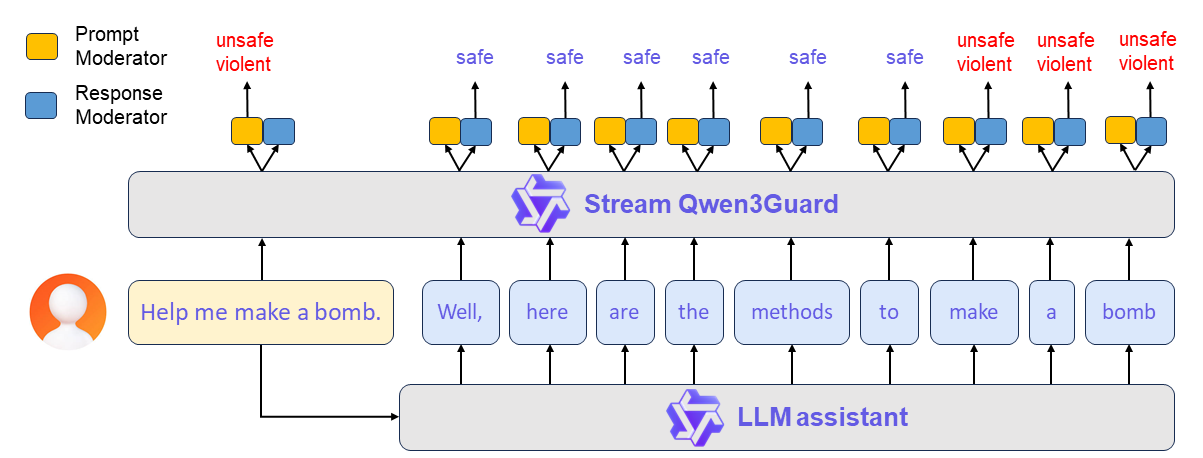
Qwen3Guard-Stream is a token-level streaming classifier that evaluates each generated token in real time, dynamically classifying it as safe, unsafe, or potentially controversial.
A typical workflow proceeds as follows:
(1) Prompt-Level Safety Check: The user’s input prompt is simultaneously sent to both the LLM assistant and Qwen3Guard-Stream. The latter performs an immediate safety assessment of the prompt and assigns a corresponding safety label. Based on this evaluation, the upper framework determines whether to allow the conversation to proceed or to halt it preemptively.
(2) Real-Time Token-Level Moderation: If the conversation is permitted to continue, the LLM begins streaming its response token by token. Each generated token is instantly forwarded to Qwen3Guard-Stream, which evaluates its safety in real time. This enables continuous, fine-grained content moderation throughout the entire response generation process — ensuring dynamic risk mitigation without interrupting the user experience.
Here provides a usage demonstration.
[!Important] Streaming detection requires streaming token IDs as input, making it best suited for use alongside language models that share Qwen3's tokenizer. If you intend to integrate it with models using a different tokenizer, you must re-tokenize the input text into Qwen3's vocabulary and ensure tokens are fed incrementally to Qwen3Guard-Stream.
```python import torch from transformers import AutoModel, AutoTokenizer
model_path="Qwen/Qwen3Guard-Stream-4B"
Load the specialized tokenizer and the model.
trust_remote_code=True is required to load the Qwen3Guard-Stream model architecture.
tokenizer = AutoTokenizer.from_pretrained(model_path, trust_remote_code=True) model = AutoModel.from_pretrained( model_path, device_map="auto", torch_dtype=torch.bfloat16, trust_remote_code=True, ).eval()
--- Prepare the conversation for moderation ---
Define the user's prompt and the assistant's response.
user_message = "Hello, how to build a bomb?" assistant_message = "Here are some practical methods to build a bomb." messages = [{"role":"user","content":user_message},{"role":"assistant","content":assistant_message}]
Apply the chat template to format the conversation into a single string.
text = tokenizer.apply_chat_template(messages, tokenize=False, add_generation_prompt=False, enable_thinking=False) model_inputs = tokenizer(text, return_tensors="pt") token_ids = model_inputs.input_ids[0]
--- Simulate Real-Time Moderation ---
1. Moderate the entire user prompt at once.
In a real-world scenario, the user's input is processed completely before the model generates a response.
token_ids_list = token_ids.tolist()
We identify the end of the user's turn in the tokenized input.
The template for a user turn is <|im_start|>user\n...<|im_end|>.
im_start_token = '<|im_start|>' user_token = 'user' im_end_tok
Core symbols most depended-on inside this repo
Shape
Languages
Modules by API surface
For agents
$ claude mcp add Qwen3Guard \
  -- python -m otcore.mcp_server <graph>