github.com/QwenLM/Qwen-Image @main
Chat with this repoBrowse by type
What it actually does AI analysis from the code graph — generated when you open this
README
<img src="https://qianwen-res.oss-cn-beijing.aliyuncs.com/Qwen-Image/qwen_image_logo.png" width="400"/>
  💜 Qwen Chat   |   🤗 HuggingFace(T2I)   |   🤗 HuggingFace(Edit)   |   🤖 ModelScope-T2I   |   🤖 ModelScope-Edit  |    📑 Tech Report    |    📑 Blog(T2I)    |    📑 Blog(Edit)   
🖥️ T2I Demo   | 🖥️ Edit Demo   |   💬 WeChat (微信)   |   🫨 Discord  

<img src="https://qianwen-res.oss-cn-beijing.aliyuncs.com/Qwen-Image/merge3.jpg" width="1024"/>
Introduction
We are thrilled to release Qwen-Image, a 20B MMDiT image foundation model that achieves significant advances in complex text rendering and precise image editing. Experiments show strong general capabilities in both image generation and editing, with exceptional performance in text rendering, especially for Chinese.

News
-
2026.02.10: We are launching Qwen-Image-2.0, a next-generation foundational image generation model. The key highlights of Qwen-Image-2.0 include:
- Professional Typography Rendering – Supports 1k-token instructions for direct generation of professional infographics, including PPTs, posters, comics, and more.
- Stronger Semantic Adherence – Native 2K resolution support for finely detailed realistic scenes, including people, nature, and architecture.
- Improved Text Rendering – Integrated understanding and generation capabilities, unifying image generation and editing in a single mode
- Lighter Model Architecture – Smaller model size with faster inference speed. Check our Blog for more details! Also give it a try at Qwen Chat.
- 2025.12.31: We released Qwen-Image-2512 weights! Check at Huggingface and ModelScope!
- 2025.12.31: We released Qwen-Image-2512! Check our Blog for more details! 🚀 Our December upgrade to Qwen-Image, just in time for the New Year.
✨ What’s new: • More realistic humans — dramatically reduced “AI look,” richer facial & age details • Finer natural textures — sharper landscapes, water, fur, and materials • Stronger text rendering — better layout, higher accuracy in text–image composition
🏆 Tested in 10,000+ blind rounds on AI Arena, Qwen-Image-2512 ranks as the strongest open-source image model, while staying competitive with closed-source systems.
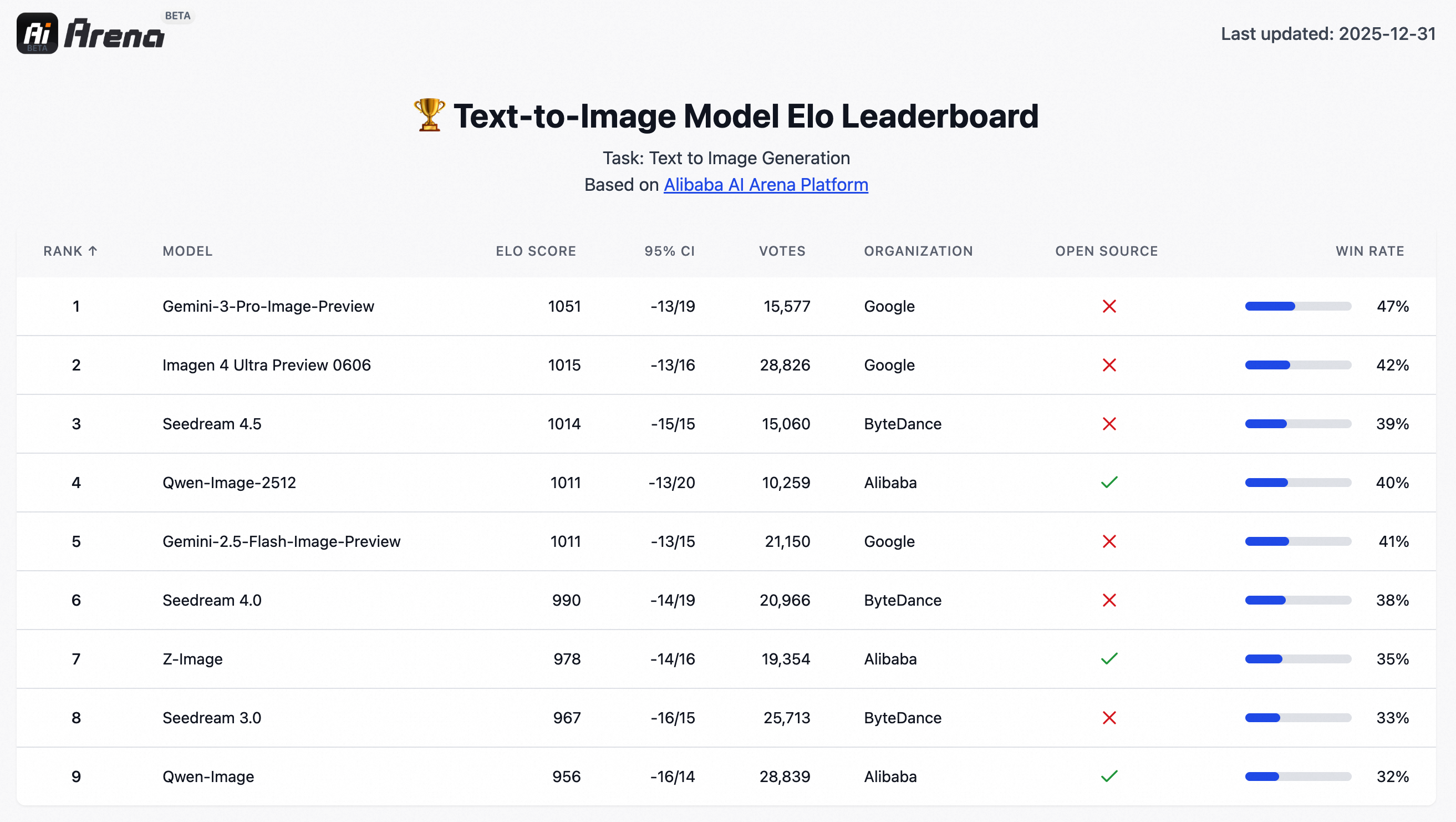 - 2025.12.31: Qwen-Image-Lightning, developed by Lightx2v, provides Day 0 acceleration support for Qwen-Image-2512.
- 2025.12.31:vLLM-Omni supports high performance Qwen-Image-2512 inference from Day-0, with long sequence parallelism, cache acceleration and fast kernels, please check here for details.
- 2025.12.23: We released Qwen-Image-Edit-2511 weights! Check at Huggingface and ModelScope!
- 2025.12.23: We released Qwen-Image-Edit-2511! Check our Blog for more details!
- 2025.12.23: LightX2V delivers Day 0 acceleration for Qwen-Image-Edit-2511, with native support for a wide range of hardware, including NVIDIA, Hygon, Metax, Ascend, and Cambricon. By combining diffusion distillation with cutting-edge inference optimizations, LightX2V achieves a 25x reduction in DiT NFEs and an order-of-magnitude 42.55x overall speedup, enabling real-time image editing across diverse AI accelerators.
- 2025.12.23: vLLM-Omni supports high performance
- 2025.12.31: Qwen-Image-Lightning, developed by Lightx2v, provides Day 0 acceleration support for Qwen-Image-2512.
- 2025.12.31:vLLM-Omni supports high performance Qwen-Image-2512 inference from Day-0, with long sequence parallelism, cache acceleration and fast kernels, please check here for details.
- 2025.12.23: We released Qwen-Image-Edit-2511 weights! Check at Huggingface and ModelScope!
- 2025.12.23: We released Qwen-Image-Edit-2511! Check our Blog for more details!
- 2025.12.23: LightX2V delivers Day 0 acceleration for Qwen-Image-Edit-2511, with native support for a wide range of hardware, including NVIDIA, Hygon, Metax, Ascend, and Cambricon. By combining diffusion distillation with cutting-edge inference optimizations, LightX2V achieves a 25x reduction in DiT NFEs and an order-of-magnitude 42.55x overall speedup, enabling real-time image editing across diverse AI accelerators.
- 2025.12.23: vLLM-Omni supports high performance Qwen-Image-Edit-2511,Qwen-Image-Layeredinference from Day-0, with long sequence parallelism, cache acceleration and fast kernels, please check here for details. -
2025.12.23: SGLang-Diffusion provides day-0 support for Qwen-Image models. To play with
Qwen-Image-Edit-2511in SGlang, please check community supports section for details. -
2025.12.19: We released Qwen-Image-Layered weights! Check at Huggingface and ModelScope!
- 2025.12.19: We released Qwen-Image-Layered! Check our Blog for more details!
- 2025.12.18: We released our Research Paper on Arxiv!
- 2025.11.11: T2I-CoreBench offers a comprehensive and complex evaluation of T2I models in real-world scenarios. On this benchmark, Qwen-Image achieves state-of-the-art performance under real-world complexities in both composition and reasoning T2I tasks, surpassing other open-source models and showing comparable results to closed-source ones.
-
2025.11.07: LeMiCa is a diffusion model inference acceleration solution developed by China Unicom Data Science and Artificial Intelligence Research Institute. By leveraging cache-based techniques and global denoising path optimization, LeMiCa provides efficient inference support for Qwen-Image, achieving nearly 3x lossless acceleration while maintaining visual consistency and quality. For more details, please visit the homepage: https://unicomai.github.io/LeMiCa/
-
2025.09.22: This September, we are pleased to introduce Qwen-Image-Edit-2509, the monthly iteration of Qwen-Image-Edit. To experience the latest model, please visit Qwen Chat and select the "Image Editing" feature. Compared with Qwen-Image-Edit released in August, the main improvements of Qwen-Image-Edit-2509 include:
-
2025.08.19: We have observed performance misalignments of Qwen-Image-Edit. To ensure optimal results, please update to the latest diffusers commit. Improvements are expected, especially in identity preservation and instruction following.
- 2025.08.18: We’re excited to announce the open-sourcing of Qwen-Image-Edit! 🎉 Try it out in your local environment with the quick start guide below, or head over to Qwen Chat or Huggingface Demo to experience the online demo right away! If you enjoy our work, please show your support by giving our repository a star. Your encouragement means a lot to us!
-
2025.08.09: Qwen-Image now supports a variety of LoRA models, such as MajicBeauty LoRA, enabling the generation of highly realistic beauty images. Check out the available weights on ModelScope.

-
2025.08.05: Qwen-Image is now natively supported in ComfyUI, see Qwen-Image in ComfyUI: New Era of Text Generation in Images!
- 2025.08.05: Qwen-Image is now on Qwen Chat. Click Qwen Chat and choose "Image Generation".
- 2025.08.05: We released our Technical Report on Arxiv!
- 2025.08.04: We released Qwen-Image weights! Check at Huggingface and ModelScope!
- 2025.08.04: We released Qwen-Image! Check our Blog for more details!
[!NOTE] Due to heavy traffic, if you'd like to experience our demo online, we also recommend visiting DashScope, WaveSpeed, and LibLib. Please find the links below in the community support.
Quick Start
-
Make sure your transformers>=4.51.3 (Supporting Qwen2.5-VL)
-
Install the latest version of diffusers
pip install git+https://github.com/huggingface/diffusers
Qwen-Image-2512 (for Text to Image generation, better character realism/texture quality)
We recommand use the latest prompt enhancing tools for Qwen-Image-2512, please check src/examples/tools/prompt_utils_2512.py
from diffusers import QwenImagePipeline
import torch
# Load the pipeline
if torch.cuda.is_available():
    torch_dtype = torch.bfloat16
    device = "cuda"
else:
    torch_dtype = torch.float32
    device = "cpu"

pipe = QwenImagePipeline.from_pretrained("Qwen/Qwen-Image-2512", torch_dtype=torch_dtype).to(device)

# Generate image
prompt = '''A 20-year-old East Asian girl with delicate, charming features and large, bright brown eyes—expressive and lively, with a cheerful or subtly smiling expression. Her naturally wavy long hair is either loose or tied in twin ponytails. She has fair skin and light makeup accentuating her youthful freshness. She wears a modern, cute dress or relaxed outfit in bright, soft colors—lightweight fabric, minimalist cut. She stands indoors at an anime convention, surrounded by banners, posters, or stalls. Lighting is typical indoor illumination—no staged lighting—and the image resembles a casual iPhone snapshot: unpretentious composition, yet brimming with vivid, fresh, youthful charm.'''

negative_prompt = "低分辨率,低画质,肢体畸形,手指畸形,画面过饱和,蜡像感,人脸无细节,过度光滑,画面具有AI感。构图混乱。文字模糊,扭曲。"


# Generate with different aspect ratios
aspect_ratios = {
    "1:1": (1328, 1328),
    "16:9": (1664, 928),
    "9:16": (928, 1664),
    "4:3": (1472, 1104),
    "3:4": (1104, 1472),
    "3:2": (1584, 1056),
    "2:3": (1056, 1584),
}

width, height = aspect_ratios["16:9"]

image = pipe(
    prompt=prompt,
    negative_prompt=negative_prompt,
    width=width,
    height=height,
    num_inference_steps=50,
    true_cfg_scale=4.0,
    generator=torch.Generator(device="cuda").manual_seed(42)
).images[0]

image.save("example.png")
Qwen-Image-Edit-2511 (for Image Editing, Multiple Image Support and Improved Consistency)
import os
import torch
from PIL import Image
from diffusers import QwenImageEditPlusPipeline
from io import BytesIO
import requests

pipeline = QwenImageEditPlusPipeline.from_pretrained("Qwen/Qwen-Image-Edit-2511", torch_dtype=torch.bfloat16)
print("pipeline loaded")

pipeline.to('cuda')
pipeline.set_progress_bar_config(disable=None)
image1 = Image.open(BytesIO(requests.get("https://qianwen-res.oss-accelerate-overseas.aliyuncs.com/Qwen-Image/edit2511/edit2511input.png").content))
prompt = "这个女生看着面前的电视屏幕,屏幕上面写着“阿里巴巴”"
inputs = {
    "image": [image1],
    "prompt": prompt,
    "generator": torch.manual_seed(0),
    "true_cfg_scale": 4.0,
    "negative_prompt": " ",
    "num_inference_steps": 40,
    "guidance_scale": 1.0,
    "num_images_per_prompt": 1,
}
with torch.inference_mode():
    output = pipeline(**inputs)
    output_image = output.images[0]
    output_image.save("output_image_edit_2511.png")
    print("image saved at", os.path.abspath("output_image_edit_2511.png"))
Previous Version
Qwen-Image (for Text-to-Image)
The following contains a code snippet illustrating how to use the model to generate images based on text prompts:
```python from diffusers import DiffusionPipeline import torch
model_name = "Qwen/Qwen-Image"
Load the pipeline
if torch.cuda.is_available(): torch_dtype = torch.bfloat16 device = "cuda" else: torch_dtype = torch.float32 device = "cpu"
pipe = DiffusionPipeline.from_pretrained(model_name, torch_dtype=torch_dtype).to(device)
positive_magic = { "en": ", Ultra HD, 4K, cinematic composition.", # for english prompt "zh": ", 超清,4K,电影级构图." # for chinese prompt }
Generate image
prompt = '''A coffee shop entrance features a chalkboard sign reading "Qwen Coffee 😊 $2 per cup," with a neon light beside it displaying "通义千问". Next to it hangs a poster showing a beautiful Chinese woman, and beneath the poster is written "π≈3.1415926-53589793-23846264-33832795-02384197".'''
negative_prompt = " " # Recommended if you don't use a negative prompt.
Generate with different aspect ratios
aspect_ratios = { "1:1": (1328, 1328), "16:9": (1664, 928), "9:16": (928, 1664), "4:3": (1472, 1104), "3:4": (1104, 1472), "3:2": (1584, 1056), "2:3": (1056, 1584), }
width, height = aspect_ratios["16:9"]
image = pipe( prompt=prompt + positive_magic["en"], negative_prompt=negative_prompt, width=width, height=height,
Core symbols most depended-on inside this repo
Shape
Languages
Modules by API surface
For agents
$ claude mcp add Qwen-Image \
  -- python -m otcore.mcp_server <graph>