github.com/PurpurMC/Purpur @1.20.6
Chat with this repoWhat it actually does AI analysis from the code graph — generated when you open this
README

Purpur






Purpur is a drop-in replacement for Paper servers designed for configurability, new fun and exciting gameplay features, and performance built on top of Paper.
Contact
Join us on Discord:

Downloads
Downloads can be obtained from the downloads page or the downloads API.

Downloads API endpoints:
* List versions of Minecraft with builds available:
https://api.purpurmc.org/v2/purpur
* List builds for a version of Minecraft:
https://api.purpurmc.org/v2/purpur/<version>
* Download a specific build of a specific version:
https://api.purpurmc.org/v2/purpur/<version>/<build>/download
* Download the latest build for a version of Minecraft:
https://api.purpurmc.org/v2/purpur/<version>/latest/download
License
All patches are licensed under the MIT license, unless otherwise noted in the patch headers.
See PaperMC/Paper, and PaperMC/Paperweight for the license of material used by this project.
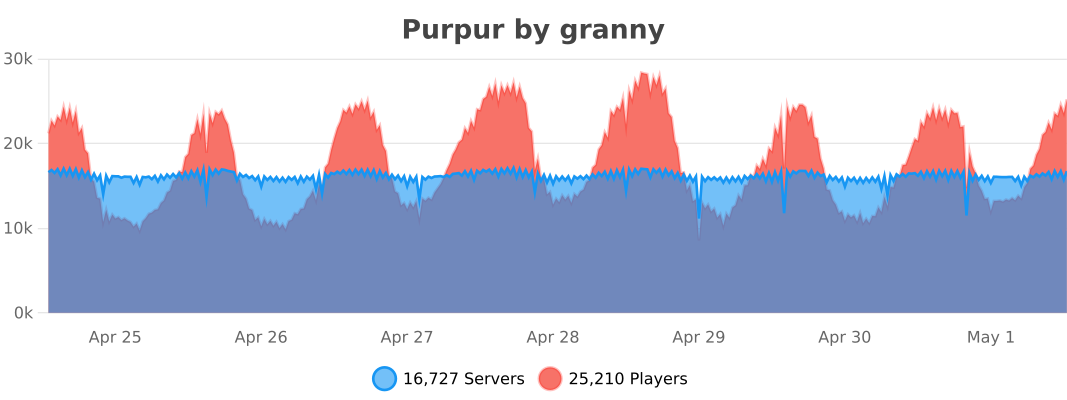
bStats
API
Javadoc
Dependency Information
Maven
<repository>
    <id>purpur</id>
    <url>https://repo.purpurmc.org/snapshots</url>
</repository>
<dependency>
    <groupId>org.purpurmc.purpur</groupId>
    <artifactId>purpur-api</artifactId>
    <version>1.20.6-R0.1-SNAPSHOT</version>
    <scope>provided</scope>
</dependency>
Gradle
repositories {
    maven("https://repo.purpurmc.org/snapshots")
}
dependencies {
    compileOnly("org.purpurmc.purpur:purpur-api:1.20.6-R0.1-SNAPSHOT")
}
Yes, this also includes all API provided by Paper, Spigot, and Bukkit.
Building and setting up
Initial setup
First, clone this repository. Do not download it.
Then run the following command in the root directory:
./gradlew applyPatches
The project is now ready for use in your IDE.
Creating a patch
Patches are effectively just commits in either Purpur-API or Purpur-Server.
To create one, just add a commit to either repo and run ./gradlew rebuildPatches, and a
patch will be placed in the patches folder. Modifying commits will also modify its
corresponding patch file.
See CONTRIBUTING.md for more detailed information.
Compiling
Use the command ./gradlew build to build the API and server. Compiled JARs
will be placed under Purpur-API/build/libs and Purpur-Server/build/libs.
These JARs are not used to start a server.
To compile a server-ready purpurclip jar, run ./gradlew createMojmapBundlerJar.
To install the purpur-api and purpur dependencies to your local Maven repo, run ./gradlew publishToMavenLocal. The compiled purpurclip jar will be in build/libs/ not Purpur-Server/build/libs.
Special Thanks To:
| ### YourKit  [YourKit](https://www.yourkit.com/), makers of the outstanding Java profiler, support open source projects of all kinds with their full-featured [Java](https://www.yourkit.com/java/profiler) and [.NET](https://www.yourkit.com/.net/profiler) application profilers. We thank them for allowing us to use their software so we can make Purpur the best it can be. |
### JetBrains
[ ](https://www.jetbrains.com)
[JetBrains](https://www.jetbrains.com/), creators of the IntelliJ IDEA, supports Purpur with one of their [Open Source Licenses](https://www.jetbrains.com/opensource/). IntelliJ IDEA is the recommended IDE for working with Purpur, and most of the Purpur team uses it. ](https://www.jetbrains.com)
[JetBrains](https://www.jetbrains.com/), creators of the IntelliJ IDEA, supports Purpur with one of their [Open Source Licenses](https://www.jetbrains.com/opensource/). IntelliJ IDEA is the recommended IDE for working with Purpur, and most of the Purpur team uses it.
|
Our Contributors
Our Sponsors
Our Backers
Core symbols most depended-on inside this repo
optionalIncludeShape
Languages
Modules by API surface
For agents
$ claude mcp add Purpur \
  -- python -m otcore.mcp_server <graph>