github.com/Picovoice/porcupine @v4.0 sqlite
README
Porcupine










Made in Vancouver, Canada by Picovoice


Porcupine is a highly-accurate and lightweight wake word engine. It enables building always-listening voice-enabled applications. It is
- using deep neural networks trained in real-world environments.
- compact and computationally-efficient. It is perfect for IoT.
- cross-platform:
- Arm Cortex-M, STM32, and Arduino
- Raspberry Pi (Zero, 3, 4, 5)
- Android and iOS
- Chrome, Safari, Firefox, and Edge
- Linux (x86_64), macOS (x86_64, arm64), and Windows (x86_64, arm64)
- scalable. It can detect multiple always-listening voice commands with no added runtime footprint.
- self-service. Developers can train custom wake word models using Picovoice Console.
Table of Contents
- Porcupine
- Table of Contents
- Use Cases
- Try It Out
- Language Support
- Performance
- Demos
- SDKs
- Releases
- FAQ
Use Cases
Porcupine is the right product if you need to detect one or a few static (always-listening) voice commands.
- If you want to create voice experiences similar to Alexa or Google, see the Picovoice platform.
- If you need to understand complex and naturally-spoken voice commands within a specific domain, see the Rhino Speech-to-Intent engine.
Try It Out
-
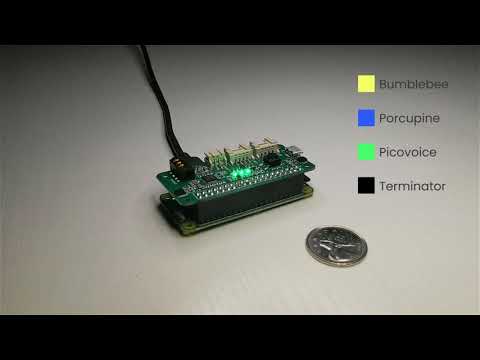
Porcupine on a Raspberry Pi Zero
Language Support
- English, Chinese (Mandarin), French, German, Italian, Japanese, Korean, Portuguese, and Spanish.
- Support for additional languages is available for commercial customers on a case-by-case basis.
Performance
A comparison between accuracy and runtime metrics of Porcupine and two other widely-used libraries, PocketSphinx and Snowboy, is provided here. Compared to the best-performing engine of these two, Porcupine is 11.0 times more accurate and 6.5 times faster (on Raspberry Pi 3).
Demos
If using SSH, clone the repository with:
git clone --recurse-submodules git@github.com:Picovoice/porcupine.git
If using HTTPS, clone the repository with:
git clone --recurse-submodules https://github.com/Picovoice/porcupine.git
Python Demos
Install the demo package:
sudo pip3 install pvporcupinedemo
With a working microphone connected to your device run the following in the terminal:
porcupine_demo_mic --access_key ${ACCESS_KEY} --keywords porcupine
The engine starts processing the audio input from the microphone in realtime and outputs to the terminal when it detects
utterances of Porcupine.
For more information about Python demos go to demo/python.
.NET Demos
From demo/dotnet/PorcupineDemo run the following in the terminal to build the demo:
dotnet build -c MicDemo.Release
Make sure there is a working microphone connected to your device. From demo/dotnet/PorcupineDemo run the following in the terminal:
dotnet run -c MicDemo.Release -- \
--access_key ${ACCESS_KEY} \
--keywords porcupine
The engine starts processing the audio input from the microphone in realtime and outputs to the terminal when it detects
utterances of Porcupine.
For more information about .NET demos go to demo/dotnet.
Java Demos
Make sure there is a working microphone connected to your device. Then invoke the following commands from the terminal:
cd demo/java
./gradlew build
cd build/libs
java -jar porcupine-mic-demo.jar -a ${ACCESS_KEY} -k porcupine
The engine starts processing the audio input from the microphone in realtime and outputs to the terminal when it detects
utterances of Porcupine.
For more information about Java demos go to demo/java.
Flutter Demos
To run the Porcupine demo on Android or iOS with Flutter, you must have the Flutter SDK installed on your system. Once installed, you can run flutter doctor to determine any other missing requirements for your relevant platform. Once your environment has been set up, launch a simulator or connect an Android/iOS device.
Run the prepare_demo script from demo/flutter with a language code to set up the demo in the language of your
choice (e.g. de -> German, ko -> Korean). To see a list of available languages, run prepare_demo without a language code.
dart scripts/prepare_demo.dart ${LANGUAGE}
Replace your AccessKey in lib/main.dart file:
final String accessKey = "{YOUR_ACCESS_KEY_HERE}"; // AccessKey obtained from Picovoice Console (https://console.picovoice.ai/)
Run the following command from demo/flutter to build and deploy the demo to your device:
flutter run
React Native Demos
To run the React Native Porcupine demo app you will first need to set up your React Native environment. For this, please refer to React Native's documentation.
Replace your AccessKey, in App.tsx file:
_accessKey: string ="${YOUR_ACCESS_KEY_HERE}" // AccessKey obtained from Picovoice Console (https://console.picovoice.ai/)
Navigate to demo/react-native/PorcupineDemo to run the following commands:
For Android:
yarn android-install          # sets up environment
yarn android-run ${LANGUAGE}  # builds and deploys to Android
For iOS:
yarn ios-install              # sets up environment
yarn ios-run ${LANGUAGE}      # builds and deploys to iOS
Replace ${LANGUAGE} with the language code of your choice (e.g. de -> German, ko -> Korean).
To see a list of available languages, run the android-run or ios-run command without a language code.
Android Demos
Using Android Studio, open
demo/android/Activity as an Android project, copy your AccessKey into MainActivity.java, select the build variant (Build > Select Build Variant...) for the desired language and then run the application.
To learn about how to use Porcupine in long-running services go to demo/android/Service.
To learn about how to use Porcupine with Android Speech to Text recognition go to demo/android/STT.
iOS Demos
The BackgroundService demo runs audio recording in the background, enabling detection of wake word while the application is not in focus and remains running in the background. The ForegroundApp demo runs wake word detection only when the application is in focus.
BackgroundService Demo
1) To run the demo, go to demo/ios/BackgroundService.
2) Open the BackgroundService.xcodeproj in XCode
3) Replace let accessKey = "${YOUR_ACCESS_KEY_HERE}" in the file ViewModel.swift with your AccessKey.
4) Run the demo with a simulator or connected iOS device
ForegroundApp Demo
To run the foreground application demo:
1) Go to demo/ios/ForegroundApp directory.
2) Open the ForegroundApp.xcodeproj in XCode
3) Replace let accessKey = "${YOUR_ACCESS_KEY_HERE}" in the file ViewModel.swift with your AccessKey.
4) Go to Product > Scheme and select the scheme for the language you would like to demo (e.g. esDemo -> Spanish Demo, deDemo -> German Demo)
5) Run the demo with a simulator or connected iOS device
The demo allows you to select any of the pre-built keywords for detection. Press start and say the selected keyword.
Web Demos
Vanilla JavaScript and HTML
From demo/web run the following in the terminal:
yarn
yarn start ${LANGUAGE}
(or)
npm install
npm run start ${LANGUAGE}
Open http://localhost:5000 in your browser to try the demo.
React Demos
From demo/react run the following in the terminal:
yarn
yarn start ${LANGUAGE}
(or)
npm install
npm run start ${LANGUAGE}
Open http://localhost:3000 in your browser to try the demo.
NodeJS Demos
Install the demo package:
yarn global add @picovoice/porcupine-node-demo
With a working microphone connected to your device run the following in the terminal:
ppn-mic-demo --access_key ${ACCESS_KEY} --keywords porcupine
The engine starts processing the audio input from the microphone in realtime and outputs to the terminal when it detects
utterances of Porcupine.
For more information about NodeJS demos go to demo/nodejs.
C Demos
The C demo requires CMake version 3.4 or higher.
The Microphone demo requires miniaudio for accessing microphone audio data.
Windows Requires MinGW to build the demo.
Microphone Demo
At the root of the repository, build with:
cmake -S demo/c/. -B demo/c/build && cmake --build demo/c/build --target porcupine_demo_mic
Linux (x86_64), macOS (x86_64, arm64), and Raspberry Pi (Zero, 3, 4, 5)
List input audio devices with:
./demo/c/build/porcupine_demo_mic --show_audio_devices
Run the demo using:
./demo/c/build/porcupine_demo_mic -l ${LIBRARY_PATH} -m lib/common/porcupine_params.pv \
-k resources/keyword_files/${PLATFORM}/porcupine_${PLATFORM}.ppn -t 0.5 \
-d ${AUDIO_DEVICE_INDEX} -a ${ACCESS_KEY}
Replace ${LIBRARY_PATH} with path to appropriate library available under lib, ${PLATFORM} with the
name of the platform you are running on (linux, raspberry-pi, or mac), ${AUDIO_DEVICE_INDEX} with
the index of your audio device and ${ACCESS_KEY} with your AccessKey.
Windows
List input audio devices with:
.\\demo\\c\\build\\porcupine_demo_mic.exe --show_audio_devices
Run the demo using:
```console .\demo\c\build\porcupine_demo_mic.exe ^ -l lib/windows/amd64/libpv_porcupine.dll ^ -m lib/common/porcupine_params.pv ^ -k resources/keyword_files/windows/porcupine_windows.ppn ^ -t 0.5 ^ -d ${AUDIO_DEVICE_
Extension points exported contracts — how you extend this code
PorcupineManagerCallback (Interface)Core symbols most depended-on inside this repo
getFirstMatchShape
Languages
Modules by API surface
Dependencies from manifests, versioned
For agents
$ claude mcp add porcupine \
  -- python -m otcore.mcp_server <graph>