github.com/PicoCreator/smol-dev-js @main
Chat with this repoBrowse by type
What it actually does AI analysis from the code graph — generated when you open this
README
Smol-Dev-JS
You own personal AI dev, which you can direct development in a collaborative back and forth experience. Think of it as pair-programming, via the command line.
Written entire in JS (no python), and is able to make both "smol-er" changes (you can ask it to change a few lines or a file or two), or "big-ger" changes (ie. generate a full project from specs for you) - the choice is urs.
This switches your role from a developer, to a "senior developer" - where you are instructing your junior developers what to do (and hope they get it right).
For best results: Generally treat the AI like a junior developer who joined the project on day 0, and is still learning the ropes. And you are the senior developer who is teaching it - and making small incremental changes - and you will get better result as you prompt your way in a loop.
Not no code, not low code, but some third thing.
Allowing you to focus on ~~sword fighting~~ the big picture, while the AI does the ~~button mashing~~ coding for you.
<img height=200 src="https://pbs.twimg.com/media/FwEzVCcaMAE7t4h?format=jpg&name=large" />
Additionally, because the changes are small, incremental, and runs in a tight loop you are in full control of it. You do not need to worry about it going out of control ~~like some autonomous agents~~. Allowing you to review each commit, and revert them or make changes yourself if needed.
Quoting the original smol-dev : does not end the world or overpromise AGI. instead of making and maintaining specific, rigid, one-shot starters, like create-react-app, or create-nextjs-app, this is basically
create-anything-appwhere you develop your scaffolding prompt in a tight loop with your smol dev.
Commands & Setup
Update to node 18
sudo npm install -g n
sudo n 18
smol-dev-js setup
Reminder: Do check on your openAI dashboard if you have GPT4 access
Install via NPM
npm install -g smol-dev-js
Either start a new JS project, or go to an existing nodejs project, run the setup function, and follow the process
cd my-js-project
smol-dev-js setup
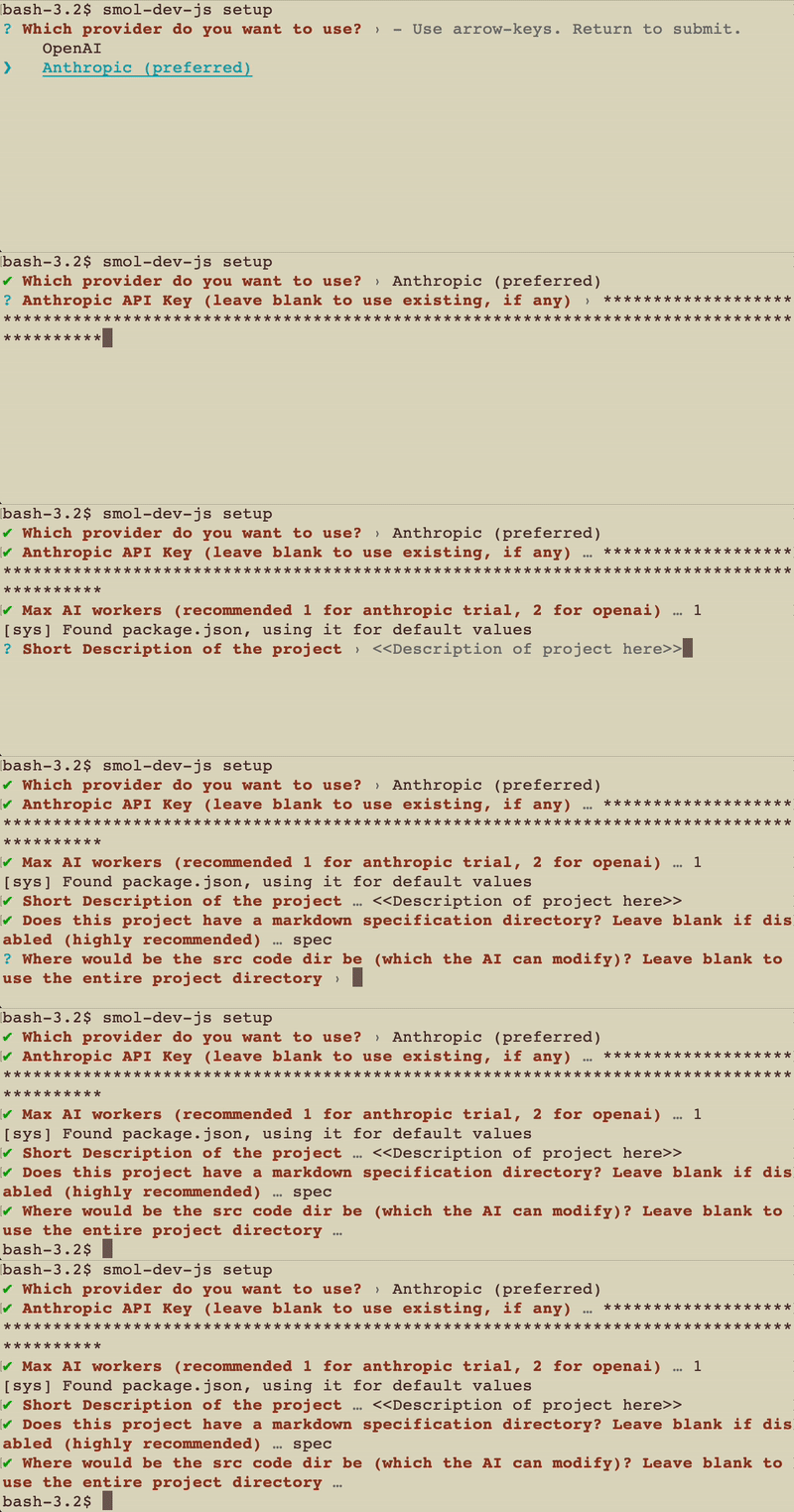
This will ask for your API keys, and setup the .smol-dev-js folder which it will use internally for you
It is highly recommended to use anthropic claude, if you have the API key, as its so much faster and more reliable then openAI as of now for this use case. For openAI this uses gpt4-8k for the heavy lifting, while downgrading to gpt3.5 for some smol-er task
smol-dev-js prompt
Run the following command to start the smol-dev-js process, in your new or existing JS project
cd my-js-project
smol-dev-js prompt
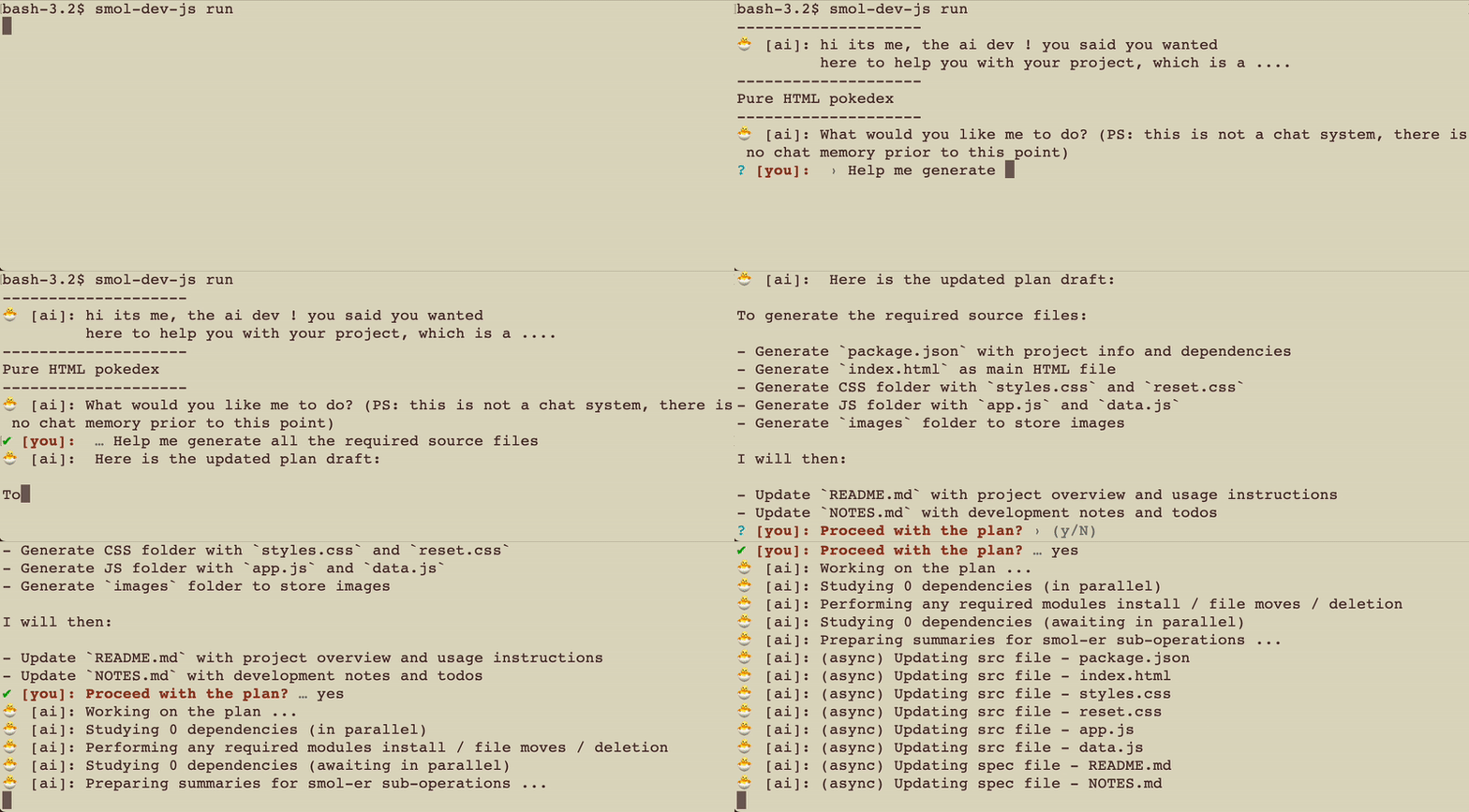
Once everything is generated, review the code and begin a loop where you ...
engineering with prompts, rather than prompt engineering
Found an error? paste it in and let the AI suggest a fix for you. Or tell it what to do to fix it.
Loop until happiness is attained. Or that you find the AI being unhelpful, and take back control.
smol-dev-js spec2code
Got all your project specifications file ready? Run th spec2code, and let the smol-dev AI generate it for you.
The general format of the spec folder should be
- README.md (high level spec)
- NOTES.md (any more point form feedback/instruction to pass to the AI globally, which may might not make sense in the spec)
- <folder>/<filename>.<type>.md (spec for a specific file)
You will need the spec folder to be configured
smol-dev-js code2spec
Lazy to write specs to an existing codebase from scratch, let the smol-dev AI generate a draft for you.
You will need the spec folder to be configured
Want to customize the settings further?
After generating the config, you can look into .smol-dev-js/config folder for various settings, including
- local cache settings
- caching with mongoDB (you can use the free tier)
- rate limits
Example Usage
this is from the original smol-dev, with a single README.md as the spec.
Notes
Innovation and insights
-
Markdown/Human language is all you need : No need to learn a new DSL, or a new language, or a new framework. Just use a common language that the AI understand (ie. english) and let the AI handle the rest.
-
Anthropic AI current laps openAI : While it needed some prompt changes. Even with a single "thread" it laps around 4 threads of gpt 3.5 /and gpt4. This is before we even take into account its support for 100k context size (the usage experience between the two is so huge, its hard to explain)
-
Context size is still king : This is a huge jump from the english compiler proj, and while AI reasoning is a factor, context size truly made it a giant leap - cant wait till 32k is affordable and commonplace
-
Debug via prompting : Better then just using chat-gpt directly, now you got more project specific answers
-
Low activation energy for unfamiliar APIs : Have no idea how to get started? Just start with a one line prompt, and let the system draft everything for you
-
Want to write your specs for prompting?? : Just let the AI know what you want to change. Even in broken english (or any other language)
-
Modal is not needed : All you need is node+NPM. We use the HTTP API directly, so no python dependencies, we include retry logic for error handling, spliting up into multiple requests, and even include caching to optimize some of the more reptitive smol ops.
this list is a derivative from the original smol-dev proj
Cavet
Unless your the lucky few who gotten access to antrohpic AI, GPT4 can be very very slow. Making the feedback loop run into several minutes (this will improve over time as AI scales up worldwide)
Also for larger projects and scripts, due to the way things are currently setup, it is possible to hit 8k limits and have scripts get cut off
Want this to work with a local model ???
Want to have this working locally? Without an internet connection?
Reach out to me, and help me make it happen !! (GPUs, funding, data, etc)
- Donate your
.smol-dev-js/cachefolder if your not working on anything sensitive, so that I can use it as training data for a local model
ps: if you email me the files, it is taken that you waived copyright for it - picocreator+ai-data (at) gmail.com
- This would be used to create a public dataset, more specifically the RWKV project, an opensource project that I am actively working on. An AI model with theoractically have no context size limit, but is capped by its lack of training.
Future directions ??
Things to do - Better examples, and a demo video and intro to tweet this out - Let the model study the existing codebase, and make better notes on all the files (include into future prompt, incrases context size) - Allow the model to lookup existing code in planning phase (in addition to existing info provided) - this might be an anthropic only behaviour due to the huge bump in context size. - Let it setup unit test, run it, and read the error - and fix it? (maybe with a loop limit)
Things that are done - (done) ~~Add support for file specific spec~~ - (done) ~~bootstrap the readme.md~~ the minimum you need now is the prompt + 1 line description - (done) ~~Support NPM package installs~~ NPM install prompt (with human confirmation) is added
Architecture / process flow
The bulk of the main run logic is within src/ai/seq/generateFilesFromPrompts.js which is called in a larger loop from src/cli/command/prompt.js. The following is the sequence of events
- Main run loop, no context is tracked between each loop
- User is asked for the opening prompt instruction
- Taking the main spec files (README.md/NOTES.md), the current project filesystem state, and the AI notes, it generates "the plan" on how to make the changes
- Does the same process as "if rejected"
- User is asked to confirm "the plan", if rejected, user is asked to provide feedback. Looping till a revised plan is confirmed.
- If rejected, ask what files the AI want more details on, before revising the plan, and add those files into the context for the next step (claude only)
- If rejected, Given the user feedback AI model revise the plan
- If rejected, Given the user feedback AI model update its own small internal notes (note: should we drop this?)
- Given the final plan, figure out what actions need to be done, and files need to be modified, this execution plan follows a strict structure of the following
- Local dependency files it would need to fetch more information on
- NPM dependency install if any
- Moving of source / spec code files
- Deletion of existing source / spec code files
- Update source / spec file (1st round)
- Update source / spec file (2nd round)
- Given the final plan and file list, ask the AI to decide common values for use in execution, with details of the local dependency files included
- Using the common values, the model executes on the above plan in stages (0 to 4)
- Once everything is updated finish, end the current main loop, and go back to the start
For the spec2code, it follows the same process as above, with the prompt of "regenerate all the src files from the provided spec" and not having the main loop.
Optimization notes
controversial optimization: The AI model forcefully converts everything to tab spacing. I dun care about your oppinion on this, as its an engineering decision, where it is literally a huge 20% +++ in tokens savings, and the models may not be able to work without it.
resonable optimization: This is currently targetted to be optimized only for JS. The reduced scope is intentional, so that we can optimize its responsiveness and usage, without over-inflating the project.
While nothing stops it from working with other languages, it was designed with JS in mind, and will likely not work as well with other languages.
Backstory
V1 prototype was the English Compiler, made in Feb 2023
While it technically works, it was faced with multiple context size related issues.
Fast forward 3 months, and the context size of models have jumped from 4k, to 8k for public users. And 32k and 100k for private users.
Subsequently the smol-ai/dev project has shown that with only 8k context size and gpt4, we have slowly reached the stage where the output is starting to "just work"
This project is subsequently a full rewrite of the original English Compiler project, along with reimagining the approach based lessons learnt from the original and smol-ai/dev
Core symbols most depended-on inside this repo
Shape
Languages
Modules by API surface
For agents
$ claude mcp add smol-dev-js \
  -- python -m otcore.mcp_server <graph>