github.com/ParkSangGwon/TedPermission @3.4.2
Chat with this repoWhat it actually does AI analysis from the code graph — generated when you open this
README

What is TedPermission?
After the update to Android 6.0 Marshmallow, we have to not only declare permissions in AndroidManifest.xml, but also request them at runtime. Furthermore, the user can turn permissions on/off anytime in application settings.
When you use dangerous permissons(ex. CAMERA, READ_CONTACTS, READ_PHONE_STATE, ...), you must check and request them at runtime.
(https://developer.android.com/guide/topics/permissions/overview?hl=en#normal-dangerous)
You can make your own permission check logic like this, but it's very complex, mainly because functions Google offer are very hard to use: checkSelfPermission(), requestPermissions(), onRequestPermissionsResult(), onActivityResult().
TedPermission makes it easy to check and request android permissions.
(For Korean) 아래 블로그를 통해 마시멜로우 권한 관련된 사항을 알아보세요
http://gun0912.tistory.com/55
Demo
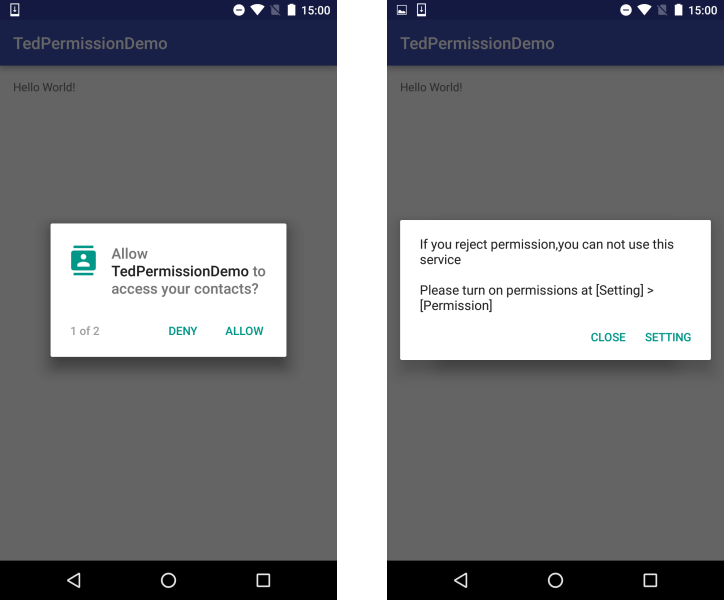
- Request permissions.
- If user denied permissions, a message dialog with a button to go to Settings will appear.
Setup
- Edit
root/app/build.gradlelike below. - You can choose only one library depend on your code style
normal/coroutine/rxJava2/rxJava3 - Replace
x.y.zwith the version shown in the 'Maven Central' button below, or the specific version you want (e.g. replacex.y.zwith3.4.1if you want 3.4.1).

repositories {
  google()
  mavenCentral()
}

dependencies {
    // Normal
    implementation("io.github.ParkSangGwon:tedpermission-normal:3.4.1")

    // Coroutine
    implementation("io.github.ParkSangGwon:tedpermission-coroutine:3.4.1")

    // RxJava2
    implementation("io.github.ParkSangGwon:tedpermission-rx2:3.4.1")
    // RxJava3
    implementation("io.github.ParkSangGwon:tedpermission-rx3:3.4.1")
}
If you think this library is useful, please press the star button at the top.

How to use
Normal
-Make PermissionListener
We will use PermissionListener for handling permission check result.
You will get the result to onPermissionGranted() or onPermissionDenied() depending on approved permissions.
    PermissionListener permissionlistener = new PermissionListener() {
        @Override
        public void onPermissionGranted() {
            Toast.makeText(MainActivity.this, "Permission Granted", Toast.LENGTH_SHORT).show();
        }

        @Override
        public void onPermissionDenied(List<String> deniedPermissions) {
            Toast.makeText(MainActivity.this, "Permission Denied\n" + deniedPermissions.toString(), Toast.LENGTH_SHORT).show();
        }


    };
-Start TedPermission
TedPermission class requires setPermissionListener(), setPermissions(), and check() methods.
Call check() to start checking for permissions.
setRationaleMessage() and setDeniedMessage() are optional methods for displaying messages.
    TedPermission.create()
        .setPermissionListener(permissionlistener)
        .setDeniedMessage("If you reject permission,you can not use this service\n\nPlease turn on permissions at [Setting] > [Permission]")
        .setPermissions(Manifest.permission.READ_CONTACTS, Manifest.permission.ACCESS_FINE_LOCATION)
        .check();
Coroutine
If you use kotlin and coroutine, You can use check()function.
TedPermissionResult instance has isGranted(), getDeniedPermissions() methods for checking permission check result.
val permissionResult =
    TedPermission.create()
        .setPermissions(Manifest.permission.WRITE_EXTERNAL_STORAGE, Manifest.permission.ACCESS_FINE_LOCATION)
        .check()
Also if you want know only granted result, you can use checkGranted(): boolean
RxJava
If you use RxJava, You can use request() method instead check().
When permission check has finished, you will receive TedPermissionResult instance.
TedPermissionResult instance has isGranted(), getDeniedPermissions() methods for checking permission check result.
    TedPermission.create()
        .setRationaleTitle(R.string.rationale_title)
        .setRationaleMessage(R.string.rationale_message) // "we need permission for read contact and find your location"
        .setPermissions(Manifest.permission.READ_CONTACTS, Manifest.permission.ACCESS_FINE_LOCATION)
        .request()
        .subscribe(tedPermissionResult -> {
          if (tedPermissionResult.isGranted()) {
            Toast.makeText(this, "Permission Granted", Toast.LENGTH_SHORT).show();
          } else {
            Toast.makeText(this,
                "Permission Denied\n" + tedPermissionResult.getDeniedPermissions().toString(), Toast.LENGTH_SHORT)
                .show();
          }
        }, throwable -> {
        });
Customize
TedPermission supports the following methods.
setGotoSettingButton(boolean) (default: true)setRationaleTitle(R.string.xxx or String)setRationaleMessage(R.string.xxx or String)setRationaleConfirmText(R.string.xxx or String) (default: confirm / 확인)setDeniedTitle(R.string.xxx or String)setDeniedMessage(R.string.xxx or String)setDeniedCloseButtonText(R.string.xxx or String) (default: close / 닫기)setGotoSettingButtonText(R.string.xxx or String) (default: setting / 설정)
Also you can use the following utility functions.
* isGranted(String... permissions): Check if all permissions are granted
* isDenied(String... permissions): Check if all permissions are denied
* getDeniedPermissions(String... permissions)
* canRequestPermission(Activity activity, String... permissions): If true you can request a system popup, false means user checked Never ask again.
* startSettingActivityForResult()
* startSettingActivityForResult(int requestCode)
Number of Cases
- Check permissions -> Already have permissions
: onPermissionGranted() is called.
- Check permissions -> Don't have permissions
: Request dialog is shown.

- Show request dialog -> User granted permissions
: onPermissionGranted() is called.
- Show request dialog -> User denied one or more permissions
: Denied dialog is shown.
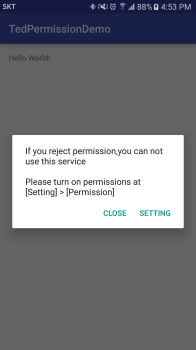
- Show denied dialog -> Close the dialog
: onPermissionDenied() called
- Show denied dialog -> Setting button clicked
: startActivityForResult() to application Setting Activity.

- Setting Activity ->
onActivityResult()
: Check permissions again
- Check permission -> Permissions are granted
: onPermissionGranted() is called.
- Check permission -> There are denied permissions
: onPermissionDenied() is called.

License
```code Copyright 2021 Ted Park
Licensed under the Apache License, Version 2.0 (the "License"); you may not use this file except in compliance with the License. You may obtain a copy of the License at
http://www.apache.org/licenses/LICENSE-2.0
Unless required by applicable law or agreed to in writing, software distributed under the License is distributed on an "AS IS" BASIS, WITHOUT WARRANTIES OR CONDITIONS OF ANY KIND, either express or implied. See the License for the specific language governing permissions and limitations under the License. ```
Extension points exported contracts — how you extend this code
PermissionListener (Interface)Core symbols most depended-on inside this repo
isEmptyShape
Languages
Modules by API surface
For agents
$ claude mcp add TedPermission \
  -- python -m otcore.mcp_server <graph>