| 74 | |
| 75 | |
| 76 | class TorchExecutor(BaseGraphExecutor, torch.nn.Module): |
| 77 | def __init__( |
| 78 | self, graph: BaseGraph, fp16_mode: bool = True, |
| 79 | device: str = 'cuda') -> None: |
| 80 | """ |
| 81 | ## PPQ Graph Executor(PPQ 执行引擎) |
| 82 | |
| 83 | 为了量化并优化神经网络模型,PPQ 实现了基于 Pytorch 的执行引擎,该执行引擎能够执行 Onnx 与 Caffe 的模型文件,目前支持 90 余种常见 Onnx 算子,涵盖 1d, 2d, 3d 视觉、语音、文本模型。 |
| 84 | PPQ 的执行引擎位于 ppq.executor 目录下,由两个主要部分组成: ppq.executor.torch.py 文件中包含了执行引擎自身; ppq.executor.op 文件夹中则包含了不同后端的算子库。 |
| 85 | |
| 86 | 在开始阅理解执行引擎之前,我们先介绍算子库的相关内容 |
| 87 | |
| 88 | ### PPQ Backend Functions(PPQ 算子库) |
| 89 | |
| 90 | 核心算子库位于 ppq.executor.op.torch.default 文件中,该文件中包含了所有算子默认的执行逻辑。 |
| 91 | |
| 92 | 我们知道,对于一个量化算子而言,由于硬件的不同其执行逻辑也可能发生变化。例如 LeakyRelu 算子的负数部分在 GPU 上会采用 x * alpha 的方式完成计算, |
| 93 | 而在 FPGA 则会采用 x = x >> 3 完成计算。正因为这种差异的存在, PPQ 允许相同的算子在不同平台(TargetPlatform)上拥有不同的执行逻辑。 |
| 94 | 这也意味着针对每一个平台,我们都将实现一个平台独特的算子库文件,这些算子库都继承于 ppq.executor.op.torch.default。 |
| 95 | |
| 96 | def Mul_forward(op: Operation, values: List[torch.Tensor], ctx: TorchBackendContext = None, **kwargs) -> torch.Tensor: |
| 97 | ASSERT_NUM_OF_INPUT(op=op, values=values, min_num_of_input=2, max_num_of_input=2) |
| 98 | values = VALUE_TO_EXECUTING_DEVICE(op=op, ctx=ctx, values=values) |
| 99 | multiplicand, multiplier = values |
| 100 | return multiplicand * multiplier |
| 101 | |
| 102 | 上文中的内容即 ppq.executor.op.torch.default 中 Mul 算子的执行逻辑,在 PPQ 中,所有算子在执行时都将接受一系列 torch.Tensor 作为输入,而后我们调用 pytorch 完成算子的计算逻辑。 |
| 103 | 你可以打开 PPQ 的算子库文件查看其他算子的执行逻辑,并且 PPQ 也提供了 register_operation_handler 函数,借助该函数你可以注册自定义算子的执行逻辑;或是覆盖现有算子的执行逻辑。 |
| 104 | |
| 105 | def register_operation_handler(handler: Callable, operation_type: str, platform: TargetPlatform): |
| 106 | if platform not in GLOBAL_DISPATCHING_TABLE: |
| 107 | raise ValueError('Unknown Platform detected, Please check your platform setting.') |
| 108 | GLOBAL_DISPATCHING_TABLE[platform][operation_type] = handler |
| 109 | |
| 110 | 该函数位于 ppq.api, 你可以使用语句 from ppq.api import register_operation_handler 来引入它。 |
| 111 | |
| 112 | ### PPQ Executor(PPQ 执行引擎) |
| 113 | 接下来我们向你介绍 PPQ 执行引擎 TorchExecutor,你可以使用语句 from ppq import TorchExecutor 导入执行引擎。初始化执行引擎则需要传入一个 PPQ 计算图实例对象, |
| 114 | 在这里我们假设已经获取到了一个量化后的计算图对象 ppq_quant_ir,并使用下面的语句初始化计算引擎 |
| 115 | |
| 116 | |
| 117 | executor = TorchExecutor(graph=ppq_quant_ir) |
| 118 | executor.forward(inputs=..., output_names=..., hooks=...) |
| 119 | |
| 120 | 我们使用 executor.forward 接口获取图的执行结果,它将可以传入三个参数: |
| 121 | |
| 122 | * inputs: inputs (Union[dict, list, torch.Tensor]): [input tensors or somewhat] |
| 123 | * output_names (List[str], optional): output variable names. default is None. |
| 124 | * hooks (Dict[str, RuntimeHook], optional): A hook table for customizing operation behaviour and collate data during executing. |
| 125 | |
| 126 | 当执行引擎获取到推理请求时,它将按拓扑顺序依次执行图中的算子:下图展示了一个简单的示例 |
| 127 | |
| 128 | 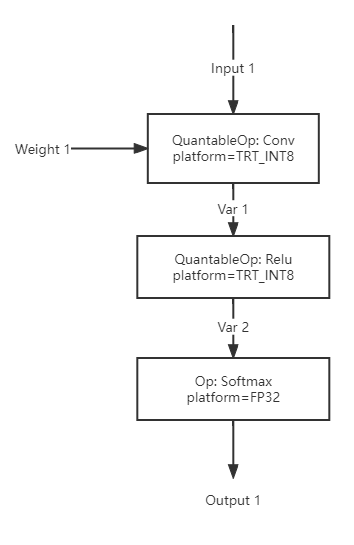 |
| 129 | |
| 130 | 在这里,我们的图中包含三个算子 Conv, Relu, Softmax,他们将按照拓扑次序被依次执行。PPQ 的执行引擎会在执行完 Conv 算子后,将 Conv 算子的结果暂存于 Var 1 中,供 Relu 算子取用。 |
| 131 | 而在执行完 Relu 算子后,PPQ 执行引擎则会及时地释放 Var 1 中暂存的数据,因为他们不会被其他算子取用,而且也不是网络的输出 Variable。在每一次推理过后,PPQ 还会清空网络中所有的暂存变量以释放显存。 |
| 132 | 下面的代码段展示了一个非量化算子的执行逻辑: |
| 133 |
no outgoing calls
no test coverage detected