hub / github.com/OpenBoardView/OpenBoardView
github.com/OpenBoardView/OpenBoardView @10.0.0
Chat with this repo
552 symbols
882 edges
124 files
47 documented · 9%
What it actually does AI analysis from the code graph — generated when you open this
loading…
README
Open Board Viewer 
Linux SDL/ImGui edition software for viewing .brd files, intended as a drop-in replacement for the "Test_Link" software and "Landrex".
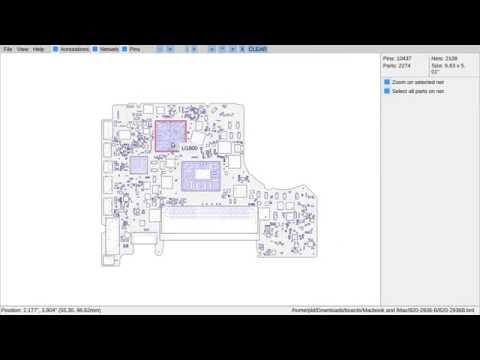


Features
- Annotations (per board database file)
- Part and pin sizes better represented
- Better outlining of irregular objects (such as connectors)
- Drag and drop
- Recently used file history
- Non-orthagonally orientated caps/resistors/diodes now drawn more realistically
- Adjustable DPI (for working on 2K/4K screens)
- Works with multiple concurrent instances
TODO
- Decode more board formats
- Compound project/file format
Prerequisites
macOS
$ brew install cmake sdl2
If you get the following error after running build.sh:
urllib.error.URLError: <urlopen error [SSL: CERTIFICATE_VERIFY_FAILED] certificate verify failed: unable to get local issuer certificate (_ssl.c:997)>
Run the script at /Applications/Python3.x/Install Certificates.command.
Ubuntu
For Ubuntu developers, you'll need the following packages at a minimum;
$ apt-get install git build-essential cmake libsdl2-dev libgtk-3-dev
Fedora
For Fedora, you will need the following packages at a minimum;
$ dnf install @development-tools

$ dnf install SDL2-devel gtk3-devel fontconfig-devel cmake
Installation
- Clone the project
$ git clone --recursive 'https://github.com/OpenBoardView/OpenBoardView'
- Build it
$ ./build.sh
- Sign it (skip if you're not on running macOS)
$ codesign --force --deep --sign - ./openboardview.app
- Run it!
$ ./bin/openboardview
...or...
$ ./openboardview.sh
...or...
$ open ./openboardview.app
Usage
-
Ctrl-O: Open file select dialog
-
w/a/s/d: pan viewport over board
- x: Reset zoom and center
- Mouse scroll, -/=: Zoom out/in
- Mouse click-hold-drag, Numeric pad up/down/left/right: pan viewport over board
- Numeric pad +/-: zoom board
- Numeric pad 5: Reset zoom and center
- Space, Middle mouse click: Flip board
- R/./Numpad-Del: Rotate clockwise
-
,/Numpad-Ins: Rotate counter-clockwise
-
/, Ctrl-F: Search
-
ESC: Clear search results and selected parts
-
p: Toggle pin display
-
m: Mirror board across Y-axis
-
L: Show net list
- K: Show part list
Core symbols most depended-on inside this repo
DPIcalled by 141
src/openboardview/GUI/DPI.cpp
WriteBool
called by 41
src/openboardview/confparse.cpp
ParseHex
called by 38
src/openboardview/confparse.cpp
WriteHex
called by 38
src/openboardview/confparse.cpp
clear
called by 37
src/openboardview/GUI/Preferences/BoardSettings/PDFFile.cpp
read_uint32_t
called by 33
src/openboardview/FileFormats/XZZPCBFile.cpp
isPressed
called by 33
src/openboardview/UI/Keyboard/KeyBinding.cpp
RightAlignedText
called by 32
src/openboardview/GUI/widgets.cpp
Shape
Languages
C++99%
Ruby1%
C1%
Modules by API surface
src/openboardview/BoardView.cpp59 symbols
src/sqlite3/sqlite3.h40 symbols
src/openboardview/FileFormats/GenCADFile.cpp25 symbols
src/openboardview/Board.h23 symbols
src/openboardview/FileFormats/XZZPCBFile.cpp19 symbols
src/openboardview/confparse.cpp14 symbols
src/openboardview/Renderers/ImGuiRendererSDL.cpp14 symbols
src/openboardview/PDFBridge/PDFBridgeSumatra.cpp14 symbols
src/openboardview/FileFormats/BRDFileBase.h14 symbols
src/openboardview/FileFormats/FZFile.cpp12 symbols
src/openboardview/GUI/Image.cpp9 symbols
src/openboardview/GUI/BackgroundImage.cpp9 symbols
For agents
$ claude mcp add OpenBoardView \
  -- python -m otcore.mcp_server <graph>