github.com/OpenAtomFoundation/pikiwidb @v3.5.7
Chat with this repoBrowse by type
What it actually does AI analysis from the code graph — generated when you open this
README



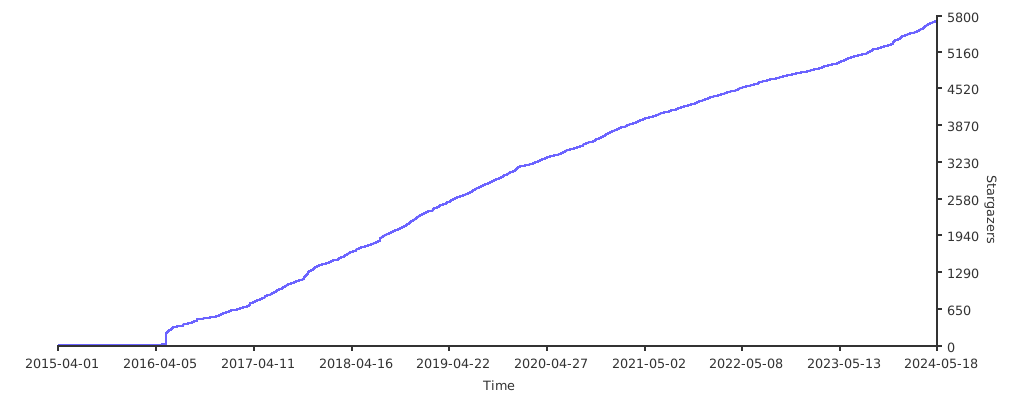
| Stargazers Over Time | Contributors Over Time |
|---|---|
 |
Introduction中文
Pika is a high-performance, large-capacity, multi-tenant, data-persistent elastic KV data storage system using RocksDB as the storage engine. It is fully compatible with the Redis protocol and supports its commonly used data structures, such as string/hash/list/zset/set/geo/hyperloglog/pubsub/bitmap/stream, etc. Redis Interface.
When Redis's in-memory usage exceeds 16GiB, it faces problems such as limited memory capacity, single-threaded blocking, long startup recovery time, high memory hardware costs, easily filled buffers, and high switching costs when one master and multiple replicas fail. The emergence of Pika is not to replace Redis but to complement it. Pika strives to completely comply with the Redis protocol, inherit Redis's convenient operation and maintenance design, and solve the bottleneck problem of Redis running out of memory capacity once the data volume becomes huge by using persistent storage. Additionally, Pika can support master-slave mode using the slaveof command, and it also supports full and incremental data synchronization.
Pika can be deployed in a single-machine master-slave mode (slaveof) or in a Codis cluster mode, allowing for simple scaling and shrinking. Migration from Redis to Pika can be smoothly executed by tools.
Pika Features
- Protocol Compatibility: Fully compatible with the Redis protocol, emphasizing high performance, large capacity, low cost, and scalability.
- Data Structures: Supports Redis's common data structures, including String, Hash, List, Zset, Set, Geo, Hyperloglog, Pubsub, Bitmap, Stream, ACL, etc.
- Cold and Hot Data: Caches hot data and persistently stores the full data in RocksDB, implementing a hierarchical storage of cold and hot data.
- High Capacity: Compared to Redis's in-memory storage, Pika supports data volumes in the hundreds of gigabytes, significantly reducing server resource consumption and enhancing data reliability.
- Deployment Modes: Supports single-machine master-slave mode (slaveof) and Codis cluster mode, making scaling and shrinking simple.
- Easy Migration: Smooth migration from Redis to Pika without modifying code.
- Convenient Operation and Maintenance: Comprehensive operation and maintenance command documentation.
Pika Storage Engine Architecture
- Supports multiple platforms: CentOS, Ubuntu, macOS
- Multi-threaded model
- Based on the RocksDB storage engine
- Multiple granularity data caching model
Deployment Modes
1. Master-Slave Mode
- Architecture similar to Redis
- Good compatibility with Redis protocol and data structures
- Each data structure uses a separate RocksDB instance
- Master-slave adopts binlog asynchronous replication

2. Distributed Cluster Mode
- Adopts Codis architecture, supports multiple groups
- Each group forms a master-slave set
- Elastic scaling based on groups

Pika User Showcase
 |
 |
 |
 |
 |
 |
 |
 |
 |
 |
 |
 |
 |
 |
 |
 |
 |
 |
 |
 |
Pika has been widely adopted by various companies for internal deployments, demonstrating its scalability and reliability. Some notable usage instances include:
- 360 Company: Internal deployment with a scale of 10,000+ instances, each having a data volume of 1.8TB.
- Weibo: Internal deployment with 10,000+ instances.
- Ximalaya(Xcache): 6,000+ instances with a massive data volume exceeding 120TB.
- Getui (个推) Company: Internal deployment involving 300+ instances, with a cumulative data volume surpassing 30TB.
Additionally, Pika is utilized by companies such as Xunlei, Xiaomi, Zhihu, New Oriental Education & Technology Group (好未来), Kuaishou, Sohu, Meituan, Maimai, and more. For a comprehensive list of users, you can refer to the official list provided by the Pika project.
These deployments across a diverse range of companies and industries underscore Pika's adaptability and effectiveness in handling large-scale, high-volume data storage requirements.
Getting Started with Pika
1. Binary Package Installation
Users can directly download the latest binary version package from releases.
2. Compilation from Source
-
2.1 Supported Platforms
-
Linux - CentOS
- Linux - Ubuntu
-
macOS(Darwin)
-
2.2 Required Library Software
-
gcc g++ supporting C++17 (version >= 9)
- make
- cmake (version >= 3.18)
- autoconf
-
tar
-
2.3 Compilation Process
-
2.3.1. Get the source code
bash git clone https://github.com/OpenAtomFoundation/pika.git -
2.3.2. Switch to the latest release version
bash git tag # Check the latest release tag (e.g., v3.4.1) git checkout TAG # Switch to the latest version (e.g., git checkout v3.4.1) -
2.3.3. Execute compilation
If the machine's gcc version is less than 9, especially on CentOS6 or CentOS7, you need to upgrade the gcc version first. Execute the following commands:
bash
  sudo yum -y install centos-release-scl
  sudo yum -y install devtoolset-9-gcc devtoolset-9-gcc-c++
  scl enable devtoolset-9 bash
For the initial compilation, it is recommended to use the build script build.sh, which checks if the required software is available on the local machine.
bash
  ./build.sh
Note: The compiled files will be saved in the output directory.
Pika is compiled by default in release mode, which does not support debugging. If debugging is needed, compile in debug mode.
bash
  rm -rf output/
  cmake -B output -DCMAKE_BUILD_TYPE=Debug
  cd output && make
Other components, such as codis, can also be compiled using build.sh.
```bash # Compile codis, default target, build-all ./build.sh codis
# Compile codis, but only build codis-proxy ./build.sh codis codis-proxy
```
-
2.4 Start Pika
bash
    ./output/pika -c ./conf/pika.conf
-
2.5 Clear Compiled Results
If you need to clear the compilation content, you can choose one of the following methods based on the situation:
Method 1: Clean only the current compilation content
bash
    cd output && make clean
Method 2: Completely recompile
bash
    rm -rf output # regenerate cmake
-
2.6 Pika Development Debugging
Setting up Pika Development Environment with CLion
3. Containerization
-
3.1 Running with Docker
Modify the following configuration items of conf/pika.conf file:
log-path : /data/log/
  db-path : /data/db/
  db-sync-path : /data/dbsync/
  dump-path : /data/dump/
And then execute the following statement to start pika in docker: ```bash docker run -d \ --restart=always \ -p 9221:9221 \ -v "$(pwd)/conf":"/pika/conf" \ -v "/tmp/pika-data":"/data" \ pikadb/pika:v3.3.6
redis-cli -p 9221 "info" ```
-
3.2 Build Custom Image
If you want to build your own image, we provide a script build_docker.sh to simplify the process.
This script accepts several optional parameters:
-t tag: Specify the Docker tag for the image. By default, the tag is pikadb/pika:.-p platform: Specify the platform for the Docker image. Options include all, linux/amd64, linux/arm, linux/arm64. By default, it uses the current docker platform setting.--proxy: Use a proxy to download packages to speed up the build process. The build will use Alibaba Cloud's image source.--help: Display help information.
Here is an example usage:
bash
  ./build_docker.sh -p linux/amd64 -t private_registry/pika:latest
-
3.3 Running with docker-compose
docker-compose.yaml
  pikadb:
    image: pikadb/pika:lastest
    container_name: pikadb
    ports:
      - "6379:9221"
    volumes:
      - ./data/pika:/pika/log
      # Specify the configuration file path. If you need to specify a configuration file, specify it here.
      # Note: pika.conf should be in the ./deploy/pika directory
      #- ./deploy/pika:/pika/conf
      - ./data/pika/db:/pika/db
      - ./data/pika/dump:/pika/dump
      - ./data/pika/dbsync:/pika/dbsync
    privileged: true
    restart: always
Performance test
- Thanks deep011 for providing performance test results.
Note: The test results were obtained under specific conditions and scenarios, and may not represent the performance in all environments and scenarios. They are for reference only.
We recommend that you conduct detailed testing of Pika in your own environment based on the usage scenario to assess whether Pika meets your requirements.
1. Test environment
- CPU Model: Intel(R) Xeon(R) CPU E5-2690 v4 @ 2.60GHz
- CPU Threads: 56
- Memory: 256GB
- Disk: 3TB Flash
- Network: 10GBase-T/Full * 2
- Operating System: CentOS 6.6
- Pika Version: 2.2.4
2. Benchmarking Tool
3. Test Cases
3.1 Case 1
-
Test Objective
Evaluate the upper limit of QPS for Pika under different worker thread counts.
-
Test Conditions
-
Pika Data Size: 800GB
- Value: 128 bytes
-
CPU not bound
-
Test Results
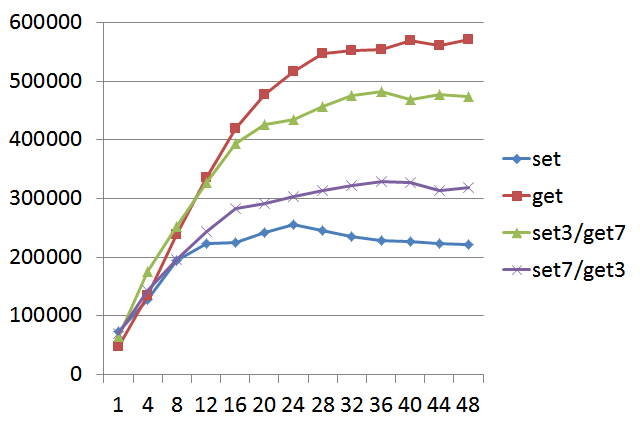
Note: The x-axis represents Pika thread count, and the y-axis represents QPS with a value size of 128 bytes. "set3/get7" indicates 30% set and 70% get operations.
-
Case One Conclusion
From the above graph, it can be observed that setting Pika's worker thread count to 20-24 is more cost-effective.
3.2 Case 2
-
Test Objective
Evaluate the RTT performance of Pika with the optimal worker thread count (20 threads).
-
Test Conditions
-
Pika Data Size: 800GB
-
Value: 128 bytes
-
Test Results
```c ====== GET ====== 10000000 requests completed in 23.10 seconds 200 parallel clients 3 bytes payload keep alive: 1 99.89% <= 1 milliseconds 100.00% <= 2 milliseconds 100.00% <= 3 milliseconds 100.00% <= 5 milliseconds 100.00% <= 6 milliseco
Extension points exported contracts — how you extend this code
Core symbols most depended-on inside this repo
Shape
Languages
Modules by API surface
For agents
$ claude mcp add pikiwidb \
  -- python -m otcore.mcp_server <graph>