github.com/NullPrivate/NullPrivate @v1.4.5
Chat with this repoWhat it actually does AI analysis from the code graph — generated when you open this
README
<img alt="AdGuard Home" src="https://github.com/NullPrivate/NullPrivate/raw/v1.4.5/doc/nullprivate_lightmode.svg" width="300px">
Privacy protection center for you and your devices
Free and open source, powerful network-wide ads & trackers blocking DNS server.
AdGuard.com | Wiki | Reddit | Twitter | Telegram




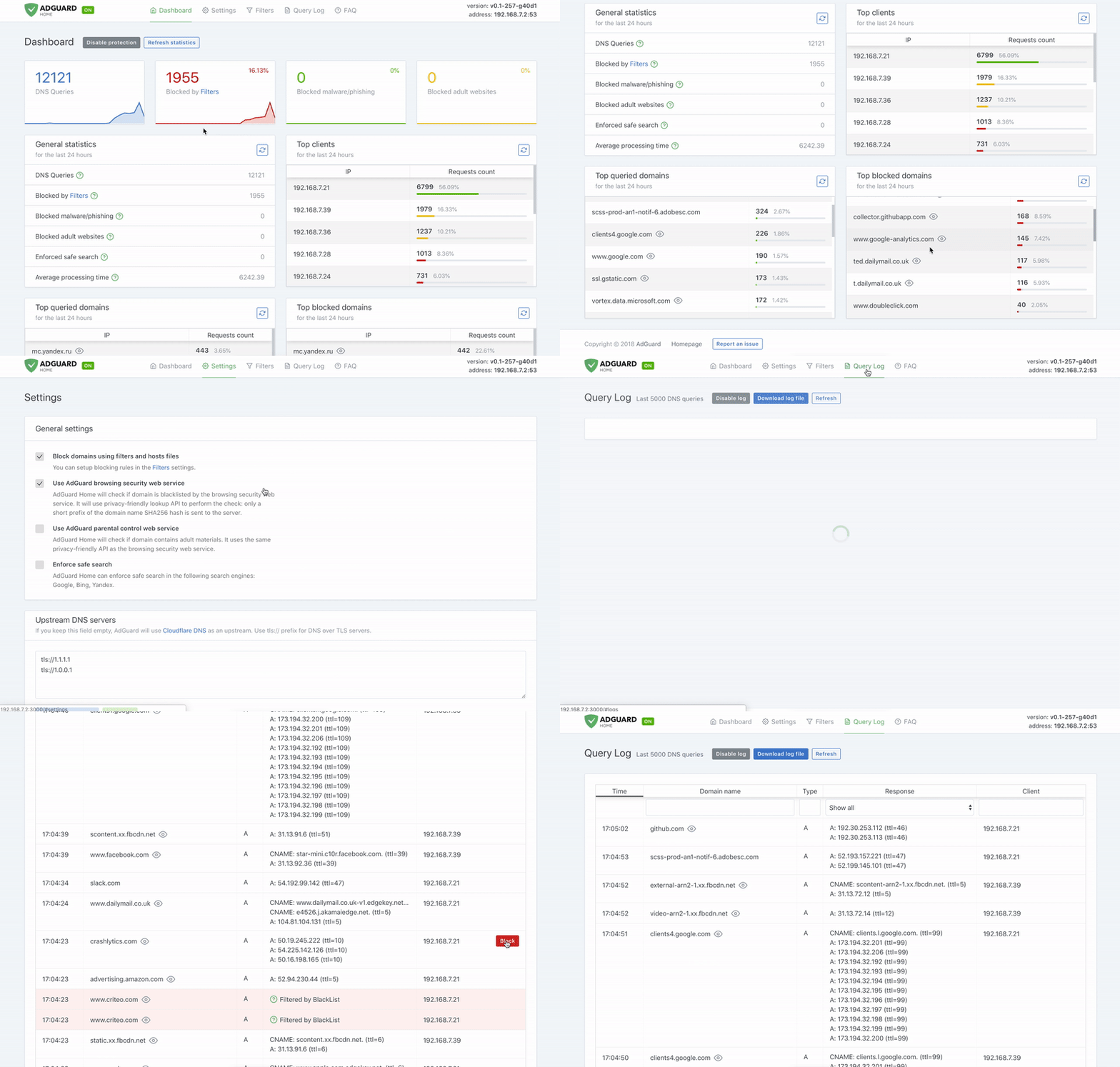
AdGuard Home is a network-wide software for blocking ads and tracking. After you set it up, it'll cover ALL your home devices, and you don't need any client-side software for that.
It operates as a DNS server that re-routes tracking domains to a “black hole”, thus preventing your devices from connecting to those servers. It's based on software we use for our public AdGuard DNS servers, and both share a lot of code.
- Getting Started
- Comparing AdGuard Home to other solutions
- How to build from source
- Contributing
- Projects that use AdGuard Home
- Acknowledgments
- Privacy
Getting Started
Automated install (Linux/Unix/MacOS/FreeBSD/OpenBSD)
To install with curl run the following command:
curl -s -S -L https://raw.githubusercontent.com/AdguardTeam/AdGuardHome/master/scripts/install.sh | sh -s -- -v
To install with wget run the following command:
wget --no-verbose -O - https://raw.githubusercontent.com/AdguardTeam/AdGuardHome/master/scripts/install.sh | sh -s -- -v
To install with fetch run the following command:
fetch -o - https://raw.githubusercontent.com/AdguardTeam/AdGuardHome/master/scripts/install.sh | sh -s -- -v
The script also accepts some options:
-c <channel>to use specified channel;-rto reinstall AdGuard Home;-uto uninstall AdGuard Home;-vfor verbose output.
Note that options -r and -u are mutually exclusive.
Alternative methods
Manual installation
Please read the Getting Started article on our Wiki to learn how to install AdGuard Home manually, and how to configure your devices to use it.
Docker
You can use our official Docker image on Docker Hub.
Snap Store
If you're running Linux, there's a secure and easy way to install AdGuard Home: get it from the Snap Store.
Guides
See our Wiki.
API
If you want to integrate with AdGuard Home, you can use our REST API. Alternatively, you can use this python client, which is used to build the AdGuard Home Hass.io Add-on.
Comparing AdGuard Home to other solutions
How is this different from public AdGuard DNS servers?
Running your own AdGuard Home server allows you to do much more than using a public DNS server. It's a completely different level. See for yourself:
-
Choose what exactly the server blocks and permits.
-
Monitor your network activity.
-
Add your own custom filtering rules.
-
Most importantly, it's your own server, and you are the only one who's in control.
How does AdGuard Home compare to Pi-Hole
At this point, AdGuard Home has a lot in common with Pi-Hole. Both block ads and trackers using the so-called “DNS sinkholing” method and both allow customizing what's blocked.
[!NOTE] We're not going to stop here. DNS sinkholing is not a bad starting point, but this is just the beginning.
AdGuard Home provides a lot of features out-of-the-box with no need to install and configure additional software. We want it to be simple to the point when even casual users can set it up with minimal effort.
[!NOTE] Some of the listed features can be added to Pi-Hole by installing additional software or by manually using SSH terminal and reconfiguring one of the utilities Pi-Hole consists of. However, in our opinion, this cannot be legitimately counted as a Pi-Hole's feature.
| Feature | AdGuard Home | Pi-Hole |
|---|---|---|
| Blocking ads and trackers | ✅ | ✅ |
| Customizing blocklists | ✅ | ✅ |
| Built-in DHCP server | ✅ | ✅ |
| HTTPS for the Admin interface | ✅ | Kind of, but you'll need to manually configure lighttpd |
| Encrypted DNS upstream servers (DNS-over-HTTPS, DNS-over-TLS, DNSCrypt) | ✅ | ❌ (requires additional software) |
| Cross-platform | ✅ | ❌ (not natively, only via Docker) |
| Running as a DNS-over-HTTPS or DNS-over-TLS server | ✅ | ❌ (requires additional software) |
| Blocking phishing and malware domains | ✅ | ❌ (requires non-default blocklists) |
| Parental control (blocking adult domains) | ✅ | ❌ (requires non-default blocklists) |
| Force Safe search on search engines | ✅ | ❌ |
| Per-client (device) configuration | ✅ | ✅ |
| Access settings (choose who can use AGH DNS) | ✅ | ❌ |
| Running without root privileges | ✅ | ❌ |
How does AdGuard Home compare to traditional ad blockers
It depends.
DNS sinkholing is capable of blocking a big percentage of ads, but it lacks the flexibility and the power of traditional ad blockers. You can get a good impression about the difference between these methods by reading this article, which compares AdGuard for Android (a traditional ad blocker) to hosts-level ad blockers (which are almost identical to DNS-based blockers in their capabilities). This level of protection is enough for some users.
Additionally, using a DNS-based blocker can help to block ads, tracking and analytics requests on other types of devices, such as SmartTVs, smart speakers or other kinds of IoT devices (on which you can't install traditional ad blockers).
Known limitations
Here are some examples of what cannot be blocked by a DNS-level blocker:
-
YouTube, Twitch ads;
-
Facebook, Twitter, Instagram sponsored posts.
Essentially, any advertising that shares a domain with content cannot be blocked by a DNS-level blocker.
Is there a chance to handle this in the future? DNS will never be enough to do this. Our only option is to use a content blocking proxy like what we do in the standalone AdGuard applications. We're going to bring this feature support to AdGuard Home in the future. Unfortunately, even in this case, there still will be cases when this won't be enough or would require quite a complicated configuration.
How to build from source
Prerequisites
Run make init to prepare the development environment.
You will need this to build AdGuard Home:
Building
Open your terminal and execute these commands:
git clone https://github.com/AdguardTeam/AdGuardHome
cd AdGuardHome
make
[!WARNING] The non-standard
-jflag is currently not supported, so building withmake -j 4or setting yourMAKEFLAGSto include, for example,-j 4is likely to break the build. If you do have yourMAKEFLAGSset to that, and you don't want to change it, you can override it by runningmake -j 1.
Check the [Makefile][src-makefile] to learn about other commands.
Building for a different platform
You can build AdGuard Home for any OS/ARCH that Go supports. In order to do this, specify GOOS and GOARCH environment variables as macros when running make.
For example:
env GOOS='linux' GOARCH='arm64' make
or:
make GOOS='linux' GOARCH='arm64'
Preparing releases
You'll need [snapcraft] to prepare a release build. Once installed, run the following command:
make build-release CHANNEL='...' VERSION='...'
See the [build-release target documentation][targ-release].
Docker image
Run make build-docker to build the Docker image locally (the one that we publish to DockerHub). Please note, that we're using [Docker Buildx][buildx] to build our official image.
You may need to prepare before using these builds:
- (Linux-only) Install Qemu:
sh
  docker run --rm --privileged multiarch/qemu-user-static --reset -p yes --credential yes
- Prepare the builder:
sh
  docker buildx create --name buildx-builder --driver docker-container --use
See the [build-docker target documentation][targ-docker].
Debugging the frontend
When you need to debug the frontend without recompiling the production version ever
Extension points exported contracts — how you extend this code
Manager (Interface)Core symbols most depended-on inside this repo
ErrorfShape
Languages
Modules by API surface
Datastores touched
For agents
$ claude mcp add NullPrivate \
  -- python -m otcore.mcp_server <graph>