hub / github.com/NeverDecaf/chromium-web-store
github.com/NeverDecaf/chromium-web-store @v1.5.5.3 sqlite
46 symbols
127 edges
15 files
0 documented · 0%
README
chromium-web-store
This extension brings the following functionality to ungoogled-chromium (and other forks that lack web store support):
- Allows installing extensions directly from chrome web store.
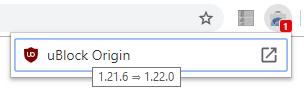
- Automatically checks for updates to your installed extensions and displays them on the badge.
Read this first
- If you are using
ungoogled-chromium: You must change the flagchrome://flags/#extension-mime-request-handlingtoAlways prompt for install. - If you are NOT using
ungoogled-chromium: Ensure the following option is checked: Extension Options (chrome://extensions/?options=ocaahdebbfolfmndjeplogmgcagdmblk) > Advanced >Always download CRX files - If you are seeing
CRX_REQUIRED_PROOF_MISSINGorApps, extensions and user scripts cannot be added from this websiteerrors, please be sure you have followed the instructions above before opening an issue. - Some extensions may not update until you restart your browser, see #4.
- If you do not see the
Add to Chromiumbutton in the web store, you can use the context menu option instead: Right click >Add to Chromium.
Usage
- Pin the Chromium Web Store badge in your browser's toolbar. (Badges are hidden by default)
- The badge will show a red number indicating available updates.
- Click on the badge, then click the name of any extension to install the latest version.
- This method will work for non-webstore extensions as well if they support it, including chromium web store itself. (See the section at the bottom of this readme if you are an extension developer and don't have your extension listed in the chrome web store.)
Installation
- Go to
chrome://flagsand search for the#extension-mime-request-handlingflag and set it toAlways prompt for install. - Download the .crx from Releases (direct link, you should be prompted to install the extension.
If the above steps do not work for you, try one of the following alternative methods:
Installation (Alternative #1)
- Go to
chrome://extensionsand enable developer mode (toggle in top right). - Download the .crx from Releases and drag-and-drop it onto the
chrome://extensionspage.
Installation (Alternative #2)
- Download the .crx from Releases and extract the contents to a folder.
- Visit
chrome://extensions/and turn on developer mode (toggle in top right). - Click
Load unpackedand select the directory you extracted the crx to.
Setup Video
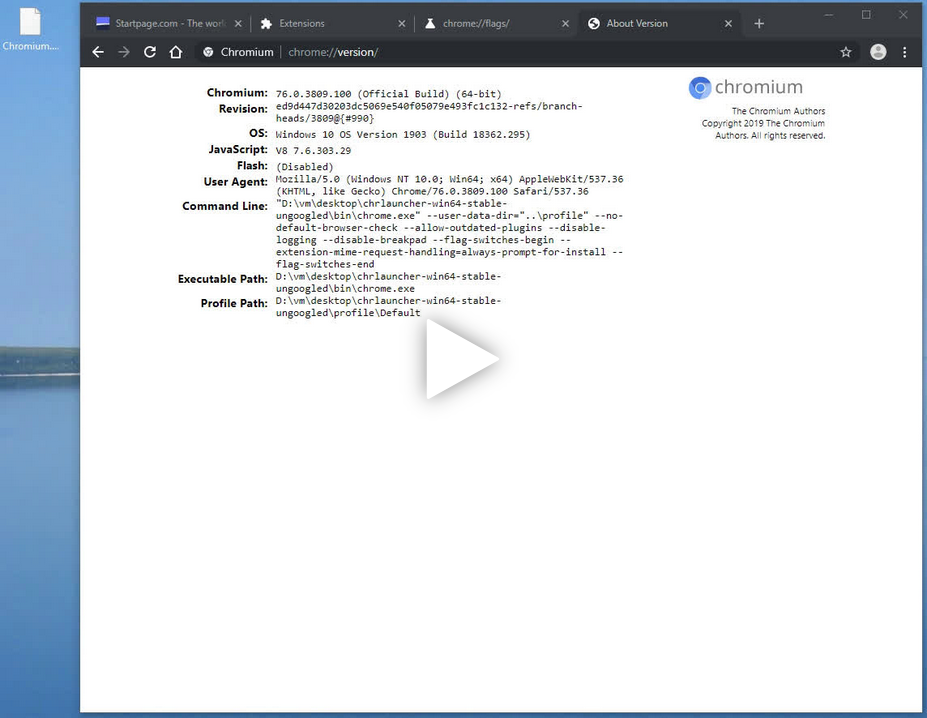 [Streamable Mirror] (Thanks @woolyss for creating & hosting this video.)
Options Notes
- Right click the badge and choose
Optionsfrom the context menu or access them viachrome://extensions. - "Web Store" extensions refer to any that were obtained from the Chrome Web Store, despite displaying
Source: Not from Chrome Web Storewhen checking extension details. - Please read the note in Release 1.4 if you wish to use the import/export feature.
If you wish to help with localization, follow these steps:
- Create a directory in
_localesnamed any supported locale code. - Copy
_locales/en/messages.jsonto your newly created directory and edit the "message" fields as necessary, you don't need to change anything else. - Submit a PR or open an issue with your translation and I will merge it.
If you are a chrome extension developer...
and do not have your extension listed in the Chrome Web Store, you can still enable updates via chromium-web-store by hosting an update manifest file; see updates.xml in this repo for an example. You must also specify a url to access this file in your extension's manifest.json under the update_url field; again, see manifest.json in this repo for an example.
For deployment
See #28 and managed_storage.json
Core symbols most depended-on inside this repo
getExtensionIdcalled by 9
src/scripts/util.js
promptInstall
called by 9
src/scripts/util.js
promptInstall
called by 7
en_nolocale/scripts/util.js
buildExtensionUrl
called by 6
src/scripts/util.js
getExtensionId
called by 6
en_nolocale/scripts/util.js
msgHandler
called by 5
src/scripts/background.js
msgHandler
called by 5
en_nolocale/scripts/background.js
p
called by 4
src/scripts/util.js
Shape
Languages
TypeScript93%
Python7%
Modules by API surface
src/scripts/util.js14 symbols
en_nolocale/scripts/util.js13 symbols
src/scripts/background.js4 symbols
en_nolocale/scripts/background.js4 symbols
src/scripts/inject.js3 symbols
untranslated.py2 symbols
src/scripts/localize.js2 symbols
src/scripts/options.js1 symbols
replace_i18n.py1 symbols
en_nolocale/scripts/options.js1 symbols
en_nolocale/scripts/inject.js1 symbols
For agents
$ claude mcp add chromium-web-store \
  -- python -m otcore.mcp_server <graph>