github.com/Neo23x0/Raccine @1.4.4
Chat with this repoBrowse by type
What it actually does AI analysis from the code graph — generated when you open this
README

Raccine
A Simple Ransomware Protection
Why
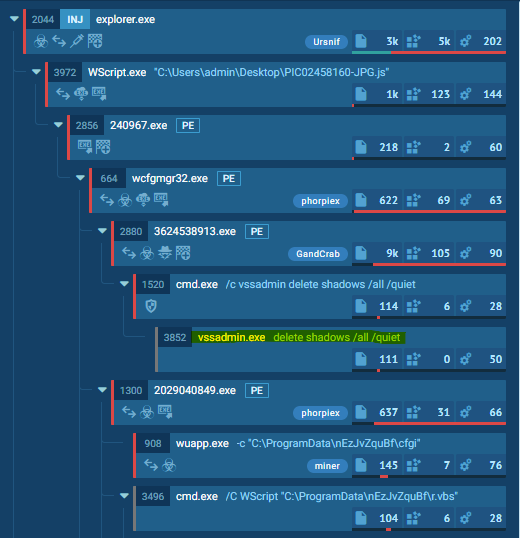
We see ransomware delete all shadow copies using vssadmin pretty often. What if we could just intercept that request and kill the invoking process? Let's try to create a simple vaccine.
How it works
We register a debugger for vssadmin.exe (and wmic.exe), which is our compiled raccine.exe. Raccine is a binary, that first collects all PIDs of the parent processes and then tries to kill all parent processes.
Advantages:
- The method is rather generic
- We don't have to replace a system file (
vssadmin.exeorwmic.exe), which could lead to integrity problems and could break our raccination on each patch day - Flexible YARA rule scanning of command line params for malicious activity
- The changes are easy to undo
- Runs on Windows 7 / Windows 2008 R2 or higher
- No running executable or additional service required (agent-less)
Disadvantages / Blind Spots:
- The legitimate use of
vssadmin.exe delete shadows(or any other blacklisted combination) isn't possible anymore - It even kills the processes that tried to invoke
vssadmin.exe delete shadows, which could be a backup process - This won't catch methods in which the malicious process isn't one of the processes in the tree that has invoked
vssadmin.exe(e.g. viaschtasks)
The Process
- Invocation of
vssadmin.exe(andwmic.exe) gets intercepted and passed toraccine.exeas debugger (vssadmin.exe delete shadowsbecomesraccine.xe vssadmin.exe delete shadows) - We then process the command line arguments and look for malicious combinations using Yara rules.
- If no malicious combination could be found, we create a new process with the original command line parameters.
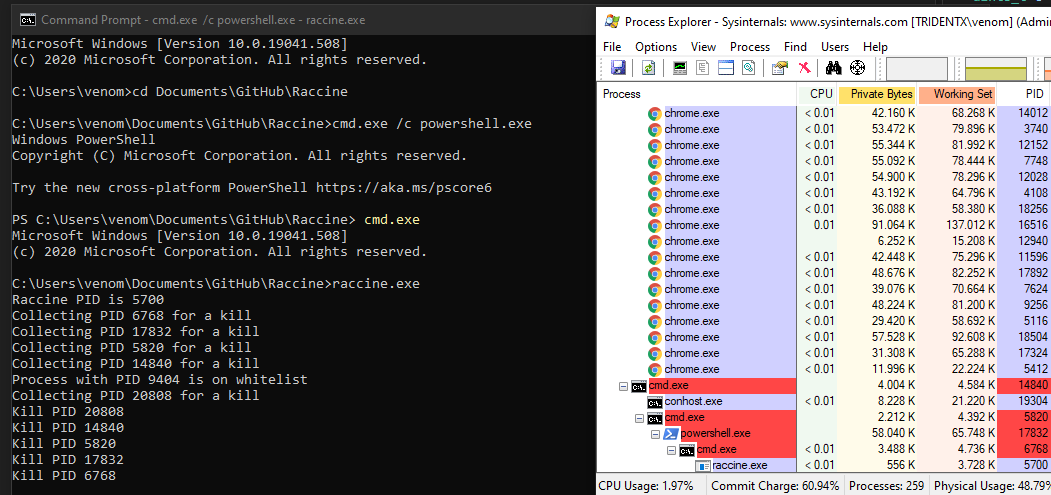
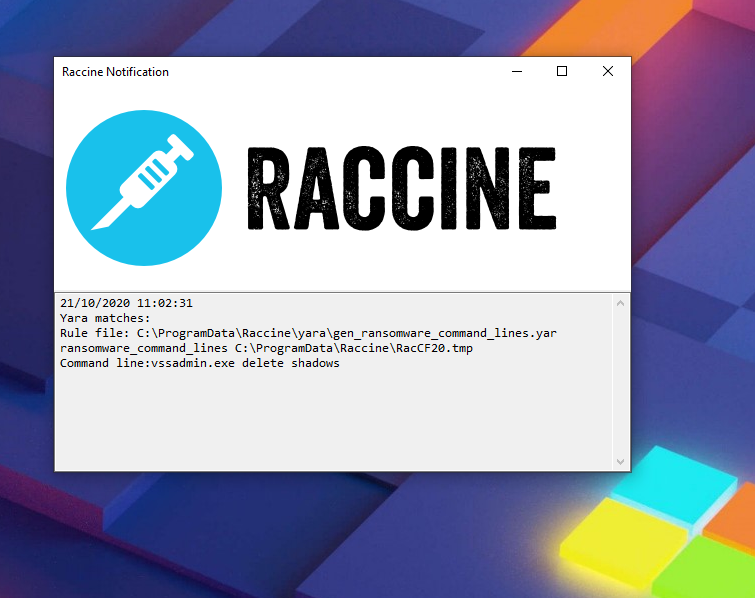
- If a malicious combination could be found, we collect all PIDs of parent processes and the start killing them (this should be the malware processes as shown in the screenshots above). Raccine shows a command line window with the killed PIDs for 5 seconds, logs it to the Windows Eventlog and then exits itself.
Malicious combinations:
deleteandshadows(vssadmin, diskshadow)resizeandshadowstorage(vssadmin)deleteandshadowstorage(vssadmin)deleteandshadowcopy(wmic)deleteandcatalogand-quiet(wbadmin)win32_shadowcopyor element from a list of encoded commands (powershell)recoveryenabled(bcedit)ignoreallfailures(bcedit)
Powershell list of encoded commands: JAB, SQBFAF, SQBuAH, SUVYI, cwBhA, aWV4I, aQBlAHgA and many more
Example
Emotet without Raccine - Link
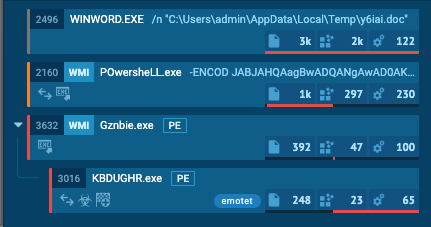
Emotet with Raccine - Link (ignore the process activity that is related to the Raccine installation)
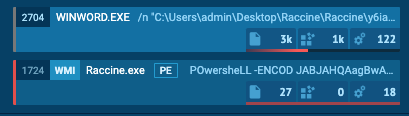
The infection gets nipped in the bud.
Warning !!!
USE IT AT YOUR OWN RISK!
You won't be able to run commands that use the blacklisted commands on a raccinated machine anymore until your apply the uninstall patch raccine-reg-patch-uninstall.reg. This could break various backup solutions that run that specific command during their work. It will not only block that request but kills all processes in that tree including the backup solution and its invoking process.
If you have a solid security monitoring that logs all process executions, you could check your logs to see if vssadmin.exe delete shadows, vssadmin.exe resize shadowstorage ... or the other blocked command lines are frequently or sporadically used for legitimate purposes in which case you should refrain from using Raccine.
Version History
- 0.1.0 - Initial version that intercepted & blocked all vssadmin.exe executions
- 0.2.0 - Version that blocks only vssadmin.exe executions that contain
deleteandshadowsin their command line and otherwise pass all parameters to a new process that invokes vssadmin with its original parameters - 0.2.1 - Removed
explorer.exefrom the whitelist - 0.3.0 - Supports the
wmicmethod callingdelete shadowcopy, no outputs for whitelisted process starts (avoids problems with wmic output processing) - 0.4.0 - Supports logging to the Windows Eventlog for each blocked attempt, looks for more malicious parameter combinations
- 0.4.1 - Statically linked binaries
- 0.4.2 - Bugfixes provided by John Lambert
- 0.5.0 - Removed Eventlog logging (basic info was unnecessary; cuased higher complexity; can be achieved by process creation logging as well), support for wbadmin filtering
- 0.5.1 - Improvements by @JohnLaTwC
- 0.5.2 - Additional check for
delete shadowstorageby @JohnLaTwC, code review by @_hillu, application icon - 0.5.3 - Batch installer
- 0.6.0 - Additional checks for
bcdedit.exe /set {default} bootstatuspolicy ignoreallfailuresandbcdedit.exe /set {default} recoveryenabled no - 0.7.0 - Additional checks for
powershell.exeandwin32_shadowcopyor a list of encoded commands - 0.7.1 - Improvements by @JohnLaTwC
- 0.7.2 - Using abolsute paths in registry patches
- 0.8.0 - Creates a log file with all intercepted requests and actions performed
C:\ProgramData\Raccine_log.txt - 0.9.0 - Logs to Windows Eventlog by @JohnLaTwC
- 0.10.0 - Simulation mode only
- 0.10.1 - Fix for Simulation mode
- 0.10.2 - Includes
diskshadow.exe delete shadowscommand - 0.10.3-5 - Minor fixes and additions
- 1.0 BETA - GUI elements and YARA rule scanning of command line params
- 1.1 BETA - YARA rule matching with external variables, troubleshooting functions
- 1.2 BETA - Signature Updater
- 1.3 BETA - In-Memory YARA Scanning of invoking parent process
- 1.4 BETA - Full x86 support, moved static strings to YARA rules to avoid AV detections, Log of accepted executions, .NET Framework setup in installer
- 1.4.2 BETA - Exit code fix (pass through of exit code returned by the intercepted program), intercept taskkill.exe
Installation
Requirements
- VC++ Runtime for YARA scanning (Installer contains the setup package from https://aka.ms/vs/16/release/VC_redist.x64.exe)
- .NET Framework 4.5
- Internet access for the YARA rule updates
- Windows 7 / Windows 2008 R2 or higher
Both the Visual C++ Redistributable package and the .NET Framework will be automatically installed running install-raccine.bat.
Automatic Installation
- Download
Raccine.zipfrom the Release section - Extract it
- Run
raccine-installer.batas administrator
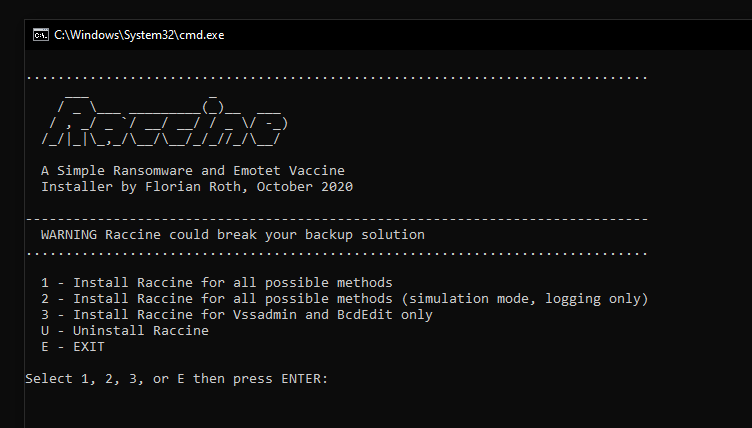
The batch installer includes an "uninstall" option.
Manual Uninstall
As Administrator do:
- Run
raccine-reg-patch-uninstall.reg - Remove
%ProgramFiles%\Raccineand `%ProgramData%\Raccine folders - Run
reg delete HKCU\Software\Raccine /F - Run
taskkill /F /IM RaccineSettings.exe - Run
reg delete "HKCU\SOFTWARE\Microsoft\Windows\CurrentVersion\Run" /V "Raccine Tray" /F - Run
schtasks /DELETE /TN "Raccine Rules Updater" /F
Updates
Program Upgrade
We recommend an uninstall and reinstall to upgrade. An uninstall removes all registry keys with configurations.
Signature Update
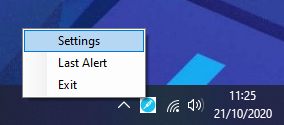
Raccine has an integrated signature-updater since version 1.2. This program named RaccineRulesSync.exe is configured to run once a day via scheduled task. You can run a signature update manually using the option in the tray icon menu.
YARA Matching
Since version 1.0, Raccine additionally uses YARA rules to determine if a process command line or parent process is malicious or not. Raccine uses 2 sets of rules for two different purposes.
./yara- rules that get applied to the command line with all parameters, e.g.WMIC.exe delete justatest./yara/in-memory- rules that get applied to process memory of the parent process of our intercepted process, e.g. ransomware.exe running our intercepted process vssadmin.exe
YARA External Variables
Since version 1.1 we pass a list of external variables into the YARA matching process to allow for much more complex and clever YARA rules that take attributes of the process and its parent into account.
| Variable | Description | Example Value |
|---|---|---|
| FromRaccine | true | |
| Name | Image file name | WMIC.exe |
| ExecutablePath | Full path to binary | C:\Windows\System32\wbem\WMIC.exe |
| CommandLine | Full command line with parameters | WMIC.exe delete justatest |
| Priority | Process priority | 32 |
| ParentName | Parent image file name | cmd.exe |
| ParentExecutablePath | Full path to parent executable | C:\Windows\System32\cmd.exe |
| ParentCommandLine | Full parent command line with parameters | C:\WINDOWS\system32\cmd.exe |
| ParentPriority | Parent process priority | 32 |
The matching process looks like this on the command line:
"C:\Program Files\Raccine\yara64.exe" -d FromRaccine="true" -d Name="WMIC.exe" -d ExecutablePath="C:\Windows\System32\wbem\WMIC.exe" -d CommandLine="WMIC.exe delete justatest" -d Priority=32 -d FromRaccine="true" -d ParentName="cmd.exe" -d ParentExecutablePath="C:\Windows\System32\cmd.exe" -d ParentCommandLine="'C:\WINDOWS\system32\cmd.exe' " -d ParentPriority=32 C:\ProgramData\Raccine\yarayara\mal_emotet.yar C:\ProgramData\Raccine\yara\Rac1C6A.tmp
The following listing shows an example YARA rule that makes use of the external variables in its coindition.
rule env_vars_test {
    condition:
        Name contains "WMIC.exe"
        and CommandLine contains "delete justatest"
        and ParentPriority >= 8
        and (
            ParentCommandLine contains "cmd"
            or ParentCommandLine contains "powershell"
        )
}
Deploy Configuration via GPO
The folder GPO includes Raccine.ADMX and Raccine.ADML. In deployment the Raccine.ADMX file goes in C:\Windows\PolicyDefinitions. The accompanying Raccine.ADML files goes in C:\Windows\PolicyDefinitions\en-US.
To use: Open GPEDIT.MSC > Computer Configuration > Administrative Templates > System > Raccine
After configuring the changes, you may need to bump gpo by running gpupdate.exe.
Logfile
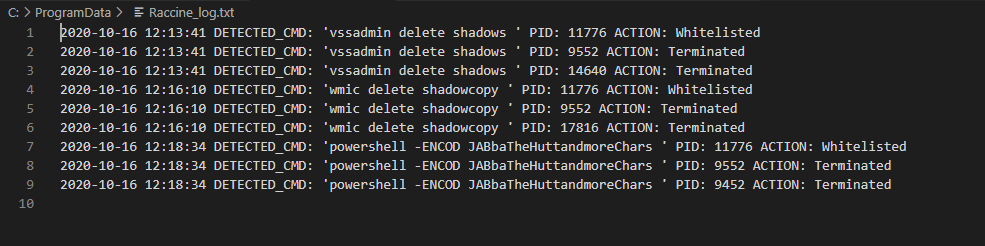
A logfile with all interceptions and actions taken is written to C:\ProgramData\Raccine\Raccine_log.txt
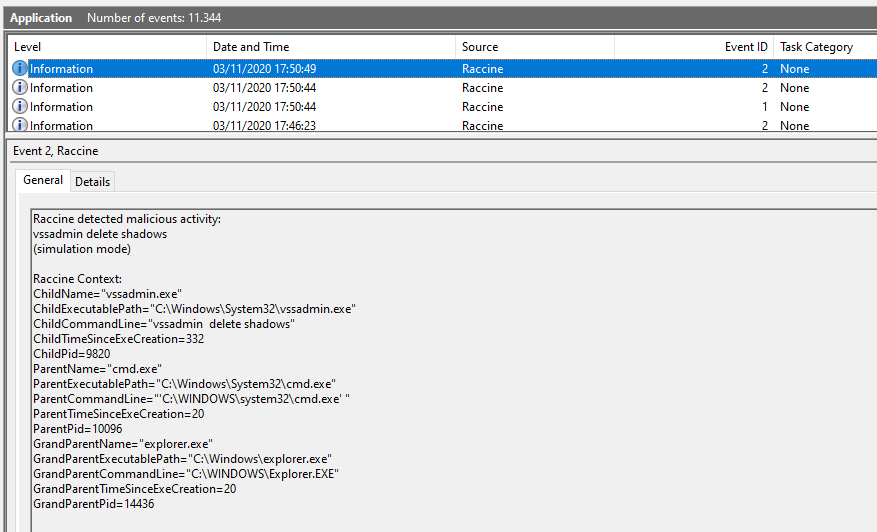
Windows Eventlog
An entry is generated by every blocking event in the Application eventlog.
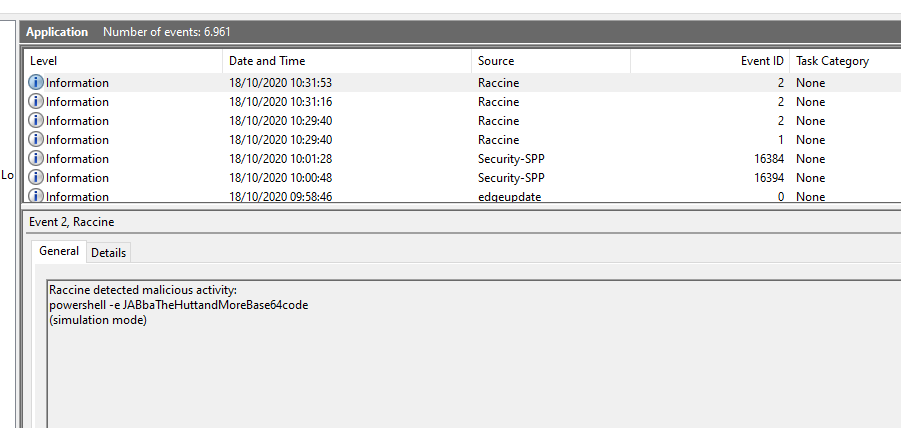
The IDs that Raccine generates
- EventId 1 - Setup activity
- EventId 2 - Malicious activity detected
- EventId 3 - Benign activity detected
Simulation Mode
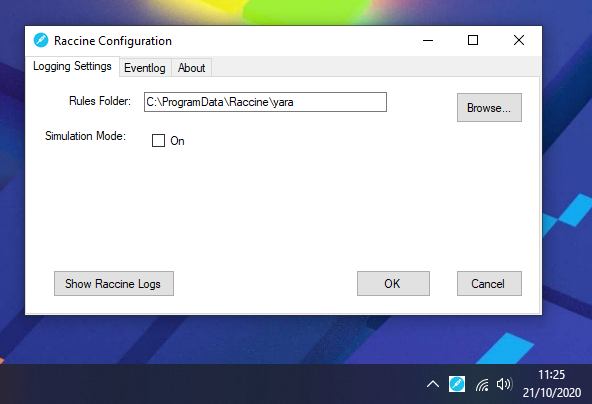
Since version 0.10.0, Raccine can be installed in "simulation mode", which activates all triggers, logs all actions but doesn't kill anything. This mode should be used in environments in which backup solutions or other legitimate software for a reasonable amount of time to check if Raccine would interfere with other software. The idea is to install Raccine in simulation mode, let it log for a week or month and then check the logs to see if it would have blocked legitimate software used in the organisation.
Screenshot
Run raccine.exe and watch the parent process tree die (screenshot of v0.1)
GUI
Available and required since version 1.
Pivot
In case that the Ransomware that your're currently handling uses a certain process name, e.g. taskdl.exe, you could just change the .reg patch to intercept calls to that name and let Raccine kill all parent processes of the invoking process tree.
Help Wanted
I'd like to extend Raccine but lack the C++ coding skills, especially o the Windows platform.
Help - My System is Broken
If anything happens to your installation, e.g. sudden error messages, broken services or programs that won't start anymore, run the file raccine-reg-patch-uninstall.reg in the reg-patches sub folder. This should bring everything back to normal.
After that your should also be able to run a full uninstallation using install-raccine.bat.
Other Info
The right pronounciation is "Rax-Een".
Credits
- Florian Roth @cyb3rops
- John Lambert @JohnLaTwC
- Eran Yom-Tov @eran_yom_tov
- Ollie Whitehouse @ollieatnccgroup
- Branislav
Core symbols most depended-on inside this repo
Shape
Languages
Modules by API surface
For agents
$ claude mcp add Raccine \
  -- python -m otcore.mcp_server <graph>