github.com/Nadrin/Quartz @v1.0.0
Chat with this repoBrowse by type
What it actually does AI analysis from the code graph — generated when you open this
README
Quartz
© 2018 - 2019 Michał Siejak (@Nadrin)
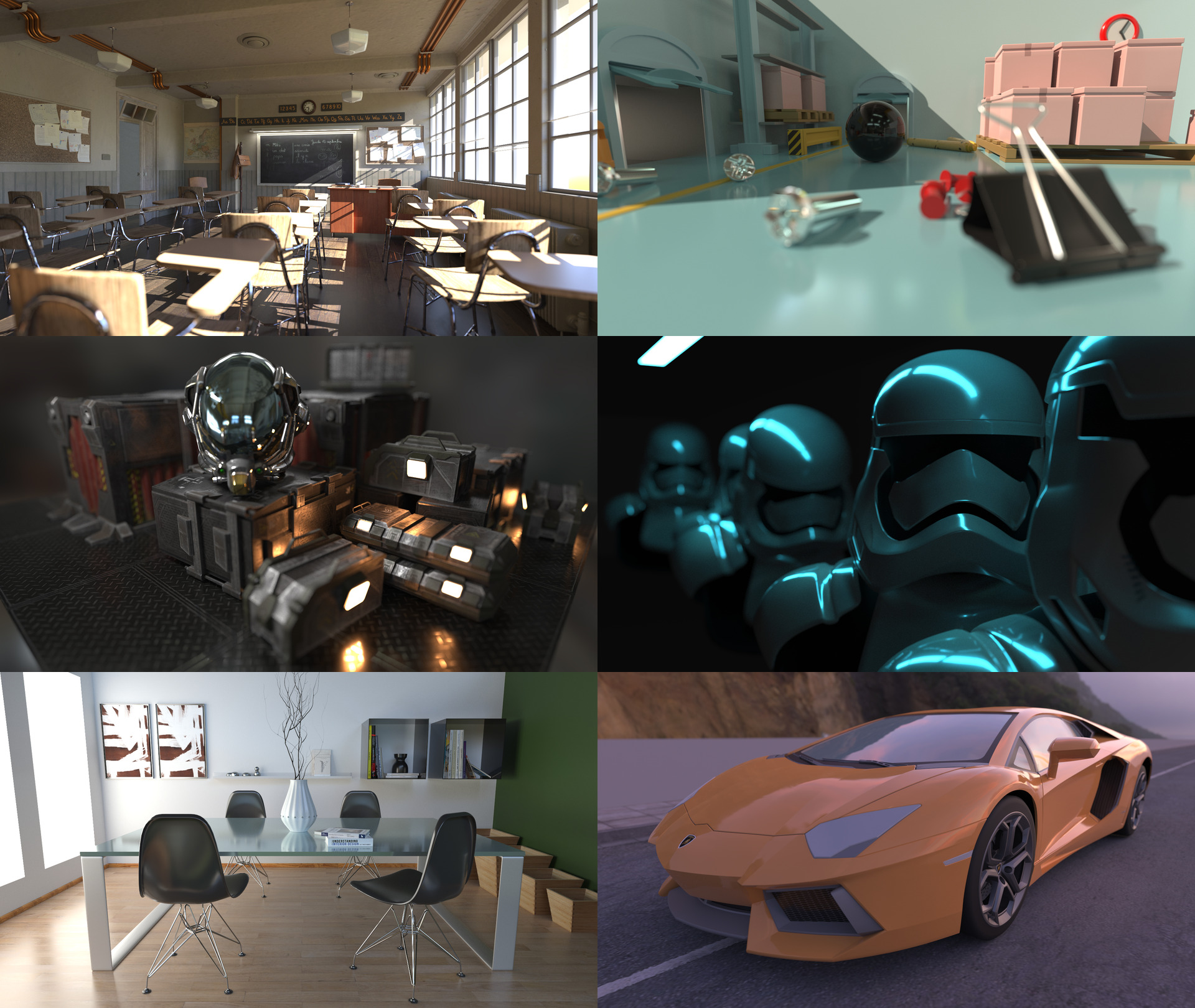
A physically based GPU path tracing renderer with a declarative, ES7-like, scene description language.
Powered by Qt 3D, NVIDIA RTX & Vulkan.
Overview
Quartz consists of several components:
- At its core is a raytracing aspect for Qt 3D implemented by the
Qt3DRaytracemodule. It provides both C++ and QML APIs for use in Qt 3D based applications and is a drop-in replacement forQt3DRender(rasterization-based rendering aspect). While not (yet) on par withQt3DRenderfeature set, manyQt3DRaytracetypes are named the same and provide similar functionality, thus making the two aspects somewhat analogous. - A standalone renderer application that can load and render arbitrary scenes in Qt 3D QML format. It provides live, progressive preview and can save to many LDR and HDR image formats.
- An "extras" module (
Qt3DRaytraceExtras) providing a set of prebuilt elements and various auxiliary utilities. - A command-line tool for assisting in conversion of complex 3D scenes to QML-defined hierarchies (
scene2qml).
Features
This project is still a work in progress. Items without a check mark are planned but not yet implemented at this time.
- [x] Unidirectional path tracing
- [x] Multiple importance sampling (MIS)
- [x] Next event estimation
- [x] Russian Roulette path termination
- [x] Physically based BRDF with metalness workflow (based on Unreal Engine 4 material model)
- [x] Triangle mesh geometry
- [x] Texture mapping (albedo, roughness & metalness maps)
- [x] Instancing
- [x] Distant (directional) lights
- [x] Area lights (emissive triangle meshes)
- [x] IBL environment probes
- [x] Thin lens model with depth of field
- [x] Reinhard tone-mapping operator
- [x] Interactive camera controller
- [ ] Wavefront based rendering architecture
- [ ] Normal mapping
- [ ] Texture LOD selection via ray differentials
- [ ] Transmission (non-opaque BSDF)
- [ ] Stratified and low-discrepancy sampling
- [ ] Denoising
- [ ] Importance sampling of IBL probes
- [ ] Gaussian reconstruction filter
- [ ] Bloom
System requirements
Quartz requires a NVIDIA RTX-series GPU with support for the following Vulkan extensions:
VK_KHR_swapchainVK_NV_ray_tracingVK_EXT_descriptor_indexing
Usage
To use the standalone renderer run Quartz.exe (or ./quartz, on Linux) and select a QML scene file in the open file dialog. Alternatively you can use the command line:
Quartz.exe [-x <viewport_width>] [-y <viewport_height>] [path_to_qml_file]
If the opened QML file contains an instance of FirstPersonCameraController the camera can be controlled interactively. Press and hold either left or right mouse button and drag the mouse around to rotate the view. Use the usual W, S, A, and D for movement. Q and E move up and down respectively.
Press F2 to save an output image file. Saving to HDR (Radiance) format writes a raw floating-point image in linear space. Saving to any other format writes a tone-mapped, gamma corrected image.
QML scene files
QML is a declarative language used by Qt 3D (and thus Quartz) to describe scene hierarchy and all required resources like textures and triangle meshes.
Each QML file consists of a root Entity and any number of child nodes, which themselves can also contain child nodes (thus forming a DAG). In most cases a Node is either an Entity or a Component. Entities can contain a number of components (but no more than one component of each type). Examples of components include: Transform, Material, and Mesh.
Every node type exposes some number of properties. A property can be bound to a simple value like 42, a node instance, or to an arbitrary JavaScript expression. The id property is special and uniquely identifies an instance of a node.
Qt 3D & QML documentation:
- Qt 3D Core QML types
- QML reference
- Object attributes
- Property bindings
- JavaScript expressions in QML documents
"Hello, World" in Quartz QML
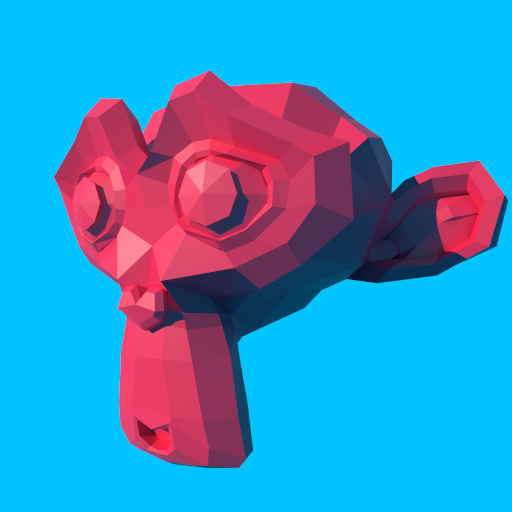
Proper documentation of Quartz QML types is still in the oven. In the meantime here's a simple QML scene to serve as an example:
import QtQuick 2.0
import Qt3D.Core 2.0
import Qt3D.Raytrace 1.0

Entity {
    id: root
    components: [
        RenderSettings {
            camera: camera
            skyColor: "#00C5FF"
            skyIntensity: 1
        }
    ]
    Camera {
        id: camera
        position: Qt.vector3d(0, 0, 2.6)
        exposure: 1.0
        fieldOfView: 60
    }
    Entity {
        Transform {
            id: sunTransform
            rotationX: 60
            rotationY: -15
            rotationZ: 35
        }
        DistantLight {
            id: sunLight
            color: Qt3DRaytrace.lrgba(1.0, 0.9, 0.8)
            intensity: 5
        }
        components: [ sunTransform, sunLight ]
    }
    Entity {
        Transform {
            id: monkeyTransform
            translation: Qt.vector3d(-0.1, 0, 0)
            rotationY: -30
        }
        Material {
            id: monkeyMaterial
            albedo: "crimson"
            roughness: 0.5
        }
        Mesh {
            id: monkeyMesh
            source: "monkey.obj"
        }
        components: [ monkeyTransform, monkeyMaterial, monkeyMesh ]
    }
}
Note on colors
Since Qt has no notion of color spaces, all color values are assumed to be in sRGB by default. To specify linear color use the Qt3DRaytrace.lrgba() function.
For symmetry there's also Qt3DRaytrace.srgba() which is equivalent to Qt.rgba().
Loading 3D models
Quartz uses Assimp for importing 3D models and thus supports many common file formats, including: Wavefront (OBJ), Autodesk FBX, Collada (DAE), glTF, and others.
Note that Mesh component treats its source file as if containing a single 3D object. Multiple objects are pre-transformed and joined into one during import.
To work with complex 3D scenes use the scene2qml tool. It converts an input scene file into QML-defined Entity hierarchy and extracts individual meshes, and textures into separate files. The resulting QML file can then be imported by using the EntityLoader node.
Conversion quality depends on the input file format and complexity of a particular scene. The resulting QML file can be further edited by hand to supplement certain information, like some Material attributes.
Building
Prerequisites
- Qt 5.12 SDK
- Khronos Vulkan SDK
- Assimp 4.1 SDK
- CMake 3.8 or newer
- Python 3.5 or newer
Environment setup
| Variable | Description | Example value |
|---|---|---|
QTDIR |
Path to Qt 5.12 headers & libraries | C:\Qt\5.12.0\msvc2017_64 |
VULKAN_SDK |
Path to Khronos Vulkan SDK | C:\VulkanSDK\1.1.97.0 |
ASSIMP_ROOT_DIR |
Path to Assimp SDK (Windows only) | C:\Program Files\Assimp |
Steps to build
- Compile GLSL shaders to SPIR-V by running:
src\raytrace\renderers\vulkan\shaders\compile.py. - Configure & build the project using the top level
CMakeLists.txtfile.
Note for Linux: Official Qt 5.12 binaries for Linux/X11 seem to have Vulkan support disabled at compile time (QTBUG-72763). If your distribution does not ship Qt 5.12 with Vulkan support enabled you will need to build Qt from sources and make sure that Vulkan support is enabled.
Running development builds
Before you run anything make sure that QML2_IMPORT_PATH is configured to look for Quartz QML plugin binaries.
On Windows, also make sure that respective directories containing Qt53DRaytrace.dll and Qt53DRaytraceExtras.dll are both in PATH.
Project structure
| Path | Description |
|---|---|
/3rdparty |
Third party libraries |
/apps/quartz |
Standalone renderer application |
/apps/scene2qml |
3D scene to QML conversion tool |
/cmake |
Local CMake modules |
/doc |
Documentation (WIP) |
/examples/assets |
Assets used by example projects |
/examples/raytrace-cpp |
C++ API usage example |
/examples/raytrace-qml |
QML API usage example |
/include |
Public C++ API include files |
/src/extras |
Extras library (Qt3DRaytraceExtras) |
/src/qml |
QML plugins |
/src/raytrace |
Raytracing aspect library (Qt3DRaytrace) |
/src/raytrace/renderers/vulkan |
Raytracing aspect Vulkan renderer |
Third party libraries
This project makes use of the following open source libraries:
Core symbols most depended-on inside this repo
Shape
Languages
Modules by API surface
For agents
$ claude mcp add Quartz \
  -- python -m otcore.mcp_server <graph>