github.com/NVIDIA-ISAAC-ROS/ros2_benchmark @v4.4-0
Chat with this repoWhat it actually does AI analysis from the code graph — generated when you open this
README
ros2_benchmark

Overview
Robots are real-time systems which require complex graphs of heterogeneous computation to perform perception, planning, and control. These graphs of computation need to perform work deterministically and with known latency. The computing platform has a fixed budget for heterogeneous computation (TOPS) and throughput; computation is typically performed on multiple CPUs, GPUs, and additional special purpose, fixed function hardware accelerators.
ros2_benchmark provides the tools for measuring the throughput, latency, and compute utilization of these complex graphs without altering the code under test. The results can be used to make informed design decisions on how best a robotics application can meet its real-time requirements. Results can be used to optimize system performance by tracking results over time against changes in the implementation and can be used in the development of program flow monitors to detect anomalies during operation of the real-time robotics application.
This tooling allows for realistic assessments of robotics application performance under load including message transport costs in RCL for practical benchmarking indicative of your real-world results. Message transport costs can be measured intra-process or inter-process including DDS overhead with support for type adaptation. This tooling does not require modification of the graph of nodes under test to measure results, allowing both open source and proprietary solutions to be measured with the same tools in an non-intrusive way. Input for benchmarking is standardized with available rosbag datasets accompanying this package.
Designed for local developer use or in CI/CD platforms, these tools can be containerized to run on cloud native platforms such as Kubernetes. The tools are commercially hardened over tens of thousands of runs. We use this nightly on 7 hardware platforms using aarch64 and x86_64 architectures on multiple graph configurations.

ros2_benchmark uses the benchmark controller to orchestrate the data loader, playback and monitor nodes to perform benchmark runs, and calculate performance results into a benchmark report.
The data loader node fetches input data from rosbag. Input data is pre-processed using a configurable graph of nodes, and buffered into memory in the playback node which supports a plug-in for type adaptation. The graph benchmarked runs unmodified with input from the playback node controlling the data rate to output received at the monitor node.

ros2_benchmark loads data from rosbag(s), performs any data pre-processing using a graph of ros nodes, and buffers the input data for benchmarking. If measuring peak throughput, the auto finder runs the graph under benchmark at multiple publisher rates to find the maximum publisher rate with less than 5% drops through the graph, otherwise it uses the specified fixed publishing rate or the timing from the rosbag.
The graph under benchmark is measured multiple times, with calculated results in a benchmark report.
Table of Contents
- ros2_benchmark
- Overview
- Table of Contents
- Latest Update
- Supported Platforms
- Quickstart
- Datasets
- Results
- Creating Custom Benchmark
- Profiling
- Live Benchmark Mode
- Updates
Latest Update
Update 2023-11-16: Add support for live benchmark mode
Supported Platforms
This package is designed and tested to be compatible aarch64 and x86_64 platforms using ROS 2 Humble.
| Platform hardware | Platform software | ROS Version |
|---|---|---|
| aarch64 |
x86_64 | Ubuntu 20.04+ | ROS 2 Humble |
Note:
ros2_benchmarkhas been tested on multiple computing platforms including Intel NUC Corei7 11th Gen and Jetson Orin.
Quickstart
To use and learn to use ros2_benchmark, start by running a sample benchmark. Follow the steps below to start measuring the performance of an AprilTag node with ros2_benchmark.
-
Install ROS 2 Humble natively (see here) or launch official Docker container with ROS 2 Humble pre-installed:
bash docker run -it ros:humble -
Setup convenience environment variables and install tools.
bash export R2B_WS_HOME=~/ros_ws && \ export ROS2_BENCHMARK_OVERRIDE_ASSETS_ROOT=$R2B_WS_HOME/src/ros2_benchmark/assets && \ sudo apt-get update && sudo apt-get install -y git git-lfs wget -
Clone this repository along with an available implementation of Apriltag detection and install dependencies.
bash mkdir -p $R2B_WS_HOME/src && cd $R2B_WS_HOME/src && \ git clone https://github.com/NVIDIA-ISAAC-ROS/ros2_benchmark.git && \ git clone https://github.com/christianrauch/apriltag_ros.git && \ cd $R2B_WS_HOME && \ sudo apt-get update && \ rosdep update && rosdep install -i -r --from-paths src --rosdistro humble -y -
Clone and build
image_procpackage with patch to fix incompatible QoS settings.bash cd $R2B_WS_HOME/src && \ git clone https://github.com/ros-perception/vision_opencv.git && cd vision_opencv && git checkout humble && \ cd $R2B_WS_HOME/src && \ git clone https://github.com/ros-perception/image_pipeline.git && cd image_pipeline && git checkout humble && \ git config user.email "benchmarking@ros2_benchmark.com" && git config user.name "ROS 2 Developer" && \ wget https://raw.githubusercontent.com/NVIDIA-ISAAC-ROS/ros2_benchmark/main/resources/patch/resize_qos_profile.patch && \ git apply resize_qos_profile.patch && \ cd $R2B_WS_HOME && \ sudo apt-get update && \ rosdep update && rosdep install -i -r --from-paths src --rosdistro humble -y && \ colcon build --packages-up-to image_proc -
Pull down
r2b dataset 2023by following the instructions here or fetch just the rosbag used in this Quickstart with the following command.bash mkdir -p $R2B_WS_HOME/src/ros2_benchmark/assets/datasets/r2b_dataset/r2b_storage && \ cd $R2B_WS_HOME/src/ros2_benchmark/assets/datasets/r2b_dataset/r2b_storage && \ wget 'https://api.ngc.nvidia.com/v2/resources/nvidia/isaac/r2bdataset2023/versions/2/files/r2b_storage/metadata.yaml' && \ wget 'https://api.ngc.nvidia.com/v2/resources/nvidia/isaac/r2bdataset2023/versions/2/files/r2b_storage/r2b_storage_0.db3' -
Build
ros2_benchmarkand source the workspace:bash cd $R2B_WS_HOME && \ colcon build --packages-up-to ros2_benchmark apriltag_ros && \ source install/setup.bash -
(Optional) Run tests to verify complete and correct installation:
bash colcon test --packages-select ros2_benchmark -
Start the AprilTag benchmark:
bash
launch_test src/ros2_benchmark/scripts/apriltag_ros_apriltag_node.py
Once the benchmark is finished, the final performance measurements are displayed in the terminal. Additionally, the final results and benchmark metadata (e.g., system information, benchmark configurations) are also exported as a JSON file.
Datasets
Input data for benchmarking is provided in a rosbag.
To provide consistency of results, we have provided multiple dataset sequences in rosbag for use with ros2_benchmark; input data in other rosbag(s) can be used. These dataset sequences were captured on a robot, using very high precision time synchronization between sensors. Captured sensor data includes HAWK (2mp RGB stereo camera with IMU), D455 and XT32.
These datasets are explicitly not provided inside this repository. Instead, visit NGC to download the dataset here.
You can also download the datasets with command-line tools as follows by first installing the NGC CLI.
wget --content-disposition https://ngc.nvidia.com/downloads/ngccli_linux.zip && unzip ngccli_linux.zip && chmod u+x ngc-cli/ngc
With the NGC CLI available, you can download the datasets with the following commands:
./ngc-cli/ngc registry resource download-version "nvidia/isaac/r2bdataset2023:3"
./ngc-cli/ngc registry resource download-version "nvidia/isaac/r2bdataset2024:1"
Then, move the datasets to their required location:
mkdir assets/datasets/r2b_dataset
mv r2bdataset2023_v3/* assets/datasets/r2b_dataset
mv r2bdataset2024_v1/* assets/datasets/r2b_dataset
r2b Dataset 2024
| Sequence | Size | Visual | Contents | Description |
|---|---|---|---|---|
| r2b_galileo | 471M | 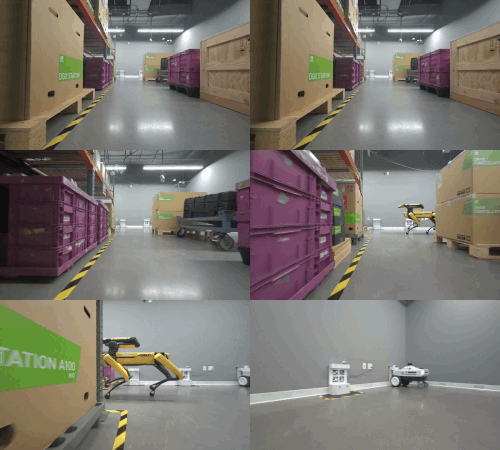 |
4x LI HAWK stereo |
L+R 1920x1200 RGB 30fps
IMU
Wheel odometry | Room sequence including robots, shelving, boxes, pallets, with moving obstacles. |
| r2b_galileo2 | 986M | 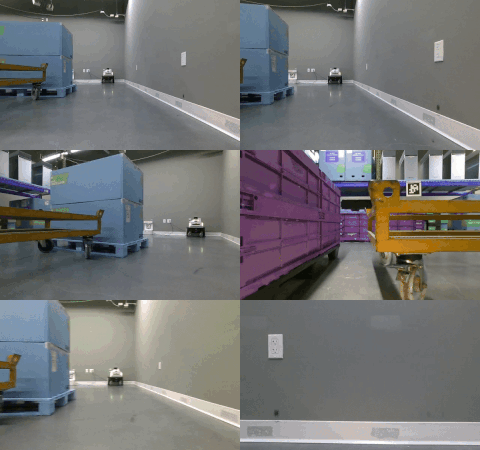 | RealSense D455
L+R 1280x720 IR Mono 30fps
Depth 1280x780 30fps
1280x800 RGB 30fps
IMU
Wheel odometry | Room sequence including robots, shelving, boxes, pallets, with moving obstacles. |
| r2b_robotarm | 1.4G | 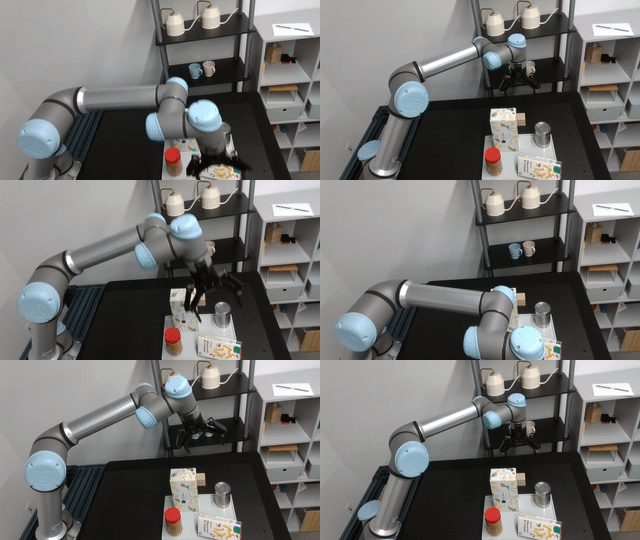 | RealSense D455
L+R 1280x720 IR Mono 30fps
Depth 1280x780 30fps
1280x800 RGB 30fps
Robot joint states | Robot arm sequence containing objects on a tray. |
| r2b_whitetunnel | 503M | 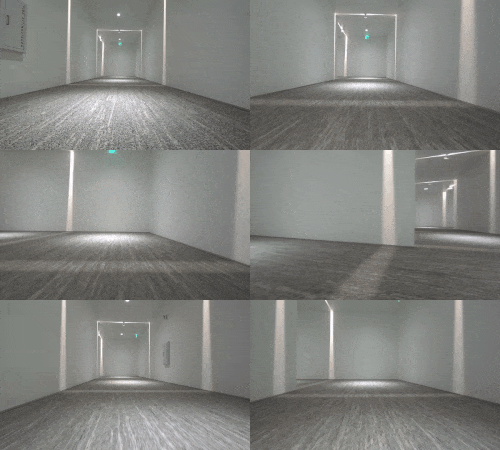 | 4x LI HAWK stereo
L+R 1920x1200 RGB 30fps
IMU
Wheel odometry | Hallway sequence with low to no feature not-perpendicular walls, specular highlights, and reflections. |
r2b Dataset 2023
| Sequence | Size | Visual | Contents | Description | | --------------------------------------------------------------------
Core symbols most depended-on inside this repo
get_loggerShape
Languages
Modules by API surface
For agents
$ claude mcp add ros2_benchmark \
  -- python -m otcore.mcp_server <graph>