github.com/NIyueeE/ds-free-api @v0.2.6
Chat with this repoWhat it actually does AI analysis from the code graph — generated when you open this
README

DS-Free-API




将免费的 DeepSeek 网页端对话反代并适配转换为标准的 OpenAI 与 Anthropic 兼容 API 协议(目前支持 chat completions 和 messages,包括流式返回与工具调用)。
项目亮点
- 零成本 API 代理:使用 DeepSeek 免费网页端,无需官方 API Key,即可获得 OpenAI / Anthropic 兼容接口
- 双协议支持:同时兼容 OpenAI Chat Completions 与 Anthropic Messages API,主流客户端即插即用
- 工具调用就绪:OpenAI function calling 完整实现,工具解析 + 三层自修复管道(文本修复 → JSON 修复 → 模型兜底),覆盖 10+ 异常格式
- 文件上传就绪:支持 OpenAI
file/image_urlcontent part 和 Anthropicimage/documentcontent block 的内联 data URL 文件自动上传到 DeepSeek 会话; HTTP URL 自动触发搜索模式,模型可直接访问链接内容 - Web 管理面板:内置可视化面板,账号池状态、API Key 管理、请求日志、配置热重载,开箱即用
- Rust 实现:单可执行文件 + 单 TOML 配置,跨平台原生高性能(Web 面板编译时嵌入,开箱即用)
- 多账号池:空闲最久优先轮转(DashMap 无锁读),支持水平扩展并发
快速开始
二进制使用
- 从 releases 下载对应平台压缩包并解压
- 复制
config.example.toml为config.toml并填入账号 (可选, 也可启动后在管理面板中配置) - 运行
./ds-free-api - 访问
http://127.0.0.1:22217/admin设置管理密码,之后可在面板中创建 API Key 和管理账号
./ds-free-api
./ds-free-api -c /path/to/config.toml
RUST_LOG=debug ./ds-free-api
并发:免费 API 有 session 级速率限制。本项目内置限流检测 + 指数退避重试,确保稳定。 推荐并行数 = 账号数 / 2。支持无 config.toml 启动后通过管理面板添加账号。
Docker 使用
docker compose -f docker-compose.yaml up -d
可以参考示例compose文件
管理面板在 http://localhost:22217/admin,首次访问设置管理密码。
config/ 和 data/ 目录通过 bind mount 挂载到容器内,配置修改自动持久化到宿主机。
免费测试账号
以下账号密码统一为 test12345:
idyllic4202@wplacetools.com
espialeilani+grace@gmail.com
ar.r.o.g.anc.e.p.c.hz.xp@gmail.com
theobald2798+gladden@gmail.com
vj.zh.z.h.d.b.b.d.udhj.db@gmail.com
工具调用标签幻觉:内置模糊匹配(全角
|<=>|、▁<=>_),自动覆盖大多数变体。 若模型输出格式不同的回退标签,可在控制面板中添加, 或者在config.toml的[deepseek]下追加:
toml
tool_call.extra_starts = ["<|tool_call_begin|>", "<tool_calls>", "<tool_call>"]
tool_call.extra_ends = ["<|tool_call_end|>", "</tool_calls>", "</tool_call>"]
API 端点
| 方法 | 路径 | 说明 |
|---|---|---|
| GET | / |
重定向到管理面板 |
| GET | /health |
健康检查 |
| POST | /v1/chat/completions |
聊天补全(支持流式与工具调用) |
| GET | /v1/models |
模型列表 |
| GET | /v1/models/{id} |
模型详情 |
| POST | /anthropic/v1/messages |
Anthropic Messages(支持流式与工具调用) |
| GET | /anthropic/v1/models |
模型列表(Anthropic 格式) |
| GET | /anthropic/v1/models/{id} |
模型详情(Anthropic 格式) |
管理面板位于 /admin,首次访问引导设置管理密码。
模型映射
config.toml 中 model_types(默认 ["default", "expert"])自动映射:
| OpenAI 模型 ID | DeepSeek 类型 |
|---|---|
deepseek-default |
快速模式 |
deepseek-expert |
专家模式 |
可选别名通过 model_aliases 按 index 对齐 model_types,默认无别名。空字符串被跳过:
# model_aliases = ["", "deepseek-v4-pro"]  → deepseek-v4-pro 映射到 expert(index 1)
model_aliases = []
Anthropic 兼容层使用相同的模型 ID,通过 /anthropic/v1/messages 调用。
能力开关
- 深度思考:默认已开启。如需显式关闭,请求体中加
"reasoning_effort": "none"。 - 智能搜索:默认已开启(DeepSeek 后端在搜索模式下会注入更强的系统提示词,提升工具调用遵循度)。如需显式关闭,请求体 中加
"web_search_options": {"search_context_size": "none"}。 - 文件上传:支持内联文件(data URL)自动上传到 DeepSeek 会话,以及 HTTP URL 自动触发搜索模式:
OpenAI 端:
json
  {"type": "file", "file": {"file_data": "data:text/plain;base64,...", "filename": "doc.txt"}}
  {"type": "image_url", "image_url": {"url": "data:image/png;base64,..."}}
  {"type": "image_url", "image_url": {"url": "https://example.com/img.jpg"}}  {" "}
Anthropic 端:
json
  {"type": "image", "source": {"type": "base64", "media_type": "image/png", "data": "..."}}
  {"type": "document", "source": {"type": "base64", "media_type": "text/plain", "data": "..."}}
  {"type": "image", "source": {"type": "url", "url": "https://example.com/img.jpg"}}
Web 管理面板
启动服务后访问 http://127.0.0.1:22217/admin 即可进入管理面板:
- 概览:请求统计、账号池状态一览
- 账号池:查看/添加/移除账号,手动重新登录 Error 状态账号
- API Keys:创建/删除 API Key,脱敏展示
- 模型:可用模型列表与详情
- 配置:当前运行配置(脱敏)
- 日志:最近请求日志与运行时日志
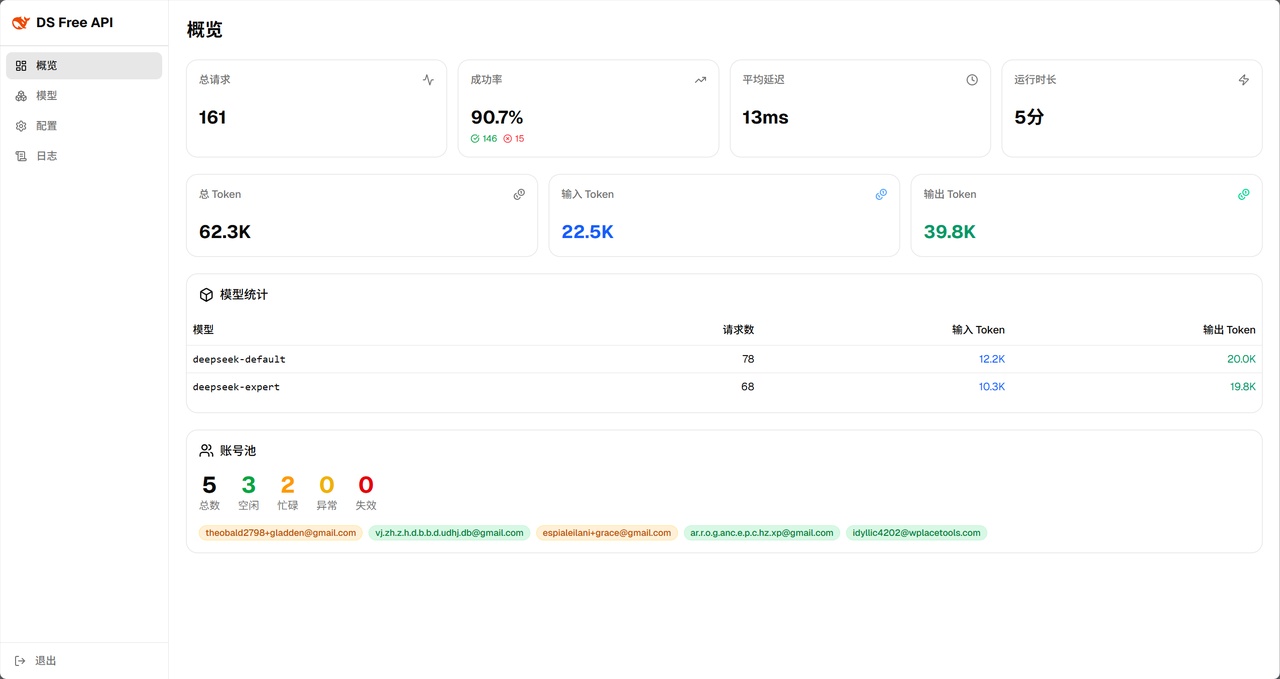
管理面板概览(Dashboard)
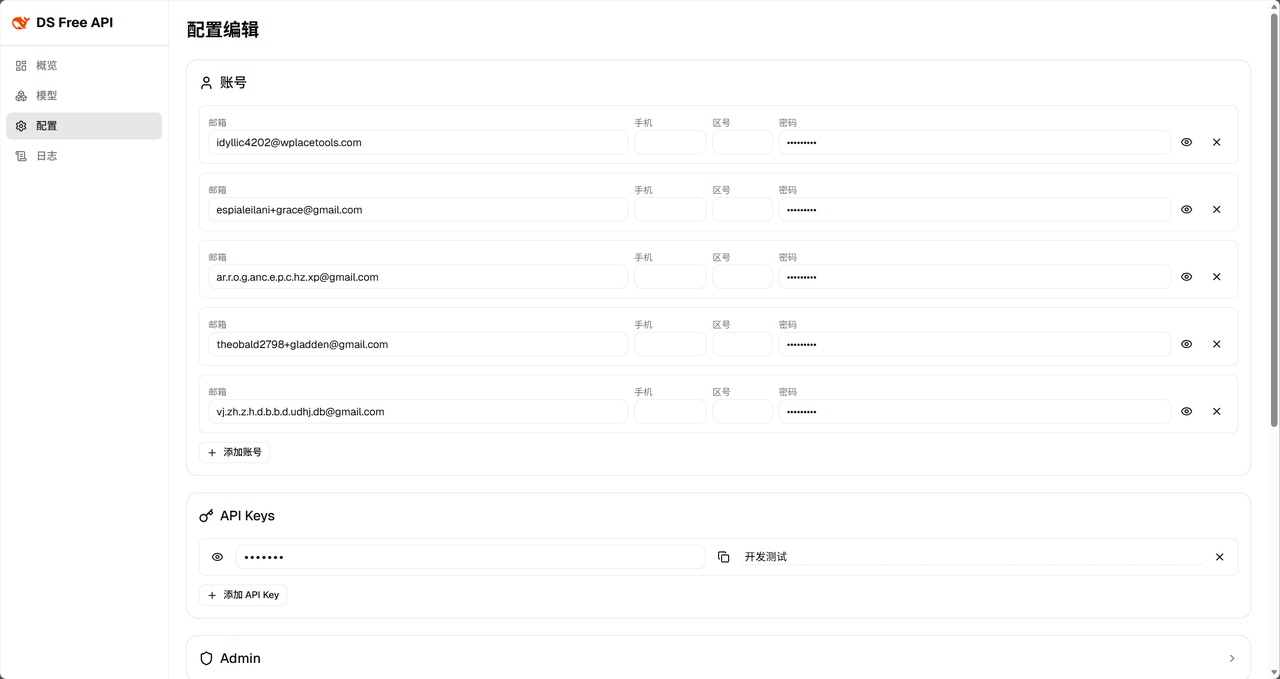
配置界面(Config)
首次访问时引导设置管理密码(bcrypt 哈希存储),登录后签发 JWT(24h 有效),支持密码重置时吊销旧 Token。
环境变量
| 变量 | 默认值 | 说明 |
|---|---|---|
RUST_LOG |
info |
日志级别(trace / debug / info / warn / error) |
DS_DATA_DIR |
.(当前目录) |
数据目录,存放 logs/runtime.log 和 stats.json |
DS_CONFIG_PATH |
./config.toml |
配置文件路径,优先级低于 -c 参数 |
安全
- 管理面板:JWT 认证 + bcrypt 密码哈希 + 登录失败率限制(5 次失败锁定 5 分钟)
- API 访问:通过管理面板创建的 API Key 鉴权(HashSet O(1) 查找)
- CORS:可配置允许的 Origin 列表,默认仅
http://localhost:22217 - 敏感信息:账号 ID 在响应头中脱敏,请求体不记录日志,持久化文件权限 0600
开发
设计哲学
一个 config.toml 反映所有运行状态。管理面板对配置的修改即时持久化到 config.toml,同时热重载到运行中的服务。
非必要不引入额外运行时系统依赖。项目始终优先选择纯 Rust 或静态链接的依赖(如 rustls → rquest + BoringSSL),确保编译产物单一二进制无外部 .so/.dll 依赖,下载即用。
简要架构图:
flowchart TB
    %% ===== 主题定义 =====
    classDef client fill:#eff6ff,stroke:#3b82f6,stroke-width:3px,color:#1d4ed8,rx:14,ry:14
    classDef gateway fill:#fffbeb,stroke:#f59e0b,stroke-width:3px,color:#92400e,rx:12,ry:12
    classDef openai_adapter fill:#f8fafc,stroke:#0a9e7b,stroke-width:2px,color:#334155,rx:10,ry:10
    classDef anthropic_compat fill:#f8fafc,stroke:#d07354,stroke-width:2px,color:#334155,rx:10,ry:10
    classDef ds_core fill:#f8fafc,stroke:#3964fe,stroke-width:2px,color:#1e40af,rx:10,ry:10
    classDef external fill:#fef2f2,stroke:#ef4444,stroke-width:3px,color:#991b1b,rx:6,ry:6

    %% ===== 节点 =====
    Client(["🖥️ 客户端"]):::client

    subgraph GW ["🌐 HTTP 接入层"]
        Handler(["路由 / 鉴权 / 序列化"]):::gateway
    end

    subgraph PL ["⚙️ 协议处理层"]
        direction TB

        subgraph AC ["Anthropic 兼容层"]
            A2O["请求转换

Anthropic → OpenAI"]:::anthropic_compat
            O2A["响应转换

OpenAI → Anthropic"]:::anthropic_compat
        end

        subgraph OA ["OpenAI 适配层"]
            ReqPipe["请求管道

校验 / 工具提取 / 提示词构建"]:::openai_adapter
            RespPipe["响应管道

SSE 解析 / 格式转换 / 工具修复"]:::openai_adapter
        end
    end

    subgraph CL ["🔧 核心层 (ds_core)"]
        Pool["账号池轮转"]:::ds_core
        PoW["PoW 求解"]:::ds_core
        Session["会话编排

创建销毁 / 历史上传"]:::ds_core
    end

    DeepSeek[("🔴 DeepSeek API")]:::external

    %% ===== 连接 =====
    Client -->|"HTTP 请求"| Handler

    Handler -->|"OpenAI 请求结构体"| ReqPipe
    Handler -->|"Anthropic 请求结构体"| A2O
    A2O -->|"OpenAI 请求结构体"| ReqPipe

    ReqPipe --> Pool
    Pool --> PoW
    PoW --> Session
    Session -->|"completion 端点"| DeepSeek

    Session -.->|"DeepSeek SSE数据流"| RespPipe
    RespPipe -.->|"OpenAI 响应结构体"| Handler
    RespPipe -.->|"OpenAI 响应结构体"| O2A
    O2A -.->|"Anthropic 响应结构体"| Handler

    %% ===== 子图样式 =====
    style GW fill:#fffbeb,stroke:#f59e0b,stroke-width:2px,stroke-dasharray: 5 5
    style PL fill:#fafafa,stroke:#94a3b8,stroke-width:2px
    style AC fill:#fdf0ec,stroke:#d07354,stroke-width:2px
    style OA fill:#e6f7f3,stroke:#0a9e7b,stroke-width:2px
    style CL fill:#eef2ff,stroke:#3964fe,stroke-width:2px,stroke-dasharray: 5 5
数据管道:
OpenAI (chat_completions) 处理管道:
flowchart TB
    %% ===== 主题定义 =====
    classDef ds_core fill:#eef2ff,stroke:#3964fe,stroke-width:2.5px,color:#1e40af,rx:10,ry:10
    classDef openai_adapter fill:#e6f7f3,stroke:#0a9e7b,stroke-width:2.5px,color:#065f46,rx:10,ry:10
    classDef step fill:#fffbeb,stroke:#f59e0b,stroke-width:1.5px,color:#334155,rx:6,ry:6

    subgraph RQ ["请求处理"]
        direction TB
        Q1["ChatCompletionsRequest"]:::openai_adapter
        Q2["参数校验 + 默认值"]:::step
        Q3["工具/文件提取 + 注入提示词"]:::step
        Q4["DeepSeek 原生标签提示词构建"]:::step
        Q5["模型映射 + 能力开关"]:::step
        Q6["限流重试

指数退避 1s→2s→4s→8s→16s"]:::step
        Q7["ChatRequest"]:::ds_core
    end

    subgraph RS1 ["非流式响应"]
        direction TB
        OR1["ds_core SSE 流"]:::ds_core
        OR2["SSE 帧解析

ContentDelta / Usage"]:::step
        OR3["状态机重组

合并连续文本 / 累积 usage"]:::step
        OR4["chunk 聚合

拼接 content / reasoning / tool_calls"]:::step
        OR5["ChatCompletionsResponse"]:::openai_adapter
    end

    subgraph RS2 ["流式响应"]
        direction TB
        OS1["ds_core SSE 流"]:::ds_core
        OS2["SSE 帧解析 + 状态机"]:::step
        OS3["Chunk 转换

DsFrame → ChatCompletionsResponseChunk"]:::step
        OS4["工具调用 XML 解析"]:::step
        OS5["异常工具调用自修复"]:::step
        OS6["stop 序列检测 + obfuscation"]:::step
        OS7["ChatCompletionsResponseChunk"]:::openai_adapter
    end

    Q1 --> Q2 --> Q3 --> Q4 --> Q5 --> Q6 --> Q7
    OR1 --> OR2 --> OR3 --> OR4 --> OR5
    OS1 --> OS2 --> OS3 --> OS4 --> OS5 --> OS6 --> OS7

    style RQ fill:#f8fafc,stroke:#0a9e7b,stroke-width:2px
    style RS1 fill:#f8fafc,stroke:#0a9e7b,stroke-width:2px
    style RS2 fill:#f8fafc,stroke:#0a9e7b,stroke-width:2px
Anthropic (messages) 处理管道:
flowchart TB
    %% ===== 主题定义 =====
    classDef oai fill:#e6f7f3,stroke:#0a9e7b,stroke-width:2.5px,color:#065f46,rx:10,ry:10
    classDef anth fill:#fdf0ec,stroke:#d07354,stroke-width:2.5px,color:#7c3a2a,rx:10,ry:10
    classDef step fill:#fffbeb,stroke:#f59e0b,stroke-width:1.5px,color:#334155,rx:6,ry:6

    subgraph RQ ["请求处理"]
        direction TB
        Q1["MessagesRequest"]:::anth
        Q2["消息展开

System 前置 / 文本合并 / 图片/文档映射"]:::step
        Q3["工具映射

ToolUnion → OpenAI Tool"]:::step
        Q4["能力开关映射

thinking → reasoning_effort"]:::step
        Q5["ChatCompletionsRequest"]:::oai
    end

    subgraph RS3 ["非流式响应"]
        direction TB
        AR1["ChatCompletionsResponse"]:::oai
        AR2["Content 拆解

reasoning → Thinking

content → Text

tool_calls → ToolUse"]:::step
        AR3["ID 映射

chatcmpl → msg

call → toolu"]:::step
        AR4["MessagesResponse"]:::anth
    end

    subgraph RS4 ["流式响应"]
        direction TB
        AS1["ChatCompletionsResponseChunk 流"]:::oai
        AS2["Chunk 状态机

块类型切换 / 索引递进"]:::step
        AS3["事件映射

content → text_delta

reasoning → thinking_delta

tool_calls → input_json_delta"]:::step
        AS4["MessagesResponseChunk"]:::anth
    end

    Q1 --> Q2 --> Q3 --> Q4 --> Q5
    AR1 --> AR2 --> AR3 --> AR4
    AS1 --> AS2 --> AS3 --> AS4

    style RQ fill:#f8fafc,stroke:#d07354,stroke-width:2px
    style RS3 fill:#f8fafc,stroke:#d07354,stroke-width:2px
    style RS4 fill:#f8fafc,stroke:#d07354,stroke-width:2px
详细开发指南(构建、测试、Docker 部署、e2e 测试等)见 docs/development.md。
许可证
GNU General Public License v3.0
DeepSeek 官方 API 非常便宜,请大家多多支持官方服务。
本项目的初心是想体验官方网页端灰度测试的最新模型。
严禁商用,避免对官方服务器造成压力,否则风险自担。
~~还有deepseek依旧是国一模!!!~~
Extension points exported contracts — how you extend this code
AuthContextType (Interface)Core symbols most depended-on inside this repo
as_strShape
Languages
Modules by API surface
For agents
$ claude mcp add ds-free-api \
  -- python -m otcore.mcp_server <graph>