github.com/Molunerfinn/PicGo @v3.0.0 sqlite
README
Special thanks to:
Warp, the intelligent terminal for developers
Available for macOS, Linux, & Windows
Sponsored by:
<img alt="Neon sponsorship" width="400" src="https://neon.com/brand/neon-logo-dark-color.svg">
Fast Postgres Databases for Teams and Agents
中文 | English

PicGo
高效创作者的最佳图片上传工具
The Ultimate Image Uploader for Efficient Creators
<a href="https://github.com/Molunerfinn/PicGo/actions">
  <img src="https://img.shields.io/badge/code%20style-standard-green.svg?style=flat-square" alt="">
</a>
<a href="https://github.com/Molunerfinn/PicGo/actions">
  <img src="https://github.com/Molunerfinn/PicGo/actions/workflows/main.yml/badge.svg" alt="">
</a>
<a href="https://github.com/Molunerfinn/PicGo/releases">
  <img src="https://img.shields.io/github/downloads/Molunerfinn/PicGo/total.svg?style=flat-square" alt="">
</a>
<a href="https://github.com/Molunerfinn/PicGo/releases/latest">
  <img src="https://img.shields.io/github/release/Molunerfinn/PicGo.svg?style=flat-square" alt="">
</a>
<a href="https://github.com/PicGo/bump-version">
  <img src="https://img.shields.io/badge/picgo-convention-blue.svg?style=flat-square" alt="">
</a>
<a href="https://atomgit.com/Molunerfinn/PicGo">
  <img src="https://atomgit.com/Molunerfinn/PicGo/star/badge.svg" alt="">
</a>
📖 应用概述
PicGo 致力于将图片上传无缝集成到你的创作工作流中。
无论你是写博客、做笔记还是编写开发文档,PicGo 都能帮你一键上传图片并自动复制链接,让你专注于内容创作本身,而不是繁琐的上传步骤。
核心支持
PicGo 原生支持主流图床平台,并可通过插件系统无限扩展:
- 国内云厂商:七牛云、腾讯云 COS、又拍云、阿里云 OSS
- 国际/开源平台:GitHub、SM.MS(S.EE)、Imgur
- 更多支持:通过插件支持 AWS S3、Cloudflare R2、MinIO 等第三方图床
注意:PicGo 本体不再增加默认的第三方图床支持。你可以自行开发第三方图床插件。详见 PicGo-Core。
✨ 特色功能
PicGo 打造了全方位的上传体验,让“传图”这件事变得前所未有的简单:
⚡️ 无缝写作流
- 自动复制链接:上传成功后,链接会自动复制到你的剪贴板。
- 格式随心定义:支持 Markdown、HTML、URL、自定义等多种格式,粘贴即用,完美适配你的编辑器。
- 零上下文切换:无需切换窗口。在你常用的编辑器里直接粘贴图片,让 PicGo 在后台完成上传。
- 通过原生支持或社区插件开启该工作流: Obsidian \ VS Code \ Typora \ Neovim \ MarkText \ SiYuan \ 等等……
🚀 极速上传体验
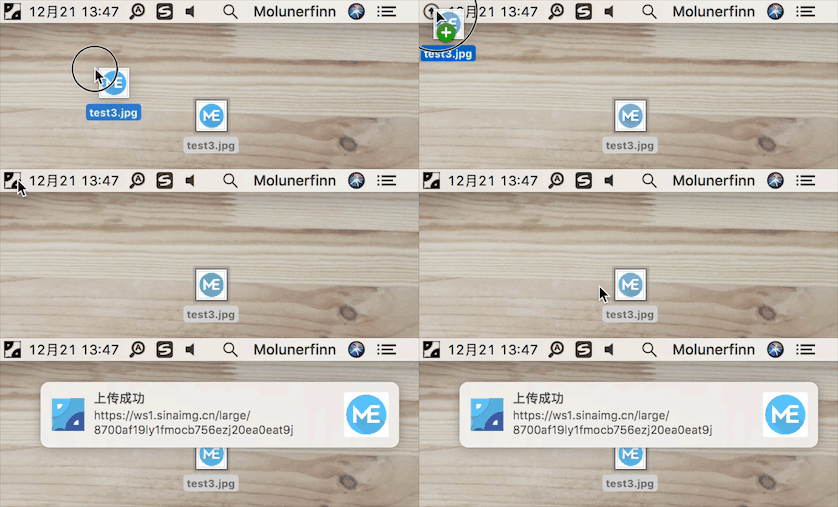
- 多维上传方式:支持拖拽图片、剪贴板粘贴、快捷键上传,甚至在 macOS/Windows 上支持右键菜单直接上传。
- 全局快捷键:默认
Command+Shift+U(macOS) /Ctrl+Shift+U(Windows/Linux) 即可唤起上传,无需离开当前窗口。 快捷键可自定义。
🧩 强大的插件生态
- 高度可扩展:PicGo 拥有丰富的插件系统,已有插件支持 AWS S3、Cloudflare R2、MinIO 等第三方图床。
- 更多可能:支持图片压缩、水印、重命名、Markdown 图片迁移等功能插件。
- 探索更多插件:Awesome-PicGo
🛠 开发者友好
- HTTP API:支持通过 HTTP 请求调用 PicGo 上传 (v2.2.0+),方便与其他工具集成。
- 开源透明:代码完全开源,安全可靠。
- 丰富的文档:详尽的开发文档助你快速上手。插件开发请参考 PicGo-Core 文档。
更多功能等你自己去发现,开发进度可以查看 Projects。
如果第一次使用,请参考应用 使用文档。遇到问题了还可以看看 FAQ 以及被关闭的 issues。
下载安装
| 下载源 | 地址/安装方式 | 平台 | 备注 |
|---|---|---|---|
| GitHub Release | https://github.com/Molunerfinn/PicGo/releases | All | 国内下载速度可能会慢 |
| 山东大学镜像站 | https://mirrors.sdu.edu.cn/github-release/Molunerfinn_PicGo | All | 感谢 山东大学镜像站 提供的镜像支持 |
| Scoop | scoop bucket add extras & scoop install picgo |
Windows | 感谢 @huangnauh 和 @Gladtbam 的贡献 |
| Chocolatey | choco install picgo |
Windows | 感谢 @iYato 的贡献 |
| Homebrew | brew install picgo --cask |
macOS | 感谢 @womeimingzi11 的贡献 |
| AUR | yay -S picgo-appimage |
Arch-Linux | 感谢 @houbaron 的贡献 |
| Nix | nix-shell -p picgo |
Nix/NixOS | 感谢 @qrzbing 的贡献 |
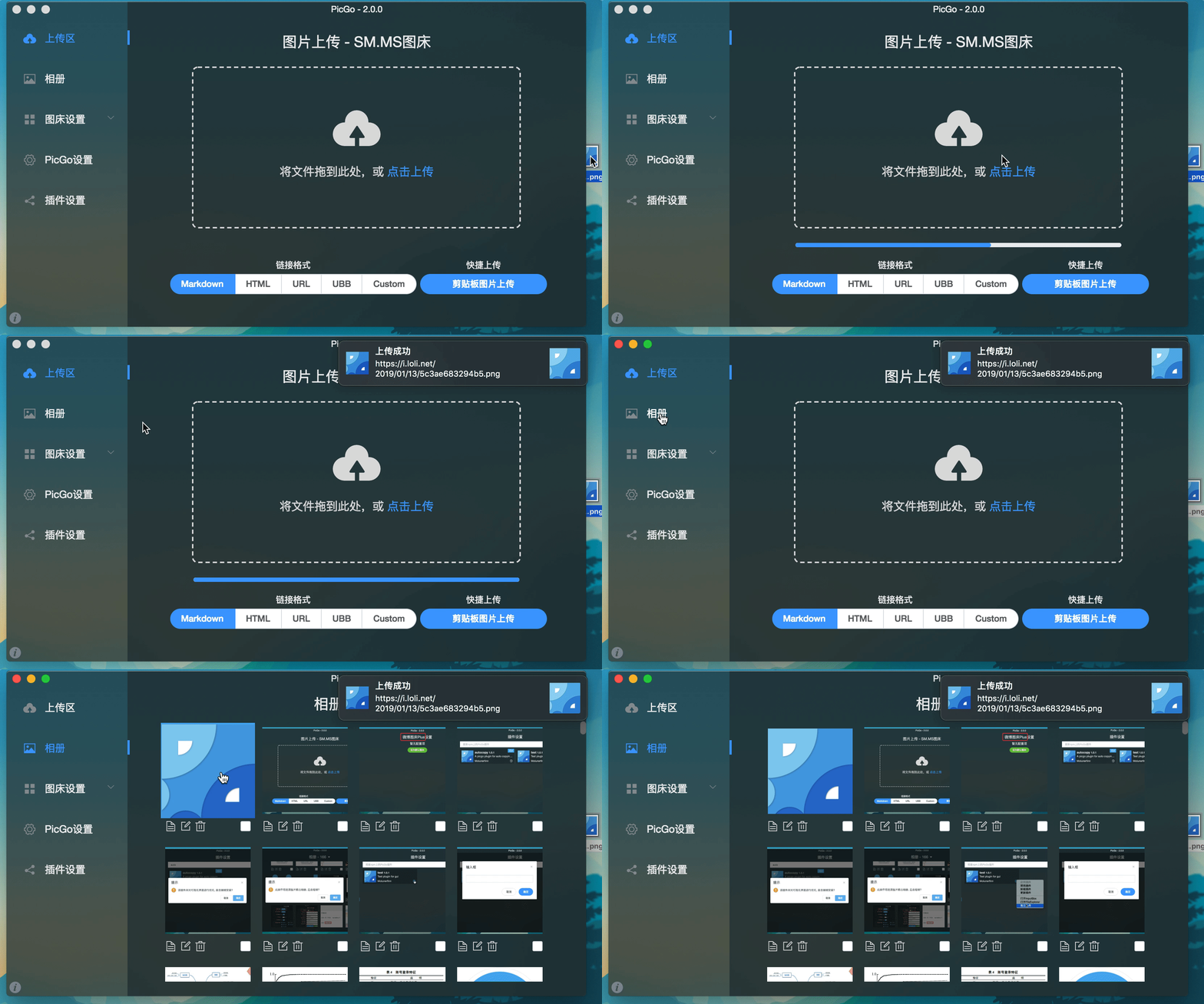
应用截图
开发说明
目前仅针对 Mac、Windows。Linux 平台并未测试。
如果你想要学习、开发、修改或自行构建 PicGo,可以依照下面的指示:
如果想学习 Electron-vue 的开发,可以查看我写的系列教程——Electron-vue 开发实战
- 你需要有 Node、Git 环境,了解 npm 的相关知识。
git clone https://github.com/Molunerfinn/PicGo.git并进入项目。pnpm下载依赖。注意如果你没有pnpm,请去 官网 下载安装后再使用。 用pnpm install将导致未知错误!- Mac 需要有 Xcode 环境,Windows 需要有 VS 环境。
- 如果需要贡献代码,可以参考贡献指南。
开发模式
输入 pnpm run dev 进入开发模式,开发模式具有热重载特性。不过需要注意的是,开发模式不稳定,会有进程崩溃的情况。此时需要:
ctrl+c # 退出开发模式
pnpm run dev # 重新进入开发模式
注:Windows 开发模式运行之后会在底部任务栏的右下角应用区出现 PicGo 的应用图标。
生产模式
如果你需要自行构建,可以 pnpm run build 开始进行构建。构建成功后,会在 dist 目录里出现构建成功的相应安装文件。
注意:如果你的网络环境不太好,可能会出现 electron-builder 下载 electron 二进制文件失败的情况。这个时候需要在 build 之前指定一下 electron 的源为国内源:
export ELECTRON_MIRROR="https://npmmirror.com/mirrors/electron/"
# 在 Windows 上,则可以使用 set ELECTRON_MIRROR=https://npmmirror.com/mirrors/electron/ (无需引号)
pnpm run build
只需第一次构建的时候指定一下国内源即可。后续构建不需要特地指定。二进制文件下载在 ~/.electron/ 目录下。如果想要更新 electron 构建版本,可以删除 ~/.electron/ 目录,然后重新运行上一步,让 electron-builder去下载最新的 electron 二进制文件。
其他相关
- vs-picgo:PicGo 的 VS Code 版。
- flutter-picgo:PicGo 的手机版 App(支持 Android 和 iOS )。
- PicHoro:另一款支持 PicGo 配置的手机版 App(暂时只支持 Android)。
赞助
如果你喜欢 PicGo 并且它对你确实有帮助,欢迎给我打赏一杯咖啡哈~
支付宝:

微信:

GitHub Sponsors:

License
Copyright (c) 2017 - Now Molunerfinn
Extension points exported contracts — how you extend this code
IAlbumDB (Interface)Core symbols most depended-on inside this repo
cnShape
Languages
Modules by API surface
Dependencies from manifests, versioned
For agents
$ claude mcp add PicGo \
  -- python -m otcore.mcp_server <graph>