github.com/Miruro-no-kuon/Miruro @main
Chat with this repoBrowse by type
What it actually does AI analysis from the code graph — generated when you open this
README
MIRURO











What is Miruro?
Welcome to Miruro, your premier destination for all things anime! Explore a comprehensive collection of high-definition anime with a seamless and user-friendly interface powered by Consumet.
Built using React and Vite, Miruro offers a cutting-edge, minimalist design that ensures both fast loading times and smooth navigation. Whether you're looking for the latest anime series or classic favorites, Miruro has you covered with an ad-free streaming experience that supports both English subtitles and dubbed versions. Additionally, you can download individual episodes without the hassle of creating an account, making your viewing experience as convenient as possible.
Features [View More]
General
- Sub/Dub Anime support
- User-friendly & Mobile responsive
- Anilist Sync
- Light/Dark theme
- Continue Watching Section
Watch Page
- Player
- Autoplay next episode
- Skip op/ed button
Installation and Local Development
1. Clone this repository using
git clone https://github.com/Miruro-no-kuon/Miruro.git
cd Miruro
2. Installation
Basic Pre-Requisites
[!TIP] This platform is built on Node.js and utilizes Bun to ensure the quickest response times achievable. While
npmcan also be used, the commands for npm would mirror those of Bun, simply substituting the specific commands accordingly.Bun is now available on Windows, Linux, and macOS. Below are the installation commands for each operating system.
Install Bun
- Linux & macOS
curl -fsSL https://bun.sh/install | bash
- Windows
powershell -c "irm bun.sh/install.ps1 | iex"
Verify installations
- Check that both Node.js and Bun are correctly installed by running.
node -v
bun -v
Install Dependencies
- You can use Bun to install dependencies quickly. If you prefer,
npmcan also be used with equivalent commands.
bun install
Copy .env.example into .env.local in the root folder
.env.local&.envare both viable options, you can also set.env.test.local,.env.development.localor.env.production.local
cp .env.example .env.local
3. Run on development &/or production (npm also works)
- Run on development mode
bun run dev
- Run on production mode
bun start
Self-Hosting Notice
[!CAUTION] Self-hosting this application is strictly limited to personal use only. Commercial utilization is prohibited, and the inclusion of advertisements on your self-hosted website may lead to serious consequences, including potential site takedown measures. Ensure compliance to avoid any legal or operational issues.
License
This project is governed by a Custom BY-NC License. What does this entail? Simply put, you are permitted to utilize, distribute, and modify the code for non-commercial purposes. However, it is imperative that due credit is accorded to our platform. Any commercial utilization of this code is strictly prohibited. For comprehensive details, please refer to the LICENSE file. Should you have inquiries or require special permissions, do not hesitate to contact us.
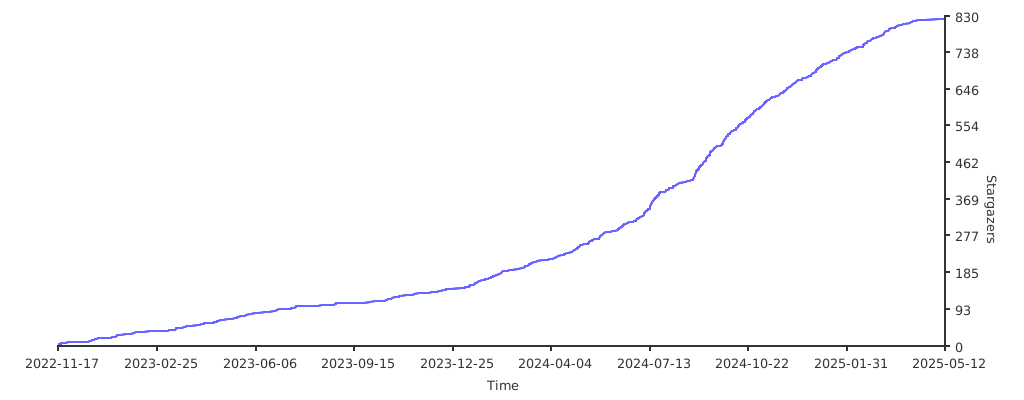
Star History
Extension points exported contracts — how you extend this code
browse all types & interfaces →
Core symbols most depended-on inside this repo
Shape
Languages
Modules by API surface
For agents
$ claude mcp add Miruro \
  -- python -m otcore.mcp_server <graph>