github.com/MikeKovarik/exifr @v7.1.3
Chat with this repoWhat it actually does AI analysis from the code graph — generated when you open this
README





Usage • Installation • Quick start • Demos • API • Perf • Changelog • FAQ • Contributing
📷 The fastest and most versatile JavaScript EXIF reading library.
Try it yourself - demo page & playground.
Features
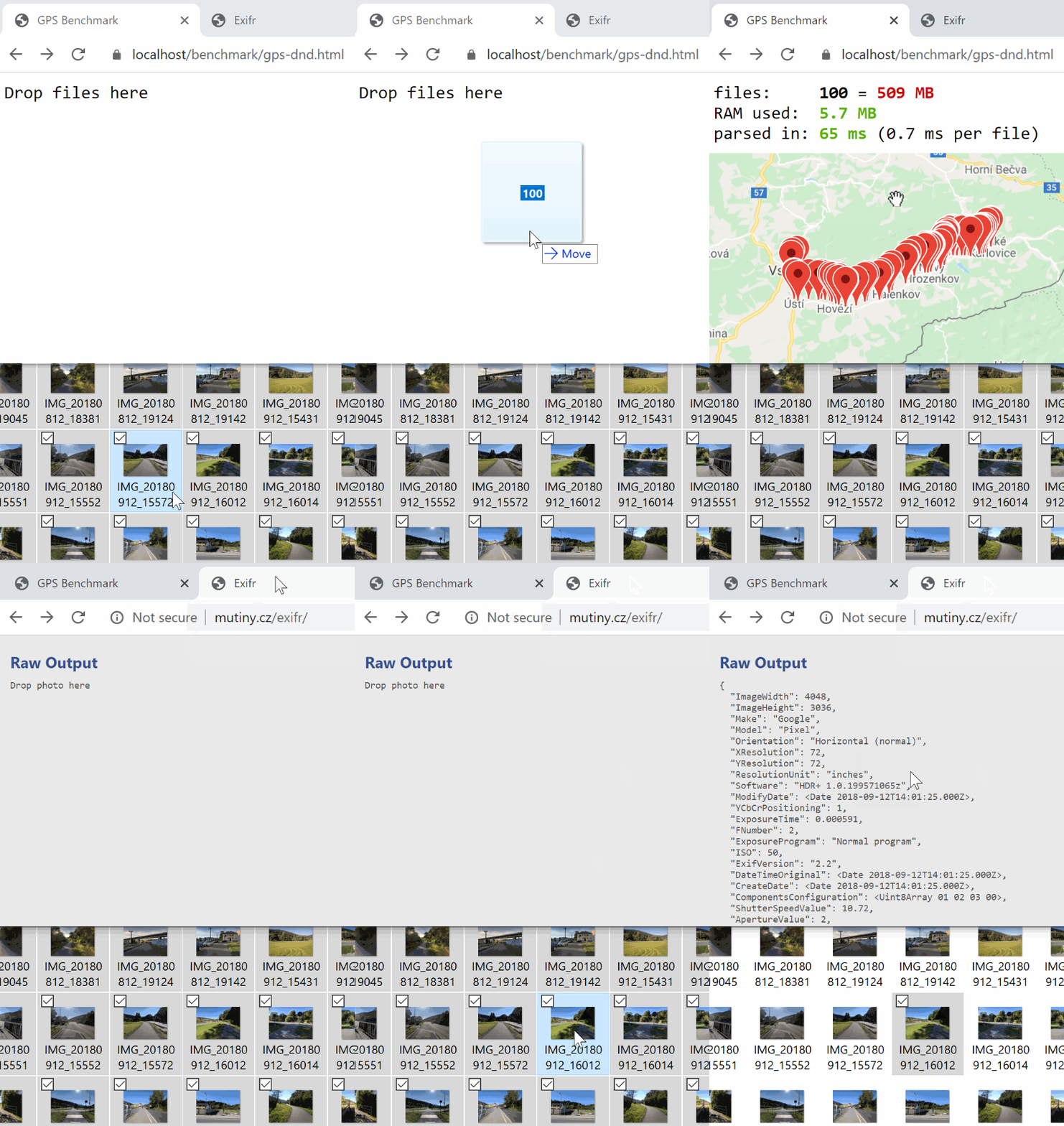
Works everywhere, parses anything you throw at it.
- 🏎️ Fastest EXIF lib: +-1ms per file
- 🗃️ Any input: buffers, url, <img> tag, and more
- 📷 Files: .jpg, .tif, .png, .heic, .avif, .iiq
- 🔎 Segments: TIFF (EXIF, GPS, etc...), XMP, ICC, IPTC, JFIF, IHDR
- 📑 Reads only first few bytes
- 🔬 Skips parsing tags you don't need
- ✨ Isomorphic: Browser & Node.js
- 🗜️ No dependencies
- 🖼️ Extracts thumbnail
- 💔 Salvages broken files
- 🧩 Modular
- 📚 Customizable tag dictionaries
- 📦 Bundled as UMD/CJS or ESM
- ✔ Tested and benchmarked
- 🤙 Promises
- 🕸 Supports even ~IE11~ IE10
and more (click to expand)
- XMP Parser - minimalistic, reliable, without dependencies
- XMP Extended
- Multi-segment ICC
- Extracts all ICC tags (RedMatrixColumn, GreenTRC, B2A2, etc...)
- TIFF dictionaries contain less frequently used, non-standard and proprietary TIFF/EXIF tags (only in full bundle)
- Handles UCS2 formatted strings (XPTitle tag), instead of leaving it as a buffer
- Normalizes strings
- Revives dates into Date class instances
- Converts GPS coords from DMS to DD format. From `
GPSLatitude,GPSLatitudeReftags ([50, 17, 58.57]&"N") to singlelatitudevalue (50.29960). - Instructs how to rotate photo with exifr.rotation() and accounts for quirky autorotation behavior of iOs Safari and Chrome 81 and newer
You don't need to read the whole file to tell if there's EXIF in it. And you don't need to extract all the data when you're looking for just a few tags. Exifr just jumps through the file structure, from pointer to pointer. Instead of reading it byte by byte, from beginning to end.
Exifr does what no other JS lib does. It's efficient and blazing fast!
| Segments | JPEG | TIFF / IIQ | HEIF (HEIC, AVIF) | PNG |
|---|---|---|---|---|
| EXIF/TIFF, GPS | ✔ | ✔ | ✔ | ✔ |
| XMP | ✔ | ✔ | ❌ | ✔ |
| IPTC | ✔ | ✔ | ❌ | 🟡 (If it's a part of IHDR) |
| ICC | ✔ | ✔ | ✔ | ✔ (Node.js only, requires zlib) |
| Thumbnail | ✔ | ❌ | ❌ | ❌ |
| JFIF (JPEG header) | ✔ | ⚫ | ⚫ | ⚫ |
| IHDR (PNG header) | ⚫ | ⚫ | ⚫ | ✔ |
Usage
file can be any binary format (Buffer, Uint8Array, Blob and more), <img> element, string path or url.
options specify what segments and blocks to parse, filters what tags to pick or skip.
| API | Returns | Description |
|---|---|---|
exifr.parse(file) |
object |
Parses IFD0, EXIF, GPS blocks |
exifr.parse(file, true) |
object |
Parses everything |
exifr.parse(file, ['Model', 'FNumber', ...]) |
object |
Parses only specified tags |
exifr.parse(file, {options}) |
object |
Custom settings |
exifr.gps(file) |
{latitude, longitude} |
Parses only GPS coords |
exifr.orientation(file) |
number |
Parses only orientation |
exifr.rotation(file) |
object |
Info how to rotate the photo |
exifr.thumbnail(file) |
Buffer\|Uint8Array binary |
Extracts embedded thumbnail |
exifr.thumbnailUrl(file) |
string Object URL |
Browser only |
exifr.sidecar(file) |
object |
Parses sidecar file |
Installation
npm install exifr
Exifr comes in three prebuilt bundles. It's a good idea to start development with full and then scale down to lite, mini, or better yet, build your own around modular core.
// Modern Node.js can import CommonJS
import exifr from 'exifr' // => exifr/dist/full.umd.cjs
// Explicily import ES Module
import exifr from 'exifr/dist/full.esm.mjs' // to use ES Modules
// CommonJS, old Node.js
var exifr = require('exifr') // => exifr/dist/full.umd.cjs
<script type="module">import exifr from 'node_modules/exifr/dist/lite.esm.js';</script>

<script src="https://cdn.jsdelivr.net/npm/exifr/dist/lite.umd.js"></script>

<script src="https://cdn.jsdelivr.net/npm/exifr/dist/lite.legacy.umd.js"></script>
Browsers: lite and mini are recommended because of balance between features and file size. UMD format attaches the library to global window.exifr object.
IE & old browsers: legacy builds come bundled with polyfills. Learn more.
Bundles & formats
- full - Contains everything. Intended for use in Node.js.
- lite - Reads JPEG and HEIC. Parses TIFF/EXIF and XMP.
- mini - Stripped down to basics. Parses most useful TIFF/EXIF from JPEGs. Has no tag dictionaries.
Of course, you can use the full version in browser, or use any other build in Node.js.
- ESM - Modern syntax for use in modern browsers and Node.js.
Uses import syntax.
* UMD - Universal format for browsers and Node.js.
Supports CJS require('exifr'), AMD/RequireJS and global window.exifr.
* legacy UMD - For use in older browsers (up to IE10).
Bundled with polyfills & shims, except for Promise polyfill. Learn more here.
Detailed comparison (click to expand)
| full | lite | mini | core | |
|---|---|---|---|---|
| chunked |
file readers | BlobReader
UrlFetcher (+ Node.js)
FsReader
Base64Reader | BlobReader
UrlFetcher (Browser only) | BlobReader | none |
| file parsers | *.jpg
*.heic
*.tif/*.iiq
*.png | *.jpg
*.heic | *.jpg | none |
| segment
parsers | TIFF (EXIF)
IPTC
XMP
ICC
JFIF
IHDR | TIFF (EXIF)
XMP | TIFF (EXIF) | none | | dictionaries | TIFF (+ less frequent tags)
IPTC
ICC
JFIF
IHDR | only TIFF keys
(IFD0, EXIF, GPS) | none | none |
| size +- | 73 Kb | 45 Kb | 29 Kb | 15 Kb |
| gzipped | 22 Kb | 12 Kb | 8 Kb | 4 Kb |
| file | full.esm.js
full.esm.mjs
full.umd.js
full.umd.cjs
full.legacy.umd.js | lite.esm.js
lite.esm.mjs
lite.umd.js
lite.umd.cjs
lite.legacy.umd.js | mini.esm.js
mini.esm.mjs
mini.umd.js
mini.umd.cjs
mini.legacy.umd.js | Learn more |
ESM, .js .mjs .cjs extensions, "main", "module", "type":"module"
TL;DR: All bundles are available in two identical copies. .mjs and .js for ESM. .cjs and .js for UMD. Pick one that works with your tooling or webserver.
(click to expand for more info)
Current state of ESM is complicated. Node.js can already handle ESM files with .mjs extension and modules with "type":"module" in package.json. Turns out the "type":"module" approach alone is not yet ready for production. Some bundlers and tools may work or break with .mjs extension, whereas it's important for Node.js. The same applies to the new .cjs extension (introduced in Node.js 13).
The library is written in ESM, with .mjs extensions and transpiled to both ESM and UMD formats.
The "main" (field in package.json) entry point is now full.umd.cjs but you can still use ESM by explicitly importing full.esm.mjs. "module" field (used by some tools) points to full.esm.mjs.
If your webserver isn't configured to handle .mjs or .cjs files you can use their identical .js clone. For example full.esm.mjs is identical to full.esm.js. So is lite.esm.cjs to lite.esm.js. Just pick one that fits your tools or environment.
Named exports vs default export
Exifr exports both named exports and a default export - object containing all the named exports.
You can use import * as exifr from 'exifr' as well as import exifr from 'exifr' (recommended).
Examples
// exifr reads the file from disk, only a few hundred bytes.
exifr.parse('./myimage.jpg')
  .then(output => console.log('Camera:', output.Make, output.Model))
// Or read the file on your own and feed the buffer into exifr.
fs.readFile('./myimage.jpg')
  .then(exifr.parse)
  .then(output => console.log('Camera:', output.Make, output.Model))
Extract only certain tags
// only GPS
let {latitude, longitude} = await exifr.gps('./myimage.jpg')
// only orientation
let num = await exifr.orientation(blob)
// only three tags
let output = await exifr.parse(file, ['ISO', 'Orientation', 'LensModel'])
// only XMP segment (and disabled TIFF which is enabled by default)
let output = await exifr.parse(file, {tiff: false, xmp: true})
Extracting thumbnail
let thumbBuffer = await exifr.thumbnail(file)
// or get object URL (browser only)
img.src = await exifr.thumbnailUrl(file)
Web Worker
let worker = new Worker('./worker.js')
worker.postMessage('../test/IMG_20180725_163423.jpg')
worker.onmessage = e => console.log(e.data)
// tip: try Transferable Objects with ArrayBuffer
worker.postMessage(arrayBuffer, [arrayBuffer])
// worker.js
importScripts('./node_modules/exifr/dist/lite.umd.js')
self.onmessage = async e => postMessage(await exifr.parse(e.data))
UMD in Browser
<img src="https://github.com/MikeKovarik/exifr/raw/v7.1.3/myimage.jpg">
<script src="https://github.com/MikeKovarik/exifr/raw/v7.1.3/node_modules/exifr/dist/lite.umd.js"></script>
<script>
  let img = document.querySelector('img')
  window.exifr.parse(img).then(exif => console.log('Exposure:', exif.ExposureTime))
</script>
ESM in Browser
<input id="filepicker" type="file" multiple>
<script type="module">
  import exifr from './node_modules/exifr/dist/lite.esm.js'
  document.querySelector('#filepicker').addEventListener('change', async e => {
    let files = Array.from(e.target.files)
    let exifs = await Promise.all(files.map(exifr.parse))
    let dates = exifs.map(exif => exif.DateTimeOriginal.toGMTString())
    console.log(`${files.length} photos taken on:`, dates)
  })
</script>
Demos
Extracts and displays embedded thumbnail. * examples/orientation.html, code
Extracts orientation and rotates the image with canvas or css. * examples/depth-map-extraction.html, code
Extracts and displays depth map. * benchmark/gps-dnd.html, code
Drag-n-Drop multiple photos and mesure the time and RAM it took to extract GPS. Then they're marked on a map. * examples/worker.html, code
Parsing file in WebWorker. * examples/legacy.html, code
Visit in IE10/IE11, * benchmark/formats-reading.html, code
Compares reading speed of various input types.
and a lot more in the examples/ folder
API
parse(file[, options])
Returns: Promise<object | undefined>
Accepts file (in any format), parses it and returns exif object. Optional options argument can be specified.
gps(file)
Returns: Promise<object | undefined>
Only extracts GPS coordinates.
Uses pick/skip filters and perf improvements to only extract latitude and longitude tags from GPS block. And to get GPS-IFD pointer it only scans through IFD0 without reading any other unrelated data.
Check out examples/gps.js to learn more.
orientation(file)
Returns: Promise<number | undefined>
Only extracts photo's orientation.
rotation(file)
Returns: Promise<object | undefined>
Only extracts photo's orientation. Returns object with instructions how to rotate the image:
deg<number>: angle in degrees (i.e.180), useful for csstransform: rotate()rad<number>: angle in radians (i.e.3.141592653589793) useful for canvas'ctx.rotate()scaleX<number>: image is (-1) or isn't (1) mirrored horizontallyscaleY<number>: image is (-1) or isn't (1) mirrored upside downdimensionSwapped<boolean>: image is rotated by 90° or 270°. Fixing rotation would s
Extension points exported contracts — how you extend this code
Tags (Interface)Core symbols most depended-on inside this repo
parseShape
Languages
Modules by API surface
Used by 5 indexed graphs manifest dependencies, hub-wide
For agents
$ claude mcp add exifr \
  -- python -m otcore.mcp_server <graph>