github.com/Mermade/widdershins @v4.0.1
Chat with this repoWhat it actually does AI analysis from the code graph — generated when you open this
README
widdershins
OpenAPI / Swagger / AsyncAPI / Semoasa definition to Slate / Shins compatible markdown





Widdershins adverb:
- In a direction contrary to the sun's course;
- anticlockwise;
- helping you produce static documentation from your OpenAPI 3.0 / Swagger 2.0 / AsyncAPI 1.x / Semoasa 0.1.0 definition
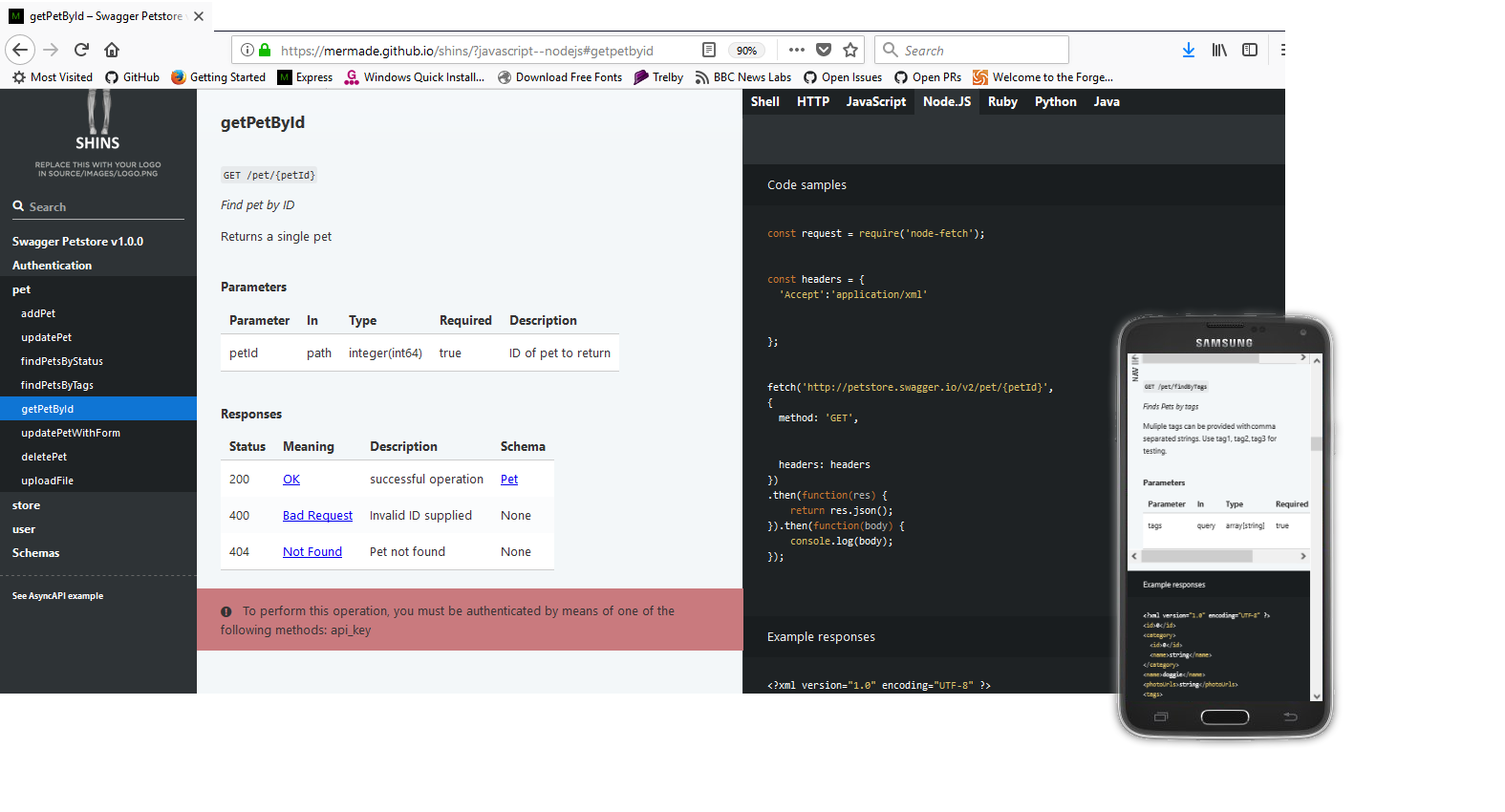
News
- Version 4.0 changes:
- Now uses Promises not callbacks
- Option to output html directly, and to ReSpec format
- Unified JavaScript and Node.js code-samples, PHP added
restrictionscolumn (readOnly/writeOnly) added to schema templates- Numerous bug fixes
- As of v3.0.0 Widdershins no longer expands the definition of OpenAPI body parameters / requestBodies by default, unless they have an inline schema. You can restore the old behaviour by using the
--expandBodyoption. - You may limit the depth of schema examples using the
--maxDepthoption. The default is 10. - To omit schemas entirely, please copy and customise the
main.dottemplate. - As of v3.1.0 Widdershins includes a generated
Authorizationheader in OpenAPI code samples. If you wish to omit this, see here.
To install
- Clone the git repository, and
npm ito install dependencies, or npm install [-g] widdershinsto install globally
Getting started
Widdershins is generally used as a stage in an API documentation pipeline. The pipeline begins with an API definition in OpenAPI 3.x, OpenAPI 2.0 (fka Swagger), API Blueprint, AsyncAPI or Semoasa format. Widdershins converts this description into markdown suitable for use by a renderer, such as Slate, Shins or html suitable for use with ReSpec.
If you need to create your input API definition, this list of available editors may be useful.
More in-depth documentation is available here.
Examples
node widdershins --search false --language_tabs 'ruby:Ruby' 'python:Python' --summary defs/petstore3.json -o petstore3.md
Options
| CLI parameter name | JavaScript parameter name | Type | Default value | Description |
|---|---|---|---|---|
| --customApiKeyValue | options.customApiKeyValue | string |
ApiKey |
Set a custom API key value to use as the API key in generated code examples. |
| --expandBody | options.expandBody | boolean |
false |
If a method's requestBody parameter refers to a schema by reference (not with a inline schema), by default, Widdershins shows only a reference to this parameter. Set this option to true to expand the schema and show all properties in the request body. |
| --headings | options.headings | integer |
2 | Set the value of the headingLevel parameter in the header so Shins knows how many heading levels to show in the table of contents. Currently supported only by Shins, not by Slate, which lacks this feature. |
| --omitBody | options.omitBody | boolean |
false |
By default, Widdershins includes the body parameter as a row in the parameters table before the rows that represent the fields in the body. Set this parameter to omit that body parameter row. |
| --omitHeader | options.omitHeader | boolean |
false |
Omit the header / YAML front-matter in the generated Markdown file. |
| --resolve | options.resolve | boolean |
false |
Resolve external $refs, using the source parameter or the input file as the base location. |
| --shallowSchemas | options.shallowSchemas | boolean |
false |
When referring to a schema with a $ref, don't show the full contents of the schema. |
| N/A | options.source | string |
None | The absolute location or URL of the source file to use as the base to resolve relative references ($refs) from; required if options.resolve is set to true. For CLI commands, Widdershins uses the input file as the base for the $refs. |
| --summary | options.tocSummary | boolean |
false |
Use the operation summary as the TOC entry instead of the ID. |
| --useBodyName | options.useBodyName | boolean |
Use original param name for OpenAPI 2.0 body parameter. | |
| -v, --verbose | options.verbose | boolean |
false |
Increase verbosity. |
| -h, --help | options.help | boolean |
false |
Show help. |
| --version | options.version | boolean |
false |
Show version number. |
| -c, --code | options.codeSamples | boolean |
false |
Omit generated code samples. |
| --httpsnippet | options.httpsnippet | boolean |
false |
Use httpsnippet to generate code samples. |
| -d, --discovery | options.discovery | boolean |
false |
Include schema.org WebAPI discovery data. |
| -e, --environment | N/A | string |
None | File to load config options from. |
| -i, --includes | options.includes | string |
None | List of files to put in the include header of the output Markdown. Processors such as Shins can then import the contents of these files. |
| -l, --lang | options.lang | boolean |
false |
Generate the list of languages for code samples based on the languages used in the source file's x-code-samples examples. |
| --language_tabs | options.language_tabs | string |
(Differs for each input type) | List of language tabs for code samples using language[:label[:client]] format, such as javascript:JavaScript:request. |
| -m, --maxDepth | options.maxDepth | integer |
10 | Maximum depth to show for schema examples. |
| -o, --outfile | N/A | string |
None | File to write the output markdown to. If left blank, Widdershins sends the output to stdout. |
| -r, --raw | options.raw | boolean |
false |
Output raw schemas instead of example values. |
| -s, --search | options.search | boolean |
true |
Set the value of the search parameter in the header so Markdown processors like Shins include search or not in their output. |
| -t, --theme | options.theme | string |
darkula | Syntax-highlighter theme to use. |
| -u, --user_templates | options.user_templates | string |
None | Directory to load override templates from. |
| -x, --experimental | options.experimental | boolean |
For backwards compatibility only; ignored. | |
| -y, --yaml | options.yaml | boolean |
false |
Display JSON schemas in YAML format. |
| options.templateCallback | function |
None | A function that is called before and after each template (JavaScript code only). |
|
| options.toc_footers | object |
A map of urls and descriptions to be added to the ToC footers array (JavaScript code only). |
In Node.JS code, create an options object and pass it to the Widdershins convert function, as in this example:
const converter = require('widdershins');
let options = {}; // defaults shown
options.codeSamples = true;
options.httpsnippet = false;
//options.language_tabs = [];
//options.language_clients = [];
//options.loadedFrom = sourceUrl; // only needed if input document is relative
//options.user_templates = './user_templates';
options.templateCallback = function(templateName,stage,data) { return data };
options.theme = 'darkula';
options.search = true;
options.sample = true; // set false by --raw
options.discovery = false;
options.includes = [];
options.shallowSchemas = false;
options.tocSummary = false;
options.headings = 2;
options.yaml = false;
//options.resolve = false;
//options.source = sourceUrl; // if resolve is true, must be set to full path or URL of the input document
converter.convert(apiObj,options,function(err,str){
  // str contains the converted markdown
});
To only include a subset of the pre-defined language-tabs, or to rename their display-names, you can override the options.language_tabs:
options.language_tabs = [{ 'go': 'Go' }, { 'http': 'HTTP' }, { 'javascript': 'JavaScript' }, { 'javascript--node': 'Node.JS' }, { 'python': 'Python' }, { 'ruby': 'Ruby' }];
The --environment option specifies a JSON or YAML-formatted options object, for example:
{
  "language_tabs": [{ "go": "Go" }, { "http": "HTTP" }, { "javascript": "JavaScript" }, { "javascript--node": "Node.JS" }, { "python": "Python" }, { "ruby": "Ruby" }],
  "verbose": true,
  "tagGroups": [
    {
      "title": "Companies",
      "tags": ["companies"]
    },
    {
      "title": "Billing",
      "tags": ["invoice-create", "invoice-close", "invoice-delete"]
    }
  ]
}
You can also use the environment file to group OAS/Swagger tagged paths together to create a more elegant table of contents, and overall page structure.
If you need to support a version of Slate \<v1.5.0 (or a renderer which also doesn't support display-names for language-tabs, such as node-slate, slate-node or whiteboard), you can use the --environment option with the included whiteboard_env.json file to simply achieve this.
If you are using the httpsnippet option to generate code samples, you can specify the client library used to perform the requests for each language by overriding the options.language_clients:
options.language_clients = [{ 'shell': 'curl' }, { 'node': 'request' }, { 'java': 'unirest' }];
If the language name differs between the markdown name required to syntax highlight and the httpsnippet required target, both can be specified in the form markdown--target.
To see the list of languages and clients supported by httpsnippet, click here.
The loadedFrom option is only needed where the OpenAPI / Swagger definition does not specify a host, and (as per the OpenAPI specification) the API endpoint is deemed to be based on the source URL
the definition was loaded from.
To see the list of highlight-js syntax highlighting themes, click here.
Schema.org WebAPI discovery data is included if the discovery option above is set true. See the W3C WebAPI Discovery Community Group for more information.
Language tabs
Widdershins supports the x-code-samples vendor-extension to completely customise your documentation. Alternatively, you can edit the default code-samples in the templates sub-directory, or override them using the user_templates option to specify a directory containing your templates.
Widdershins supports the use of multiple language tabs with the same language (i.e. plain Javascript and Node.Js). To use this support you must be using Slate (or one of its ports compatible with) version 1.5.0 or higher. Shins versions track Slate version numbers.
Templates
By default, Widdershins uses the templates in its templates/ folder to generate the Markdown output. To customize the templates, copy some or all of them to a folder and pass their location to the user_templates parameter.
The templates include .dot templates and .def partials. To override a .dot template, you must copy it and the child .def partials that the template references. Similarly, to override a .def partial, you must also copy the parent .dot template. For OpenAPI 3, the primary template is main.dot and its main child partials are parameters.def, responses.def, and callbacks.def.
This means that it is usually easiest to copy all .dot and .def files to your user templates directory so you don't skip a template or partial. To bring in changes from Widdershins updates, you can use a visual diff tool which can run across two directories, such as Meld or WinMerge.
Template syntax
Templates are compiled with doT.js.
Templates have access to a data object with a range of properties based on the document context. For information about the parameters, see the README file for the appropriate templates:
- Swagger 2.0 / OpenAPI 3.0.x template parameters
- AsyncAPI 1.x template parameters
- Semoasa 0.1.0 template parameters
To print the value of a parameter or variable in a template, use the code {{=parameterName}}. For example, to print the title of an OpenAPI 3 spec (from its info.title field), use the code {{=data.api.info.title}}.
To loop through values in an array, use the code {{~ arrayName :tempVariable}} to start the loop and the code {{~}} to close the loop. For example, the OpenAPI 3 partial parameters.def uses this code to create a table of the parameters in an operation:
|Name|In|Type|Required|Description|
|---|---|---|---|---|
{{~ data.parameters :p}}|{{=p.name}}|{{=p.in}}|{{=p.safeType}}|{{=p.required}}|{{=p.shortDesc || 'none'}}|
{{~}}
For if/then logic, use the code {{? booleanExpression}} to start the code block and the code {{?}} to close the block. For example, the OpenAPI 3 main.dot template calls the security.def partial to show information about the security schemes if the OpenAPI spec includes a securitySchemes section:
Core symbols most depended-on inside this repo
dumpSchemaShape
Languages
Modules by API surface
Used by 1 indexed graphs manifest dependencies, hub-wide
For agents
$ claude mcp add widdershins \
  -- python -m otcore.mcp_server <graph>