github.com/ManuelGil/vscode-nextjs-generator @v2.8.0
Chat with this repoWhat it actually does AI analysis from the code graph — generated when you open this
README
T3 Stack / Next.js / React File Generator






A Visual Studio Code extension to automate file and boilerplate generation for T3 Stack, Next.js, and React projects.
Introduction
Modern fullstack applications often require repetitive setup of folders, files, and boilerplate code. The T3 Stack / Next.js / React File Generator simplifies these tasks by integrating common generation commands directly into your editor. This extension is compatible with all VSCode-based editors, including VSCode, VSCodium, WindSurf, Cursor, and others, and supports Next.js (v13 & v14), React, Prisma, Drizzle, Tailwind CSS, i18next, Zod, and other popular frameworks.
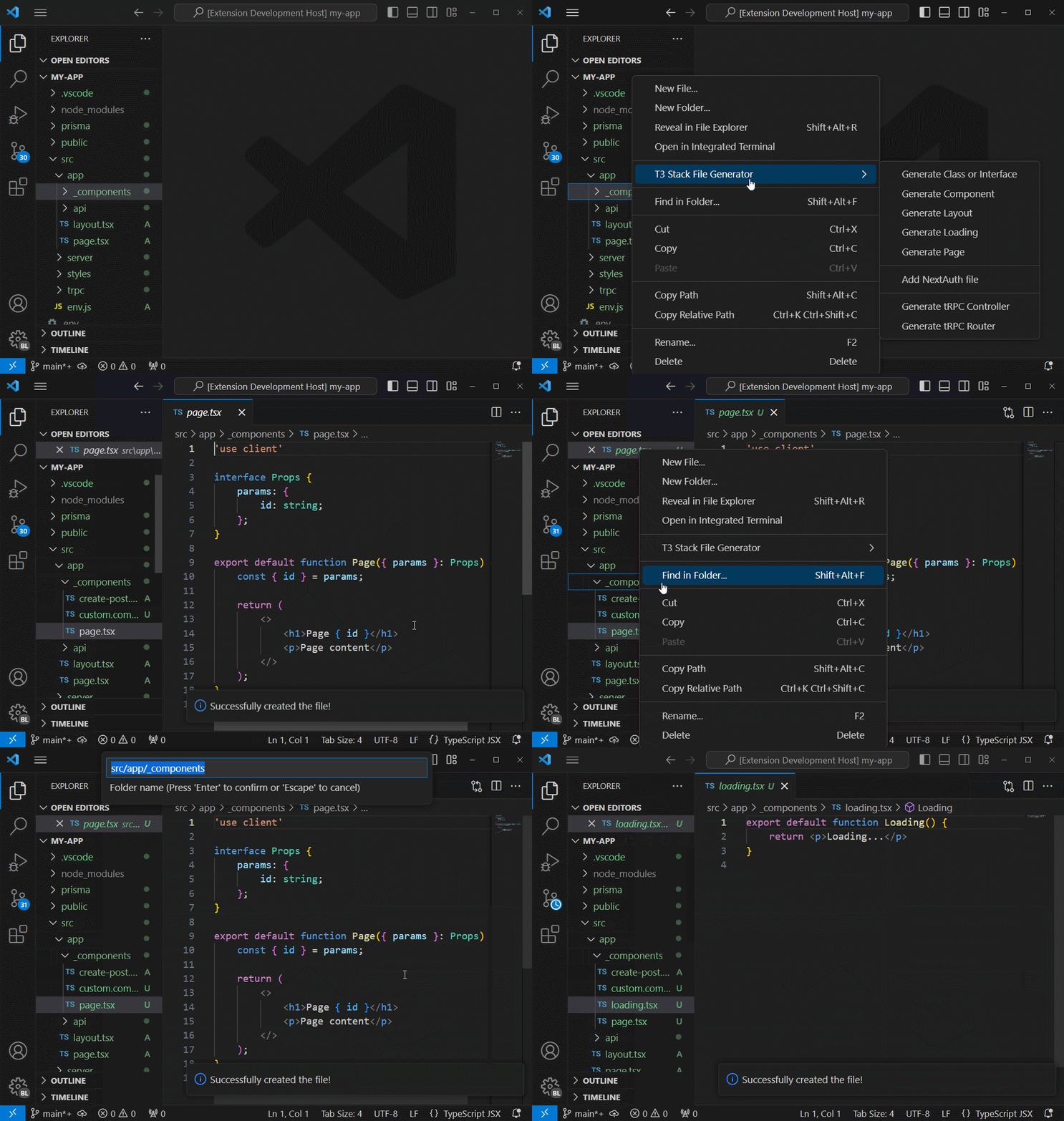
Ready to transcend your development experience?
Boost your efficiency with this VSCode extension, designed to streamline file generation for your T3 Stack project. Whether crafting individual components or kickstarting a new venture, the extension simplifies tasks through intuitive commands. Additionally, initiate your NextJS server effortlessly, enabling swift previews of your application.
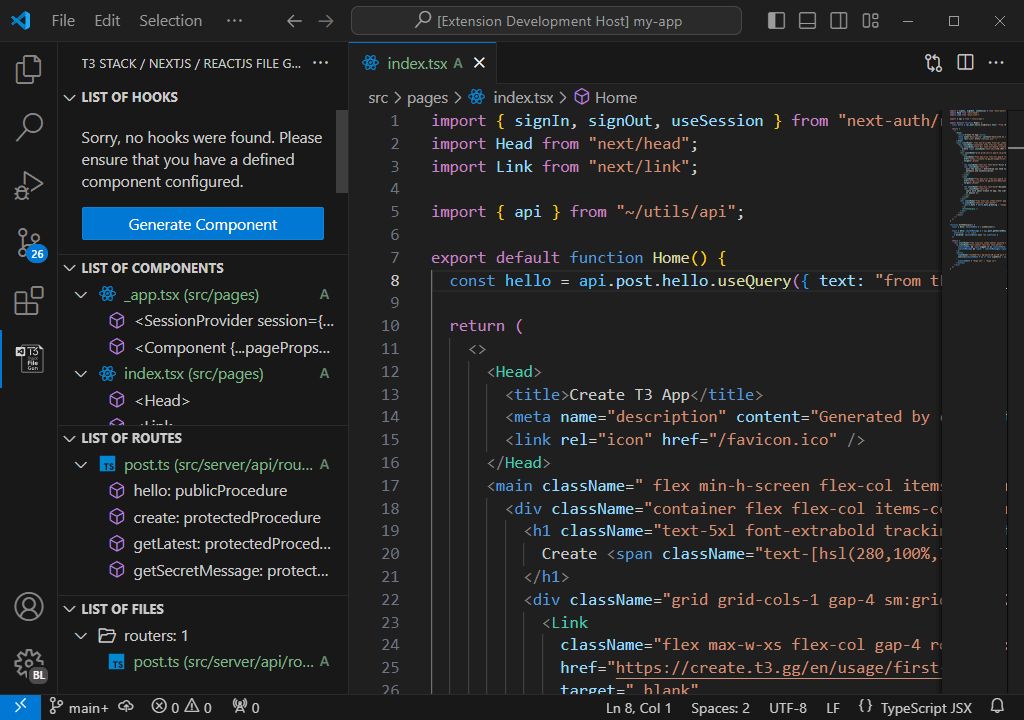
Index
- T3 Stack / Next.js / React File Generator
- Introduction
- Index
- Key Features
- Getting Started
- Example: Project Configuration
- Create a New Project
- Documentation
- Contributing
- Code of Conduct
- Changelog
- Authors
- Follow Me
- Other Extensions
- Recommended Browser Extension
- License
Key Features
- Automated File Generation Scaffold components, pages, API routes, utilities, and tests with a single command.
- Framework Snippets Ready-to-use code snippets for Next.js, React, Prisma, Drizzle, Tailwind CSS, i18next, Zod, and more.
- Customizable Settings Define import aliases, file extensions, folder watches, and naming patterns.
- Integrated Commands Context menus and palette commands for project creation, file scaffolding, and CLI invocations.
- Multi-Version Support Full compatibility with Next.js 13 and 14, TypeScript, and modern fullstack workflows.
Getting Started
- Open the Command Palette (Ctrl+Shift+P or ⌘+Shift+P) and enter
T3:to view all available commands. - Right-click in the Explorer to access context-menu generation options.
- Configure workspace settings in
.vscode/settings.jsonto tailor file structure, import aliases, and naming conventions.
Example: Project Configuration
Add or update .vscode/settings.json in your project root:
{
  "nextjs.files.alias": "~",               // Import alias (e.g., "~", "@", "#")
  "nextjs.files.extension": "tsx",         // Default file extension
  "nextjs.files.showType": true,           // Append type to filename (e.g., "component")
  "nextjs.files.include": ["js","jsx","ts","tsx"],
  "nextjs.files.exclude": [
    "**/node_modules/**",
    "**/dist/**",
    "**/.*/**"
  ],
  "nextjs.files.watch": ["components","pages","api"],
  "nextjs.files.showPath": true,           // Display path in file name labels
  "nextjs.server.turbopack": true,             // Enable Turbo mode (Next.js 14+)
  "nextjs.server.experimentalHttps": true  // Enable HTTPS (Next.js 14+)
}
Reload VS Code to apply these settings.
Create a New Project
Use the built-in T3 Stack / Vite CLI integration:
- Open the Command Palette and type
T3: Create Project. - Follow the interactive prompts to select templates, routes, and features.
- The extension will generate a fully configured T3 Stack or Next.js project in your chosen directory.
Documentation
Detailed feature and usage documentation is available in the docs folder:
Contributing
T3 Stack / Next.js / React File Generator is open-source and welcomes community contributions:
- Fork the GitHub repository.
- Create a new branch:
bash
   git checkout -b feature/your-feature
- Make your changes, commit them, and push to your fork.
- Submit a Pull Request against the
mainbranch.
Before contributing, please review the Contribution Guidelines for coding standards, testing, and commit message conventions. Open an Issue if you find a bug or want to request a new feature.
Code of Conduct
We are committed to providing a friendly, safe, and welcoming environment for all, regardless of gender, sexual orientation, disability, ethnicity, religion, or other personal characteristic. Please review our Code of Conduct before participating in our community.
Changelog
For a complete list of changes, see the CHANGELOG.md.
Authors
- Manuel Gil - Owner - @ManuelGil
See also the list of contributors who participated in this project.
Follow Me
- GitHub:
- X (formerly Twitter):


Other Extensions
-
Auto Barrel Automatically generates and maintains barrel (
index.ts) files for your TypeScript projects. -
Angular File Generator Generates boilerplate and navigates your Angular (9→20+) project from within the editor, with commands for components, services, directives, modules, pipes, guards, reactive snippets, and JSON2TS transformations.
-
NestJS File Generator Simplifies creation of controllers, services, modules, and more for NestJS projects, with custom commands and Swagger snippets.
-
NestJS Snippets Ready-to-use code patterns for creating controllers, services, modules, DTOs, filters, interceptors, and more in NestJS.
-
T3 Stack / NextJS / ReactJS File Generator Automates file creation (components, pages, hooks, API routes, etc.) in T3 Stack (Next.js, React) projects and can start your dev server from VSCode.
-
Drizzle ORM Snippets Collection of code snippets to speed up Drizzle ORM usage, defines schemas, migrations, and common database operations in TypeScript/JavaScript.
-
CodeIgniter 4 Spark Scaffolds controllers, models, migrations, libraries, and CLI commands in CodeIgniter 4 projects using Spark, directly from the editor.
-
CodeIgniter 4 Snippets Snippets for accelerating development with CodeIgniter 4, including controllers, models, validations, and more.
-
CodeIgniter 4 Shield Snippets Snippets tailored to CodeIgniter 4 Shield for faster authentication and security-related code.
-
Mustache Template Engine - Snippets & Autocomplete Snippets and autocomplete support for Mustache templates, making HTML templating faster and more reliable.
Recommended Browser Extension
For developers who work with .vsix files for offline installations or distribution, the complementary One-Click VSIX extension is recommended, available for both Chrome and Firefox.
One-Click VSIX integrates a direct "Download Extension" button into each VSCode Marketplace page, ensuring the file is saved with the
.vsixextension, even if the server provides a.ziparchive. This simplifies the process of installing or sharing extensions offline by eliminating the need for manual file renaming.
License
This project is licensed under the MIT License. See the LICENSE file for details.
Core symbols most depended-on inside this repo
Shape
Languages
Modules by API surface
For agents
$ claude mcp add vscode-nextjs-generator \
  -- python -m otcore.mcp_server <graph>