github.com/Licoy/fetch-github-hosts @v4.0.3
Chat with this repoWhat it actually does AI analysis from the code graph — generated when you open this
README
Fetch GitHub Hosts

A GitHub Hosts synchronization tool designed to help researchers and learners access GitHub faster



✨ Features
- 🖥️ Cross-platform Desktop App — Supports macOS (Intel & Apple Silicon), Windows, Linux
- 🔄 Client Mode — Automatically sync hosts from remote sources to your system
- 🌐 Server Mode — Self-hosted DNS resolution service with HTTP API
- 🌓 Dark / Light / System theme modes
- 🌍 Multi-language — 简体中文, English, 日本語
- 🔒 Smart Elevation — One-time password prompt, no repeated authorization needed
- 📡 System Tray — Run in background with one-click start/stop
📦 Installation
Download from Releases:
| Platform | File Type | Architecture |
|---|---|---|
| macOS | .dmg |
Universal (Intel + Apple Silicon) |
| Windows | .msi / .exe |
x86_64 |
| Linux | .deb / .AppImage |
x86_64 |
🚀 Usage
Desktop Client
Download, install, and run. The app provides a graphical user interface.
Client Mode
Fetches the latest GitHub DNS records from remote hosts sources and writes them to the system hosts file.
- Multiple hosts sources (FetchGithubHosts, Github520)
- Custom remote URL support
- Configurable auto-fetch interval (minutes)
Server Mode
Starts a local HTTP server that auto-resolves GitHub domains and serves hosts files.
- Default port:
9898 - Provides
hosts.txt(plain text) andhosts.json(JSON) formats - Built-in web page with dark/light theme and multi-language support
Command Line
Download your platform's binary from Releases and use it directly in the terminal.
Parameters
| Parameter | Short | Default | Description |
|---|---|---|---|
--mode |
-m |
None (opens GUI) | Mode: client or server |
--interval |
-i |
60 |
Fetch interval in minutes |
--port |
-p |
9898 |
Server mode listening port |
--url |
-u |
https://hosts.gitcdn.top/hosts.txt |
Client mode remote hosts URL |
--template |
-t |
None (built-in) | Server mode custom HTML template file path |
--lang |
-l |
Auto-detect | Language (zh-CN, en-US, ja-JP) |
Start Client
# Linux/macOS
sudo ./fetch-github-hosts -m client

# Windows
fetch-github-hosts.exe -m client

# Custom interval (every 10 minutes)
sudo ./fetch-github-hosts -m client -i 10

# Custom URL
sudo ./fetch-github-hosts -m client -u http://127.0.0.1:9898/hosts.json
Start Server
# Linux/macOS
./fetch-github-hosts -m server

# Windows
fetch-github-hosts.exe -m server

# Custom port
./fetch-github-hosts -m server -p 6666

# Custom HTML template
./fetch-github-hosts -m server -t /path/to/template.html
💡 Custom templates support
{{FGH_VERSION}}(version) and{{FGH_UPDATE_TIME}}(last update time) template variables💡 Omitting the
-mparameter launches the graphical user interface
Manual Method
Add Hosts
Visit https://hosts.gitcdn.top/hosts.txt and paste the content into your system hosts file.
- Linux / macOS:
/etc/hosts - Windows:
C:\Windows\System32\drivers\etc\hosts
Flush DNS Cache
# macOS
sudo dscacheutil -flushcache && sudo killall -HUP mDNSResponder

# Windows
ipconfig /flushdns

# Linux
sudo systemd-resolve --flush-caches
One-liner for Linux/macOS
sed -i "/# fetch-github-hosts begin/Q" /etc/hosts && curl https://hosts.gitcdn.top/hosts.txt >> /etc/hosts
💡 Set up a crontab task for automatic updates
📸 Screenshots
Client Mode

Client Started

Hosts Source Selection

Custom Hosts Source

Server Mode

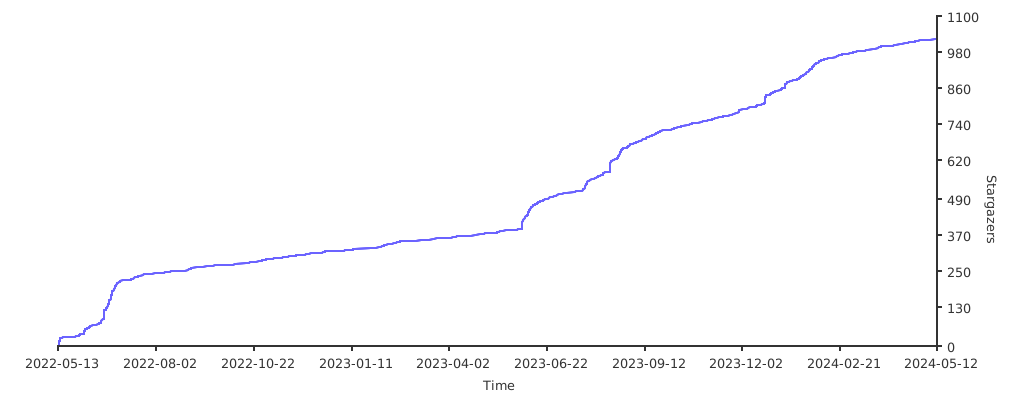
🌟 Star History
📄 License
Extension points exported contracts — how you extend this code
ClientConfig (Interface)Core symbols most depended-on inside this repo
cli_logShape
Languages
Modules by API surface
For agents
$ claude mcp add fetch-github-hosts \
  -- python -m otcore.mcp_server <graph>