github.com/Lichtso/DOS-Emulator @v0.1.0
Chat with this repoWhat it actually does AI analysis from the code graph — generated when you open this
README

DOS-Emulator
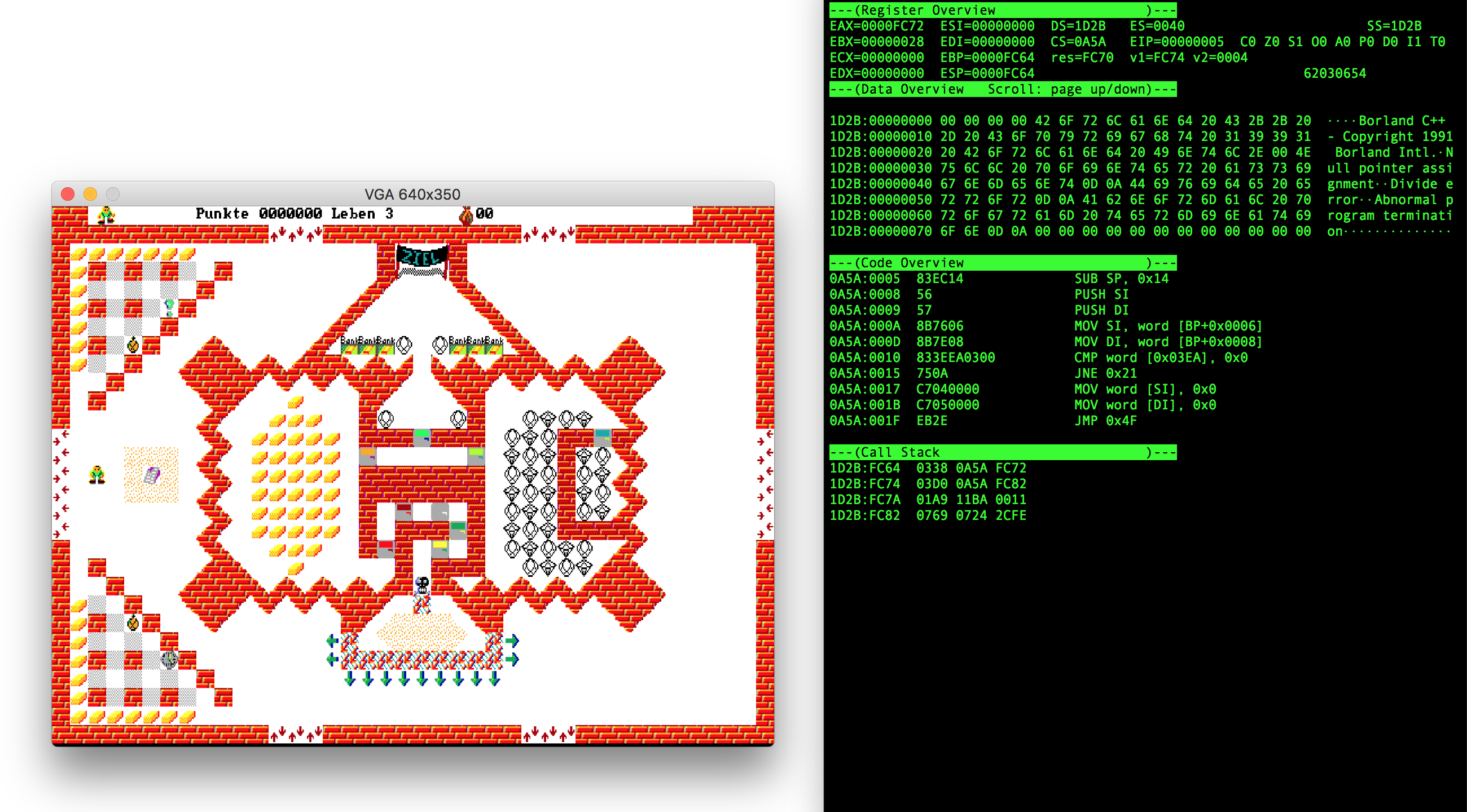
While this is inspired by DOSBox, it is not a direct port. Many features are implemented differently or not at all. The goal was just to implement enough to play one of my favorite games and learn some rust and emulation principles along the way.
Run the Example
git clone https://github.com/Lichtso/DOS-Emulator
cd DOS-Emulator
cargo build --release
curl -GOL https://cors.archive.org/cors/msdos_Robot_Junior_1991/Robot_Junior_1991.zip
mkdir -p DOS/TOM/ROBJUN
unzip -j Robot_Junior_1991.zip RobotJun/ROBJUN.EXE RobotJun/ROBJUN.MUC RobotJun/ROBJUN.SCN RobotJun/ITEMJE.CRN RobotJun/ITEMJG.CRN RobotJun/SASJ.CRN -d DOS/TOM/ROBJUN/
target/release/dos-emulator -C DOS/ DOS/TOM/ROBJUN/ROBJUN.EXE
Then setup your keyboard layout (see instructions below) and enjoy the game!
Command Line Interface
- Ctrl-c: Quit
- p: Pause (enter the debugger)
- k: Enter the keyboard-mapping-tool
Debugger
- p: Profile instructions (and save them to a file)
- a: Data overview to DS:SI (string source)
- s: Data overview to SS:SP (stack pointer)
- d: Data overview to ES:DI (string destination)
- Page-Up / Page-Down: Scroll data overview
- F5: Continue (leave the debugger)
- F10: Step over / out (places a one-shot break point behind the current instruction)
- F11: Single step
Keyboard-Mapping-Tool
 Type in the CLI to control the keybinding process and type in the video window to register a scancode at the selection.
* Escape: Leave the keyboard-mapping-tool
* Arrows: Navigate / select
* Backspace: Unregister selected entry
Type in the CLI to control the keybinding process and type in the video window to register a scancode at the selection.
* Escape: Leave the keyboard-mapping-tool
* Arrows: Navigate / select
* Backspace: Unregister selected entry
Supported Software
Currently only the Game of ROBOT episodes 0, 1, 3 and 4 are known to be playable. As host macOS is tested and Ubuntu builds. Windows does not support ANSI escape sequences which are needed by the CLI (inside the termion dependency).
Architecture
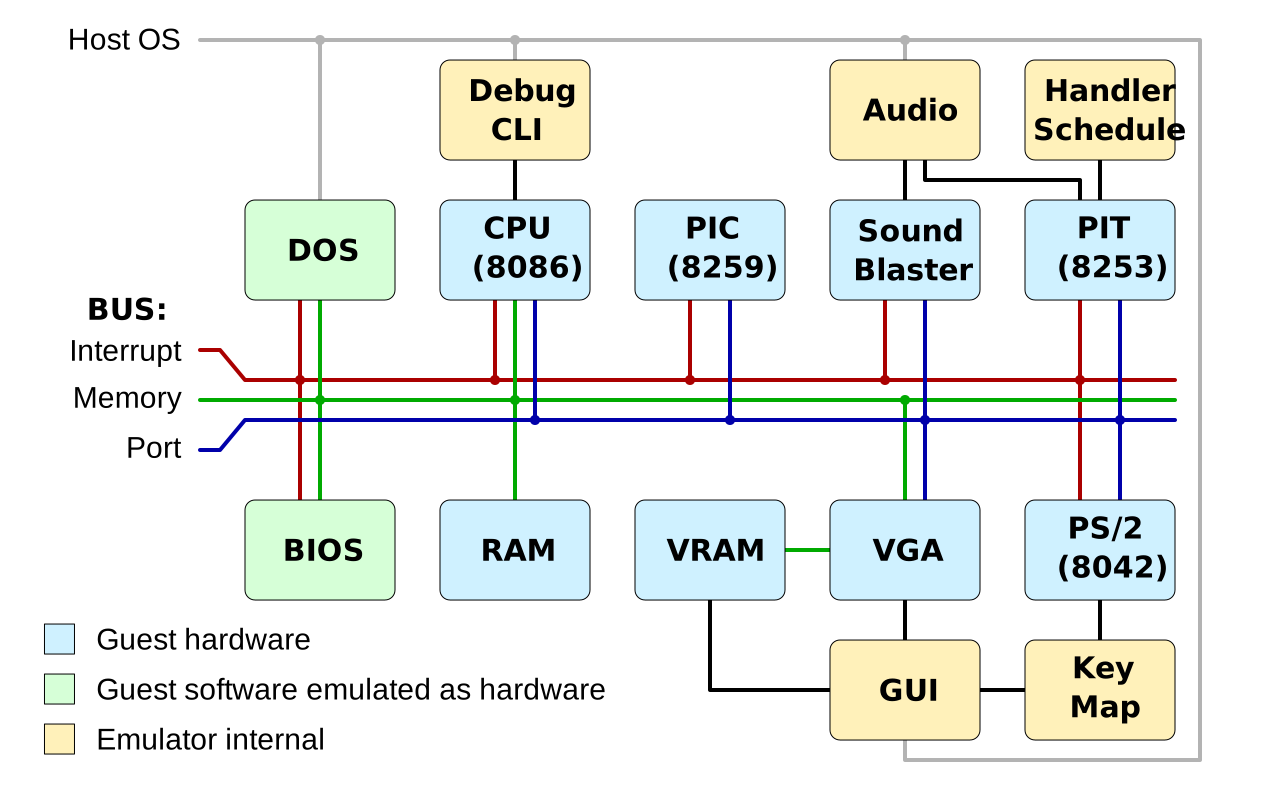
There are the following threads (without the ones spawned by dependencies): * GUI: Renders the video output and handles the input events of the window * Audio: Synthesizes the signal of the sound blaster and beeper * CLI: Debugger and actual emulation
Evaluation
In release mode on a 2,6 GHz Intel Core i7 the emulation does 10 to 19 (up to 23 using PGO) million instructions per second. As this is much faster than the original hardware was, the emulation is done in batches with sleeps in between, in order to have a consistent timing behavior and not burn the host CPU unnecessarily. This way about 45% of one host CPU core and 32 MiB of RAM are used. The emulator executable is about 1.5 MiB (stripped on macOS) and the code base 5 KLoC (without lookup tables and bindings). Some threads read data from others using raw pointers which is definitely not the rust way but an easy workaround.
References
These are the sources I used.
ISA / CPU
- http://mlsite.net/8086/
- http://www.mlsite.net/8086/8086_table.txt
- http://shell-storm.org/online/Online-Assembler-and-Disassembler/
- https://www.felixcloutier.com/x86/index.html
- https://en.wikipedia.org/wiki/Intel_8086
- https://en.wikipedia.org/wiki/X86_instruction_listings
- https://en.wikibooks.org/wiki/X86_Assembly/Machine_Language_Conversion
- https://en.wikipedia.org/wiki/Intel_BCD_opcode
- https://en.wikipedia.org/wiki/Half-carry_flag
- http://teaching.idallen.com/dat2343/10f/notes/040_overflow.txt
BUS
- http://www.ctyme.com/intr/int.htm
- http://bochs.sourceforge.net/techspec/PORTS.LST
- https://wiki.osdev.org/I/O_Ports
- https://wiki.osdev.org/IRQ
- http://staff.ustc.edu.cn/~xyfeng/research/cos/resources/machine/mem.htm
BIOS
- https://en.wikipedia.org/wiki/BIOS_interrupt_call
- http://staff.ustc.edu.cn/~xyfeng/research/cos/resources/BIOS/Resources/biosdata.htm
- http://flint.cs.yale.edu/cs422/doc/art-of-asm/pdf/CH13.PDF
DOS
- https://www.pcjs.org/pubs/pc/reference/microsoft/mspl13/msdos/
- http://bytepointer.com/resources/dos_programmers_ref_exe_format.htm
- http://tuttlem.github.io/2015/03/28/mz-exe-files.html
- http://www.piclist.com/techref/dos/pss.htm
- http://www.piclist.com/techref/dos/psps.htm
- https://en.wikipedia.org/wiki/File_Control_Block
- https://en.wikipedia.org/wiki/Program_Segment_Prefix
- https://en.wikipedia.org/wiki/Job_File_Table
Sound / Audio
- https://shipbrook.net/jeff/sb.html
- https://pdf1.alldatasheet.com/datasheet-pdf/view/103368/ETC/YMF262.html
Video / Graphics / Mouse
- http://www.osdever.net/FreeVGA/vga/vga.htm
- http://www.brackeen.com/vga/
Core symbols most depended-on inside this repo
Shape
Languages
Modules by API surface
For agents
$ claude mcp add DOS-Emulator \
  -- python -m otcore.mcp_server <graph>