github.com/LargeModGames/spotatui @v0.40.1
Chat with this repoWhat it actually does AI analysis from the code graph — generated when you open this
README
spotatui
A Spotify client for the terminal written in Rust, powered by Ratatui.
A community-maintained fork of spotify-tui, actively developed with new features like native streaming, synced lyrics, and real-time audio visualization, and growing beyond Spotify with optional local files, Subsonic/Navidrome, internet radio, and YouTube sources.







Song History
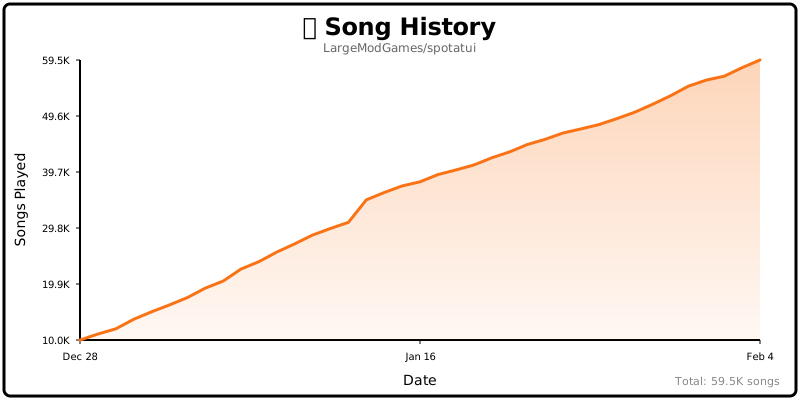
Table of Contents
- Help Wanted
- Performance
- Privacy Notice
- Migrating from spotify-tui
- Installation
- First-time setup
- Adding Spotify later
- Usage
- Native Streaming
- Music Sources (Beyond Spotify)
- Local Files
- Subsonic / Navidrome
- Internet Radio
- YouTube
- Configuration
- Discord Rich Presence
- Plugins
- Limitations
- Deprecated Spotify API Features
- Using with spotifyd
- Libraries used
- Development
- Windows Subsystem for Linux
- Maintainer
- spotatui Contributors
- Upstream Contributors (spotify-tui)
- Star History
- Roadmap
Help Wanted
spotatui is currently maintained by a solo developer. More contributors would be hugely appreciated! Here's how you can help:
- Star the repo to help others discover the project
- Report bugs or request features in Issues
- Join the community in Discussions
- Submit a PR for code, docs, or themes
See CONTRIBUTING.md for more details!
Performance
spotatui is extremely lightweight compared to the official Electron client.
| Mode | RAM Usage |
|---|---|
| Native Streaming (Base) | ~78 MB |
| With Synced Lyrics | ~78 MB |
| With System-Wide Visualizer | ~80 MB |
Tested on Arch Linux (Hyprland).
Privacy Notice
Anonymous Global Counter: spotatui includes an opt-in feature that contributes to a global counter showing how many songs have been played by all users worldwide. This feature:
- Is completely anonymous - no personal information, song names, artists, or listening history is collected
- Only sends a simple increment when a new song starts playing
- Is enabled by default but can be opted out at any time
- Can be disabled by setting
enable_global_song_count: falsein~/.config/spotatui/config.yml
We respect your privacy. This is purely a fun community metric with zero tracking of individual users.
Migrating from spotify-tui
If you used the original spotify-tui before:
- The binary name changed from
spttospotatui. - Config paths changed:
- Old:
~/.config/spotify-tui/ - New:
~/.config/spotatui/
You can copy your existing config:
mkdir -p ~/.config/spotatui
cp -r ~/.config/spotify-tui/* ~/.config/spotatui/
You may be asked to re-authenticate with Spotify the first time.
Installation
Note: Spotify is optional. On first launch spotatui asks which source you want to use, and YouTube, Subsonic/Navidrome, Internet Radio, and Local Files all work with no Spotify account. Spotify Premium is only required for the Spotify source (native streaming and Web API playback controls); you can add Spotify anytime later from the
dmenu.
# Homebrew (macOS only)
brew tap LargeModGames/spotatui
brew install spotatui

# Winget (Windows)
winget install spotatui

# Cargo
cargo install spotatui

# Arch Linux (AUR) - pre-built binary (faster)
yay -S spotatui-bin

# Arch Linux (AUR) - build from source
yay -S spotatui

# Void Linux (Unoffical Repo)
echo repository=https://raw.githubusercontent.com/Event-Horizon-VL/blackhole-vl/repository-x86_64 | sudo tee /etc/xbps.d/20-repository-extra.conf
sudo xbps-install -S spotatui
# NixOS (Flake)

# Add spotatui to your flake inputs:
inputs = {
  spotatui = {
    url = "github:LargeModGames/spotatui";
    inputs.nixpkgs.follows = "nixpkgs";
  };
}

# Add the spotatui package from your inputs to your config:
{ inputs, ...}:{
  # Your other configurations
  environment.systemPackages = with pkgs; [
    inputs.spotatui.packages.${pkgs.stdenv.hostPlatform.system}.default
  ];
}
Or download pre-built binaries from GitHub Releases.
See the Installation Wiki for platform-specific requirements and building from source.
First-time setup
Run spotatui. On the first launch it asks which source you want to set up:
Welcome to spotatui! Choose your music source:

  1) Spotify        (needs login)
  2) YouTube        (free, needs the yt-dlp binary)
  3) Subsonic       (free, needs a Subsonic/Navidrome server)
  4) Internet Radio (free)
  5) Local Files    (free)
- Pick a free source to skip Spotify entirely. Subsonic prompts for your server URL and credentials (and verifies the connection); YouTube checks that
yt-dlpis on yourPATH. Only sources compiled into your build are listed. - Pick Spotify to run the Spotify auth wizard. You'll need to create a Spotify Developer app at the Spotify Dashboard. See the Installation Wiki for step-by-step setup.
Adding Spotify later
Started with a free source and want Spotify too? Press d to open the Source & Device menu and select Spotify — spotatui opens your browser to log in without restarting. This enables Spotify's Web API (browsing, playlists, controlling external devices) right away; native (librespot) streaming still requires a restart, since it initializes at startup.
Usage
The binary is named spotatui.
Running spotatui with no arguments will bring up the UI. Press ? to bring up a help menu that shows currently implemented key events and their actions.
There is also a CLI that is able to do most of the stuff the UI does. Use spotatui --help to learn more.
See Keybindings Wiki for the full list of keyboard shortcuts.
Here are some example to get you excited.
spotatui --completions zsh # Prints shell completions for zsh to stdout (bash, power-shell and more are supported)

spotatui play --name "Your Playlist" --playlist --random # Plays a random song from "Your Playlist"
spotatui play --name "A cool song" --track # Plays 'A cool song'

spotatui playback --like --shuffle # Likes the current song and toggles shuffle mode
spotatui playback --toggle # Plays/pauses the current playback

spotatui list --liked --limit 50 # See your liked songs (50 is the max limit)

# Looks for 'An even cooler song' and gives you the '{name} from {album}' of up to 30 matches
spotatui search "An even cooler song" --tracks --format "%t from %b" --limit 30

# Generate a shareable HTML recap from spotatui's local listening history
spotatui history recap --period 30d --output ./spotatui-recap.html
Native Streaming
spotatui can play audio directly without needing spotifyd or the official Spotify app. Just run spotatui and it will appear as a Spotify Connect device.
- Works with media keys, MPRIS (Linux), and macOS Now Playing
- Premium account required
- Context-backed native playback prefers Spotify-visible playback starts when it is safe to do so, while raw URI-list playback stays on the stable direct native path
- Runs on our maintained librespot fork, which backports upstream fixes for Spotify's evolving audio delivery (e.g. the HTTP 530 CDN issue that silenced native playback)
See the Native Streaming Wiki for setup details.
Music Sources (Beyond Spotify)
spotatui is growing into a general music player. Press d to open the Source & Device
picker and switch between sources; the sidebar and search re-scope to the active source.
Playback for these sources runs through spotatui's own audio engine, so volume control and
the audio visualizer work exactly like they do for Spotify.
| Source | What it does | Needs |
|---|---|---|
| Local Files | Browse and play a folder of audio files (FLAC, MP3, OGG, WAV, …) | Nothing; set local_music_path or use the OS music dir |
| Subsonic | Browse playlists, search, and stream from any Subsonic-compatible server (Navidrome, Gonic, Airsonic, Funkwhale, …) | A server account |
| Internet Radio | Play icecast/shoutcast streams with live now-playing metadata; search the radio-browser.info directory (30k+ stations) | Nothing |
| YouTube | Search YouTube and play audio; build local playlists stored in a plain file | yt-dlp on your PATH (ffmpeg recommended) |
These sources need no Spotify Premium. Combined with YouTube's local playlists, spotatui is fully usable without any paid account.
Resuming your last session: quit while playing from a non-Spotify source and spotatui
remembers that track and its position, bringing it back on the next launch. This follows the
startup_behavior setting: the default continue resumes it exactly as it was (playing if it
was playing when you closed), play always resumes it, and pause cues it paused.
Availability: included in the Linux and Windows release binaries. Not yet available on macOS (the shared audio output path is disabled there pending a fix; contributions welcome). When building from source, enable them with cargo features:
cargo install spotatui --features local-files,subsonic,internet-radio,youtube
Local Files
behavior:
  local_music_path: "/home/you/Music" # defaults to the OS music directory
Pick Local Files in the d picker; the sidebar lists your folders. Selecting a track
queues the folder with next/previous and auto-advance.
Subsonic / Navidrome
behavior:
  subsonic_url: "https://music.example.com"
  subsonic_username: "you"
  subsonic_password: "secret" # prefer the env var below
Prefer setting the password via the SPOTATUI_SUBSONIC_PASSWORD environment variable so it
never sits in the config file in plaintext.
Internet Radio
Stations come from your config list and from searching the radio-browser.info directory
in-app (the search box searches stations while Radio is the active source; Enter plays one
directly). Press the save/like key (F by default) on a highlighted station, or while
a radio stream is playing, to save it to behavior.radio_stations and show it in the
Radio Stations sidebar. Highlight a saved sidebar station and press D to remove it.
behavior:
  radio_stations:
    - name: "SomaFM Groove Salad"
      url: "https://ice1.somafm.com/groovesalad-128-mp3"
The playbar shows a LIVE badge with the stream's now-playing title as it updates.
YouTube
Requires the yt-dlp binary (install it from your
package manager; ffmpeg is recommended for cleaner audio containers). No Google account,
no API key, no cookies: search and playback are anonymous. If yt-dlp is somewhere unusual:
behavior:
  ytdlp_path: "/opt/yt-dlp/yt-dlp" # optional; defaults to `yt-dlp` on PATH
Search for anything and press Enter on a result to play it (the first play takes a few
seconds while the audio downloads). When YouTube extraction changes and playback breaks,
updating yt-dlp (yt-dlp -U or your package manager) is the fix; no spotatui update needed.
Local YouTube playlists: since there is no usable YouTube login API, playlists live in
~/.config/spotatui/youtube_playlists.yml, a plain human-editable file you can back up or
share:
- Sidebar →
+ New Playlistcreates one won a search result adds it to a playlist (same picker dial
Extension points exported contracts — how you extend this code
Core symbols most depended-on inside this repo
Shape
Languages
Modules by API surface
For agents
$ claude mcp add spotatui \
  -- python -m otcore.mcp_server <graph>