github.com/LambdaTest/test-at-scale @v0.10.4
Chat with this repoWhat it actually does AI analysis from the code graph — generated when you open this
README

Test At Scale
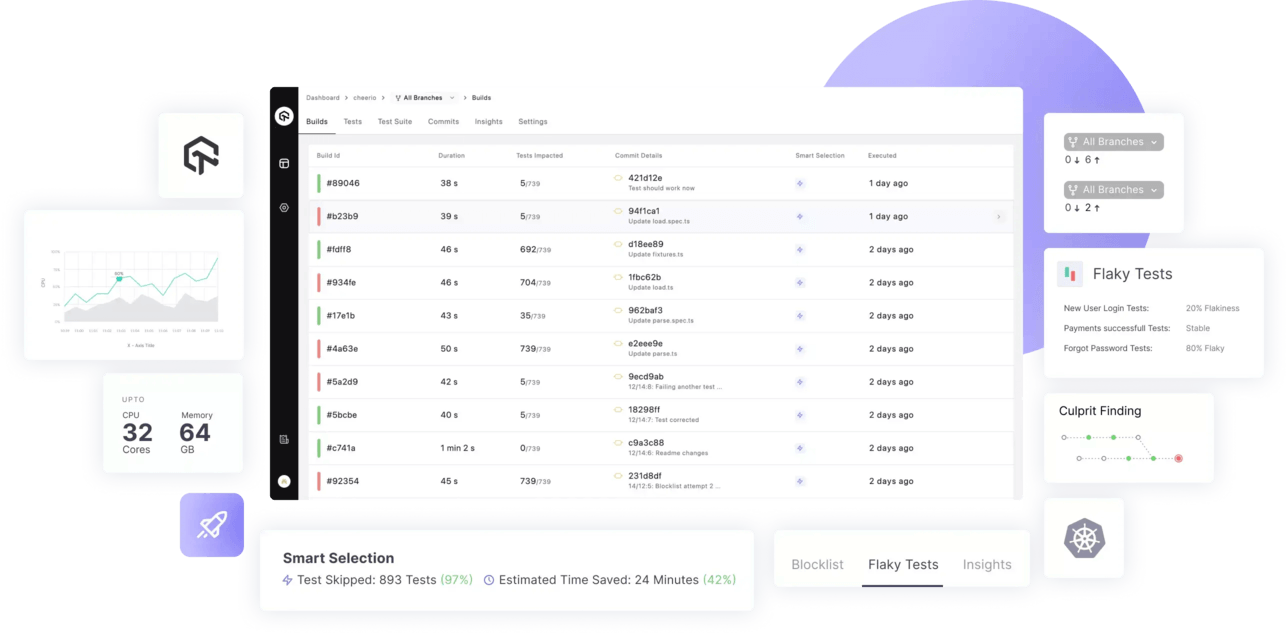
Test Smarter, Release Faster with test-at-scale.






Test at scale - TAS
TAS helps you accelerate your testing, shorten job times and get faster feedback on code changes, manage flaky tests and keep master green at all times.
To learn more about TAS features and capabilities, see our product page.
Features
- Smart test selection to run only the subset of tests which get impacted by a commit ⚡
- Smart auto grouping of test to evenly distribute test execution across multiple containers based on previous execution times
- Deep insights about test runs and execution metrics
- Support status checks for pull requests
- Advanced analytics to surface test performance and quality data
- YAML driven declarative workflow management
- Natively integrates with Github and Gitlab
- Flexible workflow to run pre-merge and post-merge tests
- Allows blocking and unblocking tests directly from the UI or YAML directive. No more WIP commits!
- Support for customizing testing environment using raw commands in pre and poststeps
- Supports Javascript monorepos
- Smart depdency caching to speedup subsequent test runs
- Easily customizable to support all major language and frameworks
- Available as hosted solution as well as self-hosted opensource runner
- [Upcoming] Smart flaky test management 🪄
Table of contents
- 🚀 Getting Started
- 💡 Tutorials
- 💖 Contribute
- 📖 Docs
Getting Started
Step 1 - Setting up a New Account
In order to create an account, visit TAS Login Page. (Or TAS Home Page) - Login using a suitable git provider and select your organization you want to continue with. - Tell us your specialization, team size.

- Select TAS Self Hosted and click on Proceed.
- You will find your LambdaTest Secret Key on this page which will be required in the next steps.
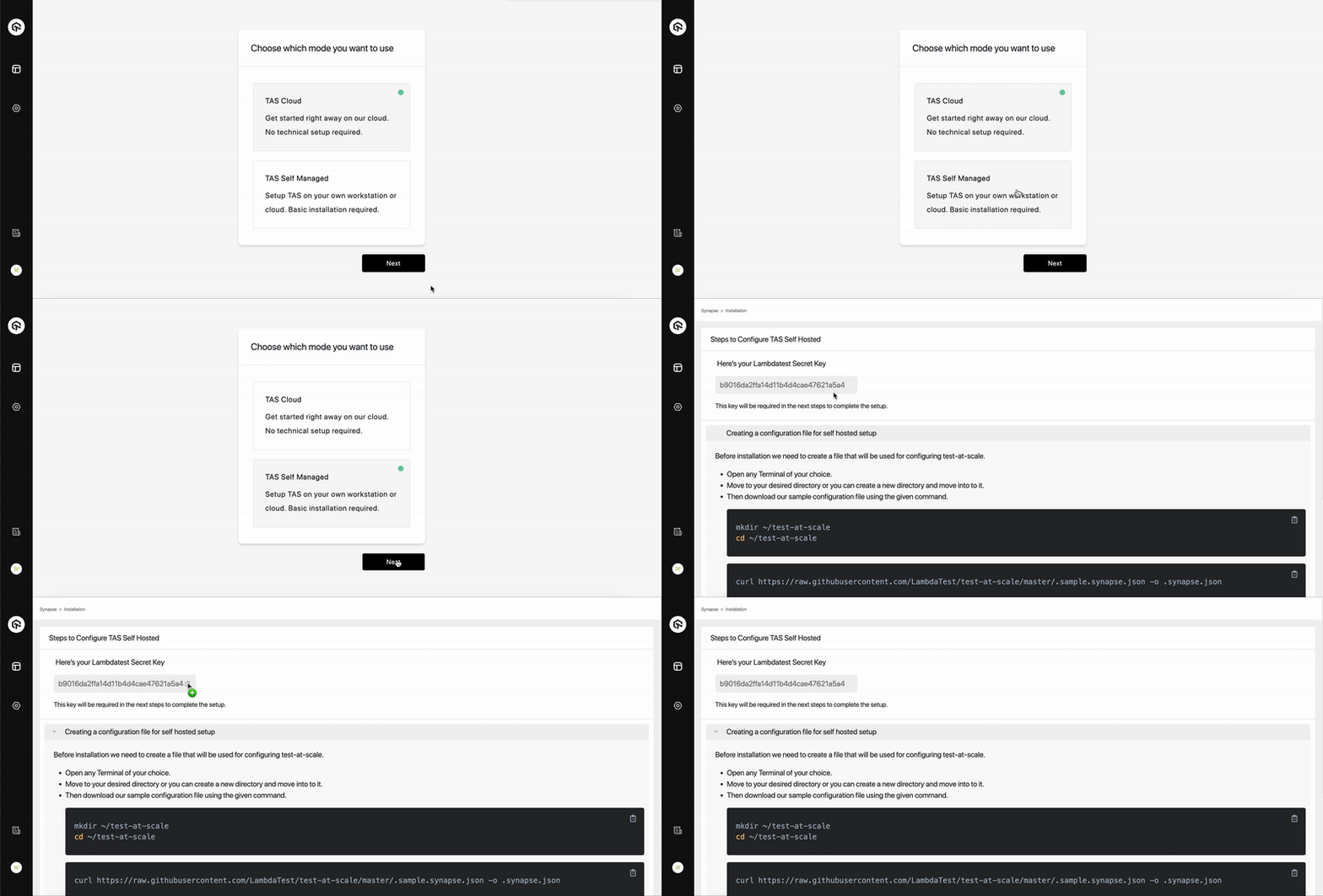
Step 2 - Creating a configuration file for self hosted setup
Before installation we need to create a file that will be used for configuring test-at-scale.
- Open any
Terminalof your choice. - Move to your desired directory or you can create a new directory and move to it using the following command.
- Download our sample configuration file using the given command.
mkdir ~/test-at-scale
cd ~/test-at-scale
curl https://raw.githubusercontent.com/LambdaTest/test-at-scale/main/.sample.synapse.json -o .synapse.json
- Open the downloaded
.synapse.jsonconfiguration file in any editor of your choice such asvi,nano,code, etc.NOTE:
.synapse.jsonfile is hidden by default. You can list it usingls -lacommand. - You will need to add the following in this file:
- 1- LambdaTest Secret Key, that you got at the end of Step 1.
- 2- Git Token, that would be required to clone the repositories after Step 3. Generating GitHub, GitLab personal access token.
- This file will also be used to store certain other parameters such as Repository Secrets (Optional), Container Registry (Optional) etc that might be required in configuring test-at-scale on your local/self-hosted environment. You can learn more about the configuration options here.
Step 3 - Installation
Installation on Docker
Prerequisites
- Docker and Docker-Compose (Recommended)
Docker Compose
- Run the docker application.
bash
  docker info --format "CPU: {{.NCPU}}, RAM: {{.MemTotal}}"
- Execute the above command to ensure that resources usable by Docker are atleast CPU: 2, RAM: 4294967296.
NOTE: In order to run test-at-scale you require a minimum configuration of 2 CPU cores and 4 GiBs of RAM.
- The
.synapse.jsonconfiguration file made in Step 2 will be required before executing the next command. - Download and run the docker compose file using the following command.
bash
  cd ~/test-at-scale
  curl -L https://raw.githubusercontent.com/LambdaTest/test-at-scale/main/docker-compose.yml -o docker-compose.yml
  docker-compose up -d
NOTE: This docker-compose file will pull the latest version of test-at-scale and install on your self hosted environment.
Installation without Docker Compose
To get up and running quickly, you can use the following instructions to setup Test at Scale on Self hosted environment without docker-compose.
- The
.synapse.jsonconfiguration file made in Step 2 will be required before executing the next command. - Execute the following command to run Test at Scale docker container
cd ~/test-at-scale
docker network create --internal test-at-scale
docker run --name synapse --restart always \
    -v /var/run/docker.sock:/var/run/docker.sock \
    -v /tmp/synapse:/tmp/synapse \
    -v ${PWD}/.synapse.json:/home/synapse/.synapse.json \
    -v /etc/machine-id:/etc/machine-id \
    --network=test-at-scale \
    lambdatest/synapse:latest
WARNING: We strongly recommend to use docker-compose while Test at Scale on Self hosted environment.
Installation on Local Machine & Supported Cloud Platforms
- Local Machine - Setup using docker.
- Setup on Azure
- Setup on AWS
-
Setup on GCP
-
Once the installation is complete, go back to the TAS portal.
- Click the 'Test Connection' button to ensure
test-at-scaleself hosted environment is connected and ready. - Hit
Proceedto move forward to Step 4
Step 4 - Importing your repo
NOTE: Currently we support Mocha, Jest and Jasmine for testing Javascript codebases. - Click the Import button for the
JSrepository you want to integrate with TAS. - Once Imported successfully, click onGo to Projectto proceed further. - You will be asked to setup apost-mergehere. We recommend to proceed ahead with default settings. (You can change these later.)

Step 5 - Configuring TAS yml
A .tas.yml file is a basic yaml configuration file that contains steps required for installing necessary dependencies and executing the tests present in your repository.
- In order to configure your imported repository, follow the steps given on the .tas.yml configuration page.
- You can also know more about .tas.yml configuration parameters here.

- Placing the
.tas.ymlconfiguration file. - Create a new file as .tas.yml at the root level of your repository .
- Copy the configuration from the TAS yml configuration page and paste them in the .tas.yml file you just created.
- Commit and Push the changes to your repo.

Language & Framework Support
Currently we support Mocha, Jest and Jasmine for testing Javascript codebases.
Tutorials
- Setting up you first repo on TAS - Cloud
- Setting up you first repo on TAS - Self Hosted
- Sample repos : Mocha, Jest, Jasmine.
- How to configure a .tas.yml file
Contribute
We love our contributors! If you'd like to contribute anything from a bug fix to a feature update, start here:
- 📕 Read our Code of Conduct Code of Conduct.
- 📖 Know more about test-at-scale and contributing from our Contribution Guide.
- 👾 Explore some good first issues good first issues.
Join our community
Engage with Developers, SDETs, and Testers around the world. - Get the latest product updates. - Discuss testing philosophies and more. Join the Test-at-scale Community on Discord. Click here if you are already an existing member.
Support & Troubleshooting
The documentation and community will help you troubleshoot most issues. If you have encountered a bug, you can contact us using one of the following channels: - Help yourself with our Documentation📚, and FAQs. - In case of Issue & bugs go to GitHub issues🐛. - For support & feedback join our Discord or reach out to us on our email💬.
We are committed to fostering an open and welcoming environment in the community. Please see the Code of Conduct.
License
TestAtScale is available under the Apache License 2.0. Use it wisely.
Extension points exported contracts — how you extend this code
LogWriterStrategy (Interface)Core symbols most depended-on inside this repo
ErrorfShape
Languages
Modules by API surface
For agents
$ claude mcp add test-at-scale \
  -- python -m otcore.mcp_server <graph>