hub / github.com/LHRUN/paint-board
github.com/LHRUN/paint-board @2.0.0
Chat with this repo
539 symbols
1,277 edges
171 files
30 documented · 6%
● updated 8mo ago2.0.0 · 2025-10-13★ 2,6241 open issues
What it actually does AI analysis from the code graph — generated when you open this
loading…
README

An open-source web-based creative canvas




English / 中文(简体) / 中文(繁体) / 日本語 / 한국어
Preview
Link: https://songlh.top/paint-board/
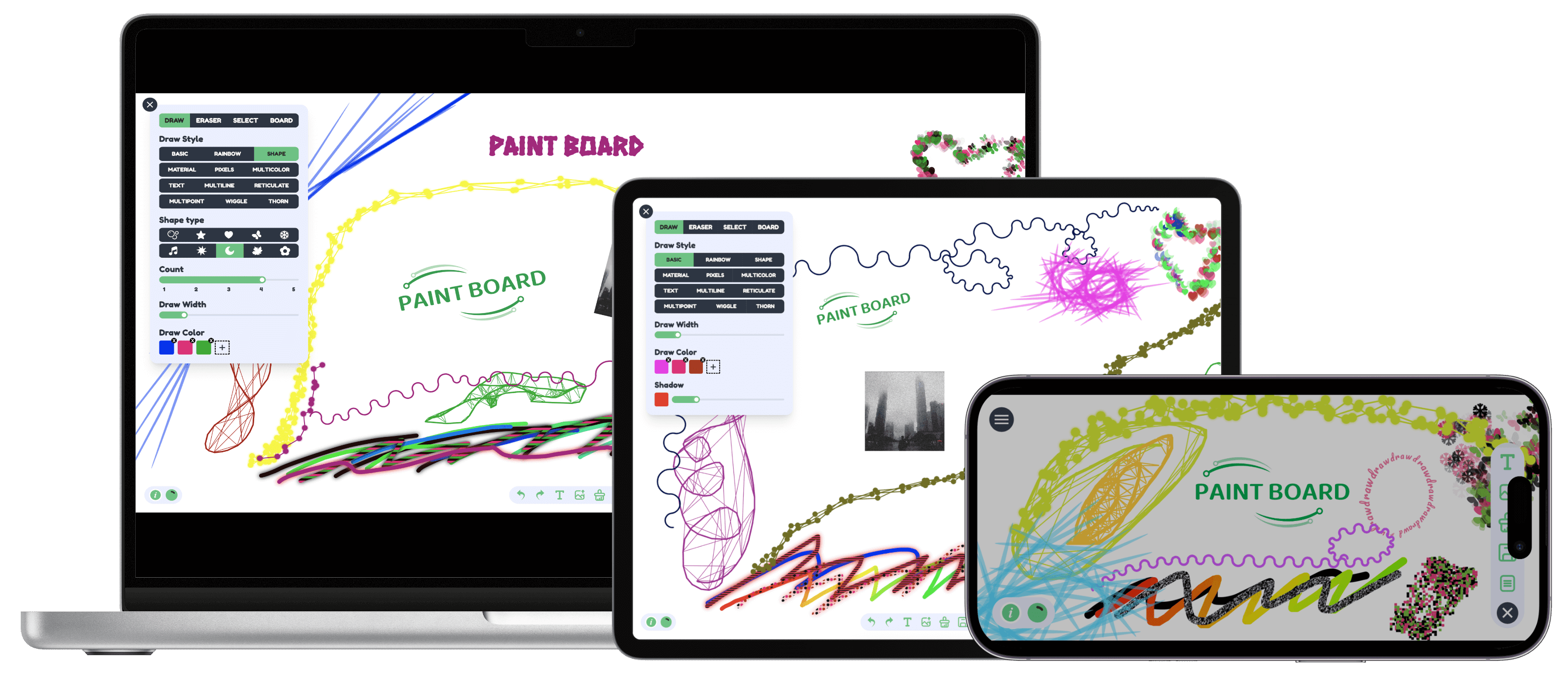
Features
- Drawing Mode
- Free Drawing: Provides 12 different brush styles, including basic brush, rainbow brush, multi-shape brush, multi-material brush, pixel brush, multi-color brush, text brush, multi-line connection brush, mesh brush, multi-point connection brush, wave curve brush, and thorn brush to meet diverse drawing needs.
- Shape Drawing: Supports drawing rich graphics, including built-in shapes and Lucide icon library graphics, which can be used with just a click. Configurable line width, line style, fill color, and fill style.
- Eraser Mode: Can linearly erase all content and supports linear width configuration.
- Selection Mode: Supports clicking or box selection for editing. After selection, you can perform drag, scale, rotate operations and various custom configurations through handles.
- Canvas Mode: Supports canvas background, custom size, and global drawing configuration.
- Action Bar: Functions from left to right are undo, redo, copy current selection, delete current selection, draw text, upload image, clear drawing content, save as image, and open file list.
- Multi-file Configuration: Supports switching between multiple canvases, each canvas can have custom titles, add, delete, and provides sorting and upload/download functions.
- i18n: 中文(简体), 中文(繁体), English, 日本語, 한국어.
V1.3.0 Video Demo
Quick Start
git clone https://github.com/LHRUN/paint-board.git
pnpm install
pnpm dev
Docker Support
- Build a Docker image with the name
paint-board.
docker build -t paint-board .
- Start a docker container.
docker run -d -p 8080:80 --name paint-board paint-board
- Accessed by opening
http://localhost:8080/paint-board/in your browser.
Browser support
We recommend using the latest version of Google Chrome, the following is the minimum version support
| 
Edge | 
Firefox | 
Chrome | 
Safari | | :--: | :--: | :--: | :--: | | 80+ | 80+ | 70+ | 13+ |
Contact me
If you have any suggestions or good ideas, welcome to contact me at any time!
- Email: song.lhlh@gmail.com
- Telegram: https://t.me/longhao_song
- Twiter: https://twitter.com/Song_LongHao
- WeChat:
Contributing
I'm glad you're interested in contributing to PAINT BOARD. If you find a bug and want to fix it, please submit it in an Issue first. For new feature additions, please contact us in Discussions, or directly through the contact details provided above, and read the Contribution Guidelines below before contributing. Thank you for your support!
Document
- After refactoring with Fabric.js
- Exploring the Canvas Series: combined with Transformers.js to achieve intelligent image processing
- Exploring the Canvas Series: The Art of Time Reversal in the Canvas
- Exploring the Canvas Series: Creative Brushes Part 1
- Exploring the Canvas Series: Creative Brushes Part 2
- Exploring the Canvas Series: Creative Brushes Part 3
- writing...
- Before refactoring with Fabric.js
- Canvas Artistry:Mastering Selection, Dragging, and Scaling
- Canvas Artistry:Drawing magic with multiple effects
License
MIT License. See the LICENSE file.
Extension points exported contracts — how you extend this code
Navigator (Interface)
(no doc)
src/types/index.d.ts
IProps (Interface)
(no doc)
src/components/cameraConfig/countDown/index.tsx
FilterFunction (Interface)
(no doc)
src/core/camera/cameraFilters.ts
CameraState (Interface)
(no doc)
src/store/camera.ts
Object (Interface)
(no doc)
src/types/index.d.ts
IProps (Interface)
(no doc)
src/components/mask/index.tsx
VerticalLine (Interface)
(no doc)
src/core/fabricMixin/alignGuideLine.ts
CameraAction (Interface)
(no doc)
src/store/camera.ts
Core symbols most depended-on inside this repo
getRandomInt
called by 32
src/utils/index.ts
initCustomObjectAttr
called by 17
src/core/utils/object.ts
render
called by 14
src/core/paintBoard.ts
isModifierKey
called by 12
src/core/event/keyboard/keyboardHandler.ts
generateRandomCoordinates
called by 11
src/core/element/draw/utils/index.ts
updateCurrentFile
called by 11
src/store/files.ts
useCurrentFile
called by 10
src/store/files.ts
triggerHook
called by 9
src/core/paintBoard.ts
Shape
Languages
TypeScript100%
Modules by API surface
src/store/files.ts26 symbols
src/core/paintBoard.ts18 symbols
src/store/shape.ts13 symbols
src/store/draw.ts12 symbols
src/types/index.d.ts10 symbols
src/store/camera.ts10 symbols
src/core/fabricMixin/alignGuideLine.ts10 symbols
src/components/uploadImage/imageSegmentation.tsx10 symbols
src/components/boardOperation/index.tsx10 symbols
src/core/event/zoomEvent.ts9 symbols
src/core/history/index.ts8 symbols
src/core/element/shape/utils/roughUtils.ts8 symbols
For agents
$ claude mcp add paint-board \
  -- python -m otcore.mcp_server <graph>