github.com/KlingAIResearch/VideoAlign @main
Chat with this repoBrowse by type
What it actually does AI analysis from the code graph — generated when you open this
README
Improving Video Generation with Human Feedback






📖 Introduction
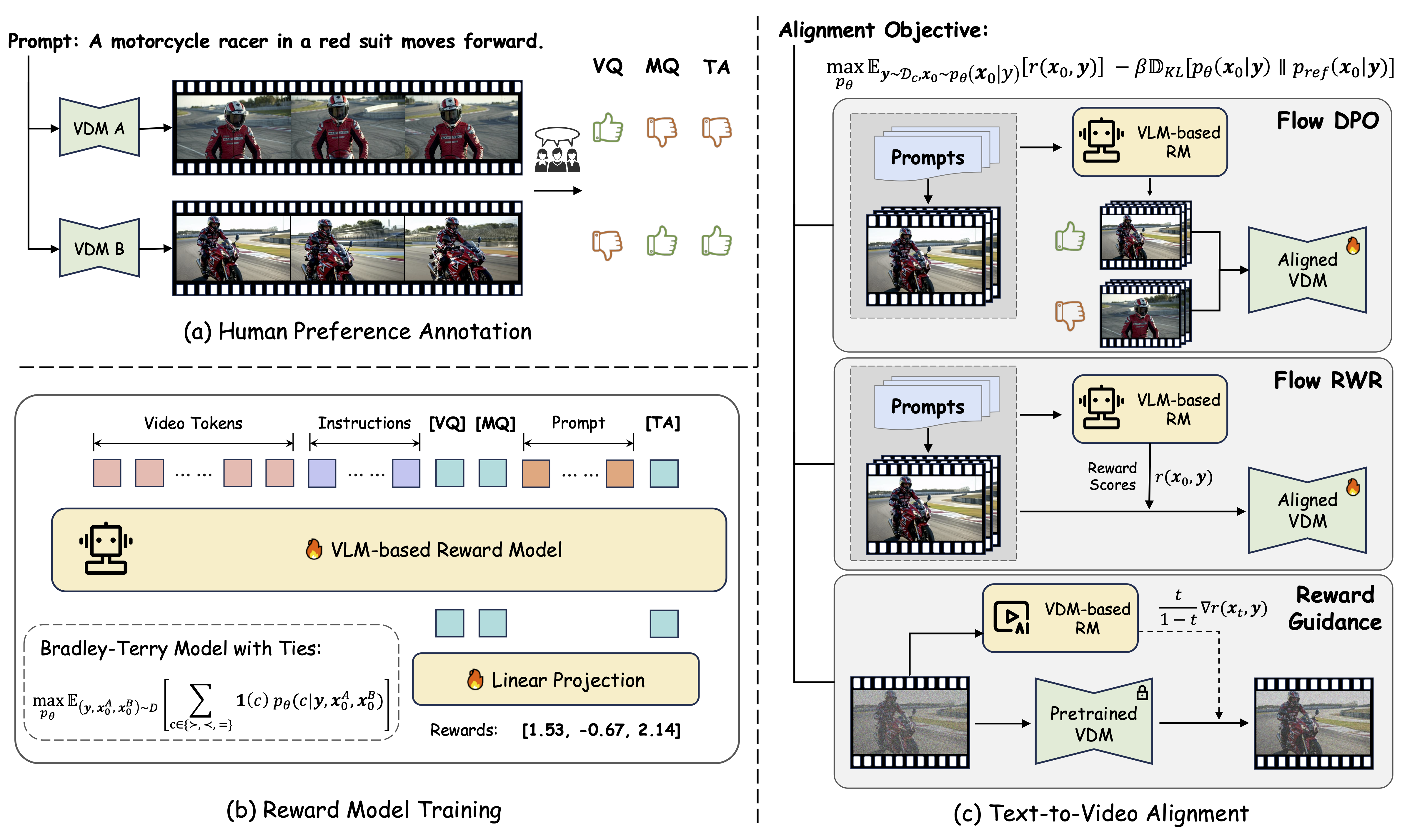
This repository open-sources the VideoReward component -- our VLM-based reward model introduced in the paper Improving Video Generation with Human Feedback. For Flow-DPO, we provide an implementation for text-to-image tasks here.
VideoReward evaluates generated videos across three critical dimensions: * Visual Quality (VQ): The clarity, aesthetics, and single-frame reasonableness. * Motion Quality (MQ): The dynamic stability, dynamic reasonableness, naturalness, and dynamic degress. * Text Alignment (TA): The relevance between the generated video and the text prompt.
This versatile reward model can be used for data filtering, guidance, reject sampling, DPO, and other RL methods.
📝 Updates
- [2025.08.14]: 🔥 We provide the prompt sets used to evaluate video generation performance in this paper, including VBench, VideoGen-Eval, and TA-Hard. See
./datasets/video_eval_promptsfor details. - [2025.07.17]: 🔥 Release the Flow-DPO.
- [2025.02.08]: 🔥 Release the VideoGen-RewardBench and Leaderboard.
- [2025.02.08]: 🔥 Release the Code and Checkpoints of VideoReward.
- [2025.01.23]: Release the Paper and Project Page.
🚀 Quick Started
1. Environment Set Up
Clone this repository and install packages.
git clone https://github.com/KwaiVGI/VideoAlign
cd VideoAlign
conda env create -f environment.yaml
conda activate VideoReward
pip install flash-attn==2.5.8 --no-build-isolation
2. Download Pretrained Weights
Please download our checkpoints from Huggingface and put it in ./checkpoints/.
cd checkpoints
git lfs install
git clone https://huggingface.co/KwaiVGI/VideoReward
cd ..
3. Scoring for a single prompt-video item.
python inference.py
✨ Eval the Performance on VideoGen-RewardBench
1. Download the VideoGen-RewardBench and put it in ./datasets/.
cd dataset
git lfs install
git clone https://huggingface.co/datasets/KwaiVGI/VideoGen-RewardBench
cd ..
2. Start inference
python eval_videogen_rewardbench.py
🏁 Train RM on Your Own Data
1. Prepare your own data as the instruction stated.
2. Start training!
sh train.sh
🤗 Acknowledgments
Our reward model is based on QWen2-VL-2B-Instruct, and our code is build upon TRL and Qwen2-VL-Finetune, thanks to all the contributors!
⭐ Citation
Please leave us a star ⭐ if you find our work helpful.
@article{liu2025improving,
  title={Improving video generation with human feedback},
  author={Liu, Jie and Liu, Gongye and Liang, Jiajun and Yuan, Ziyang and Liu, Xiaokun and Zheng, Mingwu and Wu, Xiele and Wang, Qiulin and Qin, Wenyu and Xia, Menghan and others},
  journal={arXiv preprint arXiv:2501.13918},
  year={2025}
}
@article{liu2025flow,
  title={Flow-grpo: Training flow matching models via online rl},
  author={Liu, Jie and Liu, Gongye and Liang, Jiajun and Li, Yangguang and Liu, Jiaheng and Wang, Xintao and Wan, Pengfei and Zhang, Di and Ouyang, Wanli},
  journal={arXiv preprint arXiv:2505.05470},
  year={2025}
}
Core symbols most depended-on inside this repo
Shape
Languages
Modules by API surface
For agents
$ claude mcp add VideoAlign \
  -- python -m otcore.mcp_server <graph>