github.com/JulienHeijmans/quicksnap @1.2.5
Chat with this repoWhat it actually does AI analysis from the code graph — generated when you open this
README
QuickSnap
QuickSnap is a Blender addon to quickly snap objects/vertices/points to object origins/vertices/points, similar to how vertex snap works in Maya/3Dsmax.
Presentation video:
https://user-images.githubusercontent.com/35562774/193322706-ec02d8a9-0bdf-48a9-8454-c88d7cd1a940.mp4
If the video is not playing for you, you can watch it here: https://youtu.be/9cWV0JELM88
Features:
- Snap From/To:
- Vertices
- Curve Points
- Object origins
- Scene cursor
- Constrain the translation on a single axis or a plane using (Shift+)X,Y,Z hotkeys
- Automatically display wireframe of the mesh you are snapping to and the wireframe of the object right under the mouse (Can be turned off)
- Snap onto visible and non visible points (Points closer to the camera are prioritized)
- Highlight target vertex edges for better readability
- An Add-On updater has been added, allowing easy update if bugs are fixed or if other improvement are made
Installation
- Download Code > Download Zip to download the addon on your computer

- In Blender, go to your preferences, in the add-on section, then click "Install..." in teh top-right of the window, and pick the downloaded archive.
Add-On hotkey and settings
- By default, enable the tool by using Ctrl+Shift+V (For Vertex). Watch out if you have multiple keyboards to your windows settings, Ctrl+Shift will cycle the active keyboard.
- Change the tool hotkey from the Add-On settings window
- Discover the other hotkeys in the add-on settings, and tweak your own preferences
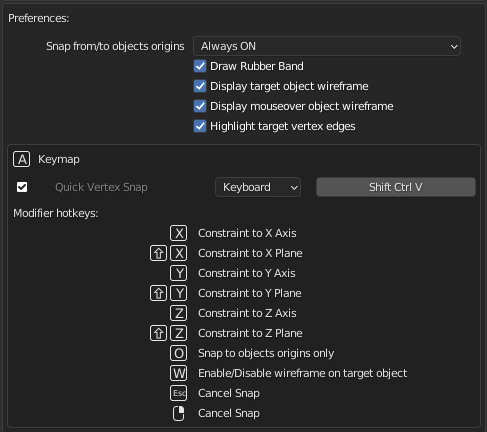
Use the tool
- Select the object or the vertices/edges/faces/curve points you want to move
- Enable the tool using the hotkey (Ctrl+Shift+V by default)
- Move the mouse over the point you want to snap FROM
- Click an hold the right mouse button, mouve the mouse over the point you want to snap TO
- Release the mouse
If you want to cancel the operation: * Press Right Mouse Button or ESC key to cancel the translation
Important notes:
This tool is not made to use on very high poly objects, and performance might get poor when many really heavy objects are under the mouse. If performances are poor, hiding objects/collections that you don't want to snap onto will help.
I am saying this but the tool should be efficient enough in most cases.
Bug Report:
- If you have an issue, first check that you have the last version of the addon, here is how to update the addon easily:
- In the Add-on preferences, scroll down, click on "Check now for QuickSnap update"
- If the same button now says: "Update now to (x,y,z)" it means that a new version exists. Click that button to update, then restart Blender.
- Here is a video showing how ot update the add-on from within blender: (You need to click on the play icon in the top right corner)

- If the problem persist with the latest version of the addon:
- Please create an issue here, and I will try to fix the issue asap: https://github.com/JulienHeijmans/quicksnap/issues
- Do not forget to explain what you were doing and what was in your scene when the issue happened. If you can share the scene, you can also do so.
Core symbols most depended-on inside this repo
print_verboseShape
Languages
Modules by API surface
For agents
$ claude mcp add quicksnap \
  -- python -m otcore.mcp_server <graph>