github.com/JonMagon/KDiskMark @3.3.0
Chat with this repoBrowse by type
What it actually does AI analysis from the code graph — generated when you open this
README
KDiskMark


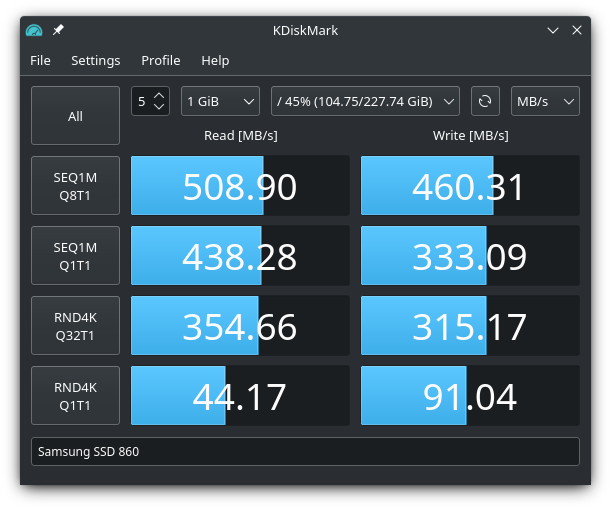
KDiskMark is an HDD and SSD benchmark tool with a very friendly graphical user interface. KDiskMark with its presets and powerful GUI calls Flexible I/O Tester and handles the output to provide an easy to view and interpret comprehensive benchmark result. The application is written in C++ with Qt and doesn't have any KDE dependencies.
Features
- Configurable block size, queues, and threads count for each test
- Many languages support
- Report generation
- Terminal (TUI) mode for environments without a graphical display
Report Example
                        KDiskMark (3.0.0): https://github.com/JonMagon/KDiskMark
                    Flexible I/O Tester (fio-3.30): https://github.com/axboe/fio
--------------------------------------------------------------------------------
* MB/s = 1,000,000 bytes/s [SATA/600 = 600,000,000 bytes/s]
* KB = 1000 bytes, KiB = 1024 bytes

[Read]
Sequential   1 MiB (Q=  8, T= 1):   508.897 MB/s [    497.0 IOPS] < 13840.05 us>
Sequential   1 MiB (Q=  1, T= 1):   438.278 MB/s [    428.0 IOPS] <  2280.14 us>
    Random   4 KiB (Q= 32, T= 1):   354.657 MB/s [  88664.6 IOPS] <   352.37 us>
    Random   4 KiB (Q=  1, T= 1):    44.166 MB/s [  11041.6 IOPS] <    88.48 us>

[Write]
Sequential   1 MiB (Q=  8, T= 1):   460.312 MB/s [    449.5 IOPS] < 15153.11 us>
Sequential   1 MiB (Q=  1, T= 1):   333.085 MB/s [    325.3 IOPS] <  2349.82 us>
    Random   4 KiB (Q= 32, T= 1):   315.170 MB/s [  78792.5 IOPS] <   383.86 us>
    Random   4 KiB (Q=  1, T= 1):    91.040 MB/s [  22760.3 IOPS] <    39.80 us>

Profile: Default
   Test: 1 GiB (x5) [Measure: 5 sec / Interval: 5 sec]
   Date: 2022-08-24 16:10:33
     OS: opensuse-tumbleweed 20220821 [linux 5.19.2-1-default]
Dependencies
Required
- GCC/Clang C++17 (or later)
- CMake >= 3.12
- Extra CMake Modules >= 5.73
- Qt with Widgets and DBus >= 5.9
- PolicyKit Agent
PolkitQt-1bindings.
- Flexible I/O Tester with libaio >= 3.1
libaiodevelopment package.
External libraries
- SingleApplication prevents launch of multiple application instances.
Installation
Binaries are available on the Releases page.
Install from the Flathub repository

flatpak install flathub io.github.jonmagon.kdiskmark
````
### Install from the Snap Store
> [!WARNING]
> Package is no longer maintained. It will remain available on Snap Store but will receive no updates.
[](https://snapcraft.io/kdiskmark)
```bash
sudo snap install kdiskmark
sudo snap connect kdiskmark:removable-media # external storages
````
### Debian / Ubuntu based distros
```bash
sudo apt update
sudo apt install kdiskmark
Ubuntu users can also use the PPA:
sudo add-apt-repository ppa:jonmagon/kdiskmark
sudo apt update
sudo apt install kdiskmark
Arch based distros
Available in the extra repository:
sudo pacman -Syu kdiskmark
Development version from AUR:
git clone https://aur.archlinux.org/kdiskmark-git.git
cd kdiskmark-git
makepkg -si
Fedora
Available in the Fedora repository:
sudo dnf install kdiskmark
openSUSE Tumbleweed
Available in the openSUSE Factory repository:
sudo zypper install kdiskmark
Terminal mode (TUI)
KDiskMark can be used without a graphical environment (e.g. on a server or a virtual console). When no graphical display is available, an interactive full-screen terminal interface starts automatically; from a desktop terminal it can be forced with the --tui option:
kdiskmark --tui
kdiskmark --tui /mnt/data   # adds the directory to the storage list
Everything configurable in the GUI is also editable in the TUI: profile, file size, loops count, storage (including adding an arbitrary directory), comparison unit, mix ratio, and language on the main screen; queues/threads per test, measuring and interval time, mode, test data, page cache flushing, O_DIRECT, CoW detection, and presets on the settings screen. The configuration is shared with the GUI.
Keys: Up/Down — navigation, Left/Right — change a value, Enter — run all tests or the focused one (on the Storage field — add a directory), E — settings screen, S — save the report, R — rescan storages, Q — quit.
Administrator privileges are requested over polkit, as in the GUI. On a virtual console the text agent pkttyagent is used automatically. In an SSH session polkit usually denies authentication for non-local users, so run the application as root there:
sudo kdiskmark --tui
Building
Building a package using CPack
You can build KDiskMark by using the following commands:
mkdir build && cd build
cmake -D CMAKE_BUILD_TYPE=Release ..
cpack -G DEB # Or RPM, ZIP etc.
Building with Qt5
To build KDiskMark with Qt5 instead of the default Qt6, use the USE_QT5 flag during the CMake configuration step:
mkdir build && cd build
cmake -D CMAKE_BUILD_TYPE=Release -D USE_QT5=ON ..
cpack -G DEB # Or RPM, ZIP etc.
Localization 
To help with localization you can use Crowdin or translate files in data/translations with Qt Linguist directly. To add a new language, copy data/translations/kdiskmark.ts to data/translations/kdiskmark_<ISO 639-1 language code>_<ISO 3166-1 alpha-2 language code>.ts, translate it, then add the file to the TS_FILES variable in CMakeLists.txt, and create a pull request. It is also possible to add localized Comment and Keywords sections into data/kdiskmark.desktop and message for PolicyKit authorization into data/dev.jonmagon.kdiskmark.helper.policy.
Languages currently available: * Chinese (Simplified) * Chinese (Traditional) * Czech * Dutch * English (default) * Finnish * French * German * Hindi * Hungarian * Italian * Japanese * Korean * Polish * Portuguese (Brazilian) * Russian * Slovak * Spanish (Mexico) * Spanish (Spain) * Swedish * Turkish * Ukrainian
TODO
- [x] Text-based user interface
- [x] Performance profiles (mix, peak, real-world)
Special Thanks
- Artem Grinev (agrinev@manjaro.org) for his help with assembling the AppImage package.
Thanks to the package maintainers, translators, and all users for supporting the project.
Credits
Application Icon
Copyright (c) https://www.iconfinder.com/baitisstudio
If you have any ideas, critics, suggestions or whatever you want to call it, please open an issue.
Core symbols most depended-on inside this repo
Shape
Languages
Modules by API surface
For agents
$ claude mcp add KDiskMark \
  -- python -m otcore.mcp_server <graph>