github.com/JayanAXHF/gitv @gitv-tui-v0.4.5
Chat with this repoWhat it actually does AI analysis from the code graph — generated when you open this
README



gitv
[!NOTE]
Following in the footsteps of the
globalregexexpressionprintgrep, I introduce to yougithubissuestuiviewergitv.
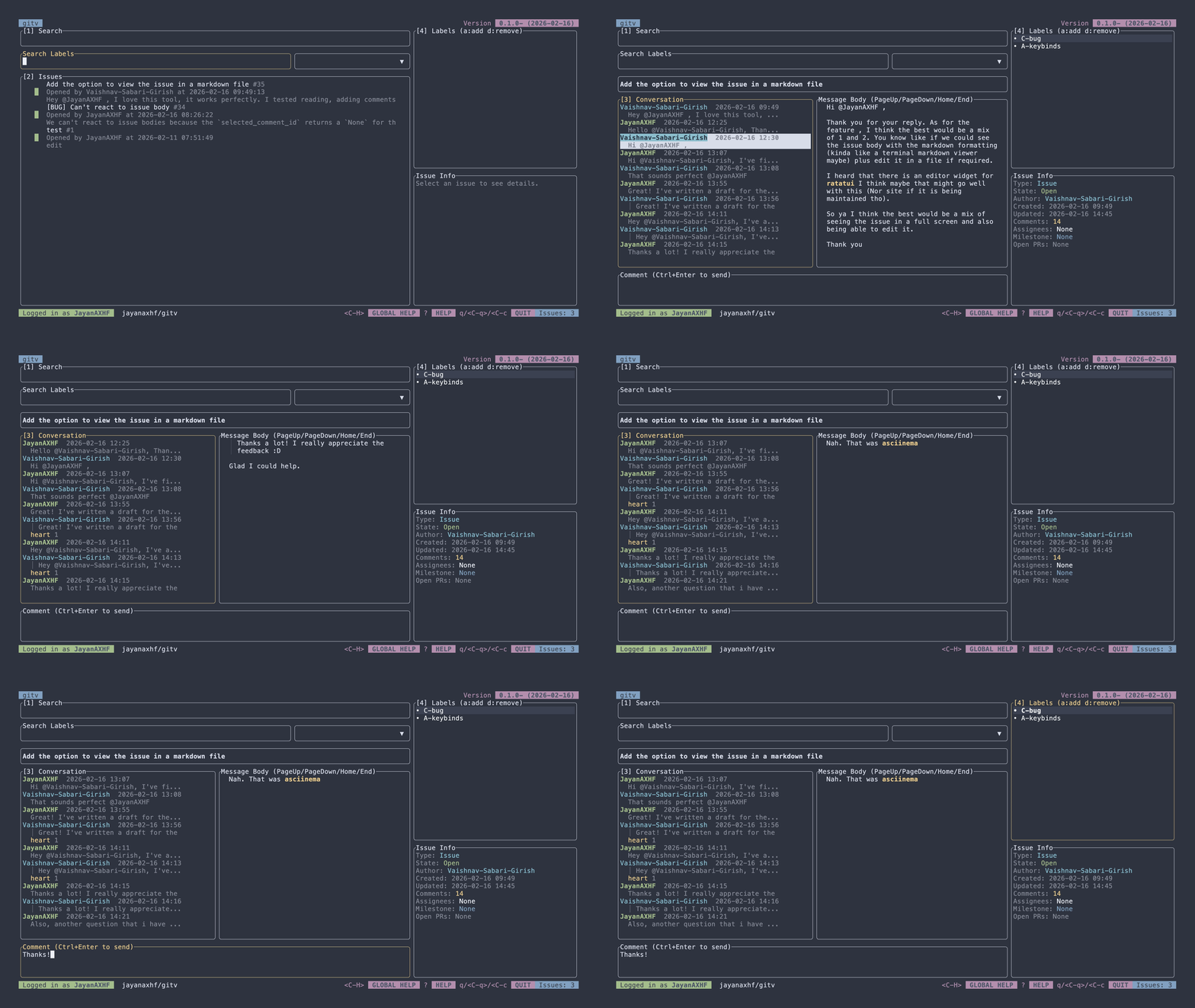
gitv is a terminal-based viewer for GitHub issues. It allows you to view and manage your GitHub issues directly from the terminal.
Features
- View issues from any GitHub repository
- View issue conversations, including parsed markdown content
- Full support for adding and removing reactions
- Regex search for labels, plus the ability to create, edit, add, and remove labels from issues
- Commenting on issues, with support for markdown formatting and quoting comments
- Editing comments
- Closing issues
- Assigning and unassigning issues to users
- Creating new issues
- Syntax highlighting for code blocks in issue conversations
Installation
Homebrew (macOS)
brew install jayanaxhf/taps/gitv
Using Cargo
cargo install --locked gitv-tui
From Source
- Clone the repository:
git clone https://github.com/jayanaxhf/gitv.git
- Navigate to the project directory:
cd gitv
- Build the project:
cargo install --path .
NixOS
Flake
First add the repository to your inputs.
Point to main branch:
inputs = {
    ...
    gitv.url = "github:JayanAXHF/gitv";
    ...
};
Point to a rev in main branch:
inputs = {
    ...
    gitv.url = "github:JayanAXHF/gitv/d70273b05c5e80b05446e4aa0847758e54435d62";
    ...
};
Point to a tag:
inputs = {
    ...
    gitv.url = "github:JayanAXHF/gitv/refs/tags/gitv-tui-v0.3.2";
    ...
};
Then your outputs should look something like this:
outputs = {...} @ inputs: {
  # Don't forget to add nixpkgs to your inputs
  nixosConfigurations."nixos" = inputs.nixpkgs.lib.nixosSystem {
    ...
    specialArgs = {inherit inputs;};
    modules = [
      ./configuration.nix
      ...
    ];
  };
};
And finally, somewhere in your configuration.nix:
{inputs, pkgs, ...}: {
  ...
  environment.systemPackages = [
    inputs.gitv.packages.${pkgs.stdenv.hostPlatform.system}.default
  ];
  ...
}
Non-Flake
Pinning Tool
First add the pin using your pinning tool.
We are going to show examples using npins.
Point to a branch:
npins add github JayanAXHF gitv -b main
Point to a rev in main branch:
npins add github JayanAXHF gitv -b main --at d70273b05c5e80b05446e4aa0847758e54435d62
Point to a tag:
npins add github JayanAXHF gitv --at gitv-tui-v0.3.2
Or point to latest release:
npins add github JayanAXHF gitv
Then add the package to your systemPackages:
let
  sources = import ./npins;
in {
  environment.systemPackages = [
    (import sources.gitv {})
  ];
}
No Pinning Tool
let
  rev = "d70273b05c5e80b05446e4aa0847758e54435d62";
  gitv = import (fetchTarball "https://github.com/JayanAXHF/gitv/archive/${rev}.tar.gz") {};
in {
  environment.systemPackages = [
    gitv
  ];
}
Usage
Usage: gitv [OPTIONS] [OWNER] [REPO]

Arguments:
  [OWNER]
          GitHub repository owner or organization (for example: `rust-lang`).

          This is required unless `--print-log-dir` or `--set-token` is provided.

  [REPO]
          GitHub repository name under `owner` (for example: `rust`).

          This is required unless `--print-log-dir` or `--set-token` is provided.

Options:
  -l, --log-level <LOG_LEVEL>
          Global logging verbosity used by the application logger.

          Defaults to `info`.

          [default: info]
          [possible values: trace, debug, info, warn, error, none]

  -p, --print-log-dir
          Prints the directory where log files are written and exits

  -s, --set-token <SET_TOKEN>
          Stores/updates the GitHub token in the configured credential store.

          When provided, this command updates the saved token value.

      --generate-man
          Generate man pages using clap-mangen and exit

  -e, --env
          When provided, this command will read the GitHub token from the environment variable

  -h, --help
          Print help (see a summary with '-h')

  -V, --version
          Print version
See KEYBINDINGS.md for a list of keybindings used in the application.
Token Security
[!NOTE] To persist the token across reboots (i.e. to store it on disk) on Linux, build with the
persist-tokenfeature flag. This requires fordbusto be present andDBUS_SESSION_BUS_ADDRESSto be set.
gitv uses the keyring crate to securely store your GitHub token in your system's credential store. This means that your token is encrypted and protected by your operating system's security features, providing a secure way to manage your authentication credentials.
Contributing
Contributions to gitv are welcome! If you have an idea for a new feature or have found a bug, please open an issue or submit a pull request on the GitHub repository.
[!TIP] Run the
init.pyinitialization script to set up your development environment. It installs a pre-push hook that runstyposandclippyto help maintain code quality and consistency. Ensure that you have thetypos-cliinstalled and available in your PATH for the pre-push hook to work correctly. You can install it usingcargo install typos-cli.[!TIP] If you're using nix then you can use the provided devshell to get your development environment up and running, it also includes the pre-push hook provided. You can do so by executing
direnv allowornix develop.
License
gitv is dual-licensed under the MIT License and the Unlicense, at your option. See the MIT and Unlicense for more information.