hub / github.com/JayanAXHF/filessh
github.com/JayanAXHF/filessh @v0.4.2
Chat with this repo
192 symbols
347 edges
17 files
21 documented · 11%
● updated 3mo agov0.4.2 · 2026-01-25★ 2225 open issues
What it actually does AI analysis from the code graph — generated when you open this
loading…
README
FileSSH



A TUI-based file explorer for SSH servers, which allows you to browse and manage files on a remote server, edit them in-place, and recursively download directories with parallel directory traversal. It also has the ability to quickly spawn SSH sessions to paths on the remote server.
Dual-licensed under MIT or the UNLICENSE.
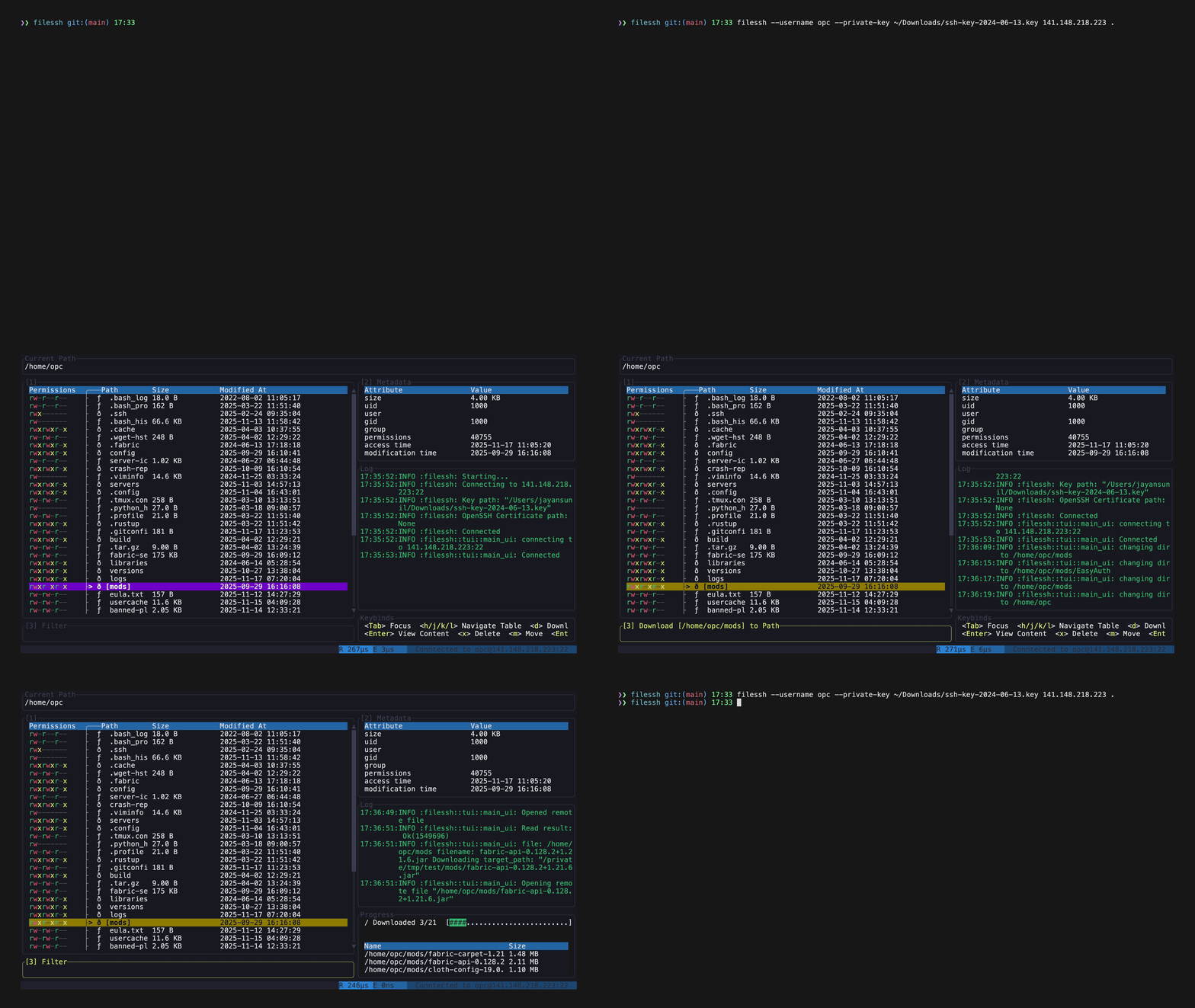
Installation
Cargo
cargo install --locked filessh
Build from source
- Ensure you have Rust and Cargo installed. You can find installation instructions at rust-lang.org.
- Clone the repository:
sh git clone https://github.com/your-username/filessh.git cd filessh - Build the project:
sh
    cargo build --release
The executable will be located attarget/release/filessh.
Todo
- [ ] Add support for rsync and scp
- [ ] Iron out bugs
Usage
filessh [OPTIONS] <HOST> <PATH>
Features
- Modify, delete and browse files on a remote server
- Recursively download directories with parallel directory traversal
- Quickly open SSH sessions to directories.
Usage
filessh [OPTIONS] [HOST] [PATH]
filessh <COMMAND>

Commands:
  connect              Connect explicitly (same as default command)
  install-man-pages    Install man pages into the system
  install-completions  Generate shell completion scripts

Arguments:
  [HOST]  The remote host to connect to (e.g., 'example.com' or '192.168.1.100')
  [PATH]  Initial directory path to open on the remote host

Options:
  -p, --port <PORT>
          The port number to use for the SSH connection [default: 22]
  -u, --username <USERNAME>
          The username for logging into the remote host
  -k, --private-key <PRIVATE_KEY>
          Path to the private key file for public key authentication
  -o, --openssh-certificate <OPENSSH_CERTIFICATE>
          Optional path to an OpenSSH certificate
  -h, --help
          Print help
  -V, --version
          Print version
Example
./target/release/filessh \
    --username myuser \
    --private-key ~/.ssh/id_rsa \
    example.com \
    /home/myuser
Extension points exported contracts — how you extend this code
ParallelVisitorBuilder (Interface)(no doc) [2 implementers]
src/par_dir_traversal/mod.rs
JoinablePaths (Interface)
(no doc) [1 implementers]
src/files.rs
ParallelVisitor (Interface)
(no doc) [1 implementers]
src/par_dir_traversal/mod.rs
Core symbols most depended-on inside this repo
joincalled by 27
src/files.rs
render
called by 25
src/patched_line_gauge.rs
push
called by 18
src/par_dir_traversal/mod.rs
send
called by 15
src/par_dir_traversal/mod.rs
sftp
called by 8
src/ssh.rs
skip_whitespace
called by 8
src/ssh_config/de.rs
keybind
called by 8
src/tui/main_ui.rs
block
called by 7
src/patched_line_gauge.rs
Shape
Languages
Rust100%
Modules by API surface
src/ssh_config/de.rs58 symbols
src/par_dir_traversal/mod.rs31 symbols
src/files.rs18 symbols
src/config.rs18 symbols
src/tui/mod.rs14 symbols
src/tui/main_ui.rs12 symbols
src/patched_line_gauge.rs12 symbols
src/ssh.rs7 symbols
src/completions.rs5 symbols
src/ssh_config/reader.rs4 symbols
src/cli/definition.rs4 symbols
src/logging.rs3 symbols
For agents
$ claude mcp add filessh \
  -- python -m otcore.mcp_server <graph>