github.com/JamieMason/ImageOptim-CLI @issue-67.2 sqlite
README
ImageOptim-CLI
Automates ImageOptim, ImageAlpha, and JPEGmini for Mac to make batch optimisation of images part of your automated build process.
- Installation
- Performance
- Grunt Plugin
- Demo
- Examples
- Optimise a directory of images
- Optimise a filtered set of images
- Passing additional options
- Adding to git pre-commit hook
- Usage
Installation
$ npm install -g imageoptim-cli
ImageOptim-CLI is written in Shell and AppleScript, so you don't need Node.js or npm. You can install manually by downloading the latest zip then adding ImageOptim-CLI to your $PATH.
$ curl --output imageoptim-cli.zip https://codeload.github.com/JamieMason/ImageOptim-CLI/zip/1.7.9
$ unzip imageoptim-cli.zip
$ export PATH=$PATH:imageoptim-cli/bin
Performance
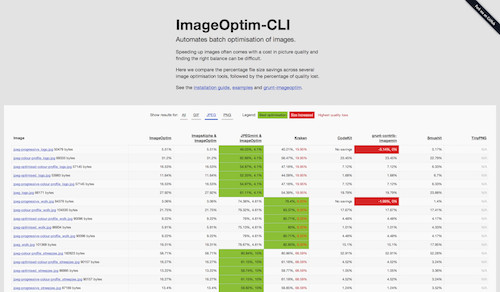
See how ImageOptim performs compared to other image optimisation tools.
Grunt Plugin
The ImageOptim-CLI Grunt plugin is grunt-imageoptim.
Demo
There's a short video demo to give you an idea of how it works.
Examples
Optimise a directory of images
This command will optimise all image files in your Awesome project.
imageOptim --directory ~/Sites/Awesome # [options]
Optimise a filtered set of images
This command will optimise just the .jpg files in your Awesome project.
find ~/Sites/Awesome -name '*.jpg' | imageOptim # [options]
Passing additional options
The long format for enabling options is as follows;
imageOptim --jpeg-mini --image-alpha --quit --directory path/to/images
The equivalent of the above in short format is as follows;
imageOptim -j -a -q -d path/to/images
Adding to git pre-commit hook
Adding the below to your_project/.git/hooks/pre-commit will run ImageOptim-CLI each time you commit new and changed files into your project. Any files which aren't images will be ignored.
git diff --cached --name-only --diff-filter=ACM | imageOptim # [options]
Usage
Usage: imageOptim [options]

Options:

  -d, --directory     directory of images to process
  -a, --image-alpha   pre-process PNGs with ImageAlpha.app *
  -j, --jpeg-mini     pre-process JPGs with JPEGmini.app **
  -q, --quit          quit all apps when complete
  -h, --help          display this usage information
  -e, --examples      display some example commands and uses
  -v, --version       display the version number

*  http://pngmini.com
** https://itunes.apple.com/us/app/jpegmini/id498944723
Core symbols most depended-on inside this repo
mergeObjectWithFileShape
Languages
Modules by API surface
Dependencies from manifests, versioned
For agents
$ claude mcp add ImageOptim-CLI \
  -- python -m otcore.mcp_server <graph>