hub / github.com/JairajJangle/react-native-visibility-sensor
github.com/JairajJangle/react-native-visibility-sensor @v1.4.16
Chat with this repo
9 symbols
16 edges
11 files
0 documented · 0%
What it actually does AI analysis from the code graph — generated when you open this
loading…
README
@futurejj/react-native-visibility-sensor
🔍 Component visibility sensor wrapper to sense whether or not a component is in viewport with configurable inset thresholds & percent visibility callback.







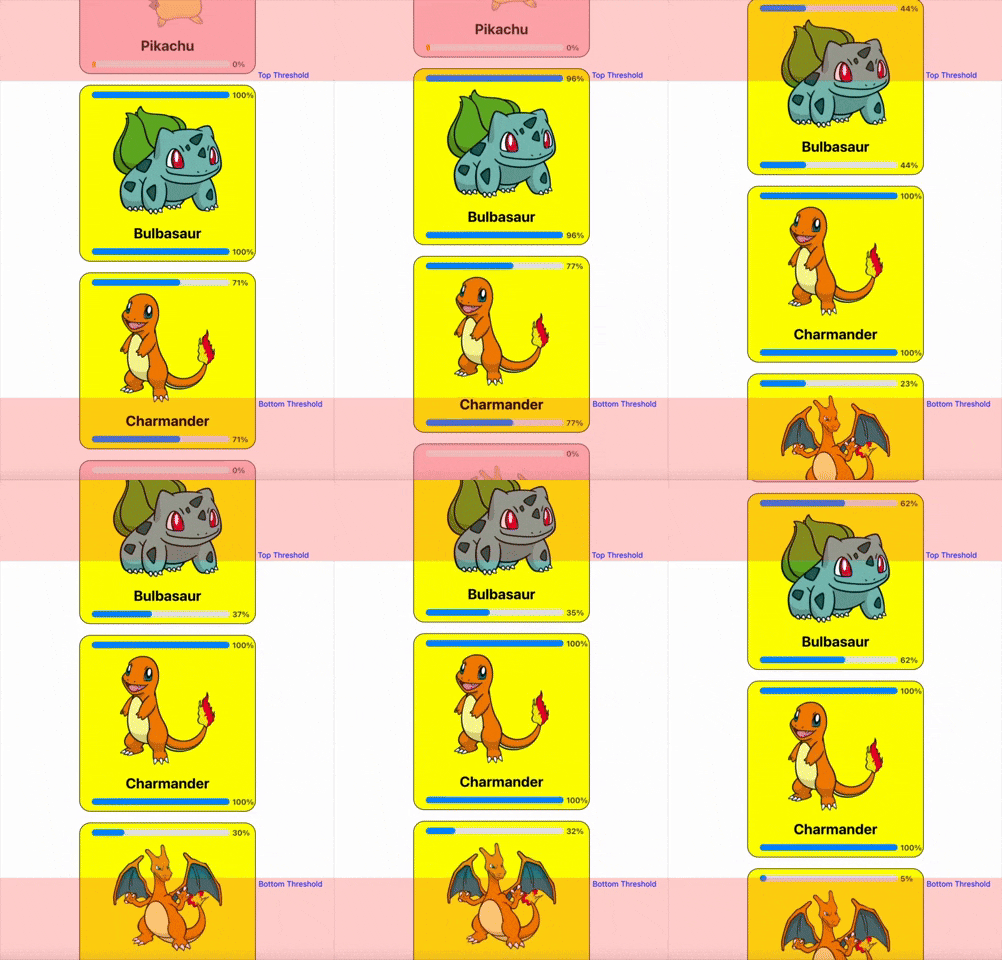

Use Cases
- Lazy Loading: Load images/content only when visible to optimize performance in feeds, galleries, charts or webviews.
- Scroll Animations: Trigger animations (e.g., fade-ins, slides) for components entering the viewport.
- Analytics Tracking: Log impressions for ads/banners when visible for a set duration or percentage.
- Dynamic UI & Optimization: Pause/resume videos, cleanup out of screen components or timers based on component visibility in feeds or carousels.
Installation
Using yarn
yarn add @futurejj/react-native-visibility-sensor
using npm:
npm install @futurejj/react-native-visibility-sensor
Usage
import React, { useState } from 'react';
import { ScrollView, Text } from 'react-native';
import { VisibilitySensor } from '@futurejj/react-native-visibility-sensor';

export default function VisibilitySensorExample() {
  const [isVisible, setIsVisible] = useState(false);
  const [percentVisible, setPercentVisible] = useState<number>(0);

  return (
    <ScrollView>
      <VisibilitySensor
        onChange={setIsVisible}
        onPercentChange={setPercentVisible} // optional callback for % change
        threshold={{ top: 100, bottom: 100 }}
        style={[styles.item, { backgroundColor: isVisible ? 'green' : 'red' }]}>

        {/* Visibility state */}
        <Text>This View is currently visible? {isVisible ? 'yes' : 'no'}</Text>

        {/* Percent visibility state */}
        <Text>{`Percent visible: ${percentVisible}%`}</Text>
      </VisibilitySensor>
    </ScrollView>
  );
}
Properties
VisibilitySensorProps extends ViewProps from React Native, which includes common properties for all views, such as style, onLayout, etc.
| Property | Type | Required | Description |
|---|---|---|---|
onChange |
(visible: boolean) => void |
Yes | Callback function that fires when visibility changes. |
onPercentChange |
(percentVisible: number) => void |
No | Callback function that fires when visibility % changes. |
disabled |
boolean |
No | If true, disables the sensor. |
triggerOnce |
boolean |
No | If true, the sensor will only trigger once. |
delay |
number or undefined |
No | The delay in milliseconds before the sensor triggers. |
threshold |
VisibilitySensorThreshold | No | Defines the part of the view that must be visible for the sensor to trigger. |
Additionally, all properties from ViewProps are also applicable.
VisibilitySensorThreshold
| Property | Type | Required | Description |
|---|---|---|---|
top |
number |
No | The top threshold value for visibility. |
bottom |
number |
No | The bottom threshold value for visibility. |
left |
number |
No | The left threshold value for visibility. |
right |
number |
No | The right threshold value for visibility. |
Notes
- ⚠️ Facing problem on Android? Refer this discussion: https://github.com/JairajJangle/react-native-visibility-sensor/pull/1#issuecomment-2251569005
Contributing
See the contributing guide to learn how to contribute to the repository and the development workflow.
License
MIT
Support the project


❤️ Thanks to
- Module built using create-react-native-library
- Forked & detached from: react-native-component-inview & @se09deluca/react-native-component-inview
- Pokemon image source: PokémonDB
- Readme is edited using Typora
Extension points exported contracts — how you extend this code
VisibilitySensorProps (Interface)
(no doc)
src/visibilitySensor.types.ts
VisibilitySensorRef (Interface)
(no doc)
src/visibilitySensor.types.ts
VisibilitySensorThreshold (Interface)
(no doc)
src/visibilitySensor.types.ts
RectDimensionsState (Interface)
(no doc)
src/visibilitySensor.types.ts
Core symbols most depended-on inside this repo
Shape
Languages
TypeScript100%
Modules by API surface
src/visibilitySensor.types.ts4 symbols
example/src/App.tsx3 symbols
src/VisibilitySensor.tsx2 symbols
For agents
$ claude mcp add react-native-visibility-sensor \
  -- python -m otcore.mcp_server <graph>