github.com/IsmaelMartinez/teams-for-linux @v2.11.1 sqlite
README
Teams for Linux






Unofficial Microsoft Teams client for Linux — a native desktop app that wraps the Teams web version with enhanced Linux integration.
✅ System notifications
✅ System tray integration (badge support varies by desktop environment)
✅ Custom backgrounds & themes
✅ Screen sharing support
✅ Multiple account profiles
[!NOTE] This is an independent project, not affiliated with Microsoft. Some features are limited by the Teams web app.
Sponsor
Recall.ai — API for Meeting Recording and Transcription
If you're looking for a meeting recording API, consider checking out Recall.ai, an API that records and transcribes Zoom, Google Meet, Microsoft Teams, in-person meetings, and more.
This sponsorship helps support the ongoing development of teams-for-linux.
Installation
Package Repositories
We have a dedicated deb and rpm repo at https://teamsforlinux.de hosted with :heart: by Nils Büchner. Please follow the installation instructions below.
Debian/Ubuntu:
sudo mkdir -p /etc/apt/keyrings
sudo wget -qO /etc/apt/keyrings/teams-for-linux.asc https://repo.teamsforlinux.de/teams-for-linux.asc
sh -c 'echo "Types: deb\nURIs: https://repo.teamsforlinux.de/debian/\nSuites: stable\nComponents: main\nSigned-By: /etc/apt/keyrings/teams-for-linux.asc\nArchitectures: amd64" | sudo tee /etc/apt/sources.list.d/teams-for-linux-packages.sources'
sudo apt update && sudo apt install teams-for-linux
RHEL/Fedora:
curl -1sLf -o /tmp/teams-for-linux.asc https://repo.teamsforlinux.de/teams-for-linux.asc; sudo rpm --import /tmp/teams-for-linux.asc
sudo curl -1sLf -o /etc/yum.repos.d/teams-for-linux.repo https://repo.teamsforlinux.de/rpm/teams-for-linux.repo
sudo dnf -y install teams-for-linux
Distribution Packages





Manual Download
Download from GitHub Releases — available as AppImage, deb, rpm, snap, tar.gz (plus Windows/macOS builds).
[!TIP] For AppImage files, use
AppImageLauncherfor better desktop integration.
Quick Start
- Install using your preferred method above
- Launch with
teams-for-linux - Configure by creating
~/.config/teams-for-linux/config.jsonif needed
Documentation
📖 Complete Documentation — Enhanced documentation with search, mobile optimization, and comprehensive guides
| Topic | Description |
|---|---|
| Installation Guide | Package repositories and installation methods |
| Configuration Guide | Complete setup and configuration options |
| Troubleshooting | Common issues and solutions |
| Multiple Profiles | Running work & personal accounts |
| Custom Backgrounds | Video call backgrounds setup |
| Contributing | Development setup and contribution guidelines |
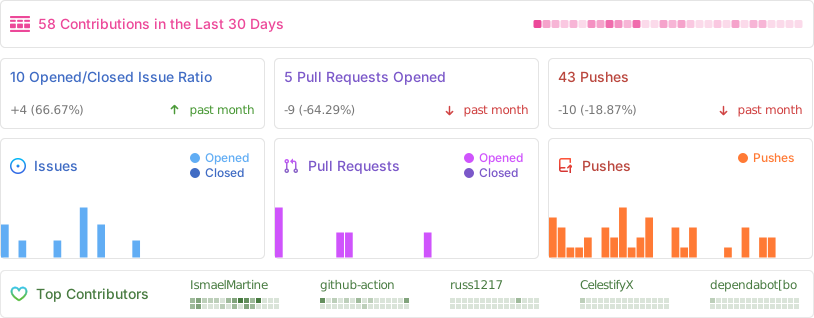
Project Activity
Support & Community
- 💬 Chat: Join our Matrix Space
- 🐛 Issues: Report bugs
- 🤝 Contributing: See
CONTRIBUTING.md
Security & Sandboxing
Electron's contextIsolation and sandbox features are disabled to enable Teams DOM access functionality. For enhanced security, use system-level sandboxing:
Available options: - Flatpak: Built-in isolation via Flathub - Snap packages: Application confinement with auto-updates - Firejail: Use this script for manual sandboxing - AppArmor/SELinux: Most Linux distributions include these by default
System-level sandboxing provides better isolation than Electron's built-in features while preserving full functionality.
Advanced Usage
History
Read about the history of this project in the HISTORY.md file.
License
GPL-3.0 — See LICENSE.md
Icons from Icon Duck (CC BY 4.0)
Core symbols most depended-on inside this repo
debugShape
Languages
Modules by API surface
Dependencies from manifests, versioned
For agents
$ claude mcp add teams-for-linux \
  -- python -m otcore.mcp_server <graph>